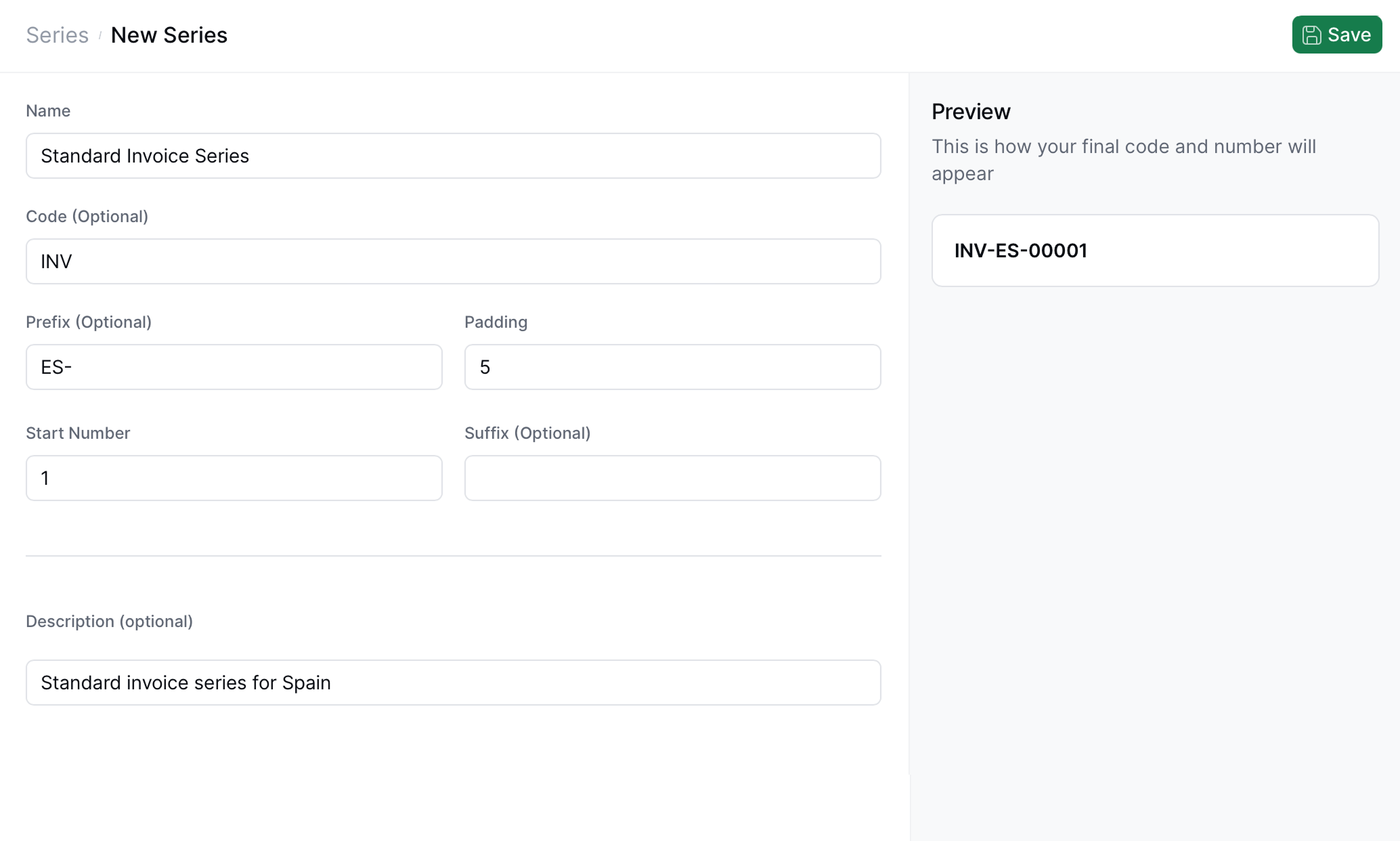
 | **Field** | **Description** | **API Property** |
| -------------------------- | ------------------------------------------------------------------------------------------- | ---------------- |
| **Name** | Human-readable label identifying the series. | `name` |
| **Code** (Optional) | Internal or business code used to categorize series. | `code` |
| **Prefix** (Optional) | Text placed before the numeric portion of the generated code. | `prefix` |
| **Padding** | Total number of digits in the numeric sequence. Zeros are added to the left when necessary. | `padding` |
| **Start Number** | The first number to be issued in the sequence. | `last_index` |
| **Suffix** (Optional) | Text appended after the numeric part. | `suffix` |
| **Description** (Optional) | Free text for internal documentation or identification. | `description` |
## Preview panel
On the right side of the form, the UI displays a **live preview** of the resulting code based on the current field values.
For example:
```
INV-ES-00001
```
Here you can verify the final output format before saving.
## Using your series
You will be able to use the series you've created from the API or through the "Add sequential code" step in your workflow. This will ensure your invoice numbers remain numbered correctly, as many regimes require not only unique invoice identifiers but also sequential numbering.
### 'Add sequential code' workflow step
| **Field** | **Description** | **API Property** |
| -------------------------- | ------------------------------------------------------------------------------------------- | ---------------- |
| **Name** | Human-readable label identifying the series. | `name` |
| **Code** (Optional) | Internal or business code used to categorize series. | `code` |
| **Prefix** (Optional) | Text placed before the numeric portion of the generated code. | `prefix` |
| **Padding** | Total number of digits in the numeric sequence. Zeros are added to the left when necessary. | `padding` |
| **Start Number** | The first number to be issued in the sequence. | `last_index` |
| **Suffix** (Optional) | Text appended after the numeric part. | `suffix` |
| **Description** (Optional) | Free text for internal documentation or identification. | `description` |
## Preview panel
On the right side of the form, the UI displays a **live preview** of the resulting code based on the current field values.
For example:
```
INV-ES-00001
```
Here you can verify the final output format before saving.
## Using your series
You will be able to use the series you've created from the API or through the "Add sequential code" step in your workflow. This will ensure your invoice numbers remain numbered correctly, as many regimes require not only unique invoice identifiers but also sequential numbering.
### 'Add sequential code' workflow step
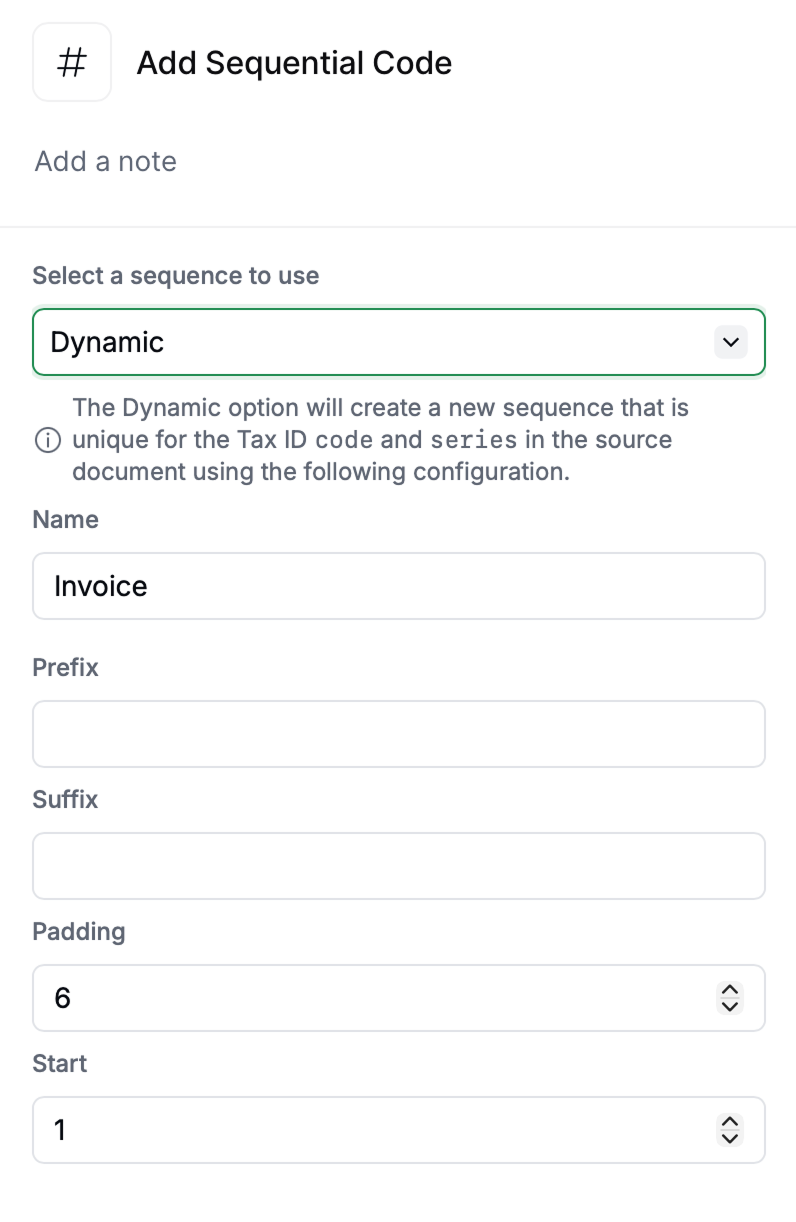 This workflow step allows you to use previously created Series, or to use a new numbering sequence tied specifically to the Tax ID and the series of the originating document. If "Dynamic sequence" is selected, the document must have a `series` defined.
## Tips
* Use **prefixes** for country or business unit codes (e.g., `ES-`, `FR-`, `US-`).
* Adjust **padding** to maintain consistent visual width across codes, and make sure you choose a length adequate for your invoicing volume.
* **Start Number** will usually be `1`, unless you are continuing a series.
* **Code** and **Description** fields are for human readability and internal organization.
## Related resources
| | |
| -------------- | ---------------------------------------------------------------------------------------------------------------------------------------------------------------------------------------------------------------------------------------------------------------------------------------------------------------------------------------------------------------------------------------------------------------------------------------------------------------------------------------------------------------------------------------------------------------------------------------------------------------------------------------------------------------------------------------------------------------------------------------------------------------------------------------------------------------------------------------------------------------------------------------------------- |
| API Reference |
This workflow step allows you to use previously created Series, or to use a new numbering sequence tied specifically to the Tax ID and the series of the originating document. If "Dynamic sequence" is selected, the document must have a `series` defined.
## Tips
* Use **prefixes** for country or business unit codes (e.g., `ES-`, `FR-`, `US-`).
* Adjust **padding** to maintain consistent visual width across codes, and make sure you choose a length adequate for your invoicing volume.
* **Start Number** will usually be `1`, unless you are continuing a series.
* **Code** and **Description** fields are for human readability and internal organization.
## Related resources
| | |
| -------------- | ---------------------------------------------------------------------------------------------------------------------------------------------------------------------------------------------------------------------------------------------------------------------------------------------------------------------------------------------------------------------------------------------------------------------------------------------------------------------------------------------------------------------------------------------------------------------------------------------------------------------------------------------------------------------------------------------------------------------------------------------------------------------------------------------------------------------------------------------------------------------------------------------------- |
| API Reference |