> ## Documentation Index
> Fetch the complete documentation index at: https://docs.invopop.com/llms.txt
> Use this file to discover all available pages before exploring further.
# Workflows overview
> Configure a workflow in Invopop to process documents.
## What is a Workflow?
A workflow in Invopop is a sequence of steps executed for each incoming job. Each step is powered by the provider of a service. Examples of services include:
* Generating PDFs
* Forwarding invoices to tax agencies
* Modifying documents
* Sending emails
* Posting webhooks
* Sending documents to ERPs or other systems
Workflows automate and streamline your document and invoicing processes. Invopop ensures each step is executed reliably, with built-in retries and error handling. The steps are executed sequentially (the next step will only execute until after the previous one has completed) so you don't need to handle asynchronous responses.
## Anatomy of a Workflow
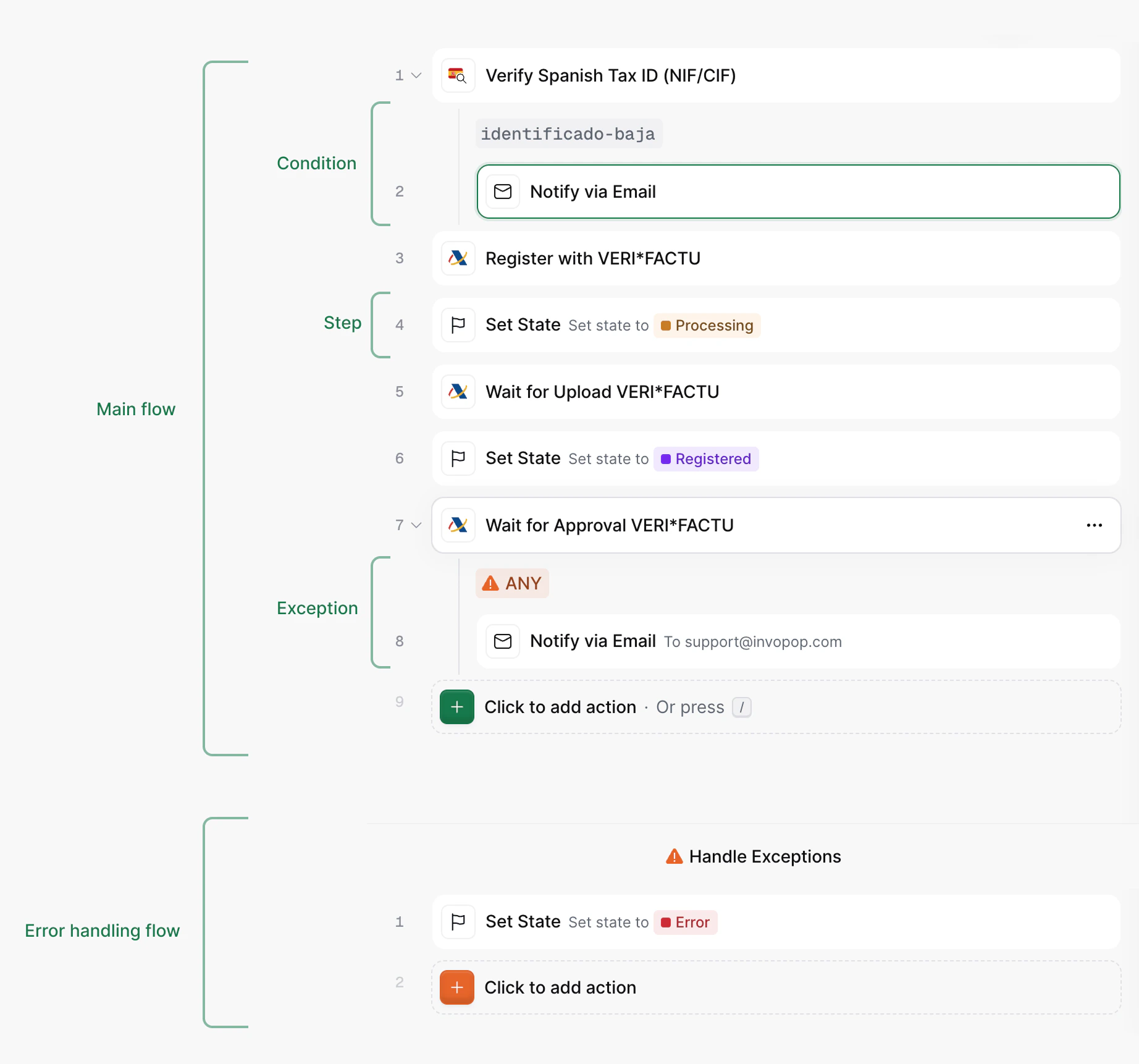 A workflow is composed of two main areas:
* **Main flow:** defines the standard sequence of steps that the workflow follows under normal conditions. It represents the intended execution path, showing how tasks progress when the steps execute correctly (`OK`) and when exceptions or errors are handled within conditions.
* **Error handling flow** defines the sequence of steps when an unhandled error or exception occurs. It allows you to specify alternative actions, recovery logic, or notifications to ensure the process can handle unexpected conditions gracefully. Keep in mind the error handling flow is executed if a step does not handle its own error through a condition.
Both flows are composed by *steps* which can contain *conditions*.
* **Steps** are action performed with the entry being processed, such as sending the document to a tax authority, generating a PDF, or sending a notification to the customer or issuer.
* **Conditions** determine the logic that directs how a workflow proceeds. They evaluate the *status* and *code* outcome of a given step, and if there's a match, it will execute the steps contained within that condition. If the status of a condition is `KO`, the *error handling flow* won't be executed as this would be a *handled error*.
## Related resources
| | |
| -------------- | ------------------------------------------------------------------------------------------------------------------------------------------------------------------------------------------------------------------------------------------------------------------------------------------------------------------------------------------------------------------------------------------------------------------------------------------------------------------------------------------------------------------------------------------------------------------------ |
| API Reference | [Create a workflow](/api-ref/transform/workflows/create-a-workflow)
A workflow is composed of two main areas:
* **Main flow:** defines the standard sequence of steps that the workflow follows under normal conditions. It represents the intended execution path, showing how tasks progress when the steps execute correctly (`OK`) and when exceptions or errors are handled within conditions.
* **Error handling flow** defines the sequence of steps when an unhandled error or exception occurs. It allows you to specify alternative actions, recovery logic, or notifications to ensure the process can handle unexpected conditions gracefully. Keep in mind the error handling flow is executed if a step does not handle its own error through a condition.
Both flows are composed by *steps* which can contain *conditions*.
* **Steps** are action performed with the entry being processed, such as sending the document to a tax authority, generating a PDF, or sending a notification to the customer or issuer.
* **Conditions** determine the logic that directs how a workflow proceeds. They evaluate the *status* and *code* outcome of a given step, and if there's a match, it will execute the steps contained within that condition. If the status of a condition is `KO`, the *error handling flow* won't be executed as this would be a *handled error*.
## Related resources
| | |
| -------------- | ------------------------------------------------------------------------------------------------------------------------------------------------------------------------------------------------------------------------------------------------------------------------------------------------------------------------------------------------------------------------------------------------------------------------------------------------------------------------------------------------------------------------------------------------------------------------ |
| API Reference | [Create a workflow](/api-ref/transform/workflows/create-a-workflow)
[Fetch all workflows](/api-ref/transform/workflows/fetch-all-workflows)
[Fetch a workflow](/api-ref/transform/workflows/fetch-a-workflow)
[Update a workflow](/api-ref/transform/workflows/update-a-workflow)
[Create a job (POST)](/api-ref/transform/jobs/create-a-job-post)
[Create a job (PUT)](/api-ref/transform/jobs/create-a-job-put) |
| Related Guides | [Workflows Guide](/guides/workflows) |