> ## Documentation Index
> Fetch the complete documentation index at: https://docs.invopop.com/llms.txt
> Use this file to discover all available pages before exploring further.
# Spain FAQ
> Frequently asked questions about invoicing compliance in Spain
### Compliance questions
**Spain**
Crea y Crece (Ley 18/2022, "Law on the Creation and Growth of Companies") is a Spanish law introducing **mandatory B2B electronic invoicing** for all businesses and professionals established in Spain.
Its primary policy goal is **combating late payments**. Spain has one of the longest average payment periods in the EU (\~80 days), and the law forces structured, traceable data on every B2B invoice, plus mandatory **invoice status reporting** (acceptance, rejection, payment date) so payment behavior becomes visible and measurable.
Key parameters as they stand now:
* **Scope**: domestic B2B transactions where the recipient is a business or professional established in Spain.
* **Architecture**: hybrid — a free public AEAT platform plus interoperable private platforms.
* **Format**: EN 16931-compliant UBL is mandatory for the public solution and for *copias fieles* submitted from private platforms; Facturae, UBL, CII and EDIFACT are accepted between private platforms.
* **Timeline**: Royal Decree 238/2026 was published 31 March 2026; the Ministerial Order is expected to enter force 1 October 2026, triggering the clocks — **12 months later** for companies with turnover >€8M, **24 months later** for everyone else, with status reporting deferred a further year for sole traders / IRPF attribution entities.
This regulation aims to transform invoicing from "PDF by email" into a structured, reportable, interoperable network.
Any entity with a Spanish NIF — companies, autónomos, and foreign entities with Spanish fiscal presence. Foreign-only entities issuing into Spain must operate through their local fiscal representation or a non-resident NIF.
Quarterly or monthly VAT (Modelo 303), annual recap (Modelo 390), recapitulative intra-EU declaration (Modelo 349), and the annual third-party transactions return (Modelo 347). Crea y Crece (2027) adds invoice status reporting (acceptance, rejection, payment date) on top.
**Facturae**
Mandatory for B2G transactions with Spanish public administrations above €5,000 since 2015 (Ley 25/2013). Voluntary for B2B today; will become broadly mandatory once Crea y Crece's implementing decree takes effect (currently expected 2027).
For B2G submissions, the supplier needs a valid digital certificate recognized by FACe (Cl\@ve, FNMT, etc.). For Invopop-generated XAdES signatures the certificate is Invopop's own; suppliers using their own signing flow upload theirs.
Spanish public administrations must accept Facturae through FACe or a regional equivalent (e-FACT in Cataluña, FACeB2B for B2B). Private sector recipients have no Facturae-specific obligations beyond the standard 4-year archival.
**No-VERI\*FACTU**
"No-VERI\*FACTU" is the alternative compliance mode under the same Spanish billing-software regulation (Reglamento de Sistemas Informáticos de Facturación). Invoices are *not* sent to AEAT in real time; instead they are registered locally in the certified system and may be inspected on demand. Suitable for businesses that prefer to keep records private unless asked.
Same fiscal residence requirements as VERI\*FACTU. Additionally, the supplier must be able to produce the chained register on AEAT request, Invopop retains it indefinitely on their behalf.
**SII**
SII (*Suministro Inmediato de Información*) is mandatory for taxpayers that file VAT on a monthly basis. In practice this includes companies with annual turnover above €6,010,121.04, members of VAT groups (REGE), and businesses registered in the monthly VAT refund register (REDEME). Other taxpayers can opt in voluntarily.
The supplier must be a Spanish-resident taxpayer subject to SII (turnover > €6M, REGE, or REDEME) or have voluntarily opted in. They must hold a digital certificate for AEAT or appoint Invopop as their representative via signed agreement.
Issued and received invoices must be reported within 4 calendar days. Subsequent corrections, cancellations, and intra-EU operations have additional bookkeeping streams (Libro de Bienes de Inversión, Libro de Operaciones Intracomunitarias).
**TicketBAI**
No, you don't need to register with TicketBAI, or upload any digital certificates to Invopop. As a certified billing provider, Invopop will sign all invoices with our own digital certificate.
TicketBAI allows three types of certificates; Invopop uses the *certificado sello de empresa* which allows us to sign e-invoices on behalf of our customers, saving you the burden of registering and uploading certificates yourself.
* Bizkaia: by the end of each quarter, except for companies under SII (turnover above 6 million euros), which must report within 4 days.
* Gipuzkoa and Álava: The submission must be done immediately after generating the invoice.
The supplier must have fiscal residence in one of the three foral territories (Bizkaia, Gipuzkoa, Álava) and sign a representation agreement allowing Invopop to issue on their behalf. No supplier-side certificate required.
**VERI\*FACTU**
Following congress approval, the VERI\*FACTU mandate has been postponed by one year. The new dates are:
* January 1, 2027 for companies
* July 1, 2027 for self-employed individuals.
VERI\*FACTU will be mandatory for companies from January 1st, 2027. The rest of tax payers (mainly self-employed indidividuals) from 1 July 2027. Companies reporting with SII (large companies) or TicketBAI are exempt from reporting with VERI\*FACTU.
VERI\*FACTU invoices don't necessarily need to be printed because they are issued with electronic invoicing systems such as Invopop. Source: [AEAT FAQ](https://sede.agenciatributaria.gob.es/Sede/iva/sistemas-informaticos-facturacion-verifactu/preguntas-frecuentes/posibilidad-remision-informacion-factura-parte-receptor.html?faqId=9e9e77fe52572910VgnVCM100000dc381e0aRCRD).
Yes, VERI\*FACTU allows issue dates to be in the past, as long as they are after October 28, 2024. The issue date can't be set with a date in the future. The AEAT is not strict about the validation, but it's best to keep your intentions clear. [GOBL](https://docs.gobl.org) gives you alternative fields such as `op_date` and `value_date` to store details about your invoicing operation.
Spanish fiscal law requires the customer to be identified with an ID document (preferably official). Set the `es-verifactu-identity-type` extension to `07` ("Not registered in census" / "No censado"), which maps to the `IDOtro` field in VERI\*FACTU.
Here is an example of a customer identity block in [GOBL](https://docs.gobl.org):
```json theme={"system"}
"customer": {
"name": "Consumer",
"identities": [
{
"label": "NIE",
"country": "ES",
"code": "Z1111111S",
"ext": {
"es-verifactu-identity-type": "07"
}
}
]
}
```
For the full list of identity type codes, see the [`es-verifactu-v1`](https://docs.gobl.org/addons/es-verifactu-v1) addon documentation.
Suppliers must use a certified billing system (Invopop is one). Each supplier must sign a representation agreement allowing Invopop to issue invoices on their behalf — without a digital certificate from the supplier's side.
### Invoicing questions
**Spain**
You should send the credit note with the same sign as the original invoice.
In Spain, unlike other countries, credit notes must be submitted to Hacienda with inverse values. Invopop handles this conversion automatically before transforming the credit note into a "factura rectificativa" (corrective invoice).
This means you only need to send the credit note following international standards (with same sign as the invoice). Invopop will automatically adapt it when submitting to Hacienda.
For reference, see the [GOBL Invoice](https://docs.gobl.org/draft-0/bill/invoice) documentation with `type` set to `credit-note`.
See the [Spain tax regime in GOBL](https://docs.gobl.org/regimes/es) for tax categories, NIF rules, and Spanish-specific extensions. Subsystem-specific addons live alongside: [`es-verifactu-v1`](https://docs.gobl.org/addons/es-verifactu-v1), [`es-tbai-v1`](https://docs.gobl.org/addons/es-tbai-v1), [`es-facturae-v3`](https://docs.gobl.org/addons/es-facturae-v3).
**Facturae**
Invopop is working on direct FACe connection as part of the 2027 Crea y Crece mandate
You submit the XML directly to the [FACe portal](https://face.gob.es/), Invopop does not submit it for you. FACe is the centralised entry point for all Spanish public administrations, and submission is the supplier's responsibility. You'll need:
* A valid digital certificate (FNMT or DNIe).
* The XML file Invopop generated (download it from the workflow output).
* The three DIR3 administrative centres correctly embedded in the invoice — `Oficina Contable` (01), `Órgano Gestor` (02), `Unidad Tramitadora` (03). If these are wrong, FACe will reject the invoice. The receiving public body publishes their codes in the [DIR3 directory](https://directorio3.gob.es/).
Submission options:
* **FACe web portal**: manual upload, fine for low volumes.
* **A registered FACe-compatible third party** (gestoría, ERP plugin, etc.).
The generated XML will be added to your silo entry as an attachment under the "files" tab with the file name `facturae.xml`. Upload this file to [FACe's online validator](https://face.gob.es/es/facturas/validar-visualizar-facturas) to verify its validity.
No, our Facturae app converts from GOBL to the Facturae format. You must report it to the AEAT through your ERP or through the [FACe](https://face.gob.es/es) platform.
**No-VERI\*FACTU**
The same GOBL invoice produces either, controlled by the workflow. The QR payload and the absence of `verifactu-qr` stamps in the silo entry distinguish No-VERI\*FACTU output. AEAT submission stamps are absent in No-VERI\*FACTU mode.
**SII**
Issued invoices must be reported within 4 calendar days from the date of issuance — and always before the 16th day of the month following the one in which the VAT liability arises. Saturdays, Sundays, and national holidays are excluded from the count. Received invoices follow the same 4-day rule but starting from the date the invoice is recorded in the books.
SII corrections are submitted as modification records (`A1`) referencing the original entry, rather than by deleting and re-sending. In practice, after fixing the underlying [GOBL](https://docs.gobl.org) document, run the SII workflow again — Invopop detects that a previous submission exists for the same invoice and emits the modification record automatically.
**TicketBAI**
Build a GOBL invoice with the `es-tbai-v1` addon, send it through the TicketBAI Issue Invoice workflow. Invopop signs with its *sello de empresa* certificate, generates the chained XML, and submits to the relevant Diputación Foral (Bizkaia, Gipuzkoa, or Álava).
This is expected. QR codes generated in the TicketBAI sandbox environment are intentionally non-functional to prevent sandbox invoices from being mistaken for real ones.
To verify that a sandbox QR code is correct, upload the PDF or a QR image to the foral tax authority's test verification page: [pruebatuz.bizkaia.eus](https://pruebatuz.bizkaia.eus/B4PEQR0C/testQr.xhtml?idioma=es).
**VERI\*FACTU**
In VERI\*FACTU, you should only cancel an invoice if it hasn't been handed to the customer nor accepted by the tax authority. Different from a credit note or a corrective, canceling an invoice doesn't produce a second document, which means you don't have a paper to hand to your customer to show the cancellation. That's why, if the invoice has been handed to the customer, we recommend issuing a credit note instead.
The response from VERI\*FACTU should contain all the details you need to be able to decide what changes need to be made to the [GOBL](https://docs.gobl.org) document in order to be processed correctly. Make the changes either via the Invopop API or console directly on the same document, and simply resend to the VERI\*FACTU workflow.
Invopop will ensure that the correct substitution document is generated by checking previous attempts and including the correct codes in the new request.
We do not provide the QR code image itself. The QR code is a visual representation of a URL that you need to generate on your own if you're creating custom PDFs or need it for any other purpose.
The full requirements are in the AEAT [VERI\*FACTU QR specification](https://www.agenciatributaria.es/static_files/AEAT_Desarrolladores/EEDD/IVA/VERI-FACTU/DetalleEspecificacTecnCodigoQRfactura.pdf) PDF document in Spanish. Here you can read that:
> The "QR" code must have a size between 30x30 and 40x40 millimeters and follow the specifications of the ISO/IEC 18004:2015 standard. For the generation of the "QR" code, the M (medium) error correction level shall be used.
Generate your own QR code image as follows:
* **API**: fetch the entry and get `data -> head -> stamps -> verifactu-qr`.
* **Console**: in the invoice entry click on the kebab `···` menu and select **View Headers**.
Use the VERI\*FACTU URL in a library capable of generating ISO/IEC 18004:2015 QR images (Invopop uses [go-qr](https://github.com/piglig/go-qr))
Store or embed the image in your PDF. You can [see how we generate QR images](https://github.com/invopop/gobl.html/blob/main/components/images/images.go) in our open source gobl.html library.
VERI\*FACTU requires every request to be linked with a fingerprint or hash. During the "Generate VERI\*FACTU" and "Cancel VERI\*FACTU" actions, Invopop will automatically find the last request made for the same supplier, and incorporate the chained data into the new request.
Its important to understand the VERI\*FACTU focuses on requests, and not individual documents; a single invoice may have multiple entries in the chain if it has been processed multiple times due to incorrect details, cancellations, or substitutions.
Invopop guarantees the chain is never broken using database transactions and retries in the case of collisions.
The most common errors are related to format issues or invalid extensions, which are already handled in Invopop through the [`es-verifactu-v1`](https://docs.gobl.org/addons/es-verifactu-v1) addon validations. These prevent most of the typical problems before they reach the submission stage.
Among the errors that aren't yet validated on our side, the five most frequent ones are:
* `4104: Error en la cabecera: el valor del campo NIF del bloque ObligadoEmision no está identificado.` → The issuer's name must match what's registered for that NIF (tax ID).
* `4102: El XML no cumple el esquema. Falta informar campo obligatorio.` → Usually occurs when a required field is missing in the XML, often within the Desglose (taxes) section.
* `1110: El NIF no está identificado en el censo de la AEAT.` → The provided NIF (tax ID) isn't found in the AEAT registry (often due to typos or testing data).
* `3000: Registro de facturación duplicado.` → Triggered when issuing the same invoice series/code twice.
* `2001: El NIF del bloque Destinatarios no está identificado en el censo de la AEAT.` → Similar to 1110, but applies to the NIF (tax ID) of the customer.
You can set your own description using the notes object in the invoice. The key used for the description needs to be set to general. For example:
```
"notes": [
{
"key": "general",
"text": "This will appear as DescripcionOperacion"
}
]
```
We generate a default description if the note is not provided which is what you are currently seeing. This default description will neatly cut off before it reaches a length of 500 characters as that is the limit the AEAT imposes.
| Key | Text |
| ------------------- | ------------------------------------------------------------ |
| `reverse-charge` | Reverse Charge / Inversión del sujeto pasivo. |
| `simplified-scheme` | Factura expedida por contribuyente en régimen simplificado. |
| `self-billed` | Facturación por el destinatario. |
| `travel-agency` | Régimen especial de las agencias de viajes. |
| `second-hand-goods` | Régimen especial de los bienes usados. |
| `art` | Régimen especial de los objetos de arte. |
| `antiques` | Régimen especial de las antigüedades y objetos de colección. |
| `cash-basis` | Régimen especial del criterio de caja. |
### Registering supplier questions
**Spain**
We reject agreements when:
* The uploaded document is not signed (they upload the unsigned template).
* Users upload a handwritten signature without and ID.
* The electronic signature is made with an FNMT certificate.
* The agreement is missing a date or location.
* The name is entered as an email address.
The job will state the reason for rejection.
A KO will be triggered and the supplier will be labelled with the `Error` state. We currently recommend sending a reminder to the supplier through a webhook.
The registration link will not expire and the entity will still be able to upload their registration documents which will be validated. Should you choose to run this workflow again using this supplier, the supplier will be accepted or rejected immediately because the required documentation has already been provided and validated.
If the uploaded agreement documents were rejected, a KO will be triggered and the supplier will be labelled with the `Error` state. We currently recommend sending a notification to the supplier through a webhook within the **Error Handling** section.
Afterwards, if you wish to re-register the supplier with new documents, you must:
1. Unregister the supplier using the **Unregister Supplier workflow**.
2. Re-run the Register supplier workflow.
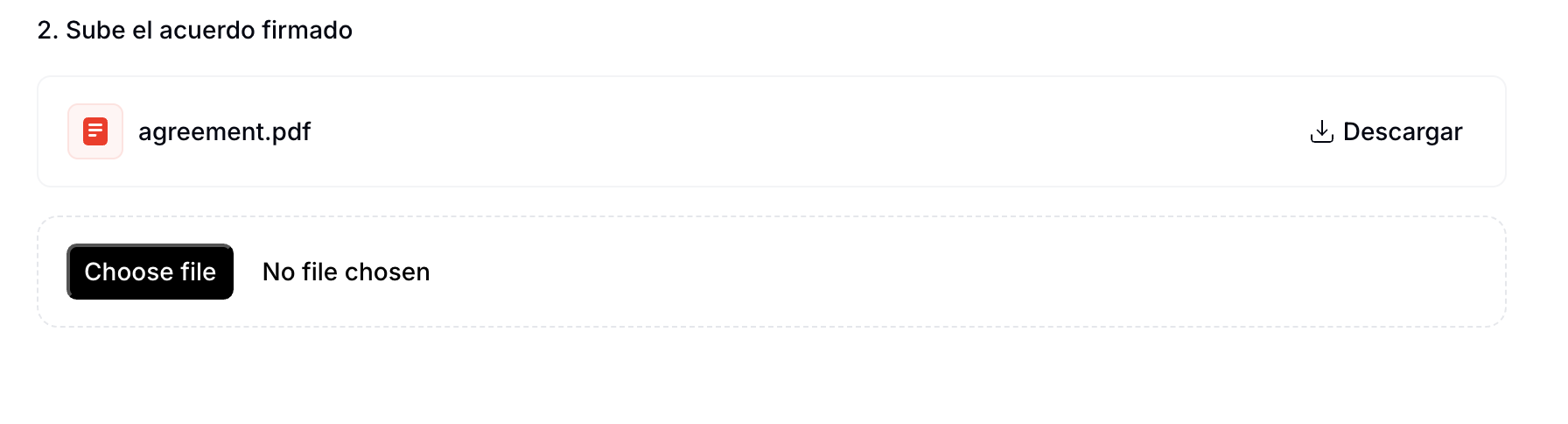
This will restart the entire registration process. When uploading documents, the previously submitted agreement will appear selected by default. Simply choose a new file and click `Continue` to override the old one. See the image below for reference:
 In order to complete the representation agreement you will need to provide the following information:
**Company**
1. Name
2. NIF
3. Address
**Legal representative**
1. Full name
2. Government ID type and number
3. Address
```json Spain supplier example theme={"system"}
{
"$schema": "https://gobl.org/draft-0/org/party",
"name": "Invopop S.L.",
"tax_id": {
"country": "ES",
"code": "B85905495"
},
"people": [
{
"name": {
"given": "Juan",
"surname": "Pérez González"
},
"identities": [
{
"key": "national",
"code": "123456789A"
}
],
"addresses": [
{
"num": "10",
"street": "Calle Ejemplo",
"locality": "Madrid",
"region": "Madrid",
"code": "28020",
"country": "ES"
}
]
}
],
"addresses": [
{
"num": "42",
"street": "Calle Pradillo",
"locality": "Madrid",
"region": "Madrid",
"code": "28002",
"country": "ES"
}
],
"emails": [
{
"addr": "billing@example.com"
}
]
}
```
If the entity is an self-employed individual (*autónomo*), only the information requested in in the **Legal representative** section is required.
```json Spain autónomo supplier example theme={"system"}
{
"$schema": "https://gobl.org/draft-0/org/party",
"name": "Juan Pérez González",
"tax_id": {
"country": "ES",
"code": "B85905495"
},
"addresses": [
{
"num": "42",
"street": "Calle Pradillo",
"locality": "Madrid",
"region": "Madrid",
"code": "28002",
"country": "ES"
}
],
"emails": [
{
"addr": "autonomo@example.com"
}
]
}
```
The supplier can add their electronic signature to the PDF document ([instructions](https://helpx.adobe.com/acrobat/using/signing-pdfs.html)), or sign with a handwritten signature (we recommend using [Adobe's online service](https://www.adobe.com/acrobat/online/sign-pdf.html).
Individual documents are limited to a maximum size of 10MB. Uploads exceeding this size will result in an error.
**Facturae**
Facturae itself has no central registration — the supplier just needs to enrol on FACe (or the relevant regional portal) using their digital certificate. Invopop signs the XML; submission to FACe is currently manual via the supplier's account.
Facturae requires an XAdES signature on the XML using a qualified certificate (FNMT *persona jurídica*, Cl\@ve, ACCV, etc.). Invopop signs with its own certificate by default; bring-your-own is supported on request.
**No-VERI\*FACTU**
Run the No-VERI\*FACTU Register Supplier workflow. The agreement is identical to VERI\*FACTU's, but Invopop does not register the supplier with AEAT for active reporting, only for invoicing on their behalf.
**SII**
Run the SII Register Supplier workflow. The supplier signs the representation agreement and Invopop registers as their *colaborador social* with AEAT. Invopop's own certificate is then used for SII submissions on their behalf.
SII web services accept any AEAT-recognized certificate. Invopop signs submissions with its *certificado de representante de persona jurídica*, acting under the colaborador social arrangement — suppliers do not upload their own certificates.
**TicketBAI**
Run the TicketBAI Register Supplier workflow. The legal representative signs the agreement (electronic or handwritten + ID); the supplier's foral territory determines which Diputación Foral endpoint Invopop will submit to.
None — Invopop uses its own *certificado sello de empresa* (one of the three TicketBAI-permitted types). Suppliers do not need to register with the foral tax authority or upload any certificate.
**VERI\*FACTU**
Run the VERI\*FACTU Register Supplier workflow. The legal representative signs the PDF agreement (electronic or handwritten signature with ID) and Invopop registers the supplier with AEAT for invoicing on their behalf.
### Reporting questions
**SII**
Continuously, every issued or received invoice must be reported within 4 calendar days (excluding weekends and holidays), and always before the 16th of the following month. There is no daily cadence; submissions happen as documents are processed.
SOAP web services with XML payloads — distinct schemas for issued (`SuministroFactEmitidas`), received (`SuministroFactRecibidas`), investment goods, and intra-EU operations. Each call carries up to 10,000 records signed with the issuer's (or representative's) certificate.
***
Ask and answer questions about Spain's regulation →
In order to complete the representation agreement you will need to provide the following information:
**Company**
1. Name
2. NIF
3. Address
**Legal representative**
1. Full name
2. Government ID type and number
3. Address
```json Spain supplier example theme={"system"}
{
"$schema": "https://gobl.org/draft-0/org/party",
"name": "Invopop S.L.",
"tax_id": {
"country": "ES",
"code": "B85905495"
},
"people": [
{
"name": {
"given": "Juan",
"surname": "Pérez González"
},
"identities": [
{
"key": "national",
"code": "123456789A"
}
],
"addresses": [
{
"num": "10",
"street": "Calle Ejemplo",
"locality": "Madrid",
"region": "Madrid",
"code": "28020",
"country": "ES"
}
]
}
],
"addresses": [
{
"num": "42",
"street": "Calle Pradillo",
"locality": "Madrid",
"region": "Madrid",
"code": "28002",
"country": "ES"
}
],
"emails": [
{
"addr": "billing@example.com"
}
]
}
```
If the entity is an self-employed individual (*autónomo*), only the information requested in in the **Legal representative** section is required.
```json Spain autónomo supplier example theme={"system"}
{
"$schema": "https://gobl.org/draft-0/org/party",
"name": "Juan Pérez González",
"tax_id": {
"country": "ES",
"code": "B85905495"
},
"addresses": [
{
"num": "42",
"street": "Calle Pradillo",
"locality": "Madrid",
"region": "Madrid",
"code": "28002",
"country": "ES"
}
],
"emails": [
{
"addr": "autonomo@example.com"
}
]
}
```
The supplier can add their electronic signature to the PDF document ([instructions](https://helpx.adobe.com/acrobat/using/signing-pdfs.html)), or sign with a handwritten signature (we recommend using [Adobe's online service](https://www.adobe.com/acrobat/online/sign-pdf.html).
Individual documents are limited to a maximum size of 10MB. Uploads exceeding this size will result in an error.
**Facturae**
Facturae itself has no central registration — the supplier just needs to enrol on FACe (or the relevant regional portal) using their digital certificate. Invopop signs the XML; submission to FACe is currently manual via the supplier's account.
Facturae requires an XAdES signature on the XML using a qualified certificate (FNMT *persona jurídica*, Cl\@ve, ACCV, etc.). Invopop signs with its own certificate by default; bring-your-own is supported on request.
**No-VERI\*FACTU**
Run the No-VERI\*FACTU Register Supplier workflow. The agreement is identical to VERI\*FACTU's, but Invopop does not register the supplier with AEAT for active reporting, only for invoicing on their behalf.
**SII**
Run the SII Register Supplier workflow. The supplier signs the representation agreement and Invopop registers as their *colaborador social* with AEAT. Invopop's own certificate is then used for SII submissions on their behalf.
SII web services accept any AEAT-recognized certificate. Invopop signs submissions with its *certificado de representante de persona jurídica*, acting under the colaborador social arrangement — suppliers do not upload their own certificates.
**TicketBAI**
Run the TicketBAI Register Supplier workflow. The legal representative signs the agreement (electronic or handwritten + ID); the supplier's foral territory determines which Diputación Foral endpoint Invopop will submit to.
None — Invopop uses its own *certificado sello de empresa* (one of the three TicketBAI-permitted types). Suppliers do not need to register with the foral tax authority or upload any certificate.
**VERI\*FACTU**
Run the VERI\*FACTU Register Supplier workflow. The legal representative signs the PDF agreement (electronic or handwritten signature with ID) and Invopop registers the supplier with AEAT for invoicing on their behalf.
### Reporting questions
**SII**
Continuously, every issued or received invoice must be reported within 4 calendar days (excluding weekends and holidays), and always before the 16th of the following month. There is no daily cadence; submissions happen as documents are processed.
SOAP web services with XML payloads — distinct schemas for issued (`SuministroFactEmitidas`), received (`SuministroFactRecibidas`), investment goods, and intra-EU operations. Each call carries up to 10,000 records signed with the issuer's (or representative's) certificate.
***
Ask and answer questions about Spain's regulation →