> ## Documentation Index
> Fetch the complete documentation index at: https://docs.invopop.com/llms.txt
> Use this file to discover all available pages before exploring further.
# Documentos Fiscais Eletrônicos Guide
> Issue Documentos Fiscais Eletrônicos in Brazil
## Introduction
Brazil has a variety of electronic tax documents that must be issued in different cases for various tax purposes. These include service invoices (NFS-e), product invoices (NF-e), and consumer invoices (NFC-e). Each document type is subject to variations from state to state and municipality to municipality, with each jurisdiction applying its own rules, formats, and APIs for issuing fiscal documents.
Invopop's **Documentos Fiscais Eletrônicos** app provides a unified way to issue fiscal documents across all Brazilian states and over 2000 municipalities using GOBL. You can find [the full list of supported municipalities here](https://tecnospeed.com.br/plugdfe/nfse/#homologacao).
This guide will walk you through the steps required first to register a supplier and then issue electronic fiscal documents in their name.
| - | Sandbox | Live |
| ---------------- | -------------------------------------------------------- | ------------------------------------------------------------------ |
| **Supplier** | Registration required, but details don't need to be real | Real company details required |
| **Responses** | Simulated/mocked | Real from DFe system |
| **Certificates** | Not required to be valid | Must be valid and real |
| **PDF & XML** | Always the same mock-up files attached to silo entry | Actual XML sent to tax authority and actual generated PDF attached |
## Prerequisites
To issue electronic fiscal documents in Brazil, you will need:
* Supplier details, including:
* name,
* CNPJ (*Cadastro Nacional da Pessoa Jurídica*),
* address,
* municipality code (IBGE),
* municipal registration number (for NFS-e),
* state registration number (for NF-e and NFC-e),
* whether the supplier opts into the *Simples Nacional* tax regime,
* whether the supplier benefits from a fiscal incentive, and,
* optionally, any special tax regime (MEI, estimated, coop…) the supplier is subject to.
* Customer details (except for NFC-e where the customer is optional).
* Details of the goods or services provided:
* quantity,
* price,
* applicable tax rates (ISS, ICMS, PIS, COFINS, etc.), and,
* (only for services) service code (*Código Item Lista Serviço*) as defined by the municipality.
* To have chosen an invoice series
* A certificate and password accepted by the municipality (for NFS-e) or the state (for NF-e and NFC-e) to send electronic fiscal documents in the name of the supplier.
## Setup
There are four key processes to prepare:
* connect the **Documentos Fiscais Eletrônicos Brazil** app,
* create the supplier registration workflow,
* configure the supplier post-registration workflow,
* prepare the invoicing workflows.
These instructions apply to both the sandbox and live environments. Please note that the sandbox environment is simulated, and most responses are mocked. You'll still need to register suppliers in the sandbox, but the company details, certificates or passwords don't need to be valid or real.
All of the following steps must be carried out from the [Invopop Console](https://console.invopop.com).
Enter the **Configuration** section, then tap **Apps**. Tap on the **Connect** button of the **Documentos Fiscais Eletrônicos Brazil** app.
 Follow one of the methods below and ensure to **Save** and **Publish** the workflow:
This workflow will start the registration of a supplier to issue electronic tax documents.
Copy and paste into a new [Empty Party workflow](https://console.invopop.com/redirect/workflows/new?template=empty-party) code view.
```json Example NFC/NFS-e register supplier workflow theme={"system"}
{
"name": "NFC/NFS-e register supplier",
"description": "Register a supplier to issue NFC/NFS-e in Brazil",
"schema": "org/party",
"steps": [
{
"id": "68e5abd0-b64b-11f0-8ddf-b9fd6fa99d97",
"name": "Sign envelope",
"provider": "silo.close"
},
{
"id": "6f0a6500-b64b-11f0-8ddf-b9fd6fa99d97",
"name": "Register supplier in Brazil",
"provider": "nfe-br.register"
},
{
"id": "71918510-b64b-11f0-8ddf-b9fd6fa99d97",
"name": "Set state",
"provider": "silo.state",
"summary": "Set state to `processing`{.state .processing}",
"config": {
"state": "processing"
}
}
],
"rescue": [
{
"id": "7d127750-b64b-11f0-8ddf-b9fd6fa99d97",
"name": "Set state",
"provider": "silo.state",
"summary": "Set state to `error`{.state .error}",
"config": {
"state": "error"
}
}
]
}
```
Before starting, review the [workflows guide](/guides/features/workflows) to understand the general setup process.
In [Console](https://console.invopop.com), create a new workflow and choose [Empty Party workflow](https://console.invopop.com/redirect/workflows/new?template=empty-party) as the base. Then name the workflow with a descriptive label such as "NFS-e register supplier workflow".
The new workflow will need to perform three steps:
* **Sign envelope**
* **Register supplier in Brazil**
* **Set state** - with configuration set to `Processing`.
Add any additional steps you may need, and save the new workflow.
Follow one of the methods below and ensure to **Save** and **Publish** the workflow:
This workflow should contain any processing that needs to happen after a supplier completes the registration process.
Copy and paste into a new [Empty Party workflow](https://console.invopop.com/redirect/workflows/new?template=empty-party) code view.
```json Example Brazil supplier post-registration workflow theme={"system"}
{
"name": "Brazil supplier post-registration",
"description": "Mark a supplier as registered",
"schema": "org/party",
"steps": [
{
"id": "ec727530-b648-11f0-8ddf-b9fd6fa99d97",
"name": "Set state",
"provider": "silo.state",
"summary": "Set state to `registered`{.state .registered}",
"config": {
"state": "registered"
}
}
],
"rescue": [
{
"id": "9a7b3d50-1358-11ef-af96-a18cfb3774fa",
"name": "Set state",
"provider": "silo.state",
"summary": "Set state to `error`{.state .error}",
"config": {
"state": "error"
}
}
]
}
```
Before starting, review the [workflows guide](/guides/features/workflows) to understand the general setup process.
In [Console](https://console.invopop.com), create a new workflow and choose [Empty Party workflow](https://console.invopop.com/redirect/workflows/new?template=empty-party) as the base. Then name the workflow with a descriptive label such as "DF-e process supplier post-registration".
This workflow is composed of a single step:
1. **Set state** - To `Registered`.
This workflow will automatically be executed once a supplier completes the registration process. You can customize it to suit your needs (*e.g.*, adding a webhook, or an email notification after a supplier has been registered.)
Now you need to go back to **Configuration** > **Apps**, tap the **Configure** button on the **Documentos Fiscais Eletrônicos Brazil** app, choose the "Post-registration workflow" we just created and **Save** the changes.
You can skip this step if you're not interested in issuing NFS-e documents.
Follow one of the methods below and ensure to **Save** and **Publish** the workflow:
This workflow will issue a service invoice (NFS-e) in Brazil.
Copy and paste into a new [Empty Invoice workflow](https://console.invopop.com/redirect/workflows/new?template=empty-invoice) code view.
```json Example DF-e issue service invoice (NFS-e) workflow theme={"system"}
{
"name": "DF-e issue service invoice (NFS-e)",
"description": "Issue a NFS-e invoice in Brazil",
"schema": "bill/invoice",
"steps": [
{
"id": "d1c7bde0-b651-11f0-b6c3-efa5610a4723",
"name": "Set State",
"provider": "silo.state",
"summary": "Set state to `processing`{.state .processing}",
"config": {
"state": "processing"
}
},
{
"id": "dbcb8600-b651-11f0-b6c3-efa5610a4723",
"name": "Add Sequential Code",
"provider": "sequence.enumerate",
"summary": "Dynamic · NFS-e · 1",
"config": {
"name": "NFS-e",
"padding": 1,
"start": 1
}
},
{
"id": "e8eba950-b651-11f0-b6c3-efa5610a4723",
"name": "Sign Envelope",
"provider": "silo.close"
},
{
"id": "ec64f190-b651-11f0-b6c3-efa5610a4723",
"name": "Send NFS-e (Brazil)",
"provider": "nfe-br.send"
},
{
"id": "eecc7bb0-b651-11f0-b6c3-efa5610a4723",
"name": "Set State",
"provider": "silo.state",
"summary": "Set state to `sent`{.state .sent}",
"config": {
"state": "sent"
}
}
],
"rescue": [
{
"id": "f9195ac0-b651-11f0-b6c3-efa5610a4723",
"name": "Set State",
"provider": "silo.state",
"summary": "Set state to `error`{.state .error}",
"config": {
"state": "error"
}
}
]
}
```
Before starting, review the [workflows guide](/guides/features/workflows) to understand the general setup process.
In [Console](https://console.invopop.com), create a new workflow and choose [Empty Invoice workflow](https://console.invopop.com/redirect/workflows/new?template=empty-invoice) as the base. Then name the workflow with a descriptive label such as "Issue NFS-e invoice".
The new workflow will need to perform these steps:
* **Set state** - to `Processing`.
* **Add sequential code** - with dynamic sequences and a name like "NFS-e".
* **Send NFS-e to Prefeitura**.
* **Set state** - to `Sent`.
Finally, in the Error Handling area, add the **Set state** action and select `Error`.
Add any additional steps you may need, and save the new workflow.
You can skip this step if you're not interested in issuing NF-e documents.
Follow one of the methods below and ensure to **Save** and **Publish** the workflow:
This workflow will issue a product invoice (NF-e) in Brazil.
Copy and paste into a new [Empty Invoice workflow](https://console.invopop.com/redirect/workflows/new?template=empty-invoice) code view.
```json Example issue NF-e invoice workflow theme={"system"}
{
"name": "Issue NF-e invoice",
"description": "Issue an NF-e product invoice via PlugNotas",
"schema": "bill/invoice",
"steps": [
{
"id": "ddfb8e79-8260-4ecd-bf59-115e837cd135",
"name": "Set state",
"provider": "silo.state",
"summary": "Set state to `processing`{.state .processing}",
"config": {
"state": "processing"
}
},
{
"id": "169c4b15-83ae-4242-b0c9-4e4915d15361",
"name": "Add sequential code",
"provider": "sequence.enumerate",
"summary": "Dynamic · NF-e · 1",
"config": {
"name": "NF-e",
"padding": 1,
"start": 1
}
},
{
"id": "283dae9e-ea44-46c0-8f63-5af48ec5f388",
"name": "Sign envelope",
"provider": "silo.close"
},
{
"id": "12bd4677-dc3c-4043-85ca-54f8d034803d",
"name": "Send NF-e to SEFAZ",
"provider": "nfe-br.send.nfe"
},
{
"id": "999ad559-1040-4e69-98c9-93e62c8833d4",
"name": "Set state",
"provider": "silo.state",
"summary": "Set state to `sent`{.state .sent}",
"config": {
"state": "sent"
}
}
],
"rescue": [
{
"id": "5c38f3d4-1338-4990-a248-0822c5081124",
"name": "Set state",
"provider": "silo.state",
"summary": "Set state to `error`{.state .error}",
"config": {
"state": "error"
}
}
]
}
```
Before starting, review the [workflows guide](/guides/features/workflows) to understand the general setup process.
In [Console](https://console.invopop.com), create a new workflow and choose [Empty Invoice workflow](https://console.invopop.com/redirect/workflows/new?template=empty-invoice) as the base. Then name the workflow with a descriptive label such as "Issue NF-e invoice".
The new workflow will need to perform these steps:
* **Set state** - to `Processing`.
* **Add sequential code** - with dynamic sequences and a name like "NF-e".
* **Send NF-e to SEFAZ**.
* **Set state** - to `Sent`.
Finally, in the Error Handling area, add the **Set state** action and select `Error`.
Add any additional steps you may need, and save the new workflow.
You can skip this step if you're not interested in issuing NFC-e documents.
Follow one of the methods below and ensure to **Save** and **Publish** the workflow:
This workflow will issue a customer invoice (NFC-e) in Brazil.
Copy and paste into a new [Empty Invoice workflow](https://console.invopop.com/redirect/workflows/new?template=empty-invoice) code view.
```json Example issue NFC-e invoice workflow theme={"system"}
{
"name": "Issue NFC-e invoice",
"description": "Issue an NFC-e consumer invoice via PlugNotas",
"schema": "bill/invoice",
"steps": [
{
"id": "93769100-b652-11f0-a7d9-bfad358c6464",
"name": "Set state",
"provider": "silo.state",
"summary": "Set state to `processing`{.state .processing}",
"config": {
"state": "processing"
}
},
{
"id": "971c6780-b652-11f0-a7d9-bfad358c6464",
"name": "Add sequential code",
"provider": "sequence.enumerate",
"summary": "Dynamic · NFC-e · 1",
"config": {
"name": "NFC-e",
"padding": 1,
"start": 1
}
},
{
"id": "9f965b50-b652-11f0-a7d9-bfad358c6464",
"name": "Sign envelope",
"provider": "silo.close"
},
{
"id": "8693f670-b653-11f0-a7d9-bfad358c6464",
"name": "Send NFC-e to SEFAZ",
"provider": "nfe-br.send.nfce"
},
{
"id": "a9dc0e70-b652-11f0-a7d9-bfad358c6464",
"name": "Set state",
"provider": "silo.state",
"summary": "Set state to `sent`{.state .sent}",
"config": {
"state": "sent"
}
}
],
"rescue": [
{
"id": "b0f7f8e0-b652-11f0-a7d9-bfad358c6464",
"name": "Set state",
"provider": "silo.state",
"summary": "Set state to `error`{.state .error}",
"config": {
"state": "error"
}
}
]
}
```
Before starting, review the [workflows guide](/guides/features/workflows) to understand the general setup process.
In [Console](https://console.invopop.com), create a new workflow and choose [Empty Invoice workflow](https://console.invopop.com/redirect/workflows/new?template=empty-invoice) as the base. Then name the workflow with a descriptive label such as "Issue NFC-e invoice".
The new workflow will need to perform these steps:
* **Set state** - to `Processing`.
* **Add sequential code** - with dynamic sequences and a name like "NFC-e".
* **Send NFC-e to SEFAZ**.
* **Set state** - to `Sent`.
Finally, in the Error Handling area, add the **Set state** action and select `Error`.
Add any additional steps you may need, and save the new workflow.
You can skip this step if you're not interested in cancelling NFS-e documents.
Follow one of the methods below and ensure to **Save** and **Publish** the workflow:
This workflow will cancel a previously sent NFS-e invoice in Brazil.
Copy and paste into a new [Empty Invoice workflow](https://console.invopop.com/redirect/workflows/new?template=empty-invoice) code view.
```json Example Cancel NFS-e invoice workflow theme={"system"}
{
"name": "Cancel NFS-e invoice",
"description": "Cancel an NFS-e service invoice via PlugNotas",
"schema": "bill/invoice",
"steps": [
{
"id": "5e63dc30-535e-11f1-aba1-0fa2408cece2",
"name": "Set state",
"provider": "silo.state",
"summary": "Set state to `processing`{.state .processing}",
"config": {
"state": "processing"
}
},
{
"id": "71238320-535e-11f1-aba1-0fa2408cece2",
"name": "Cancel NFS-e with Prefeitura",
"provider": "nfe-br.cancel.nfse"
},
{
"id": "65aa8020-535e-11f1-aba1-0fa2408cece2",
"name": "Set state",
"provider": "silo.state",
"summary": "Set state to `void`{.state .void}",
"config": {
"state": "void"
}
}
],
"rescue": [
{
"id": "6b3199c0-535e-11f1-aba1-0fa2408cece2",
"name": "Set state",
"provider": "silo.state",
"summary": "Set state to `error`{.state .error}",
"config": {
"state": "error"
}
}
]
}
```
Before starting, review the [workflows guide](/guides/features/workflows) to understand the general setup process.
In [Console](https://console.invopop.com), create a new workflow and choose [Empty Invoice workflow](https://console.invopop.com/redirect/workflows/new?template=empty-invoice) as the base. Then name the workflow with a descriptive label such as "Cancel NFS-e invoice".
The new workflow will need to perform these steps:
* **Set state** - to `Processing`.
* **Cancel NFS-e with Prefeitura**.
* **Set state** - to `Void`.
Finally, in the Error Handling area, add the **Set state** action and select `Error`.
Add any additional steps you may need, and save the new workflow.
You can skip this step if you're not interested in cancelling NF-e documents.
Follow one of the methods below and ensure to **Save** and **Publish** the workflow:
This workflow will cancel a previously sent NF-e invoice in Brazil.
Copy and paste into a new [Empty Invoice workflow](https://console.invopop.com/redirect/workflows/new?template=empty-invoice) code view.
```json Example Cancel NF-e invoice workflow theme={"system"}
{
"name": "Cancel NF-e invoice",
"description": "Cancel an NF-e product invoice via PlugNotas",
"schema": "bill/invoice",
"steps": [
{
"id": "7b40e24a-0c51-4462-b3e9-d2d20d424a0d",
"name": "Set state",
"provider": "silo.state",
"summary": "Set state to `processing`{.state .processing}",
"config": {
"state": "processing"
}
},
{
"id": "834e52d6-d50a-4340-9ca6-f07557aa94d5",
"name": "Cancel NF-e with SEFAZ",
"provider": "nfe-br.cancel.nfe"
},
{
"id": "ddfb8e79-8260-4ecd-bf60-115e837cd135",
"name": "Set state",
"provider": "silo.state",
"summary": "Set state to `void`{.state .void}",
"config": {
"state": "void"
}
}
],
"rescue": [
{
"id": "169c4b15-83ae-4243-b0c9-4e4915d15361",
"name": "Set state",
"provider": "silo.state",
"summary": "Set state to `error`{.state .error}",
"config": {
"state": "error"
}
}
]
}
```
Before starting, review the [workflows guide](/guides/features/workflows) to understand the general setup process.
In [Console](https://console.invopop.com), create a new workflow and choose [Empty Invoice workflow](https://console.invopop.com/redirect/workflows/new?template=empty-invoice) as the base. Then name the workflow with a descriptive label such as "Cancel NF-e invoice".
The new workflow will need to perform these steps:
* **Set state** - to `Processing`.
* **Cancel NF-e with SEFAZ**.
* **Set state** - to `Void`.
Finally, in the Error Handling area, add the **Set state** action and select `Error`.
Add any additional steps you may need, and save the new workflow.
You can skip this step if you're not interested in cancelling NFC-e documents.
Follow one of the methods below and ensure to **Save** and **Publish** the workflow:
This workflow will cancel a previously sent NFC-e invoice in Brazil.
Copy and paste into a new [Empty Invoice workflow](https://console.invopop.com/redirect/workflows/new?template=empty-invoice) code view.
```json Example Cancel NFC-e invoice workflow theme={"system"}
{
"name": "Cancel NFC-e invoice",
"description": "Cancel an NFC-e consumer invoice via PlugNotas",
"schema": "bill/invoice",
"steps": [
{
"id": "5e63dc30-535e-11f1-aba1-0fa2408cece2",
"name": "Set state",
"provider": "silo.state",
"summary": "Set state to `processing`{.state .processing}",
"config": {
"state": "processing"
}
},
{
"id": "71238320-535e-11f1-aba1-0fa2408cece2",
"name": "Cancel NFC-e with SEFAZ",
"provider": "nfe-br.cancel.nfce"
},
{
"id": "65aa8020-535e-11f1-aba1-0fa2408cece2",
"name": "Set state",
"provider": "silo.state",
"summary": "Set state to `void`{.state .void}",
"config": {
"state": "void"
}
}
],
"rescue": [
{
"id": "6b3199c0-535e-11f1-aba1-0fa2408cece2",
"name": "Set state",
"provider": "silo.state",
"summary": "Set state to `error`{.state .error}",
"config": {
"state": "error"
}
}
]
}
```
Before starting, review the [workflows guide](/guides/features/workflows) to understand the general setup process.
In [Console](https://console.invopop.com), create a new workflow and choose [Empty Invoice workflow](https://console.invopop.com/redirect/workflows/new?template=empty-invoice) as the base. Then name the workflow with a descriptive label such as "Cancel NFC-e invoice".
The new workflow will need to perform these steps:
* **Set state** - to `Processing`.
* **Cancel NFC-e with SEFAZ**.
* **Set state** - to `Void`.
Finally, in the Error Handling area, add the **Set state** action and select `Error`.
Add any additional steps you may need, and save the new workflow.
## Running
In this section, we'll provide details on how to first persist and register a supplier, followed by issuing invoices on their behalf.
As usual, the recommended approach for running jobs is to perform two steps; first upload the document to the [silo](/api-ref/silo/entries/create-an-entry-put), second [create a job](/api-ref/transform/jobs/create-a-job-put).
All operations described in the following sections can be performed manually via the Invopop Console, or programmatically via the API. The process is essentially the same in both cases, so we'll demonstrate the manual method for this guide.
### Register a Supplier
Find the **Parties** section of the sidebar and click **Suppliers**. Tap the **+ New Supplier** button to be presented with a new editor. Copy and paste the example provided below (for testing purposes only, in production you'll need the details of an actual company). The example includes all the fields required to register a supplier for both NF-e/NFC-e and NFS-e issuance.
```json Brazil supplier example for sandbox expandable theme={"system"}
{
"$schema": "https://gobl.org/draft-0/org/party",
"name": "TechNova Soluções Digitais Ltda.",
"tax_id": {
"country": "BR",
"code": "05229829000184"
},
"identities": [
{
"key": "br-nfse-municipal-reg",
"code": "45678901234567"
},
{
"key": "br-nfe-state-reg",
"code": "66093885154234"
}
],
"addresses": [
{
"num": "101",
"street": "Avenida Paulista",
"locality": "Bela Vista",
"region": "São Paulo",
"state": "SP",
"code": "01311-000",
"country": "BR"
}
],
"emails": [
{
"addr": "contact@technova.test"
}
],
"ext": {
"br-ibge-municipality": "3550308",
"br-nfse-simples": "1"
}
}
```
Tap **Build**, ensure there are no errors, and click **Save**.
We should now see the document. Find and click the **Select Workflow** button. Select the **Register Supplier** workflow created during setup, and click **Run workflow**.
The execution should be successful, and the silo entry will now be in the `Processing` state. Tap the **Meta** tab to see the registration link:
Follow one of the methods below and ensure to **Save** and **Publish** the workflow:
This workflow will start the registration of a supplier to issue electronic tax documents.
Copy and paste into a new [Empty Party workflow](https://console.invopop.com/redirect/workflows/new?template=empty-party) code view.
```json Example NFC/NFS-e register supplier workflow theme={"system"}
{
"name": "NFC/NFS-e register supplier",
"description": "Register a supplier to issue NFC/NFS-e in Brazil",
"schema": "org/party",
"steps": [
{
"id": "68e5abd0-b64b-11f0-8ddf-b9fd6fa99d97",
"name": "Sign envelope",
"provider": "silo.close"
},
{
"id": "6f0a6500-b64b-11f0-8ddf-b9fd6fa99d97",
"name": "Register supplier in Brazil",
"provider": "nfe-br.register"
},
{
"id": "71918510-b64b-11f0-8ddf-b9fd6fa99d97",
"name": "Set state",
"provider": "silo.state",
"summary": "Set state to `processing`{.state .processing}",
"config": {
"state": "processing"
}
}
],
"rescue": [
{
"id": "7d127750-b64b-11f0-8ddf-b9fd6fa99d97",
"name": "Set state",
"provider": "silo.state",
"summary": "Set state to `error`{.state .error}",
"config": {
"state": "error"
}
}
]
}
```
Before starting, review the [workflows guide](/guides/features/workflows) to understand the general setup process.
In [Console](https://console.invopop.com), create a new workflow and choose [Empty Party workflow](https://console.invopop.com/redirect/workflows/new?template=empty-party) as the base. Then name the workflow with a descriptive label such as "NFS-e register supplier workflow".
The new workflow will need to perform three steps:
* **Sign envelope**
* **Register supplier in Brazil**
* **Set state** - with configuration set to `Processing`.
Add any additional steps you may need, and save the new workflow.
Follow one of the methods below and ensure to **Save** and **Publish** the workflow:
This workflow should contain any processing that needs to happen after a supplier completes the registration process.
Copy and paste into a new [Empty Party workflow](https://console.invopop.com/redirect/workflows/new?template=empty-party) code view.
```json Example Brazil supplier post-registration workflow theme={"system"}
{
"name": "Brazil supplier post-registration",
"description": "Mark a supplier as registered",
"schema": "org/party",
"steps": [
{
"id": "ec727530-b648-11f0-8ddf-b9fd6fa99d97",
"name": "Set state",
"provider": "silo.state",
"summary": "Set state to `registered`{.state .registered}",
"config": {
"state": "registered"
}
}
],
"rescue": [
{
"id": "9a7b3d50-1358-11ef-af96-a18cfb3774fa",
"name": "Set state",
"provider": "silo.state",
"summary": "Set state to `error`{.state .error}",
"config": {
"state": "error"
}
}
]
}
```
Before starting, review the [workflows guide](/guides/features/workflows) to understand the general setup process.
In [Console](https://console.invopop.com), create a new workflow and choose [Empty Party workflow](https://console.invopop.com/redirect/workflows/new?template=empty-party) as the base. Then name the workflow with a descriptive label such as "DF-e process supplier post-registration".
This workflow is composed of a single step:
1. **Set state** - To `Registered`.
This workflow will automatically be executed once a supplier completes the registration process. You can customize it to suit your needs (*e.g.*, adding a webhook, or an email notification after a supplier has been registered.)
Now you need to go back to **Configuration** > **Apps**, tap the **Configure** button on the **Documentos Fiscais Eletrônicos Brazil** app, choose the "Post-registration workflow" we just created and **Save** the changes.
You can skip this step if you're not interested in issuing NFS-e documents.
Follow one of the methods below and ensure to **Save** and **Publish** the workflow:
This workflow will issue a service invoice (NFS-e) in Brazil.
Copy and paste into a new [Empty Invoice workflow](https://console.invopop.com/redirect/workflows/new?template=empty-invoice) code view.
```json Example DF-e issue service invoice (NFS-e) workflow theme={"system"}
{
"name": "DF-e issue service invoice (NFS-e)",
"description": "Issue a NFS-e invoice in Brazil",
"schema": "bill/invoice",
"steps": [
{
"id": "d1c7bde0-b651-11f0-b6c3-efa5610a4723",
"name": "Set State",
"provider": "silo.state",
"summary": "Set state to `processing`{.state .processing}",
"config": {
"state": "processing"
}
},
{
"id": "dbcb8600-b651-11f0-b6c3-efa5610a4723",
"name": "Add Sequential Code",
"provider": "sequence.enumerate",
"summary": "Dynamic · NFS-e · 1",
"config": {
"name": "NFS-e",
"padding": 1,
"start": 1
}
},
{
"id": "e8eba950-b651-11f0-b6c3-efa5610a4723",
"name": "Sign Envelope",
"provider": "silo.close"
},
{
"id": "ec64f190-b651-11f0-b6c3-efa5610a4723",
"name": "Send NFS-e (Brazil)",
"provider": "nfe-br.send"
},
{
"id": "eecc7bb0-b651-11f0-b6c3-efa5610a4723",
"name": "Set State",
"provider": "silo.state",
"summary": "Set state to `sent`{.state .sent}",
"config": {
"state": "sent"
}
}
],
"rescue": [
{
"id": "f9195ac0-b651-11f0-b6c3-efa5610a4723",
"name": "Set State",
"provider": "silo.state",
"summary": "Set state to `error`{.state .error}",
"config": {
"state": "error"
}
}
]
}
```
Before starting, review the [workflows guide](/guides/features/workflows) to understand the general setup process.
In [Console](https://console.invopop.com), create a new workflow and choose [Empty Invoice workflow](https://console.invopop.com/redirect/workflows/new?template=empty-invoice) as the base. Then name the workflow with a descriptive label such as "Issue NFS-e invoice".
The new workflow will need to perform these steps:
* **Set state** - to `Processing`.
* **Add sequential code** - with dynamic sequences and a name like "NFS-e".
* **Send NFS-e to Prefeitura**.
* **Set state** - to `Sent`.
Finally, in the Error Handling area, add the **Set state** action and select `Error`.
Add any additional steps you may need, and save the new workflow.
You can skip this step if you're not interested in issuing NF-e documents.
Follow one of the methods below and ensure to **Save** and **Publish** the workflow:
This workflow will issue a product invoice (NF-e) in Brazil.
Copy and paste into a new [Empty Invoice workflow](https://console.invopop.com/redirect/workflows/new?template=empty-invoice) code view.
```json Example issue NF-e invoice workflow theme={"system"}
{
"name": "Issue NF-e invoice",
"description": "Issue an NF-e product invoice via PlugNotas",
"schema": "bill/invoice",
"steps": [
{
"id": "ddfb8e79-8260-4ecd-bf59-115e837cd135",
"name": "Set state",
"provider": "silo.state",
"summary": "Set state to `processing`{.state .processing}",
"config": {
"state": "processing"
}
},
{
"id": "169c4b15-83ae-4242-b0c9-4e4915d15361",
"name": "Add sequential code",
"provider": "sequence.enumerate",
"summary": "Dynamic · NF-e · 1",
"config": {
"name": "NF-e",
"padding": 1,
"start": 1
}
},
{
"id": "283dae9e-ea44-46c0-8f63-5af48ec5f388",
"name": "Sign envelope",
"provider": "silo.close"
},
{
"id": "12bd4677-dc3c-4043-85ca-54f8d034803d",
"name": "Send NF-e to SEFAZ",
"provider": "nfe-br.send.nfe"
},
{
"id": "999ad559-1040-4e69-98c9-93e62c8833d4",
"name": "Set state",
"provider": "silo.state",
"summary": "Set state to `sent`{.state .sent}",
"config": {
"state": "sent"
}
}
],
"rescue": [
{
"id": "5c38f3d4-1338-4990-a248-0822c5081124",
"name": "Set state",
"provider": "silo.state",
"summary": "Set state to `error`{.state .error}",
"config": {
"state": "error"
}
}
]
}
```
Before starting, review the [workflows guide](/guides/features/workflows) to understand the general setup process.
In [Console](https://console.invopop.com), create a new workflow and choose [Empty Invoice workflow](https://console.invopop.com/redirect/workflows/new?template=empty-invoice) as the base. Then name the workflow with a descriptive label such as "Issue NF-e invoice".
The new workflow will need to perform these steps:
* **Set state** - to `Processing`.
* **Add sequential code** - with dynamic sequences and a name like "NF-e".
* **Send NF-e to SEFAZ**.
* **Set state** - to `Sent`.
Finally, in the Error Handling area, add the **Set state** action and select `Error`.
Add any additional steps you may need, and save the new workflow.
You can skip this step if you're not interested in issuing NFC-e documents.
Follow one of the methods below and ensure to **Save** and **Publish** the workflow:
This workflow will issue a customer invoice (NFC-e) in Brazil.
Copy and paste into a new [Empty Invoice workflow](https://console.invopop.com/redirect/workflows/new?template=empty-invoice) code view.
```json Example issue NFC-e invoice workflow theme={"system"}
{
"name": "Issue NFC-e invoice",
"description": "Issue an NFC-e consumer invoice via PlugNotas",
"schema": "bill/invoice",
"steps": [
{
"id": "93769100-b652-11f0-a7d9-bfad358c6464",
"name": "Set state",
"provider": "silo.state",
"summary": "Set state to `processing`{.state .processing}",
"config": {
"state": "processing"
}
},
{
"id": "971c6780-b652-11f0-a7d9-bfad358c6464",
"name": "Add sequential code",
"provider": "sequence.enumerate",
"summary": "Dynamic · NFC-e · 1",
"config": {
"name": "NFC-e",
"padding": 1,
"start": 1
}
},
{
"id": "9f965b50-b652-11f0-a7d9-bfad358c6464",
"name": "Sign envelope",
"provider": "silo.close"
},
{
"id": "8693f670-b653-11f0-a7d9-bfad358c6464",
"name": "Send NFC-e to SEFAZ",
"provider": "nfe-br.send.nfce"
},
{
"id": "a9dc0e70-b652-11f0-a7d9-bfad358c6464",
"name": "Set state",
"provider": "silo.state",
"summary": "Set state to `sent`{.state .sent}",
"config": {
"state": "sent"
}
}
],
"rescue": [
{
"id": "b0f7f8e0-b652-11f0-a7d9-bfad358c6464",
"name": "Set state",
"provider": "silo.state",
"summary": "Set state to `error`{.state .error}",
"config": {
"state": "error"
}
}
]
}
```
Before starting, review the [workflows guide](/guides/features/workflows) to understand the general setup process.
In [Console](https://console.invopop.com), create a new workflow and choose [Empty Invoice workflow](https://console.invopop.com/redirect/workflows/new?template=empty-invoice) as the base. Then name the workflow with a descriptive label such as "Issue NFC-e invoice".
The new workflow will need to perform these steps:
* **Set state** - to `Processing`.
* **Add sequential code** - with dynamic sequences and a name like "NFC-e".
* **Send NFC-e to SEFAZ**.
* **Set state** - to `Sent`.
Finally, in the Error Handling area, add the **Set state** action and select `Error`.
Add any additional steps you may need, and save the new workflow.
You can skip this step if you're not interested in cancelling NFS-e documents.
Follow one of the methods below and ensure to **Save** and **Publish** the workflow:
This workflow will cancel a previously sent NFS-e invoice in Brazil.
Copy and paste into a new [Empty Invoice workflow](https://console.invopop.com/redirect/workflows/new?template=empty-invoice) code view.
```json Example Cancel NFS-e invoice workflow theme={"system"}
{
"name": "Cancel NFS-e invoice",
"description": "Cancel an NFS-e service invoice via PlugNotas",
"schema": "bill/invoice",
"steps": [
{
"id": "5e63dc30-535e-11f1-aba1-0fa2408cece2",
"name": "Set state",
"provider": "silo.state",
"summary": "Set state to `processing`{.state .processing}",
"config": {
"state": "processing"
}
},
{
"id": "71238320-535e-11f1-aba1-0fa2408cece2",
"name": "Cancel NFS-e with Prefeitura",
"provider": "nfe-br.cancel.nfse"
},
{
"id": "65aa8020-535e-11f1-aba1-0fa2408cece2",
"name": "Set state",
"provider": "silo.state",
"summary": "Set state to `void`{.state .void}",
"config": {
"state": "void"
}
}
],
"rescue": [
{
"id": "6b3199c0-535e-11f1-aba1-0fa2408cece2",
"name": "Set state",
"provider": "silo.state",
"summary": "Set state to `error`{.state .error}",
"config": {
"state": "error"
}
}
]
}
```
Before starting, review the [workflows guide](/guides/features/workflows) to understand the general setup process.
In [Console](https://console.invopop.com), create a new workflow and choose [Empty Invoice workflow](https://console.invopop.com/redirect/workflows/new?template=empty-invoice) as the base. Then name the workflow with a descriptive label such as "Cancel NFS-e invoice".
The new workflow will need to perform these steps:
* **Set state** - to `Processing`.
* **Cancel NFS-e with Prefeitura**.
* **Set state** - to `Void`.
Finally, in the Error Handling area, add the **Set state** action and select `Error`.
Add any additional steps you may need, and save the new workflow.
You can skip this step if you're not interested in cancelling NF-e documents.
Follow one of the methods below and ensure to **Save** and **Publish** the workflow:
This workflow will cancel a previously sent NF-e invoice in Brazil.
Copy and paste into a new [Empty Invoice workflow](https://console.invopop.com/redirect/workflows/new?template=empty-invoice) code view.
```json Example Cancel NF-e invoice workflow theme={"system"}
{
"name": "Cancel NF-e invoice",
"description": "Cancel an NF-e product invoice via PlugNotas",
"schema": "bill/invoice",
"steps": [
{
"id": "7b40e24a-0c51-4462-b3e9-d2d20d424a0d",
"name": "Set state",
"provider": "silo.state",
"summary": "Set state to `processing`{.state .processing}",
"config": {
"state": "processing"
}
},
{
"id": "834e52d6-d50a-4340-9ca6-f07557aa94d5",
"name": "Cancel NF-e with SEFAZ",
"provider": "nfe-br.cancel.nfe"
},
{
"id": "ddfb8e79-8260-4ecd-bf60-115e837cd135",
"name": "Set state",
"provider": "silo.state",
"summary": "Set state to `void`{.state .void}",
"config": {
"state": "void"
}
}
],
"rescue": [
{
"id": "169c4b15-83ae-4243-b0c9-4e4915d15361",
"name": "Set state",
"provider": "silo.state",
"summary": "Set state to `error`{.state .error}",
"config": {
"state": "error"
}
}
]
}
```
Before starting, review the [workflows guide](/guides/features/workflows) to understand the general setup process.
In [Console](https://console.invopop.com), create a new workflow and choose [Empty Invoice workflow](https://console.invopop.com/redirect/workflows/new?template=empty-invoice) as the base. Then name the workflow with a descriptive label such as "Cancel NF-e invoice".
The new workflow will need to perform these steps:
* **Set state** - to `Processing`.
* **Cancel NF-e with SEFAZ**.
* **Set state** - to `Void`.
Finally, in the Error Handling area, add the **Set state** action and select `Error`.
Add any additional steps you may need, and save the new workflow.
You can skip this step if you're not interested in cancelling NFC-e documents.
Follow one of the methods below and ensure to **Save** and **Publish** the workflow:
This workflow will cancel a previously sent NFC-e invoice in Brazil.
Copy and paste into a new [Empty Invoice workflow](https://console.invopop.com/redirect/workflows/new?template=empty-invoice) code view.
```json Example Cancel NFC-e invoice workflow theme={"system"}
{
"name": "Cancel NFC-e invoice",
"description": "Cancel an NFC-e consumer invoice via PlugNotas",
"schema": "bill/invoice",
"steps": [
{
"id": "5e63dc30-535e-11f1-aba1-0fa2408cece2",
"name": "Set state",
"provider": "silo.state",
"summary": "Set state to `processing`{.state .processing}",
"config": {
"state": "processing"
}
},
{
"id": "71238320-535e-11f1-aba1-0fa2408cece2",
"name": "Cancel NFC-e with SEFAZ",
"provider": "nfe-br.cancel.nfce"
},
{
"id": "65aa8020-535e-11f1-aba1-0fa2408cece2",
"name": "Set state",
"provider": "silo.state",
"summary": "Set state to `void`{.state .void}",
"config": {
"state": "void"
}
}
],
"rescue": [
{
"id": "6b3199c0-535e-11f1-aba1-0fa2408cece2",
"name": "Set state",
"provider": "silo.state",
"summary": "Set state to `error`{.state .error}",
"config": {
"state": "error"
}
}
]
}
```
Before starting, review the [workflows guide](/guides/features/workflows) to understand the general setup process.
In [Console](https://console.invopop.com), create a new workflow and choose [Empty Invoice workflow](https://console.invopop.com/redirect/workflows/new?template=empty-invoice) as the base. Then name the workflow with a descriptive label such as "Cancel NFC-e invoice".
The new workflow will need to perform these steps:
* **Set state** - to `Processing`.
* **Cancel NFC-e with SEFAZ**.
* **Set state** - to `Void`.
Finally, in the Error Handling area, add the **Set state** action and select `Error`.
Add any additional steps you may need, and save the new workflow.
## Running
In this section, we'll provide details on how to first persist and register a supplier, followed by issuing invoices on their behalf.
As usual, the recommended approach for running jobs is to perform two steps; first upload the document to the [silo](/api-ref/silo/entries/create-an-entry-put), second [create a job](/api-ref/transform/jobs/create-a-job-put).
All operations described in the following sections can be performed manually via the Invopop Console, or programmatically via the API. The process is essentially the same in both cases, so we'll demonstrate the manual method for this guide.
### Register a Supplier
Find the **Parties** section of the sidebar and click **Suppliers**. Tap the **+ New Supplier** button to be presented with a new editor. Copy and paste the example provided below (for testing purposes only, in production you'll need the details of an actual company). The example includes all the fields required to register a supplier for both NF-e/NFC-e and NFS-e issuance.
```json Brazil supplier example for sandbox expandable theme={"system"}
{
"$schema": "https://gobl.org/draft-0/org/party",
"name": "TechNova Soluções Digitais Ltda.",
"tax_id": {
"country": "BR",
"code": "05229829000184"
},
"identities": [
{
"key": "br-nfse-municipal-reg",
"code": "45678901234567"
},
{
"key": "br-nfe-state-reg",
"code": "66093885154234"
}
],
"addresses": [
{
"num": "101",
"street": "Avenida Paulista",
"locality": "Bela Vista",
"region": "São Paulo",
"state": "SP",
"code": "01311-000",
"country": "BR"
}
],
"emails": [
{
"addr": "contact@technova.test"
}
],
"ext": {
"br-ibge-municipality": "3550308",
"br-nfse-simples": "1"
}
}
```
Tap **Build**, ensure there are no errors, and click **Save**.
We should now see the document. Find and click the **Select Workflow** button. Select the **Register Supplier** workflow created during setup, and click **Run workflow**.
The execution should be successful, and the silo entry will now be in the `Processing` state. Tap the **Meta** tab to see the registration link:
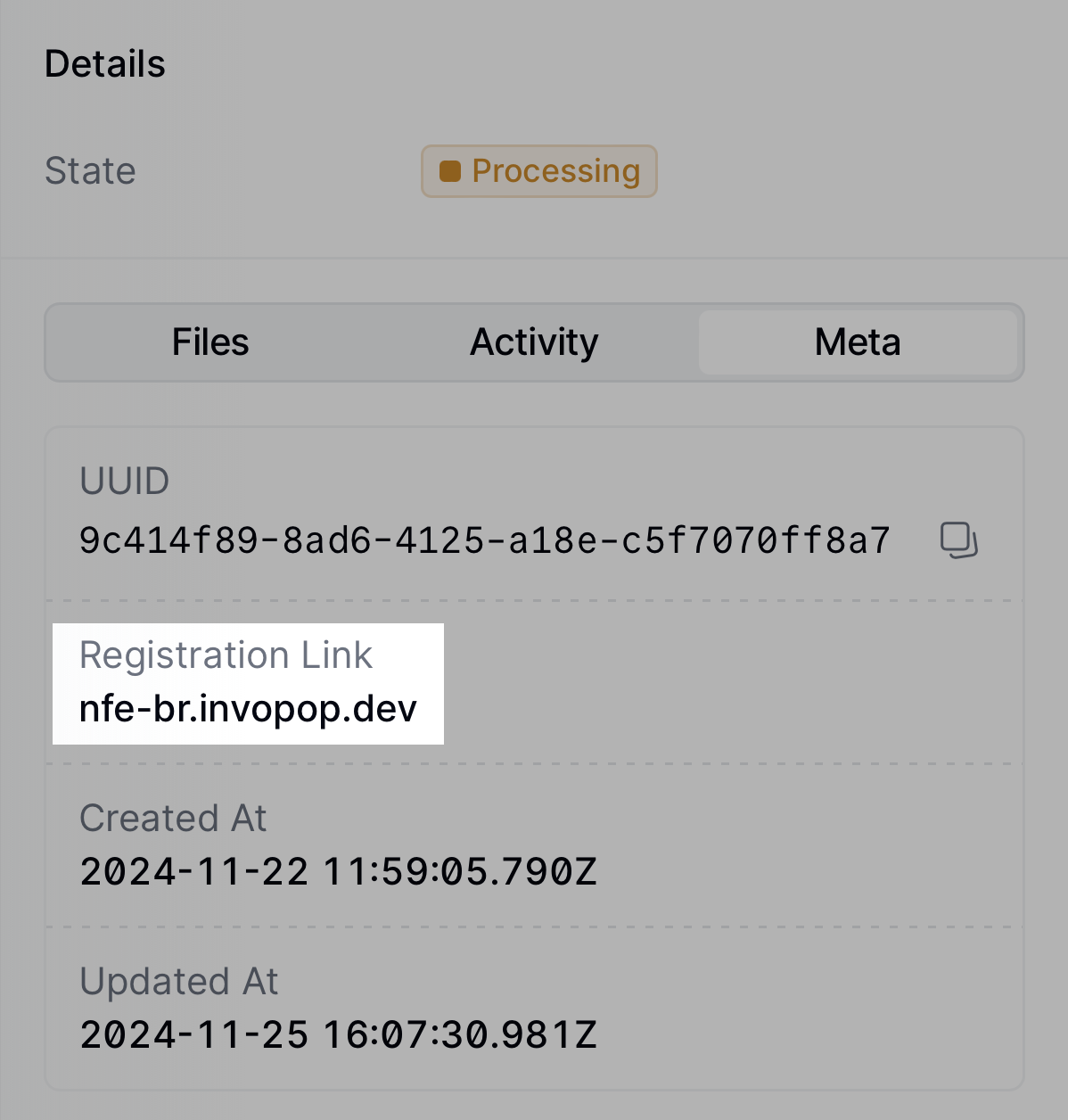 You can access the registration link via the API by [fetching the silo
entry](/api-ref/silo/entries/fetch-an-entry) and reading the `meta` row where
the `key` is set to `registration-link`.
Tap the registration link. A new browser window will open with a form to upload the supplier's credentials. Note that this form can be shared directly with the supplier, if necessary.
You can access the registration link via the API by [fetching the silo
entry](/api-ref/silo/entries/fetch-an-entry) and reading the `meta` row where
the `key` is set to `registration-link`.
Tap the registration link. A new browser window will open with a form to upload the supplier's credentials. Note that this form can be shared directly with the supplier, if necessary.
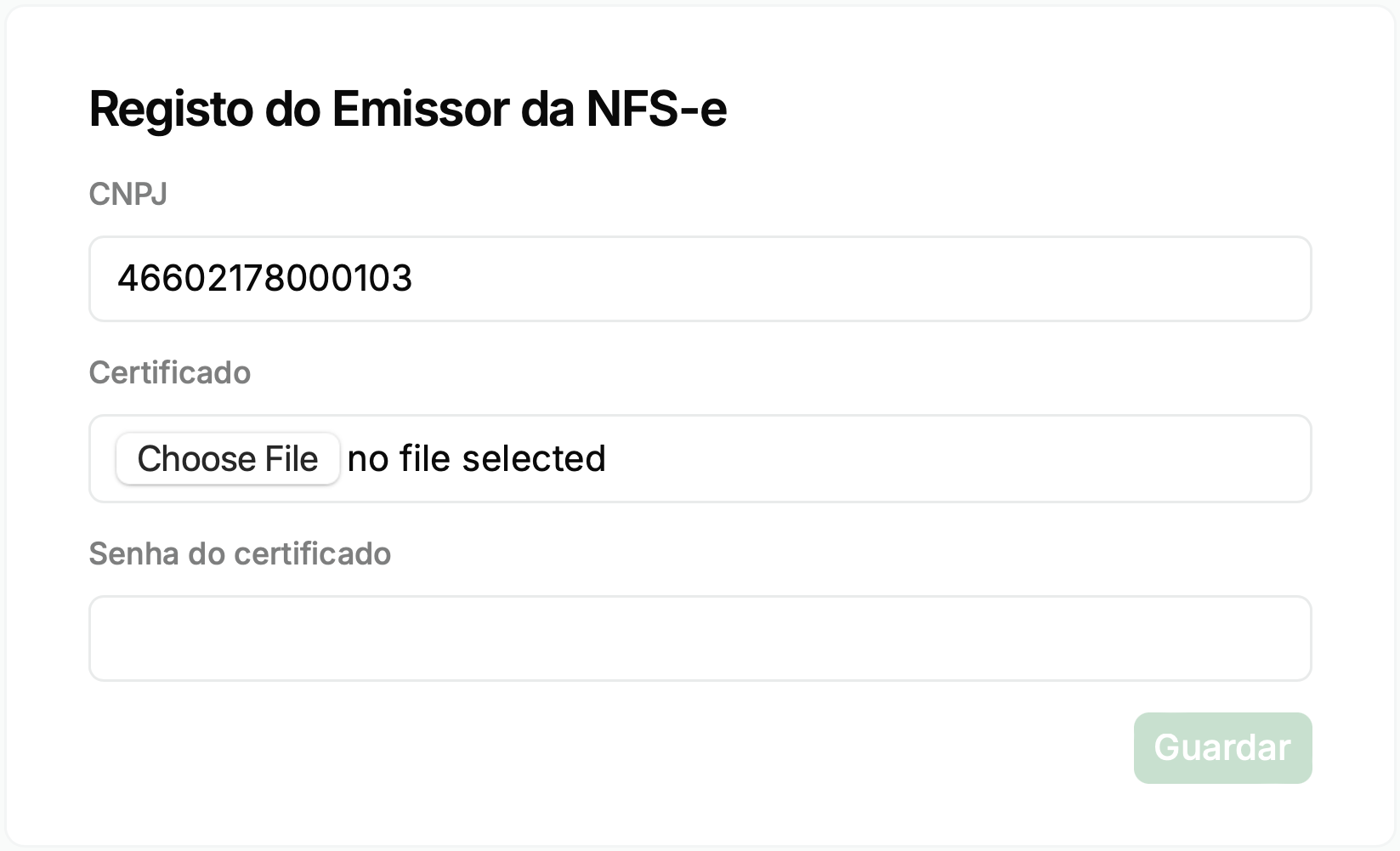 The details from this form are sent securely to Invopop's local partner, PlugNotas, who will use them to authenticate the supplier in the corresponding tax authority.
The supplier must ensure that the certificate and password are valid and accepted by the municipality or state where they operate.
Once the form is submitted, the supplier will be registered, and the post-registration workflow will be executed, changing the supplier's state to `Registered`.
From this point on, you can send service invoices on behalf of the supplier.
### Send Invoices
The following examples are of example [GOBL](https://docs.gobl.org) documents you can copy and paste directly into the [Invopop Console](https://console.invopop.com) or store via the API as silo entries. Then, you must run the appropriate issue workflow created during setup — "DF-e issue service invoice (NFS-e)", "DF-e issue product invoice (NF-e)", or "DF-e issue consumer invoice (NFC-e)" — over them.
In the sandbox environment, you'll notice that executing the workflow will always result in the same PDF and XML being attached to the silo entry. These are mock-up files returned by the sandbox environment for testing purposes.
In production, the actual XML file sent to the tax authority and the actual PDF generated will be attached to the silo entry.
In this example, we're issuing a simple service invoice (NFS-e) from a Brazilian supplier to another Brazilian business customer.
Notice:
* we've added the [`br-nfse-v1`](https://docs.gobl.org/addons/br-nfse-v1) addon; this ensures the document will be validated using the NFS-e rules built into the [GOBL](https://docs.gobl.org) library,
* extensions (`ext`) and identities have been used in multiple locations for fields whose values cannot be determined any other way,
* ISS percentage is provided explicitly as it varies depending on the municipality and type of service,
* there are no totals or calculations; all these will be made automatically when uploading, and,
* make sure to process it with the "DF-e issue service invoice (NFS-e)" workflow created during setup.
```json B2B Service Invoice (NFS-e) theme={"system"}
{
"$schema": "https://gobl.org/draft-0/bill/invoice",
"$addons": [
"br-nfse-v1"
],
"series": "XXBR",
"supplier": {
"name": "TechNova Soluções Digitais Ltda.",
"tax_id": {
"country": "BR",
"code": "05229829000184"
},
"identities": [
{
"key": "br-nfse-municipal-reg",
"code": "45678901234567"
}
],
"addresses": [
{
"num": "101",
"street": "Avenida Paulista",
"locality": "Bela Vista",
"region": "São Paulo",
"state": "SP",
"code": "01311-000",
"country": "BR"
}
],
"emails": [
{
"addr": "contact@technova.test"
}
],
"ext": {
"br-ibge-municipality": "3550308",
"br-nfse-simples": "1"
}
},
"customer": {
"name": "Construforte Engenharia Ltda.",
"tax_id": {
"country": "BR",
"code": "46602178000103"
},
"addresses": [
{
"num": "75",
"street": "Avenida Sete de Setembro",
"street_extra": "Bloco C",
"locality": "Centro",
"region": "Salvador",
"state": "BA",
"code": "40060-000",
"country": "BR"
}
]
},
"lines": [
{
"quantity": "15",
"item": {
"name": "Consultancy Services",
"price": "100.00",
"ext": {
"br-nfse-cnae": "62.01-5-01",
"br-nfse-service": "10.5"
}
},
"taxes": [
{
"cat": "ISS",
"percent": "15%"
}
]
}
]
}
```
```json Built version theme={"system"}
{
"$schema": "https://gobl.org/draft-0/bill/invoice",
"$regime": "BR",
"$addons": [
"br-nfse-v1"
],
"type": "standard",
"series": "XXBR",
"issue_date": "2026-07-08",
"currency": "BRL",
"supplier": {
"name": "TechNova Soluções Digitais Ltda.",
"tax_id": {
"country": "BR",
"code": "05229829000184"
},
"identities": [
{
"key": "br-nfse-municipal-reg",
"code": "45678901234567"
}
],
"addresses": [
{
"num": "101",
"street": "Avenida Paulista",
"locality": "Bela Vista",
"region": "São Paulo",
"state": "SP",
"code": "01311-000",
"country": "BR"
}
],
"emails": [
{
"addr": "contact@technova.test"
}
],
"ext": {
"br-ibge-municipality": "3550308",
"br-nfse-fiscal-incentive": "2",
"br-nfse-simples": "1"
}
},
"customer": {
"name": "Construforte Engenharia Ltda.",
"tax_id": {
"country": "BR",
"code": "46602178000103"
},
"addresses": [
{
"num": "75",
"street": "Avenida Sete de Setembro",
"street_extra": "Bloco C",
"locality": "Centro",
"region": "Salvador",
"state": "BA",
"code": "40060-000",
"country": "BR"
}
]
},
"lines": [
{
"i": 1,
"quantity": "15",
"item": {
"name": "Consultancy Services",
"price": "100.00",
"ext": {
"br-nfse-cnae": "62.01-5-01",
"br-nfse-service": "10.5"
}
},
"sum": "1500.00",
"taxes": [
{
"cat": "ISS",
"percent": "15%",
"ext": {
"br-nfse-iss-liability": "1"
}
}
],
"total": "1500.00"
}
],
"totals": {
"sum": "1500.00",
"total": "1500.00",
"taxes": {
"categories": [
{
"code": "ISS",
"informative": true,
"rates": [
{
"ext": {
"br-nfse-iss-liability": "1"
},
"base": "1500.00",
"percent": "15%",
"amount": "225.00"
}
],
"amount": "225.00"
}
],
"sum": "0.00"
},
"tax": "0.00",
"total_with_tax": "1500.00",
"payable": "1500.00"
}
}
```
In this example, we're issuing a simple service invoice (NFS-e) with the currently supported RTC (Tax Reform) fields.
Notice the differences from the previous example:
* we've set the [`br-nfse-operation`](https://docs.gobl.org/addons/br-nfse-v1#operation-indicator) extension, the [`br-nfse-tax-status`](https://docs.gobl.org/addons/br-nfse-v1#tax-status-code-cst) extension and the [`br-nfse-tax-class`](https://docs.gobl.org/addons/br-nfse-v1#tax-classification-code) extension at item level which will be used to determine the IBS and CBS taxes as part of the tax reform.
```json B2B Service Invoice (NFS-e) RTC theme={"system"}
{
"$schema": "https://gobl.org/draft-0/bill/invoice",
"$addons": [
"br-nfse-v1"
],
"series": "XXBR",
"supplier": {
"name": "TechNova Soluções Digitais Ltda.",
"tax_id": {
"country": "BR",
"code": "05229829000184"
},
"identities": [
{
"key": "br-nfse-municipal-reg",
"code": "45678901234567"
}
],
"addresses": [
{
"num": "101",
"street": "Avenida Paulista",
"locality": "Bela Vista",
"region": "São Paulo",
"state": "SP",
"code": "01311-000",
"country": "BR"
}
],
"emails": [
{
"addr": "contact@technova.test"
}
],
"ext": {
"br-ibge-municipality": "3550308",
"br-nfse-simples": "1"
}
},
"customer": {
"name": "Construforte Engenharia Ltda.",
"tax_id": {
"country": "BR",
"code": "46602178000103"
},
"addresses": [
{
"num": "75",
"street": "Avenida Sete de Setembro",
"street_extra": "Bloco C",
"locality": "Centro",
"region": "Salvador",
"state": "BA",
"code": "40060-000",
"country": "BR"
}
]
},
"lines": [
{
"quantity": "15",
"item": {
"name": "Consultancy Services",
"price": "100.00",
"ext": {
"br-nfse-cnae": "62.01-5-01",
"br-nfse-operation": "030101",
"br-nfse-service": "10.5",
"br-nfse-tax-class": "000001",
"br-nfse-tax-status": "000"
}
},
"taxes": [
{
"cat": "ISS",
"percent": "15%"
}
]
}
]
}
```
```json Built version theme={"system"}
{
"$schema": "https://gobl.org/draft-0/bill/invoice",
"$regime": "BR",
"$addons": [
"br-nfse-v1"
],
"type": "standard",
"series": "XXBR",
"issue_date": "2026-07-08",
"currency": "BRL",
"supplier": {
"name": "TechNova Soluções Digitais Ltda.",
"tax_id": {
"country": "BR",
"code": "05229829000184"
},
"identities": [
{
"key": "br-nfse-municipal-reg",
"code": "45678901234567"
}
],
"addresses": [
{
"num": "101",
"street": "Avenida Paulista",
"locality": "Bela Vista",
"region": "São Paulo",
"state": "SP",
"code": "01311-000",
"country": "BR"
}
],
"emails": [
{
"addr": "contact@technova.test"
}
],
"ext": {
"br-ibge-municipality": "3550308",
"br-nfse-fiscal-incentive": "2",
"br-nfse-simples": "1"
}
},
"customer": {
"name": "Construforte Engenharia Ltda.",
"tax_id": {
"country": "BR",
"code": "46602178000103"
},
"addresses": [
{
"num": "75",
"street": "Avenida Sete de Setembro",
"street_extra": "Bloco C",
"locality": "Centro",
"region": "Salvador",
"state": "BA",
"code": "40060-000",
"country": "BR"
}
]
},
"lines": [
{
"i": 1,
"quantity": "15",
"item": {
"name": "Consultancy Services",
"price": "100.00",
"ext": {
"br-nfse-cnae": "62.01-5-01",
"br-nfse-operation": "030101",
"br-nfse-service": "10.5",
"br-nfse-tax-class": "000001",
"br-nfse-tax-status": "000"
}
},
"sum": "1500.00",
"taxes": [
{
"cat": "ISS",
"percent": "15%",
"ext": {
"br-nfse-iss-liability": "1"
}
}
],
"total": "1500.00"
}
],
"totals": {
"sum": "1500.00",
"total": "1500.00",
"taxes": {
"categories": [
{
"code": "ISS",
"informative": true,
"rates": [
{
"ext": {
"br-nfse-iss-liability": "1"
},
"base": "1500.00",
"percent": "15%",
"amount": "225.00"
}
],
"amount": "225.00"
}
],
"sum": "0.00"
},
"tax": "0.00",
"total_with_tax": "1500.00",
"payable": "1500.00"
}
}
```
In this example, we're issuing an extended product invoice (NF-e) from a Brazilian supplier to another Brazilian business customer.
Notice:
* we've added the [`br-nfe-v4`](https://docs.gobl.org/addons/br-nfe-v4) addon without the `simplified` tag; this sets the [`br-nfe-model`](https://docs.gobl.org/addons/br-nfe-v4#model) extension to `55` (NF-e),
* the customer is required for NF-e and must include a full address; Brazilian customers must declare the [`br-ibge-municipality`](https://docs.gobl.org/addons/br-nfe-v4#municipality-code) extension and a valid state, while foreign customers can be identified by a country-qualified `identity` (e.g. a passport) instead of a `tax_id`,
* supplier and customer addresses must include a `country`; it is auto-filled from the party's tax ID (or first identity that declares a country) when omitted,
* each line must include a [`br-nfe-cfop`](https://docs.gobl.org/addons/br-nfe-v4#cfop-fiscal-operations-and-services-code) extension to classify the fiscal operation,
* item identities carry the NCM product classification code (`cProd` in the NF-e XML) and the GTIN barcode (`cEAN`),
* `item.ref` maps to the supplier's internal product code, and `item.unit` is converted to a UNECE unit code,
* line `discounts` reduce the taxable base (`vDesc`); line `charges` with key `delivery` map to freight (`vFrete`) and key `insurance` to insurance value (`vSeg`),
* `line.order` provides the line reference within the purchase order (`nItemPed`),
* a line `notes` entry with key `goods` maps to per-item additional information (`infAdProd`),
* `ordering.code` sets the purchase order number (`nPed` in `compra`) and `ordering.contracts[0].code` sets the contract number (`nCont`),
* `delivery.receiver` sets a separate delivery address (`entrega`) when goods ship to a different location than the buyer's fiscal address,
* the payment instructions key is set to `credit-transfer`, which causes the [`br-nfe-payment-means`](https://docs.gobl.org/addons/br-nfe-v4#payment-method) extension to be set automatically to `18` (transferência bancária),
* a `general` note maps to complementary information (`infCpl`) in the NF-e XML,
* tax percentages are provided explicitly as they vary depending on the state and type of goods,
* there are no totals or calculations; all these will be made automatically when uploading, and,
* make sure to process it with the "DF-e issue product invoice (NF-e)" workflow created during setup.
```json B2B Product Invoice (NF-e) theme={"system"}
{
"$schema": "https://gobl.org/draft-0/bill/invoice",
"$addons": [
"br-nfe-v4"
],
"series": "1",
"issue_date": "2026-05-22",
"tax": {
"ext": {
"br-nfe-model": "55",
"br-nfe-presence": "2"
}
},
"supplier": {
"name": "TechNova Soluções Digitais Ltda.",
"tax_id": {
"country": "BR",
"code": "05229829000184"
},
"identities": [
{
"key": "br-nfe-state-reg",
"code": "12345678901234"
}
],
"addresses": [
{
"num": "101",
"street": "Avenida Paulista",
"locality": "Bela Vista",
"region": "São Paulo",
"state": "SP",
"code": "01311-000",
"country": "BR"
}
],
"emails": [
{
"addr": "contact@technova.test"
}
],
"ext": {
"br-ibge-municipality": "3550308"
}
},
"customer": {
"name": "Construforte Engenharia Ltda.",
"tax_id": {
"country": "BR",
"code": "46602178000103"
},
"addresses": [
{
"num": "75",
"street": "Avenida Sete de Setembro",
"street_extra": "Bloco C",
"locality": "Centro",
"region": "Salvador",
"state": "BA",
"code": "40060-000",
"country": "BR"
}
],
"ext": {
"br-ibge-municipality": "2927408"
}
},
"ordering": {
"code": "PED-2026-0547",
"contracts": [
{
"code": "CON-2026-015"
}
]
},
"delivery": {
"receiver": {
"name": "Construforte Engenharia Ltda.",
"tax_id": {
"country": "BR",
"code": "46602178000103"
},
"addresses": [
{
"num": "1200",
"street": "Avenida ACM",
"locality": "Caminho das Árvores",
"region": "Salvador",
"state": "BA",
"code": "41820-014",
"country": "BR"
}
],
"ext": {
"br-ibge-municipality": "2927408"
}
}
},
"lines": [
{
"quantity": "10",
"order": "1",
"item": {
"ref": "USB-C-2M",
"name": "Cabo USB-C 2 metros",
"unit": "piece",
"price": "28.90",
"identities": [
{
"key": "ncm",
"code": "85444290"
},
{
"key": "gtin",
"code": "7891234567890"
}
]
},
"discounts": [
{
"percent": "5%",
"reason": "Desconto comercial"
}
],
"charges": [
{
"key": "delivery",
"amount": "15.00"
},
{
"key": "insurance",
"amount": "5.00"
}
],
"notes": [
{
"key": "goods",
"text": "Cabo homologado para carregamento rápido."
}
],
"taxes": [
{
"cat": "ICMS",
"percent": "12.0%"
},
{
"cat": "PIS",
"percent": "1.65%"
},
{
"cat": "COFINS",
"percent": "7.60%"
}
],
"ext": {
"br-nfe-cfop": "6102"
}
}
],
"payment": {
"instructions": {
"key": "credit-transfer"
}
},
"notes": [
{
"key": "reason",
"text": "Venda de Mercadorias"
},
{
"key": "general",
"text": "Pedido nº 2026/0547."
}
]
}
```
```json Built version theme={"system"}
{
"$schema": "https://gobl.org/draft-0/bill/invoice",
"$regime": "BR",
"$addons": [
"br-nfe-v4"
],
"type": "standard",
"series": "1",
"issue_date": "2026-05-22",
"currency": "BRL",
"tax": {
"ext": {
"br-nfe-model": "55",
"br-nfe-operation-type": "1",
"br-nfe-presence": "2",
"br-nfe-purpose": "1"
}
},
"supplier": {
"name": "TechNova Soluções Digitais Ltda.",
"tax_id": {
"country": "BR",
"code": "05229829000184"
},
"identities": [
{
"key": "br-nfe-state-reg",
"code": "12345678901234"
}
],
"addresses": [
{
"num": "101",
"street": "Avenida Paulista",
"locality": "Bela Vista",
"region": "São Paulo",
"state": "SP",
"code": "01311-000",
"country": "BR"
}
],
"emails": [
{
"addr": "contact@technova.test"
}
],
"ext": {
"br-ibge-municipality": "3550308",
"br-nfe-regime": "3"
}
},
"customer": {
"name": "Construforte Engenharia Ltda.",
"tax_id": {
"country": "BR",
"code": "46602178000103"
},
"addresses": [
{
"num": "75",
"street": "Avenida Sete de Setembro",
"street_extra": "Bloco C",
"locality": "Centro",
"region": "Salvador",
"state": "BA",
"code": "40060-000",
"country": "BR"
}
],
"ext": {
"br-ibge-municipality": "2927408"
}
},
"lines": [
{
"i": 1,
"quantity": "10",
"order": "1",
"item": {
"ref": "USB-C-2M",
"name": "Cabo USB-C 2 metros",
"identities": [
{
"key": "ncm",
"code": "85444290"
},
{
"key": "gtin",
"code": "7891234567890"
}
],
"price": "28.90",
"unit": "piece"
},
"sum": "289.00",
"discounts": [
{
"reason": "Desconto comercial",
"percent": "5%",
"amount": "14.45"
}
],
"charges": [
{
"key": "delivery",
"amount": "15.00"
},
{
"key": "insurance",
"amount": "5.00"
}
],
"taxes": [
{
"cat": "ICMS",
"percent": "12.0%",
"ext": {
"br-nfe-icms-cst": "00",
"br-nfe-icms-origin": "0"
}
},
{
"cat": "PIS",
"percent": "1.65%",
"ext": {
"br-nfe-pis-cst": "01"
}
},
{
"cat": "COFINS",
"percent": "7.60%",
"ext": {
"br-nfe-cofins-cst": "01"
}
}
],
"total": "294.55",
"notes": [
{
"key": "goods",
"text": "Cabo homologado para carregamento rápido."
}
],
"ext": {
"br-nfe-cfop": "6102"
}
}
],
"ordering": {
"code": "PED-2026-0547",
"contracts": [
{
"code": "CON-2026-015"
}
]
},
"payment": {
"instructions": {
"key": "credit-transfer",
"ext": {
"br-nfe-payment-means": "18"
}
}
},
"delivery": {
"receiver": {
"name": "Construforte Engenharia Ltda.",
"tax_id": {
"country": "BR",
"code": "46602178000103"
},
"addresses": [
{
"num": "1200",
"street": "Avenida ACM",
"locality": "Caminho das Árvores",
"region": "Salvador",
"state": "BA",
"code": "41820-014",
"country": "BR"
}
],
"ext": {
"br-ibge-municipality": "2927408"
}
}
},
"totals": {
"sum": "294.55",
"total": "294.55",
"taxes": {
"categories": [
{
"code": "ICMS",
"informative": true,
"rates": [
{
"ext": {
"br-nfe-icms-cst": "00",
"br-nfe-icms-origin": "0"
},
"base": "294.55",
"percent": "12.0%",
"amount": "35.35"
}
],
"amount": "35.35"
},
{
"code": "PIS",
"informative": true,
"rates": [
{
"ext": {
"br-nfe-pis-cst": "01"
},
"base": "294.55",
"percent": "1.65%",
"amount": "4.86"
}
],
"amount": "4.86"
},
{
"code": "COFINS",
"informative": true,
"rates": [
{
"ext": {
"br-nfe-cofins-cst": "01"
},
"base": "294.55",
"percent": "7.60%",
"amount": "22.39"
}
],
"amount": "22.39"
}
],
"sum": "0.00"
},
"tax": "0.00",
"total_with_tax": "294.55",
"payable": "294.55"
},
"notes": [
{
"key": "reason",
"text": "Venda de Mercadorias"
},
{
"key": "general",
"text": "Pedido nº 2026/0547."
}
]
}
```
In this example, we're issuing a product invoice (NF-e) from a supplier enrolled in the *Simples Nacional* tax regime.
Notice the differences from the previous example:
* the supplier declares its regime with the [`br-nfe-regime`](https://docs.gobl.org/addons/br-nfe-v4#tax-regime-code) extension set to `1` (*Simples Nacional*); use `2` for *Simples Nacional, Excess* or `4` for *MEI* — omitting it defaults to `3` (normal regime),
* each ICMS line carries the [`br-nfe-icms-csosn`](https://docs.gobl.org/addons/br-nfe-v4#icms-simples-nacional-status-code-csosn) extension (here `101`, taxed with credit permission) instead of the `br-nfe-icms-cst` code that normal-regime issuers use,
* PIS and COFINS are still required on every line but are not levied per item under *Simples Nacional*, so they use the [`br-nfe-pis-cst`](https://docs.gobl.org/addons/br-nfe-v4#pis-tax-status-code-cst) and [`br-nfe-cofins-cst`](https://docs.gobl.org/addons/br-nfe-v4#cofins-tax-status-code-cst) extensions set to `49` (other operations) at a `0%` rate,
* there are no totals or calculations; all these will be made automatically when uploading, and,
* make sure to process it with the "DF-e issue product invoice (NF-e)" workflow created during setup.
```json B2B Product Invoice — Simples Nacional (NF-e) theme={"system"}
{
"$schema": "https://gobl.org/draft-0/bill/invoice",
"$addons": [
"br-nfe-v4"
],
"series": "1",
"tax": {
"ext": {
"br-nfe-presence": "1"
}
},
"supplier": {
"name": "Marcenaria Arte & Design ME",
"tax_id": {
"country": "BR",
"code": "21586733000120"
},
"identities": [
{
"key": "br-nfe-state-reg",
"code": "0623458900"
}
],
"addresses": [
{
"num": "85",
"street": "Rua dos Artesãos",
"locality": "Savassi",
"region": "Minas Gerais",
"state": "MG",
"code": "30140-071",
"country": "BR"
}
],
"emails": [
{
"addr": "contato@artedesign.com.br"
}
],
"ext": {
"br-ibge-municipality": "3106200",
"br-nfe-regime": "1"
}
},
"customer": {
"name": "Comércio de Móveis Paulista Ltda.",
"tax_id": {
"country": "BR",
"code": "33944792000101"
},
"addresses": [
{
"num": "742",
"street": "Avenida Paulista",
"locality": "Bela Vista",
"region": "São Paulo",
"state": "SP",
"code": "01310-100",
"country": "BR"
}
],
"ext": {
"br-ibge-municipality": "3550308"
}
},
"lines": [
{
"quantity": "5",
"item": {
"name": "Mesa de Jantar em Madeira Maciça",
"price": "900.00",
"identities": [
{
"key": "ncm",
"code": "94036000"
}
]
},
"taxes": [
{
"cat": "ICMS",
"percent": "2.56%",
"ext": {
"br-nfe-icms-csosn": "101"
}
},
{
"cat": "PIS",
"percent": "0%",
"ext": {
"br-nfe-pis-cst": "49"
}
},
{
"cat": "COFINS",
"percent": "0%",
"ext": {
"br-nfe-cofins-cst": "49"
}
}
],
"ext": {
"br-nfe-cfop": "6102"
}
}
],
"payment": {
"instructions": {
"key": "credit-transfer"
}
},
"notes": [
{
"key": "reason",
"text": "Venda de mercadoria"
}
]
}
```
```json Built version theme={"system"}
{
"$schema": "https://gobl.org/draft-0/bill/invoice",
"$regime": "BR",
"$addons": [
"br-nfe-v4"
],
"type": "standard",
"series": "1",
"issue_date": "2026-07-08",
"currency": "BRL",
"tax": {
"ext": {
"br-nfe-model": "55",
"br-nfe-operation-type": "1",
"br-nfe-presence": "1",
"br-nfe-purpose": "1"
}
},
"supplier": {
"name": "Marcenaria Arte \u0026 Design ME",
"tax_id": {
"country": "BR",
"code": "21586733000120"
},
"identities": [
{
"key": "br-nfe-state-reg",
"code": "0623458900"
}
],
"addresses": [
{
"num": "85",
"street": "Rua dos Artesãos",
"locality": "Savassi",
"region": "Minas Gerais",
"state": "MG",
"code": "30140-071",
"country": "BR"
}
],
"emails": [
{
"addr": "contato@artedesign.com.br"
}
],
"ext": {
"br-ibge-municipality": "3106200",
"br-nfe-regime": "1"
}
},
"customer": {
"name": "Comércio de Móveis Paulista Ltda.",
"tax_id": {
"country": "BR",
"code": "33944792000101"
},
"addresses": [
{
"num": "742",
"street": "Avenida Paulista",
"locality": "Bela Vista",
"region": "São Paulo",
"state": "SP",
"code": "01310-100",
"country": "BR"
}
],
"ext": {
"br-ibge-municipality": "3550308"
}
},
"lines": [
{
"i": 1,
"quantity": "5",
"item": {
"name": "Mesa de Jantar em Madeira Maciça",
"identities": [
{
"key": "ncm",
"code": "94036000"
}
],
"price": "900.00"
},
"sum": "4500.00",
"taxes": [
{
"cat": "ICMS",
"percent": "2.56%",
"ext": {
"br-nfe-icms-csosn": "101",
"br-nfe-icms-origin": "0"
}
},
{
"cat": "PIS",
"percent": "0%",
"ext": {
"br-nfe-pis-cst": "49"
}
},
{
"cat": "COFINS",
"percent": "0%",
"ext": {
"br-nfe-cofins-cst": "49"
}
}
],
"total": "4500.00",
"ext": {
"br-nfe-cfop": "6102"
}
}
],
"payment": {
"instructions": {
"key": "credit-transfer",
"ext": {
"br-nfe-payment-means": "18"
}
}
},
"totals": {
"sum": "4500.00",
"total": "4500.00",
"taxes": {
"categories": [
{
"code": "ICMS",
"informative": true,
"rates": [
{
"ext": {
"br-nfe-icms-csosn": "101",
"br-nfe-icms-origin": "0"
},
"base": "4500.00",
"percent": "2.56%",
"amount": "115.20"
}
],
"amount": "115.20"
},
{
"code": "PIS",
"informative": true,
"rates": [
{
"ext": {
"br-nfe-pis-cst": "49"
},
"base": "4500.00",
"percent": "0%",
"amount": "0.00"
}
],
"amount": "0.00"
},
{
"code": "COFINS",
"informative": true,
"rates": [
{
"ext": {
"br-nfe-cofins-cst": "49"
},
"base": "4500.00",
"percent": "0%",
"amount": "0.00"
}
],
"amount": "0.00"
}
],
"sum": "0.00"
},
"tax": "0.00",
"total_with_tax": "4500.00",
"payable": "4500.00"
},
"notes": [
{
"key": "reason",
"text": "Venda de mercadoria"
}
]
}
```
In this example, we're issuing a NF-e that fully returns the goods of a previously issued B2B product invoice — a *devolução total* under the pre-reform (pre-RTC) rules.
Notice the differences from a standard product invoice:
* the document `type` is `credit-note`; it keeps the [`br-nfe-v4`](https://docs.gobl.org/addons/br-nfe-v4) addon and is still issued as an NF-e, so [`br-nfe-model`](https://docs.gobl.org/addons/br-nfe-v4#fiscal-document-model-code) is derived as `55`,
* a `preceding` entry references the original NF-e and carries its SEFAZ access key (*chave de acesso*) as a stamp — you can copy it from the `sefaz-key` entry in the `stamps` array of the original invoice's envelope `head`, where it was added once the tax authority authorized the document,
* because this is a full return, the [`br-nfe-purpose`](https://docs.gobl.org/addons/br-nfe-v4#purpose-code) extension is set to `4` (*Goods Return*) and the [`br-nfe-operation-type`](https://docs.gobl.org/addons/br-nfe-v4#operation-type-code) extension to `0` (*Inbound / Entrada*), since the returned goods re-enter the supplier; standard invoices set these automatically to `1` (normal) and `1` (outbound), but corrective documents must set both explicitly,
* no [`br-nfe-credit-note-type`](https://docs.gobl.org/addons/br-nfe-v4#credit-note-type-code) extension is used: that field only applies to post-reform IBS/CBS credit notes (those set `br-nfe-purpose` to `5`),
* the line [`br-nfe-cfop`](https://docs.gobl.org/addons/br-nfe-v4#cfop-fiscal-operations-and-services-code) is a return code — `2202` (*Devolução de venda de mercadoria adquirida ou recebida de terceiros*) — mirroring the original `6102` sale but recorded as an inbound inter-state operation (CFOP starting with `2`),
* the payment sets the [`br-nfe-payment-means`](https://docs.gobl.org/addons/br-nfe-v4#payment-method) extension to `90` (*No payment*), as a return does not involve a new payment,
* there are no totals or calculations; all these will be made automatically when uploading, and,
* make sure to process it with the "DF-e issue product invoice (NF-e)" workflow created during setup.
```json Credit Note — Full Return (NF-e) theme={"system"}
{
"$schema": "https://gobl.org/draft-0/bill/invoice",
"$addons": [
"br-nfe-v4"
],
"type": "credit-note",
"series": "1",
"issue_date": "2024-11-20",
"tax": {
"ext": {
"br-nfe-presence": "1",
"br-nfe-purpose": "4",
"br-nfe-operation-type": "0"
}
},
"preceding": [
{
"type": "standard",
"series": "1",
"code": "1",
"issue_date": "2024-11-15",
"stamps": [
{
"prv": "sefaz-key",
"val": "35241105229829000184550010000000011000000019"
}
]
}
],
"supplier": {
"name": "TechNova Soluções Digitais Ltda.",
"tax_id": {
"country": "BR",
"code": "05229829000184"
},
"identities": [
{
"key": "br-nfe-state-reg",
"code": "12345678901234"
}
],
"addresses": [
{
"num": "101",
"street": "Avenida Paulista",
"locality": "Bela Vista",
"region": "São Paulo",
"state": "SP",
"code": "01311-000",
"country": "BR"
}
],
"emails": [
{
"addr": "contact@technova.test"
}
],
"ext": {
"br-ibge-municipality": "3550308"
}
},
"customer": {
"name": "Construforte Engenharia Ltda.",
"tax_id": {
"country": "BR",
"code": "46602178000103"
},
"addresses": [
{
"num": "75",
"street": "Avenida Sete de Setembro",
"street_extra": "Bloco C",
"locality": "Centro",
"region": "Salvador",
"state": "BA",
"code": "40060-000",
"country": "BR"
}
],
"ext": {
"br-ibge-municipality": "2927408"
}
},
"lines": [
{
"quantity": "10",
"item": {
"name": "Cabo USB-C 2 metros",
"price": "28.90",
"identities": [
{
"key": "ncm",
"code": "85444290"
}
]
},
"taxes": [
{
"cat": "ICMS",
"percent": "12.0%"
},
{
"cat": "PIS",
"percent": "1.65%"
},
{
"cat": "COFINS",
"percent": "7.60%"
}
],
"ext": {
"br-nfe-cfop": "2202"
}
}
],
"payment": {
"instructions": {
"key": "other",
"ext": {
"br-nfe-payment-means": "90"
}
}
},
"notes": [
{
"key": "reason",
"text": "Devolução total de mercadoria"
}
]
}
```
```json Built version theme={"system"}
{
"$schema": "https://gobl.org/draft-0/bill/invoice",
"$regime": "BR",
"$addons": [
"br-nfe-v4"
],
"type": "credit-note",
"series": "1",
"issue_date": "2024-11-20",
"currency": "BRL",
"preceding": [
{
"type": "standard",
"issue_date": "2024-11-15",
"series": "1",
"code": "1",
"stamps": [
{
"prv": "sefaz-key",
"val": "35241105229829000184550010000000011000000019"
}
]
}
],
"tax": {
"ext": {
"br-nfe-model": "55",
"br-nfe-operation-type": "0",
"br-nfe-presence": "1",
"br-nfe-purpose": "4"
}
},
"supplier": {
"name": "TechNova Soluções Digitais Ltda.",
"tax_id": {
"country": "BR",
"code": "05229829000184"
},
"identities": [
{
"key": "br-nfe-state-reg",
"code": "12345678901234"
}
],
"addresses": [
{
"num": "101",
"street": "Avenida Paulista",
"locality": "Bela Vista",
"region": "São Paulo",
"state": "SP",
"code": "01311-000",
"country": "BR"
}
],
"emails": [
{
"addr": "contact@technova.test"
}
],
"ext": {
"br-ibge-municipality": "3550308",
"br-nfe-regime": "3"
}
},
"customer": {
"name": "Construforte Engenharia Ltda.",
"tax_id": {
"country": "BR",
"code": "46602178000103"
},
"addresses": [
{
"num": "75",
"street": "Avenida Sete de Setembro",
"street_extra": "Bloco C",
"locality": "Centro",
"region": "Salvador",
"state": "BA",
"code": "40060-000",
"country": "BR"
}
],
"ext": {
"br-ibge-municipality": "2927408"
}
},
"lines": [
{
"i": 1,
"quantity": "10",
"item": {
"name": "Cabo USB-C 2 metros",
"identities": [
{
"key": "ncm",
"code": "85444290"
}
],
"price": "28.90"
},
"sum": "289.00",
"taxes": [
{
"cat": "ICMS",
"percent": "12.0%",
"ext": {
"br-nfe-icms-cst": "00",
"br-nfe-icms-origin": "0"
}
},
{
"cat": "PIS",
"percent": "1.65%",
"ext": {
"br-nfe-pis-cst": "01"
}
},
{
"cat": "COFINS",
"percent": "7.60%",
"ext": {
"br-nfe-cofins-cst": "01"
}
}
],
"total": "289.00",
"ext": {
"br-nfe-cfop": "2202"
}
}
],
"payment": {
"instructions": {
"key": "other",
"ext": {
"br-nfe-payment-means": "90"
}
}
},
"totals": {
"sum": "289.00",
"total": "289.00",
"taxes": {
"categories": [
{
"code": "ICMS",
"informative": true,
"rates": [
{
"ext": {
"br-nfe-icms-cst": "00",
"br-nfe-icms-origin": "0"
},
"base": "289.00",
"percent": "12.0%",
"amount": "34.68"
}
],
"amount": "34.68"
},
{
"code": "PIS",
"informative": true,
"rates": [
{
"ext": {
"br-nfe-pis-cst": "01"
},
"base": "289.00",
"percent": "1.65%",
"amount": "4.77"
}
],
"amount": "4.77"
},
{
"code": "COFINS",
"informative": true,
"rates": [
{
"ext": {
"br-nfe-cofins-cst": "01"
},
"base": "289.00",
"percent": "7.60%",
"amount": "21.96"
}
],
"amount": "21.96"
}
],
"sum": "0.00"
},
"tax": "0.00",
"total_with_tax": "289.00",
"payable": "289.00"
},
"notes": [
{
"key": "reason",
"text": "Devolução total de mercadoria"
}
]
}
```
In this example, we're issuing a simple consumer invoice (NFC-e) from a Brazilian supplier.
Notice:
* we've added the [`br-nfe-v4`](https://docs.gobl.org/addons/br-nfe-v4) addon with the `simplified` tag; this sets the [`br-nfe-model`](https://docs.gobl.org/addons/br-nfe-v4#model) extension to `65` (NFC-e),
* the customer is optional and in this example we've omitted it,
* extensions (`ext`) and identities have been used in multiple locations for fields whose values cannot be determined any other way,
* the payment instructions key is set to `card`, which causes the [`br-nfe-payment-means`](https://docs.gobl.org/addons/br-nfe-v4#payment-method) extension to be set automatically to `03` (cartão de crédito),
* tax percentages are provided explicitly as they vary depending on the state and type of goods,
* there are no totals or calculations; all these will be made automatically when uploading, and,
* make sure to process it with the "DF-e issue consumer invoice (NFC-e)" workflow created during setup.
```json B2C Consumer Invoice (NFC-e) theme={"system"}
{
"$schema": "https://gobl.org/draft-0/bill/invoice",
"$addons": [
"br-nfe-v4"
],
"$tags": [
"simplified"
],
"series": "123",
"tax": {
"ext": {
"br-nfe-presence": "1"
}
},
"supplier": {
"name": "TechNova Soluções Digitais Ltda.",
"tax_id": {
"country": "BR",
"code": "05229829000184"
},
"identities": [
{
"key": "br-nfe-state-reg",
"code": "12345678901234"
}
],
"addresses": [
{
"num": "101",
"street": "Avenida Paulista",
"locality": "Bela Vista",
"region": "São Paulo",
"state": "SP",
"code": "01311-000",
"country": "BR"
}
],
"emails": [
{
"addr": "contact@technova.test"
}
],
"ext": {
"br-ibge-municipality": "3550308",
"br-nfse-simples": "1"
}
},
"lines": [
{
"quantity": "2",
"item": {
"name": "Cabo USB-C 2 metros",
"price": "28.90"
},
"taxes": [
{
"cat": "ICMS",
"percent": "18.0%"
},
{
"cat": "PIS",
"percent": "1.65%"
},
{
"cat": "COFINS",
"percent": "7.60%"
}
]
}
],
"payment": {
"instructions": {
"key": "card"
}
},
"notes": [
{
"key": "reason",
"text": "Venda de mercadoria"
}
]
}
```
```json Built version theme={"system"}
{
"$schema": "https://gobl.org/draft-0/bill/invoice",
"$regime": "BR",
"$addons": [
"br-nfe-v4"
],
"$tags": [
"simplified"
],
"type": "standard",
"series": "123",
"issue_date": "2026-07-08",
"currency": "BRL",
"tax": {
"ext": {
"br-nfe-model": "65",
"br-nfe-operation-type": "1",
"br-nfe-presence": "1",
"br-nfe-purpose": "1"
}
},
"supplier": {
"name": "TechNova Soluções Digitais Ltda.",
"tax_id": {
"country": "BR",
"code": "05229829000184"
},
"identities": [
{
"key": "br-nfe-state-reg",
"code": "12345678901234"
}
],
"addresses": [
{
"num": "101",
"street": "Avenida Paulista",
"locality": "Bela Vista",
"region": "São Paulo",
"state": "SP",
"code": "01311-000",
"country": "BR"
}
],
"emails": [
{
"addr": "contact@technova.test"
}
],
"ext": {
"br-ibge-municipality": "3550308",
"br-nfe-regime": "3",
"br-nfse-simples": "1"
}
},
"lines": [
{
"i": 1,
"quantity": "2",
"item": {
"name": "Cabo USB-C 2 metros",
"price": "28.90"
},
"sum": "57.80",
"taxes": [
{
"cat": "ICMS",
"percent": "18.0%",
"ext": {
"br-nfe-icms-cst": "00",
"br-nfe-icms-origin": "0"
}
},
{
"cat": "PIS",
"percent": "1.65%",
"ext": {
"br-nfe-pis-cst": "01"
}
},
{
"cat": "COFINS",
"percent": "7.60%",
"ext": {
"br-nfe-cofins-cst": "01"
}
}
],
"total": "57.80"
}
],
"payment": {
"instructions": {
"key": "card",
"ext": {
"br-nfe-payment-means": "03"
}
}
},
"totals": {
"sum": "57.80",
"total": "57.80",
"taxes": {
"categories": [
{
"code": "ICMS",
"informative": true,
"rates": [
{
"ext": {
"br-nfe-icms-cst": "00",
"br-nfe-icms-origin": "0"
},
"base": "57.80",
"percent": "18.0%",
"amount": "10.40"
}
],
"amount": "10.40"
},
{
"code": "PIS",
"informative": true,
"rates": [
{
"ext": {
"br-nfe-pis-cst": "01"
},
"base": "57.80",
"percent": "1.65%",
"amount": "0.95"
}
],
"amount": "0.95"
},
{
"code": "COFINS",
"informative": true,
"rates": [
{
"ext": {
"br-nfe-cofins-cst": "01"
},
"base": "57.80",
"percent": "7.60%",
"amount": "4.39"
}
],
"amount": "4.39"
}
],
"sum": "0.00"
},
"tax": "0.00",
"total_with_tax": "57.80",
"payable": "57.80"
},
"notes": [
{
"key": "reason",
"text": "Venda de mercadoria"
}
]
}
```
### Cancel an invoice
If you need to cancel a document that has already been sent to the tax authority, you can use the cancel workflows created during setup. Run the appropriate cancel workflow — NFS-e, NF-e, or NFC-e — over the silo entry you want to cancel. On success, the entry will be set to `Void`.
NFS-e cancellations are subject to the rules of each municipality. Some require a specific cancellation code. NFC-e cancellations must be requested within the cancellation window set by the originating state.
#### Configuration
Both cancel actions accept optional parameters that control the cancellation request. They can be set as a default on the workflow step (via the step's configuration page in the Console) or overridden per job by passing them as arguments when [creating the job via the API](/api-ref/transform/jobs/create-a-job-put).
| Parameter | Job argument | Applies to | Notes |
| ------------------- | ---------------------- | ---------------------- | --------------------------------------------------------------------------------------------------------------------------------------------------- |
| Cancellation reason | `nfe-br-cancel-reason` | NFS-e, NF-e, and NFC-e | Free-text reason for the cancellation. For NF-e and NFC-e, must be at least 15 characters if provided. Defaults to the system default when omitted. |
| Cancellation code | `nfe-br-cancel-code` | NFS-e only | Municipality-specific cancellation code, for example `9` for "Outros" in the National NFS-e system. Defaults to the system default when omitted. |
Job arguments take precedence over the step configuration. To pass them when creating a job via the API:
```json theme={"system"}
{
"workflow_id": "...",
"silo_entry_id": "...",
"args": {
"nfe-br-cancel-reason": "Cancelamento a pedido do Prestador",
"nfe-br-cancel-code": "9"
}
}
```
## FAQ
Invopop supports NF-e, NFS-e and NFC-e documents. Transport documents (MDF-e and CF-e) are not currently supported.
For further details on how GOBL prepares data for conversion, see:
* The [Brazil Regime GOBL Reference](https://docs.gobl.org/regimes/br).
* The [NFS-e Addon GOBL Reference](https://docs.gobl.org/addons/br-nfse-v1).
* The [NF-e Addon GOBL Reference](https://docs.gobl.org/addons/br-nfe-v4).
More available in our [Brazil FAQ](/faq/brazil) section
***
| | |
| ---------- | -------------------------------------------------------------------------------------------------------------------------------------------------------------------------------------------------------------------------------------------------------------------------------------------------------------------------------------------------------------------------- |
| Compliance | [Invoicing compliance in Brazil](/compliance/brazil)
The details from this form are sent securely to Invopop's local partner, PlugNotas, who will use them to authenticate the supplier in the corresponding tax authority.
The supplier must ensure that the certificate and password are valid and accepted by the municipality or state where they operate.
Once the form is submitted, the supplier will be registered, and the post-registration workflow will be executed, changing the supplier's state to `Registered`.
From this point on, you can send service invoices on behalf of the supplier.
### Send Invoices
The following examples are of example [GOBL](https://docs.gobl.org) documents you can copy and paste directly into the [Invopop Console](https://console.invopop.com) or store via the API as silo entries. Then, you must run the appropriate issue workflow created during setup — "DF-e issue service invoice (NFS-e)", "DF-e issue product invoice (NF-e)", or "DF-e issue consumer invoice (NFC-e)" — over them.
In the sandbox environment, you'll notice that executing the workflow will always result in the same PDF and XML being attached to the silo entry. These are mock-up files returned by the sandbox environment for testing purposes.
In production, the actual XML file sent to the tax authority and the actual PDF generated will be attached to the silo entry.
In this example, we're issuing a simple service invoice (NFS-e) from a Brazilian supplier to another Brazilian business customer.
Notice:
* we've added the [`br-nfse-v1`](https://docs.gobl.org/addons/br-nfse-v1) addon; this ensures the document will be validated using the NFS-e rules built into the [GOBL](https://docs.gobl.org) library,
* extensions (`ext`) and identities have been used in multiple locations for fields whose values cannot be determined any other way,
* ISS percentage is provided explicitly as it varies depending on the municipality and type of service,
* there are no totals or calculations; all these will be made automatically when uploading, and,
* make sure to process it with the "DF-e issue service invoice (NFS-e)" workflow created during setup.
```json B2B Service Invoice (NFS-e) theme={"system"}
{
"$schema": "https://gobl.org/draft-0/bill/invoice",
"$addons": [
"br-nfse-v1"
],
"series": "XXBR",
"supplier": {
"name": "TechNova Soluções Digitais Ltda.",
"tax_id": {
"country": "BR",
"code": "05229829000184"
},
"identities": [
{
"key": "br-nfse-municipal-reg",
"code": "45678901234567"
}
],
"addresses": [
{
"num": "101",
"street": "Avenida Paulista",
"locality": "Bela Vista",
"region": "São Paulo",
"state": "SP",
"code": "01311-000",
"country": "BR"
}
],
"emails": [
{
"addr": "contact@technova.test"
}
],
"ext": {
"br-ibge-municipality": "3550308",
"br-nfse-simples": "1"
}
},
"customer": {
"name": "Construforte Engenharia Ltda.",
"tax_id": {
"country": "BR",
"code": "46602178000103"
},
"addresses": [
{
"num": "75",
"street": "Avenida Sete de Setembro",
"street_extra": "Bloco C",
"locality": "Centro",
"region": "Salvador",
"state": "BA",
"code": "40060-000",
"country": "BR"
}
]
},
"lines": [
{
"quantity": "15",
"item": {
"name": "Consultancy Services",
"price": "100.00",
"ext": {
"br-nfse-cnae": "62.01-5-01",
"br-nfse-service": "10.5"
}
},
"taxes": [
{
"cat": "ISS",
"percent": "15%"
}
]
}
]
}
```
```json Built version theme={"system"}
{
"$schema": "https://gobl.org/draft-0/bill/invoice",
"$regime": "BR",
"$addons": [
"br-nfse-v1"
],
"type": "standard",
"series": "XXBR",
"issue_date": "2026-07-08",
"currency": "BRL",
"supplier": {
"name": "TechNova Soluções Digitais Ltda.",
"tax_id": {
"country": "BR",
"code": "05229829000184"
},
"identities": [
{
"key": "br-nfse-municipal-reg",
"code": "45678901234567"
}
],
"addresses": [
{
"num": "101",
"street": "Avenida Paulista",
"locality": "Bela Vista",
"region": "São Paulo",
"state": "SP",
"code": "01311-000",
"country": "BR"
}
],
"emails": [
{
"addr": "contact@technova.test"
}
],
"ext": {
"br-ibge-municipality": "3550308",
"br-nfse-fiscal-incentive": "2",
"br-nfse-simples": "1"
}
},
"customer": {
"name": "Construforte Engenharia Ltda.",
"tax_id": {
"country": "BR",
"code": "46602178000103"
},
"addresses": [
{
"num": "75",
"street": "Avenida Sete de Setembro",
"street_extra": "Bloco C",
"locality": "Centro",
"region": "Salvador",
"state": "BA",
"code": "40060-000",
"country": "BR"
}
]
},
"lines": [
{
"i": 1,
"quantity": "15",
"item": {
"name": "Consultancy Services",
"price": "100.00",
"ext": {
"br-nfse-cnae": "62.01-5-01",
"br-nfse-service": "10.5"
}
},
"sum": "1500.00",
"taxes": [
{
"cat": "ISS",
"percent": "15%",
"ext": {
"br-nfse-iss-liability": "1"
}
}
],
"total": "1500.00"
}
],
"totals": {
"sum": "1500.00",
"total": "1500.00",
"taxes": {
"categories": [
{
"code": "ISS",
"informative": true,
"rates": [
{
"ext": {
"br-nfse-iss-liability": "1"
},
"base": "1500.00",
"percent": "15%",
"amount": "225.00"
}
],
"amount": "225.00"
}
],
"sum": "0.00"
},
"tax": "0.00",
"total_with_tax": "1500.00",
"payable": "1500.00"
}
}
```
In this example, we're issuing a simple service invoice (NFS-e) with the currently supported RTC (Tax Reform) fields.
Notice the differences from the previous example:
* we've set the [`br-nfse-operation`](https://docs.gobl.org/addons/br-nfse-v1#operation-indicator) extension, the [`br-nfse-tax-status`](https://docs.gobl.org/addons/br-nfse-v1#tax-status-code-cst) extension and the [`br-nfse-tax-class`](https://docs.gobl.org/addons/br-nfse-v1#tax-classification-code) extension at item level which will be used to determine the IBS and CBS taxes as part of the tax reform.
```json B2B Service Invoice (NFS-e) RTC theme={"system"}
{
"$schema": "https://gobl.org/draft-0/bill/invoice",
"$addons": [
"br-nfse-v1"
],
"series": "XXBR",
"supplier": {
"name": "TechNova Soluções Digitais Ltda.",
"tax_id": {
"country": "BR",
"code": "05229829000184"
},
"identities": [
{
"key": "br-nfse-municipal-reg",
"code": "45678901234567"
}
],
"addresses": [
{
"num": "101",
"street": "Avenida Paulista",
"locality": "Bela Vista",
"region": "São Paulo",
"state": "SP",
"code": "01311-000",
"country": "BR"
}
],
"emails": [
{
"addr": "contact@technova.test"
}
],
"ext": {
"br-ibge-municipality": "3550308",
"br-nfse-simples": "1"
}
},
"customer": {
"name": "Construforte Engenharia Ltda.",
"tax_id": {
"country": "BR",
"code": "46602178000103"
},
"addresses": [
{
"num": "75",
"street": "Avenida Sete de Setembro",
"street_extra": "Bloco C",
"locality": "Centro",
"region": "Salvador",
"state": "BA",
"code": "40060-000",
"country": "BR"
}
]
},
"lines": [
{
"quantity": "15",
"item": {
"name": "Consultancy Services",
"price": "100.00",
"ext": {
"br-nfse-cnae": "62.01-5-01",
"br-nfse-operation": "030101",
"br-nfse-service": "10.5",
"br-nfse-tax-class": "000001",
"br-nfse-tax-status": "000"
}
},
"taxes": [
{
"cat": "ISS",
"percent": "15%"
}
]
}
]
}
```
```json Built version theme={"system"}
{
"$schema": "https://gobl.org/draft-0/bill/invoice",
"$regime": "BR",
"$addons": [
"br-nfse-v1"
],
"type": "standard",
"series": "XXBR",
"issue_date": "2026-07-08",
"currency": "BRL",
"supplier": {
"name": "TechNova Soluções Digitais Ltda.",
"tax_id": {
"country": "BR",
"code": "05229829000184"
},
"identities": [
{
"key": "br-nfse-municipal-reg",
"code": "45678901234567"
}
],
"addresses": [
{
"num": "101",
"street": "Avenida Paulista",
"locality": "Bela Vista",
"region": "São Paulo",
"state": "SP",
"code": "01311-000",
"country": "BR"
}
],
"emails": [
{
"addr": "contact@technova.test"
}
],
"ext": {
"br-ibge-municipality": "3550308",
"br-nfse-fiscal-incentive": "2",
"br-nfse-simples": "1"
}
},
"customer": {
"name": "Construforte Engenharia Ltda.",
"tax_id": {
"country": "BR",
"code": "46602178000103"
},
"addresses": [
{
"num": "75",
"street": "Avenida Sete de Setembro",
"street_extra": "Bloco C",
"locality": "Centro",
"region": "Salvador",
"state": "BA",
"code": "40060-000",
"country": "BR"
}
]
},
"lines": [
{
"i": 1,
"quantity": "15",
"item": {
"name": "Consultancy Services",
"price": "100.00",
"ext": {
"br-nfse-cnae": "62.01-5-01",
"br-nfse-operation": "030101",
"br-nfse-service": "10.5",
"br-nfse-tax-class": "000001",
"br-nfse-tax-status": "000"
}
},
"sum": "1500.00",
"taxes": [
{
"cat": "ISS",
"percent": "15%",
"ext": {
"br-nfse-iss-liability": "1"
}
}
],
"total": "1500.00"
}
],
"totals": {
"sum": "1500.00",
"total": "1500.00",
"taxes": {
"categories": [
{
"code": "ISS",
"informative": true,
"rates": [
{
"ext": {
"br-nfse-iss-liability": "1"
},
"base": "1500.00",
"percent": "15%",
"amount": "225.00"
}
],
"amount": "225.00"
}
],
"sum": "0.00"
},
"tax": "0.00",
"total_with_tax": "1500.00",
"payable": "1500.00"
}
}
```
In this example, we're issuing an extended product invoice (NF-e) from a Brazilian supplier to another Brazilian business customer.
Notice:
* we've added the [`br-nfe-v4`](https://docs.gobl.org/addons/br-nfe-v4) addon without the `simplified` tag; this sets the [`br-nfe-model`](https://docs.gobl.org/addons/br-nfe-v4#model) extension to `55` (NF-e),
* the customer is required for NF-e and must include a full address; Brazilian customers must declare the [`br-ibge-municipality`](https://docs.gobl.org/addons/br-nfe-v4#municipality-code) extension and a valid state, while foreign customers can be identified by a country-qualified `identity` (e.g. a passport) instead of a `tax_id`,
* supplier and customer addresses must include a `country`; it is auto-filled from the party's tax ID (or first identity that declares a country) when omitted,
* each line must include a [`br-nfe-cfop`](https://docs.gobl.org/addons/br-nfe-v4#cfop-fiscal-operations-and-services-code) extension to classify the fiscal operation,
* item identities carry the NCM product classification code (`cProd` in the NF-e XML) and the GTIN barcode (`cEAN`),
* `item.ref` maps to the supplier's internal product code, and `item.unit` is converted to a UNECE unit code,
* line `discounts` reduce the taxable base (`vDesc`); line `charges` with key `delivery` map to freight (`vFrete`) and key `insurance` to insurance value (`vSeg`),
* `line.order` provides the line reference within the purchase order (`nItemPed`),
* a line `notes` entry with key `goods` maps to per-item additional information (`infAdProd`),
* `ordering.code` sets the purchase order number (`nPed` in `compra`) and `ordering.contracts[0].code` sets the contract number (`nCont`),
* `delivery.receiver` sets a separate delivery address (`entrega`) when goods ship to a different location than the buyer's fiscal address,
* the payment instructions key is set to `credit-transfer`, which causes the [`br-nfe-payment-means`](https://docs.gobl.org/addons/br-nfe-v4#payment-method) extension to be set automatically to `18` (transferência bancária),
* a `general` note maps to complementary information (`infCpl`) in the NF-e XML,
* tax percentages are provided explicitly as they vary depending on the state and type of goods,
* there are no totals or calculations; all these will be made automatically when uploading, and,
* make sure to process it with the "DF-e issue product invoice (NF-e)" workflow created during setup.
```json B2B Product Invoice (NF-e) theme={"system"}
{
"$schema": "https://gobl.org/draft-0/bill/invoice",
"$addons": [
"br-nfe-v4"
],
"series": "1",
"issue_date": "2026-05-22",
"tax": {
"ext": {
"br-nfe-model": "55",
"br-nfe-presence": "2"
}
},
"supplier": {
"name": "TechNova Soluções Digitais Ltda.",
"tax_id": {
"country": "BR",
"code": "05229829000184"
},
"identities": [
{
"key": "br-nfe-state-reg",
"code": "12345678901234"
}
],
"addresses": [
{
"num": "101",
"street": "Avenida Paulista",
"locality": "Bela Vista",
"region": "São Paulo",
"state": "SP",
"code": "01311-000",
"country": "BR"
}
],
"emails": [
{
"addr": "contact@technova.test"
}
],
"ext": {
"br-ibge-municipality": "3550308"
}
},
"customer": {
"name": "Construforte Engenharia Ltda.",
"tax_id": {
"country": "BR",
"code": "46602178000103"
},
"addresses": [
{
"num": "75",
"street": "Avenida Sete de Setembro",
"street_extra": "Bloco C",
"locality": "Centro",
"region": "Salvador",
"state": "BA",
"code": "40060-000",
"country": "BR"
}
],
"ext": {
"br-ibge-municipality": "2927408"
}
},
"ordering": {
"code": "PED-2026-0547",
"contracts": [
{
"code": "CON-2026-015"
}
]
},
"delivery": {
"receiver": {
"name": "Construforte Engenharia Ltda.",
"tax_id": {
"country": "BR",
"code": "46602178000103"
},
"addresses": [
{
"num": "1200",
"street": "Avenida ACM",
"locality": "Caminho das Árvores",
"region": "Salvador",
"state": "BA",
"code": "41820-014",
"country": "BR"
}
],
"ext": {
"br-ibge-municipality": "2927408"
}
}
},
"lines": [
{
"quantity": "10",
"order": "1",
"item": {
"ref": "USB-C-2M",
"name": "Cabo USB-C 2 metros",
"unit": "piece",
"price": "28.90",
"identities": [
{
"key": "ncm",
"code": "85444290"
},
{
"key": "gtin",
"code": "7891234567890"
}
]
},
"discounts": [
{
"percent": "5%",
"reason": "Desconto comercial"
}
],
"charges": [
{
"key": "delivery",
"amount": "15.00"
},
{
"key": "insurance",
"amount": "5.00"
}
],
"notes": [
{
"key": "goods",
"text": "Cabo homologado para carregamento rápido."
}
],
"taxes": [
{
"cat": "ICMS",
"percent": "12.0%"
},
{
"cat": "PIS",
"percent": "1.65%"
},
{
"cat": "COFINS",
"percent": "7.60%"
}
],
"ext": {
"br-nfe-cfop": "6102"
}
}
],
"payment": {
"instructions": {
"key": "credit-transfer"
}
},
"notes": [
{
"key": "reason",
"text": "Venda de Mercadorias"
},
{
"key": "general",
"text": "Pedido nº 2026/0547."
}
]
}
```
```json Built version theme={"system"}
{
"$schema": "https://gobl.org/draft-0/bill/invoice",
"$regime": "BR",
"$addons": [
"br-nfe-v4"
],
"type": "standard",
"series": "1",
"issue_date": "2026-05-22",
"currency": "BRL",
"tax": {
"ext": {
"br-nfe-model": "55",
"br-nfe-operation-type": "1",
"br-nfe-presence": "2",
"br-nfe-purpose": "1"
}
},
"supplier": {
"name": "TechNova Soluções Digitais Ltda.",
"tax_id": {
"country": "BR",
"code": "05229829000184"
},
"identities": [
{
"key": "br-nfe-state-reg",
"code": "12345678901234"
}
],
"addresses": [
{
"num": "101",
"street": "Avenida Paulista",
"locality": "Bela Vista",
"region": "São Paulo",
"state": "SP",
"code": "01311-000",
"country": "BR"
}
],
"emails": [
{
"addr": "contact@technova.test"
}
],
"ext": {
"br-ibge-municipality": "3550308",
"br-nfe-regime": "3"
}
},
"customer": {
"name": "Construforte Engenharia Ltda.",
"tax_id": {
"country": "BR",
"code": "46602178000103"
},
"addresses": [
{
"num": "75",
"street": "Avenida Sete de Setembro",
"street_extra": "Bloco C",
"locality": "Centro",
"region": "Salvador",
"state": "BA",
"code": "40060-000",
"country": "BR"
}
],
"ext": {
"br-ibge-municipality": "2927408"
}
},
"lines": [
{
"i": 1,
"quantity": "10",
"order": "1",
"item": {
"ref": "USB-C-2M",
"name": "Cabo USB-C 2 metros",
"identities": [
{
"key": "ncm",
"code": "85444290"
},
{
"key": "gtin",
"code": "7891234567890"
}
],
"price": "28.90",
"unit": "piece"
},
"sum": "289.00",
"discounts": [
{
"reason": "Desconto comercial",
"percent": "5%",
"amount": "14.45"
}
],
"charges": [
{
"key": "delivery",
"amount": "15.00"
},
{
"key": "insurance",
"amount": "5.00"
}
],
"taxes": [
{
"cat": "ICMS",
"percent": "12.0%",
"ext": {
"br-nfe-icms-cst": "00",
"br-nfe-icms-origin": "0"
}
},
{
"cat": "PIS",
"percent": "1.65%",
"ext": {
"br-nfe-pis-cst": "01"
}
},
{
"cat": "COFINS",
"percent": "7.60%",
"ext": {
"br-nfe-cofins-cst": "01"
}
}
],
"total": "294.55",
"notes": [
{
"key": "goods",
"text": "Cabo homologado para carregamento rápido."
}
],
"ext": {
"br-nfe-cfop": "6102"
}
}
],
"ordering": {
"code": "PED-2026-0547",
"contracts": [
{
"code": "CON-2026-015"
}
]
},
"payment": {
"instructions": {
"key": "credit-transfer",
"ext": {
"br-nfe-payment-means": "18"
}
}
},
"delivery": {
"receiver": {
"name": "Construforte Engenharia Ltda.",
"tax_id": {
"country": "BR",
"code": "46602178000103"
},
"addresses": [
{
"num": "1200",
"street": "Avenida ACM",
"locality": "Caminho das Árvores",
"region": "Salvador",
"state": "BA",
"code": "41820-014",
"country": "BR"
}
],
"ext": {
"br-ibge-municipality": "2927408"
}
}
},
"totals": {
"sum": "294.55",
"total": "294.55",
"taxes": {
"categories": [
{
"code": "ICMS",
"informative": true,
"rates": [
{
"ext": {
"br-nfe-icms-cst": "00",
"br-nfe-icms-origin": "0"
},
"base": "294.55",
"percent": "12.0%",
"amount": "35.35"
}
],
"amount": "35.35"
},
{
"code": "PIS",
"informative": true,
"rates": [
{
"ext": {
"br-nfe-pis-cst": "01"
},
"base": "294.55",
"percent": "1.65%",
"amount": "4.86"
}
],
"amount": "4.86"
},
{
"code": "COFINS",
"informative": true,
"rates": [
{
"ext": {
"br-nfe-cofins-cst": "01"
},
"base": "294.55",
"percent": "7.60%",
"amount": "22.39"
}
],
"amount": "22.39"
}
],
"sum": "0.00"
},
"tax": "0.00",
"total_with_tax": "294.55",
"payable": "294.55"
},
"notes": [
{
"key": "reason",
"text": "Venda de Mercadorias"
},
{
"key": "general",
"text": "Pedido nº 2026/0547."
}
]
}
```
In this example, we're issuing a product invoice (NF-e) from a supplier enrolled in the *Simples Nacional* tax regime.
Notice the differences from the previous example:
* the supplier declares its regime with the [`br-nfe-regime`](https://docs.gobl.org/addons/br-nfe-v4#tax-regime-code) extension set to `1` (*Simples Nacional*); use `2` for *Simples Nacional, Excess* or `4` for *MEI* — omitting it defaults to `3` (normal regime),
* each ICMS line carries the [`br-nfe-icms-csosn`](https://docs.gobl.org/addons/br-nfe-v4#icms-simples-nacional-status-code-csosn) extension (here `101`, taxed with credit permission) instead of the `br-nfe-icms-cst` code that normal-regime issuers use,
* PIS and COFINS are still required on every line but are not levied per item under *Simples Nacional*, so they use the [`br-nfe-pis-cst`](https://docs.gobl.org/addons/br-nfe-v4#pis-tax-status-code-cst) and [`br-nfe-cofins-cst`](https://docs.gobl.org/addons/br-nfe-v4#cofins-tax-status-code-cst) extensions set to `49` (other operations) at a `0%` rate,
* there are no totals or calculations; all these will be made automatically when uploading, and,
* make sure to process it with the "DF-e issue product invoice (NF-e)" workflow created during setup.
```json B2B Product Invoice — Simples Nacional (NF-e) theme={"system"}
{
"$schema": "https://gobl.org/draft-0/bill/invoice",
"$addons": [
"br-nfe-v4"
],
"series": "1",
"tax": {
"ext": {
"br-nfe-presence": "1"
}
},
"supplier": {
"name": "Marcenaria Arte & Design ME",
"tax_id": {
"country": "BR",
"code": "21586733000120"
},
"identities": [
{
"key": "br-nfe-state-reg",
"code": "0623458900"
}
],
"addresses": [
{
"num": "85",
"street": "Rua dos Artesãos",
"locality": "Savassi",
"region": "Minas Gerais",
"state": "MG",
"code": "30140-071",
"country": "BR"
}
],
"emails": [
{
"addr": "contato@artedesign.com.br"
}
],
"ext": {
"br-ibge-municipality": "3106200",
"br-nfe-regime": "1"
}
},
"customer": {
"name": "Comércio de Móveis Paulista Ltda.",
"tax_id": {
"country": "BR",
"code": "33944792000101"
},
"addresses": [
{
"num": "742",
"street": "Avenida Paulista",
"locality": "Bela Vista",
"region": "São Paulo",
"state": "SP",
"code": "01310-100",
"country": "BR"
}
],
"ext": {
"br-ibge-municipality": "3550308"
}
},
"lines": [
{
"quantity": "5",
"item": {
"name": "Mesa de Jantar em Madeira Maciça",
"price": "900.00",
"identities": [
{
"key": "ncm",
"code": "94036000"
}
]
},
"taxes": [
{
"cat": "ICMS",
"percent": "2.56%",
"ext": {
"br-nfe-icms-csosn": "101"
}
},
{
"cat": "PIS",
"percent": "0%",
"ext": {
"br-nfe-pis-cst": "49"
}
},
{
"cat": "COFINS",
"percent": "0%",
"ext": {
"br-nfe-cofins-cst": "49"
}
}
],
"ext": {
"br-nfe-cfop": "6102"
}
}
],
"payment": {
"instructions": {
"key": "credit-transfer"
}
},
"notes": [
{
"key": "reason",
"text": "Venda de mercadoria"
}
]
}
```
```json Built version theme={"system"}
{
"$schema": "https://gobl.org/draft-0/bill/invoice",
"$regime": "BR",
"$addons": [
"br-nfe-v4"
],
"type": "standard",
"series": "1",
"issue_date": "2026-07-08",
"currency": "BRL",
"tax": {
"ext": {
"br-nfe-model": "55",
"br-nfe-operation-type": "1",
"br-nfe-presence": "1",
"br-nfe-purpose": "1"
}
},
"supplier": {
"name": "Marcenaria Arte \u0026 Design ME",
"tax_id": {
"country": "BR",
"code": "21586733000120"
},
"identities": [
{
"key": "br-nfe-state-reg",
"code": "0623458900"
}
],
"addresses": [
{
"num": "85",
"street": "Rua dos Artesãos",
"locality": "Savassi",
"region": "Minas Gerais",
"state": "MG",
"code": "30140-071",
"country": "BR"
}
],
"emails": [
{
"addr": "contato@artedesign.com.br"
}
],
"ext": {
"br-ibge-municipality": "3106200",
"br-nfe-regime": "1"
}
},
"customer": {
"name": "Comércio de Móveis Paulista Ltda.",
"tax_id": {
"country": "BR",
"code": "33944792000101"
},
"addresses": [
{
"num": "742",
"street": "Avenida Paulista",
"locality": "Bela Vista",
"region": "São Paulo",
"state": "SP",
"code": "01310-100",
"country": "BR"
}
],
"ext": {
"br-ibge-municipality": "3550308"
}
},
"lines": [
{
"i": 1,
"quantity": "5",
"item": {
"name": "Mesa de Jantar em Madeira Maciça",
"identities": [
{
"key": "ncm",
"code": "94036000"
}
],
"price": "900.00"
},
"sum": "4500.00",
"taxes": [
{
"cat": "ICMS",
"percent": "2.56%",
"ext": {
"br-nfe-icms-csosn": "101",
"br-nfe-icms-origin": "0"
}
},
{
"cat": "PIS",
"percent": "0%",
"ext": {
"br-nfe-pis-cst": "49"
}
},
{
"cat": "COFINS",
"percent": "0%",
"ext": {
"br-nfe-cofins-cst": "49"
}
}
],
"total": "4500.00",
"ext": {
"br-nfe-cfop": "6102"
}
}
],
"payment": {
"instructions": {
"key": "credit-transfer",
"ext": {
"br-nfe-payment-means": "18"
}
}
},
"totals": {
"sum": "4500.00",
"total": "4500.00",
"taxes": {
"categories": [
{
"code": "ICMS",
"informative": true,
"rates": [
{
"ext": {
"br-nfe-icms-csosn": "101",
"br-nfe-icms-origin": "0"
},
"base": "4500.00",
"percent": "2.56%",
"amount": "115.20"
}
],
"amount": "115.20"
},
{
"code": "PIS",
"informative": true,
"rates": [
{
"ext": {
"br-nfe-pis-cst": "49"
},
"base": "4500.00",
"percent": "0%",
"amount": "0.00"
}
],
"amount": "0.00"
},
{
"code": "COFINS",
"informative": true,
"rates": [
{
"ext": {
"br-nfe-cofins-cst": "49"
},
"base": "4500.00",
"percent": "0%",
"amount": "0.00"
}
],
"amount": "0.00"
}
],
"sum": "0.00"
},
"tax": "0.00",
"total_with_tax": "4500.00",
"payable": "4500.00"
},
"notes": [
{
"key": "reason",
"text": "Venda de mercadoria"
}
]
}
```
In this example, we're issuing a NF-e that fully returns the goods of a previously issued B2B product invoice — a *devolução total* under the pre-reform (pre-RTC) rules.
Notice the differences from a standard product invoice:
* the document `type` is `credit-note`; it keeps the [`br-nfe-v4`](https://docs.gobl.org/addons/br-nfe-v4) addon and is still issued as an NF-e, so [`br-nfe-model`](https://docs.gobl.org/addons/br-nfe-v4#fiscal-document-model-code) is derived as `55`,
* a `preceding` entry references the original NF-e and carries its SEFAZ access key (*chave de acesso*) as a stamp — you can copy it from the `sefaz-key` entry in the `stamps` array of the original invoice's envelope `head`, where it was added once the tax authority authorized the document,
* because this is a full return, the [`br-nfe-purpose`](https://docs.gobl.org/addons/br-nfe-v4#purpose-code) extension is set to `4` (*Goods Return*) and the [`br-nfe-operation-type`](https://docs.gobl.org/addons/br-nfe-v4#operation-type-code) extension to `0` (*Inbound / Entrada*), since the returned goods re-enter the supplier; standard invoices set these automatically to `1` (normal) and `1` (outbound), but corrective documents must set both explicitly,
* no [`br-nfe-credit-note-type`](https://docs.gobl.org/addons/br-nfe-v4#credit-note-type-code) extension is used: that field only applies to post-reform IBS/CBS credit notes (those set `br-nfe-purpose` to `5`),
* the line [`br-nfe-cfop`](https://docs.gobl.org/addons/br-nfe-v4#cfop-fiscal-operations-and-services-code) is a return code — `2202` (*Devolução de venda de mercadoria adquirida ou recebida de terceiros*) — mirroring the original `6102` sale but recorded as an inbound inter-state operation (CFOP starting with `2`),
* the payment sets the [`br-nfe-payment-means`](https://docs.gobl.org/addons/br-nfe-v4#payment-method) extension to `90` (*No payment*), as a return does not involve a new payment,
* there are no totals or calculations; all these will be made automatically when uploading, and,
* make sure to process it with the "DF-e issue product invoice (NF-e)" workflow created during setup.
```json Credit Note — Full Return (NF-e) theme={"system"}
{
"$schema": "https://gobl.org/draft-0/bill/invoice",
"$addons": [
"br-nfe-v4"
],
"type": "credit-note",
"series": "1",
"issue_date": "2024-11-20",
"tax": {
"ext": {
"br-nfe-presence": "1",
"br-nfe-purpose": "4",
"br-nfe-operation-type": "0"
}
},
"preceding": [
{
"type": "standard",
"series": "1",
"code": "1",
"issue_date": "2024-11-15",
"stamps": [
{
"prv": "sefaz-key",
"val": "35241105229829000184550010000000011000000019"
}
]
}
],
"supplier": {
"name": "TechNova Soluções Digitais Ltda.",
"tax_id": {
"country": "BR",
"code": "05229829000184"
},
"identities": [
{
"key": "br-nfe-state-reg",
"code": "12345678901234"
}
],
"addresses": [
{
"num": "101",
"street": "Avenida Paulista",
"locality": "Bela Vista",
"region": "São Paulo",
"state": "SP",
"code": "01311-000",
"country": "BR"
}
],
"emails": [
{
"addr": "contact@technova.test"
}
],
"ext": {
"br-ibge-municipality": "3550308"
}
},
"customer": {
"name": "Construforte Engenharia Ltda.",
"tax_id": {
"country": "BR",
"code": "46602178000103"
},
"addresses": [
{
"num": "75",
"street": "Avenida Sete de Setembro",
"street_extra": "Bloco C",
"locality": "Centro",
"region": "Salvador",
"state": "BA",
"code": "40060-000",
"country": "BR"
}
],
"ext": {
"br-ibge-municipality": "2927408"
}
},
"lines": [
{
"quantity": "10",
"item": {
"name": "Cabo USB-C 2 metros",
"price": "28.90",
"identities": [
{
"key": "ncm",
"code": "85444290"
}
]
},
"taxes": [
{
"cat": "ICMS",
"percent": "12.0%"
},
{
"cat": "PIS",
"percent": "1.65%"
},
{
"cat": "COFINS",
"percent": "7.60%"
}
],
"ext": {
"br-nfe-cfop": "2202"
}
}
],
"payment": {
"instructions": {
"key": "other",
"ext": {
"br-nfe-payment-means": "90"
}
}
},
"notes": [
{
"key": "reason",
"text": "Devolução total de mercadoria"
}
]
}
```
```json Built version theme={"system"}
{
"$schema": "https://gobl.org/draft-0/bill/invoice",
"$regime": "BR",
"$addons": [
"br-nfe-v4"
],
"type": "credit-note",
"series": "1",
"issue_date": "2024-11-20",
"currency": "BRL",
"preceding": [
{
"type": "standard",
"issue_date": "2024-11-15",
"series": "1",
"code": "1",
"stamps": [
{
"prv": "sefaz-key",
"val": "35241105229829000184550010000000011000000019"
}
]
}
],
"tax": {
"ext": {
"br-nfe-model": "55",
"br-nfe-operation-type": "0",
"br-nfe-presence": "1",
"br-nfe-purpose": "4"
}
},
"supplier": {
"name": "TechNova Soluções Digitais Ltda.",
"tax_id": {
"country": "BR",
"code": "05229829000184"
},
"identities": [
{
"key": "br-nfe-state-reg",
"code": "12345678901234"
}
],
"addresses": [
{
"num": "101",
"street": "Avenida Paulista",
"locality": "Bela Vista",
"region": "São Paulo",
"state": "SP",
"code": "01311-000",
"country": "BR"
}
],
"emails": [
{
"addr": "contact@technova.test"
}
],
"ext": {
"br-ibge-municipality": "3550308",
"br-nfe-regime": "3"
}
},
"customer": {
"name": "Construforte Engenharia Ltda.",
"tax_id": {
"country": "BR",
"code": "46602178000103"
},
"addresses": [
{
"num": "75",
"street": "Avenida Sete de Setembro",
"street_extra": "Bloco C",
"locality": "Centro",
"region": "Salvador",
"state": "BA",
"code": "40060-000",
"country": "BR"
}
],
"ext": {
"br-ibge-municipality": "2927408"
}
},
"lines": [
{
"i": 1,
"quantity": "10",
"item": {
"name": "Cabo USB-C 2 metros",
"identities": [
{
"key": "ncm",
"code": "85444290"
}
],
"price": "28.90"
},
"sum": "289.00",
"taxes": [
{
"cat": "ICMS",
"percent": "12.0%",
"ext": {
"br-nfe-icms-cst": "00",
"br-nfe-icms-origin": "0"
}
},
{
"cat": "PIS",
"percent": "1.65%",
"ext": {
"br-nfe-pis-cst": "01"
}
},
{
"cat": "COFINS",
"percent": "7.60%",
"ext": {
"br-nfe-cofins-cst": "01"
}
}
],
"total": "289.00",
"ext": {
"br-nfe-cfop": "2202"
}
}
],
"payment": {
"instructions": {
"key": "other",
"ext": {
"br-nfe-payment-means": "90"
}
}
},
"totals": {
"sum": "289.00",
"total": "289.00",
"taxes": {
"categories": [
{
"code": "ICMS",
"informative": true,
"rates": [
{
"ext": {
"br-nfe-icms-cst": "00",
"br-nfe-icms-origin": "0"
},
"base": "289.00",
"percent": "12.0%",
"amount": "34.68"
}
],
"amount": "34.68"
},
{
"code": "PIS",
"informative": true,
"rates": [
{
"ext": {
"br-nfe-pis-cst": "01"
},
"base": "289.00",
"percent": "1.65%",
"amount": "4.77"
}
],
"amount": "4.77"
},
{
"code": "COFINS",
"informative": true,
"rates": [
{
"ext": {
"br-nfe-cofins-cst": "01"
},
"base": "289.00",
"percent": "7.60%",
"amount": "21.96"
}
],
"amount": "21.96"
}
],
"sum": "0.00"
},
"tax": "0.00",
"total_with_tax": "289.00",
"payable": "289.00"
},
"notes": [
{
"key": "reason",
"text": "Devolução total de mercadoria"
}
]
}
```
In this example, we're issuing a simple consumer invoice (NFC-e) from a Brazilian supplier.
Notice:
* we've added the [`br-nfe-v4`](https://docs.gobl.org/addons/br-nfe-v4) addon with the `simplified` tag; this sets the [`br-nfe-model`](https://docs.gobl.org/addons/br-nfe-v4#model) extension to `65` (NFC-e),
* the customer is optional and in this example we've omitted it,
* extensions (`ext`) and identities have been used in multiple locations for fields whose values cannot be determined any other way,
* the payment instructions key is set to `card`, which causes the [`br-nfe-payment-means`](https://docs.gobl.org/addons/br-nfe-v4#payment-method) extension to be set automatically to `03` (cartão de crédito),
* tax percentages are provided explicitly as they vary depending on the state and type of goods,
* there are no totals or calculations; all these will be made automatically when uploading, and,
* make sure to process it with the "DF-e issue consumer invoice (NFC-e)" workflow created during setup.
```json B2C Consumer Invoice (NFC-e) theme={"system"}
{
"$schema": "https://gobl.org/draft-0/bill/invoice",
"$addons": [
"br-nfe-v4"
],
"$tags": [
"simplified"
],
"series": "123",
"tax": {
"ext": {
"br-nfe-presence": "1"
}
},
"supplier": {
"name": "TechNova Soluções Digitais Ltda.",
"tax_id": {
"country": "BR",
"code": "05229829000184"
},
"identities": [
{
"key": "br-nfe-state-reg",
"code": "12345678901234"
}
],
"addresses": [
{
"num": "101",
"street": "Avenida Paulista",
"locality": "Bela Vista",
"region": "São Paulo",
"state": "SP",
"code": "01311-000",
"country": "BR"
}
],
"emails": [
{
"addr": "contact@technova.test"
}
],
"ext": {
"br-ibge-municipality": "3550308",
"br-nfse-simples": "1"
}
},
"lines": [
{
"quantity": "2",
"item": {
"name": "Cabo USB-C 2 metros",
"price": "28.90"
},
"taxes": [
{
"cat": "ICMS",
"percent": "18.0%"
},
{
"cat": "PIS",
"percent": "1.65%"
},
{
"cat": "COFINS",
"percent": "7.60%"
}
]
}
],
"payment": {
"instructions": {
"key": "card"
}
},
"notes": [
{
"key": "reason",
"text": "Venda de mercadoria"
}
]
}
```
```json Built version theme={"system"}
{
"$schema": "https://gobl.org/draft-0/bill/invoice",
"$regime": "BR",
"$addons": [
"br-nfe-v4"
],
"$tags": [
"simplified"
],
"type": "standard",
"series": "123",
"issue_date": "2026-07-08",
"currency": "BRL",
"tax": {
"ext": {
"br-nfe-model": "65",
"br-nfe-operation-type": "1",
"br-nfe-presence": "1",
"br-nfe-purpose": "1"
}
},
"supplier": {
"name": "TechNova Soluções Digitais Ltda.",
"tax_id": {
"country": "BR",
"code": "05229829000184"
},
"identities": [
{
"key": "br-nfe-state-reg",
"code": "12345678901234"
}
],
"addresses": [
{
"num": "101",
"street": "Avenida Paulista",
"locality": "Bela Vista",
"region": "São Paulo",
"state": "SP",
"code": "01311-000",
"country": "BR"
}
],
"emails": [
{
"addr": "contact@technova.test"
}
],
"ext": {
"br-ibge-municipality": "3550308",
"br-nfe-regime": "3",
"br-nfse-simples": "1"
}
},
"lines": [
{
"i": 1,
"quantity": "2",
"item": {
"name": "Cabo USB-C 2 metros",
"price": "28.90"
},
"sum": "57.80",
"taxes": [
{
"cat": "ICMS",
"percent": "18.0%",
"ext": {
"br-nfe-icms-cst": "00",
"br-nfe-icms-origin": "0"
}
},
{
"cat": "PIS",
"percent": "1.65%",
"ext": {
"br-nfe-pis-cst": "01"
}
},
{
"cat": "COFINS",
"percent": "7.60%",
"ext": {
"br-nfe-cofins-cst": "01"
}
}
],
"total": "57.80"
}
],
"payment": {
"instructions": {
"key": "card",
"ext": {
"br-nfe-payment-means": "03"
}
}
},
"totals": {
"sum": "57.80",
"total": "57.80",
"taxes": {
"categories": [
{
"code": "ICMS",
"informative": true,
"rates": [
{
"ext": {
"br-nfe-icms-cst": "00",
"br-nfe-icms-origin": "0"
},
"base": "57.80",
"percent": "18.0%",
"amount": "10.40"
}
],
"amount": "10.40"
},
{
"code": "PIS",
"informative": true,
"rates": [
{
"ext": {
"br-nfe-pis-cst": "01"
},
"base": "57.80",
"percent": "1.65%",
"amount": "0.95"
}
],
"amount": "0.95"
},
{
"code": "COFINS",
"informative": true,
"rates": [
{
"ext": {
"br-nfe-cofins-cst": "01"
},
"base": "57.80",
"percent": "7.60%",
"amount": "4.39"
}
],
"amount": "4.39"
}
],
"sum": "0.00"
},
"tax": "0.00",
"total_with_tax": "57.80",
"payable": "57.80"
},
"notes": [
{
"key": "reason",
"text": "Venda de mercadoria"
}
]
}
```
### Cancel an invoice
If you need to cancel a document that has already been sent to the tax authority, you can use the cancel workflows created during setup. Run the appropriate cancel workflow — NFS-e, NF-e, or NFC-e — over the silo entry you want to cancel. On success, the entry will be set to `Void`.
NFS-e cancellations are subject to the rules of each municipality. Some require a specific cancellation code. NFC-e cancellations must be requested within the cancellation window set by the originating state.
#### Configuration
Both cancel actions accept optional parameters that control the cancellation request. They can be set as a default on the workflow step (via the step's configuration page in the Console) or overridden per job by passing them as arguments when [creating the job via the API](/api-ref/transform/jobs/create-a-job-put).
| Parameter | Job argument | Applies to | Notes |
| ------------------- | ---------------------- | ---------------------- | --------------------------------------------------------------------------------------------------------------------------------------------------- |
| Cancellation reason | `nfe-br-cancel-reason` | NFS-e, NF-e, and NFC-e | Free-text reason for the cancellation. For NF-e and NFC-e, must be at least 15 characters if provided. Defaults to the system default when omitted. |
| Cancellation code | `nfe-br-cancel-code` | NFS-e only | Municipality-specific cancellation code, for example `9` for "Outros" in the National NFS-e system. Defaults to the system default when omitted. |
Job arguments take precedence over the step configuration. To pass them when creating a job via the API:
```json theme={"system"}
{
"workflow_id": "...",
"silo_entry_id": "...",
"args": {
"nfe-br-cancel-reason": "Cancelamento a pedido do Prestador",
"nfe-br-cancel-code": "9"
}
}
```
## FAQ
Invopop supports NF-e, NFS-e and NFC-e documents. Transport documents (MDF-e and CF-e) are not currently supported.
For further details on how GOBL prepares data for conversion, see:
* The [Brazil Regime GOBL Reference](https://docs.gobl.org/regimes/br).
* The [NFS-e Addon GOBL Reference](https://docs.gobl.org/addons/br-nfse-v1).
* The [NF-e Addon GOBL Reference](https://docs.gobl.org/addons/br-nfe-v4).
More available in our [Brazil FAQ](/faq/brazil) section
***
| | |
| ---------- | -------------------------------------------------------------------------------------------------------------------------------------------------------------------------------------------------------------------------------------------------------------------------------------------------------------------------------------------------------------------------- |
| Compliance | [Invoicing compliance in Brazil](/compliance/brazil)
[Compliance timeline](/timelines/brazil) |
| Apps | [Documentos Fiscais Eletrônicos Brazil](/apps/documentos-fiscais-electronicos-brazil) |
| Guides | [DFE Brazil Guide](/guides/br-dfe) |
| FAQ | [Brazil FAQ](/faq/brazil) |
| GOBL | [Brazil Tax Regime](https://docs.gobl.org/regimes/br)
[Brazil NF-e Addon](https://docs.gobl.org/addons/br-nfe-v4)
[Brazil NFS-e Addon](https://docs.gobl.org/addons/br-nfse-v1) |
Ask and answer questions about invoicing in Brazil →