> ## Documentation Index
> Fetch the complete documentation index at: https://docs.invopop.com/llms.txt
> Use this file to discover all available pages before exploring further.

# Supplier registration in Colombia

> Register suppliers with the DIAN through Alegra to issue invoices in Colombia.

export const WorkflowDiagram = ({workflow}) => {
  const stateColors = {
    processing: "yellow",
    sent: "blue",
    received: "blue",
    registered: "green",
    completed: "green",
    error: "red"
  };
  const StateChip = ({state, label}) => <Badge size="sm" color={stateColors[state] || "gray"} icon="square-small" iconType="solid">
      {label.charAt(0).toUpperCase() + label.slice(1)}
    </Badge>;
  const providerIcons = {
    "silo.state": "https://silo.invopop.com/images/status.svg",
    "silo.close": "https://silo.invopop.com/images/check-badge.svg",
    "silo.if": "https://assets.invopop.com/apps/silo/if.svg",
    "silo.folder": "https://silo.invopop.com/images/folder.svg",
    "silo.modify": "https://silo.invopop.com/images/modify.svg",
    "silo.correct": "https://silo.invopop.com/images/replace.svg",
    "silo.sleep": "https://assets.invopop.com/icons/sleep.svg",
    silo: "https://assets.invopop.com/apps/silo/icon.svg",
    "sequence.enumerate": "https://sequence.invopop.com/images/enumerate.svg",
    "transform.job.create": "https://transform.invopop.com/images/jobs.svg",
    webhook: "https://webhook.invopop.com/icon.svg",
    lookup: "magnifying-glass",
    dropbox: "https://dropbox.invopop.com/icon.png",
    pdf: "https://pdf.invopop.com/file-pdf.svg",
    peppol: "https://assets.invopop.com/apps/peppol/icon.svg",
    ubl: "https://assets.invopop.com/apps/ubl/logo.svg",
    cii: "https://assets.invopop.com/apps/cii/logo.svg",
    "gov-co": "https://assets.invopop.com/flags/co.svg",
    "gov-dk": "https://assets.invopop.com/flags/dk.svg",
    "gov-fi": "https://assets.invopop.com/flags/fi.svg",
    "gov-fr": "https://assets.invopop.com/flags/fr.svg",
    "chorus-pro": "https://assets.invopop.com/apps/chroruspro/icon.svg",
    "gov-es": "https://assets.invopop.com/apps/gov-es/icon.svg",
    "gov-es.sii": "https://assets.invopop.com/apps/sii/icon.svg",
    "gov-es.ticketbai": "https://assets.invopop.com/apps/ticketbai/icon.svg",
    "gov-es.facturae": "https://assets.invopop.com/apps/facturae/icon.svg",
    verifactu: "https://assets.invopop.com/apps/verifactu/icon.svg",
    "gov-pl": "https://assets.invopop.com/apps/ksef/icon.svg",
    "gov-sa": "https://assets.invopop.com/apps/zatca/icon.svg",
    "gov-ar": "https://assets.invopop.com/apps/arca/icon.svg",
    "at-pt": "https://assets.invopop.com/apps/at-pt/icon.svg",
    "sat-mx": "https://assets.invopop.com/apps/sat-mexico/icon.svg",
    "sw-sapien": "https://assets.invopop.com/apps/sw-sapien/icon.svg",
    "sdi-it": "https://assets.invopop.com/apps/sdi-italy/icon.svg",
    "ticket-it": "https://assets.invopop.com/apps/agenzia-entrate/icon.svg",
    "nfe-br": "https://assets.invopop.com/apps/notas-fiscais-eletronicas-brazil/icon.svg",
    chargebee: "https://assets.invopop.com/apps/chargebee/icon.svg",
    stripe: "https://assets.invopop.com/apps/stripe/icon.svg",
    email: "https://assets.invopop.com/apps/email/icon.svg",
    cron: "https://assets.invopop.com/apps/cron/icon.svg",
    tables: "https://assets.invopop.com/apps/tables/icon.svg",
    ilyda: "https://assets.invopop.com/apps/ilyda/icon.svg",
    invoicexpress: "https://assets.invopop.com/apps/invoicexpress/icon.svg"
  };
  const iconFor = provider => {
    const parts = (provider || "").split(".");
    for (let i = parts.length; i > 0; i--) {
      const url = providerIcons[parts.slice(0, i).join(".")];
      if (url) return url;
    }
    return null;
  };
  const StepIcon = ({provider}) => {
    const url = iconFor(provider);
    return <span title={provider} className="flex h-7 w-7 shrink-0 items-center justify-center rounded-md border border-gray-950/10 bg-white dark:border-white/10 dark:bg-white/5">
        {url && url.startsWith("http") ? <img src={url} alt="" className="h-4 w-4" /> : null}
        {url && !url.startsWith("http") ? <Icon icon={url} iconType="solid" size={14} /> : null}
      </span>;
  };
  const renderSummary = summary => {
    const nodes = [];
    const re = /`([^`]+)`(\{[^}]*\})?/g;
    let last = 0;
    let m;
    let k = 0;
    while ((m = re.exec(summary)) !== null) {
      if (m.index > last) nodes.push(summary.slice(last, m.index));
      const attrs = m[2] || "";
      if (attrs.indexOf(".state") >= 0) {
        const state = (attrs.match(/\.state\s+\.([\w-]+)/) || [])[1] || m[1];
        nodes.push(<StateChip key={k++} state={state} label={m[1]} />);
      } else if (attrs) {
        nodes.push(<span key={k++} className="text-sm font-medium text-gray-700 dark:text-gray-300">
            {m[1]}
          </span>);
      } else {
        nodes.push(<code key={k++} className="text-sm rounded bg-gray-100 px-1 font-mono text-sm dark:bg-white/10">
            {m[1]}
          </code>);
      }
      last = m.index + m[0].length;
    }
    if (last < summary.length) nodes.push(summary.slice(last));
    return nodes;
  };
  const NoteRow = ({text}) => <div className="mt-4 mb-1 font-mono text-sm leading-5 text-gray-400 dark:text-gray-500">{"// " + text}</div>;
  const renderSteps = (steps, counter) => (steps || []).map(step => {
    counter.n += 1;
    const n = counter.n;
    const branches = (step.next || []).filter(b => b.steps && b.steps.length > 0);
    return <div key={step.id || "step-" + n}>
          {step.notes ? <NoteRow text={step.notes} /> : null}
          <div className="mt-2.5 flex items-center">
            <span className="absolute left-0 w-10 text-center font-mono text-sm text-gray-400 select-none dark:text-gray-500">
              {n}
            </span>
            <div className="flex min-w-0 flex-1 items-center gap-2 rounded-xl border border-gray-950/5 bg-white px-2 py-2 dark:border-white/10 dark:bg-gray-900">
              <StepIcon provider={step.provider} />
              <span className="text-sm shrink-0 font-medium text-gray-900 dark:text-gray-100">{step.name}</span>
              {step.summary ? <span className="text-sm min-w-0 truncate text-gray-500 dark:text-gray-400">{renderSummary(step.summary)}</span> : null}
            </div>
          </div>
          {branches.length > 0 ? <div className="ml-5 border-l border-gray-200 -my-1 py-1 pl-6 dark:border-white/10">
              {branches.map((branch, bi) => <div key={branch.code || branch.status || bi}>
                  <div className="mt-4">
                    <span className="rounded-md bg-gray-200/70 px-2 py-1 font-mono text-sm text-gray-600 dark:bg-white/10 dark:text-gray-300">
                      {branch.code || branch.status}
                    </span>
                  </div>
                  {renderSteps(branch.steps, counter)}
                </div>)}
            </div> : null}
        </div>;
  });
  const counter = {
    n: 0
  };
  const wf = workflow || ({});
  return <div className="not-prose relative my-5 rounded-2xl border border-gray-950/5 bg-gray-50 py-3 pr-4 pb-5 pl-12 dark:border-white/10 dark:bg-white/[0.03]">
      {renderSteps(wf.steps, counter)}
      {wf.rescue && wf.rescue.length > 0 ? <div className="mt-6 border-t border-dashed border-gray-300 dark:border-white/10">
          <NoteRow text="If any step fails" />
          {renderSteps(wf.rescue, counter)}
        </div> : null}
    </div>;
};

export const coRegisterWorkflow = {
  "name": "Colombia register supplier",
  "description": "Register a supplier with the DIAN through Alegra",
  "schema": "org/party",
  "steps": [{
    "id": "9cb7f64d-95df-414d-9945-b204a1993d4b",
    "name": "Set state",
    "provider": "silo.state",
    "summary": "Set state to `processing`{.state .processing}",
    "config": {
      "state": "processing"
    }
  }, {
    "id": "19ad51e4-7277-4ce7-909d-30bd6aeca68d",
    "name": "Register supplier",
    "provider": "gov-co.register"
  }, {
    "id": "8b9fd00a-fa37-466f-9c89-c44a4a680d39",
    "name": "Wait for DIAN enablement",
    "provider": "gov-co.wait.enablement"
  }, {
    "id": "0f69cd97-bbc3-46e6-bd53-7ccd44945107",
    "name": "Set state",
    "provider": "silo.state",
    "summary": "Set state to `registered`{.state .registered}",
    "config": {
      "state": "registered"
    }
  }],
  "rescue": [{
    "id": "65de083c-5053-4f87-b269-fc2028cd74f8",
    "name": "Set state",
    "provider": "silo.state",
    "summary": "Set state to `error`{.state .error}",
    "config": {
      "state": "error"
    }
  }]
};

## Introduction

The [DIAN](https://www.dian.gov.co/) is the Colombian government agency responsible for managing and overseeing tax collection, customs operations, and facilitating international trade.

Before issuing electronic invoices, a business must be registered with the DIAN with an active RUT (*Registro Único Tributario*), pass the DIAN enablement (*habilitación*) with its chosen technology provider, and hold an authorized numbering range for its invoices.

Invopop has partnered with [Alegra](https://www.alegra.com), a DIAN-authorized technology provider, to onboard suppliers and issue documents on their behalf. Registering a supplier involves three steps:

1. **Invopop:** a workflow creates the supplier's Alegra account and publishes a portal link.
2. **DIAN:** the supplier selects Alegra as their technology provider and submits the enablement test set through that portal.
3. **Numbering (live only):** the supplier links their authorized numbering range to Alegra in the DIAN portal.

Once a supplier is registered, continue with the companion guide: [Invoicing in Colombia](/guides/co-dian-invoicing).

<Warning>
  The previous Plemsi integration is deprecated and no longer maintained. If your suppliers still issue through Plemsi, follow [Migrate from Plemsi](#migrate-from-plemsi) to move them to this integration.
</Warning>

| - | Sandbox | Live |
| - | - | - |
| **Supplier** | Only Alegra's test NIT (`9005590882`) | Any Colombian supplier with an active RUT |
| **Enablement** | Simulated with fixed TestSetIds | DIAN enablement, once per supplier |
| **Resolution** | Fixed test resolution (`SETP`), seeded automatically | The supplier's numbering ranges linked to Alegra |

## Prerequisites

To register a supplier in Colombia, you will need:

* **Supplier details** to build the [GOBL](https://docs.gobl.org) party: legal name, NIT with the verification digit, and email. The address and the [`co-dian-municipality`](https://docs.gobl.org/addons/co-dian-v2) extension are optional here but required on invoices.
* **The supplier's legal representative**, with access to the [DIAN e-invoicing portal](https://micrositios.dian.gov.co/sistema-de-facturacion-electronica/instructivo-de-registro-y-habilitacion-en-factura-electronica-dian/), to select Alegra and run the enablement.
* For live issuing, a **numbering range authorization** (*resolución de numeración*) from the DIAN for each invoice series. See [Numbering resolutions](#numbering-resolutions).

<Accordion title="Colombia supplier">
  The name, NIT with the verification digit, and an email address are required for registration. The example also includes the address and the `co-dian-municipality` extension identifying where the supplier is registered, and uses Alegra's sandbox NIT so it can be registered in the sandbox.

  ```json Colombia supplier example theme={"system"}
  {
      "$schema": "https://gobl.org/draft-0/org/party",
      "name": "EXAMPLE SUPPLIER S.A.S.",
      "tax_id": {
          "country": "CO",
          "type": "tin",
          "code": "9005590882"
      },
      "addresses": [
          {
              "street": "CRA 15 88 64 OF 502",
              "locality": "Bogotá, D.C.",
              "region": "Bogotá",
              "country": "CO"
          }
      ],
      "emails": [
          {
              "addr": "facturacion@examplesupplier.co"
          }
      ],
      "ext": {
          "co-dian-municipality": "11001"
      }
  }
  ```

  <Note>
    If the supplier has special tax obligations, set them with the [`co-dian-fiscal-responsibility`](https://docs.gobl.org/addons/co-dian-v2) extension: `O-13` *Gran contribuyente*, `O-15` *Autorretenedor*, `O-23` *Agente de retención IVA*, or `O-47` *Régimen simple de tributación*. It defaults to `R-99-PN` when none apply.
  </Note>
</Accordion>

## Setup

All of the following steps must be carried out from the [Invopop Console](https://console.invopop.com).

<Steps>
  <Step title="Connect the Colombia app">
    1. Navigate to **Configuration** → **Apps**
    2. Find **Colombia** in the app discovery list
    3. Click **Connect** to activate
  </Step>

  <Step title="Create the registration workflow">
    <Card iconType="duotone" title="Colombia register supplier workflow" icon="code-branch" href="https://console.invopop.com/redirect/workflows/new?template=co-register" horizontal>
      Add to my workspace →
    </Card>

    <Tabs>
      <Tab title="Workflow">
        <WorkflowDiagram workflow={coRegisterWorkflow} />
      </Tab>

      <Tab title="Code">
        Copy and paste into a new [Empty Party workflow](https://console.invopop.com/redirect/workflows/new?template=empty-party) code view.

        ```json Colombia register supplier workflow theme={"system"}
        {
            "name": "Colombia register supplier",
            "description": "Register a supplier with the DIAN through Alegra",
            "schema": "org/party",
            "steps": [
                {
                    "id": "9cb7f64d-95df-414d-9945-b204a1993d4b",
                    "name": "Set state",
                    "provider": "silo.state",
                    "summary": "Set state to `processing`{.state .processing}",
                    "config": {
                        "state": "processing"
                    }
                },
                {
                    "id": "19ad51e4-7277-4ce7-909d-30bd6aeca68d",
                    "name": "Register supplier",
                    "provider": "gov-co.register"
                },
                {
                    "id": "8b9fd00a-fa37-466f-9c89-c44a4a680d39",
                    "name": "Wait for DIAN enablement",
                    "provider": "gov-co.wait.enablement"
                },
                {
                    "id": "0f69cd97-bbc3-46e6-bd53-7ccd44945107",
                    "name": "Set state",
                    "provider": "silo.state",
                    "summary": "Set state to `registered`{.state .registered}",
                    "config": {
                        "state": "registered"
                    }
                }
            ],
            "rescue": [
                {
                    "id": "65de083c-5053-4f87-b269-fc2028cd74f8",
                    "name": "Set state",
                    "provider": "silo.state",
                    "summary": "Set state to `error`{.state .error}",
                    "config": {
                        "state": "error"
                    }
                }
            ]
        }
        ```
      </Tab>
    </Tabs>
  </Step>
</Steps>

### How it works

<Steps>
  <Step title="Set state → Processing">
    Sets the state of the silo entry to <Badge color="yellow">Processing</Badge>.
  </Step>

  <Step title="Register supplier">
    Validates the party's name, NIT, and email, creates the supplier's company in Alegra, and publishes a public enablement portal link under the `registration-link` key in the entry's meta section.
  </Step>

  <Step title="Wait for DIAN enablement">
    Pauses until the DIAN accepts the enablement test set the supplier submits from the portal. The step resumes automatically as soon as the DIAN responds.
  </Step>

  <Step title="Set state → Registered">
    Sets the state of the silo entry to <Badge color="purple">Registered</Badge>.
  </Step>
</Steps>

## Register a supplier

Each supplier NIT can be registered once per workspace and environment. For each supplier:

<Steps>
  <Step title="Upload the supplier party">
    Create a silo entry with the supplier's details as a GOBL [`org.Party`](https://docs.gobl.org/draft-0/org/party) document, either from the Console or via the [API](/api-ref/silo/entries/create-an-entry-put):

    ```json Colombia supplier example theme={"system"}
    {
        "$schema": "https://gobl.org/draft-0/org/party",
        "name": "EXAMPLE SUPPLIER S.A.S.",
        "tax_id": {
            "country": "CO",
            "type": "tin",
            "code": "9005590882"
        },
        "addresses": [
            {
                "street": "CRA 15 88 64 OF 502",
                "locality": "Bogotá, D.C.",
                "region": "Bogotá",
                "country": "CO"
            }
        ],
        "emails": [
            {
                "addr": "facturacion@examplesupplier.co"
            }
        ],
        "ext": {
            "co-dian-municipality": "11001"
        }
    }
    ```
  </Step>

  <Step title="Run the registration workflow">
    Run the workflow created during setup on the supplier entry, from the Console or by [creating a job](/api-ref/transform/jobs/create-a-job-post). The job creates the Alegra company and pauses at the **Wait for DIAN enablement** step.
  </Step>

  <Step title="Share the portal link">
    Open the supplier entry in the Console and copy the **registration-link** from its meta section. Share it with the supplier's legal representative: it is public and needs no Invopop account.

    Via the API, [fetch the silo entry](/api-ref/silo/entries/fetch-an-entry) and read the `link_url` of the `meta` row with the key `registration-link`:

    ```json theme={"system"}
    {
      "meta": [
        {
          "key": "registration-link",
          "link_scope": "public",
          "link_url": "https://gov-co.invopop.app/portal/{silo_entry_id}"
        }
      ]
    }
    ```

    To skip the portal entirely, submit the TestSetId yourself as described in [Complete the enablement via the API](#complete-the-enablement-via-the-api).
  </Step>

  <Step title="Select Alegra as technology provider at the DIAN">
    In the DIAN **Habilitación** portal, the legal representative:

    1. Goes to **Registro y habilitación** → **Documentos electrónicos** → **Factura electrónica**.
    2. Selects **Software de un proveedor tecnológico** as the operation mode.
    3. Selects **Soluciones Alegra S.A.S** as the provider and Alegra's software, then clicks **Asociar**.
    4. Opens the test set details and copies the **TestSetId**.

    The DIAN explains these screens in sections 1 and 2 of [Registration and operation mode selection](https://www.dian.gov.co/impuestos/factura-electronica/Documents/Registro-y-Seleccion-del-Modo-de-Operacion-Factura-Electronica.pdf).
  </Step>

  <Step title="Submit the test set">
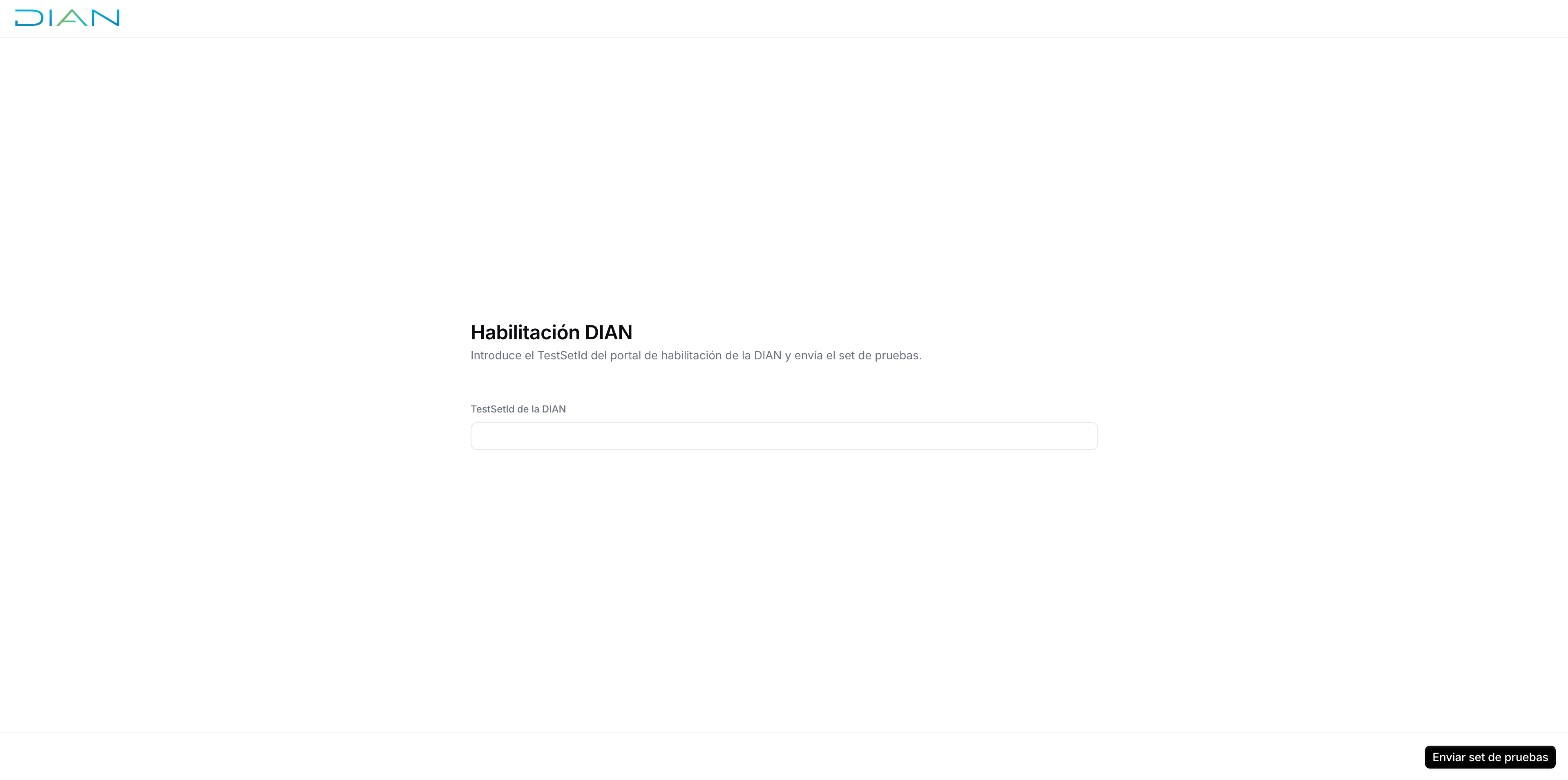
    The legal representative pastes the TestSetId into the Invopop portal and clicks **Enviar set de pruebas**. Alegra sends the required test documents to the DIAN automatically.

    <Frame caption="Enablement portal">
      <img width="600" src="https://mintcdn.com/invopop/altprvHBIue7hAVA/assets/guides/co-dian-enablement-portal.png?fit=max&auto=format&n=altprvHBIue7hAVA&q=85&s=c4ee5ff3aad884edb5861168d1d80902" alt="Enablement portal with the DIAN TestSetId field and the Enviar set de pruebas button" data-path="assets/guides/co-dian-enablement-portal.png" />
    </Frame>

    To submit the TestSetId without the hosted portal, use the [Submit test set](/api-ref/apps/gov-co/enablement-submit) endpoint.
  </Step>

  <Step title="Wait for the DIAN response">
    The portal refreshes while the DIAN processes the test set. Once accepted, the workflow resumes and the entry moves to the registered state. If the DIAN rejects the test set, the workflow fails with the DIAN's error details; fix the cause and re-run the registration workflow to start again.
  </Step>
</Steps>

<Info>
  Re-running the registration workflow on the same entry is safe: it restarts the enablement if it hasn't been accepted yet, and does nothing once the supplier is enabled.
</Info>

## Numbering resolutions

In live, every invoice series needs a DIAN numbering range authorization linked to Alegra. This isn't needed in the sandbox, which uses the fixed `SETP` test resolution.

<Steps>
  <Step title="Request the numbering range">
    The legal representative requests the range in the DIAN's MUISCA system (**Numeración de Facturación** → **Solicitar numeración de facturación** → **Autorizar Rango**), choosing a prefix of up to four letters or digits, which becomes the invoice `series`. Once signed, the DIAN issues form 1876 with the authorized ranges and validity. See [Request for invoice numbering authorization](https://www.dian.gov.co/impuestos/factura-electronica/Documents/Numeracion2022-AutorizacionF.pdf).
  </Step>

  <Step title="Link the range to Alegra">
    Once the DIAN has accepted the test set, and about two hours after the range request, log in to the production environment through **Facturando Electrónicamente**. Go to **Configuración** → **Rangos de numeración**, select Alegra's software (**Soluciones Alegra S.A.S**) and the authorized range, and click **Agregar**. If the operation mode doesn't show in production, use **Sincronizar a Producción** in the test set details of the Habilitación portal. The DIAN explains this in sections 3 and 4 of [Registration and operation mode selection](https://www.dian.gov.co/impuestos/factura-electronica/Documents/Registro-y-Seleccion-del-Modo-de-Operacion-Factura-Electronica.pdf).
  </Step>
</Steps>

Invopop fetches the supplier's linked resolutions automatically before sending, so no further action is needed. Check them anytime with [List resolutions](/api-ref/apps/gov-co/resolutions-list). To extend a range that is about to expire with numbers left, see [Request for invoice numbering extension](https://www.dian.gov.co/impuestos/factura-electronica/Documents/Numeracion2022-Habilitacion-F.pdf); once a range is used up, request a new one.

## Complete the enablement via the API

For platforms that want to drive the enablement programmatically instead of sharing the hosted portal, use the enablement API (both endpoints under `/apps/gov-co/v1/entries/{silo_entry_id}/enablement`). The entry must belong to the authenticated workspace and have been registered first.

<Steps>
  <Step title="Submit the test set">
    [Submit test set](/api-ref/apps/gov-co/enablement-submit) with the TestSetId from the DIAN enablement portal. It responds `400` when a test set is already awaiting the DIAN outcome, the supplier is already enabled, or a previous enablement failed. Run the registration workflow again to restart a failed enablement.
  </Step>

  <Step title="Track the outcome">
    [Fetch the enablement status](/api-ref/apps/gov-co/enablement-get): `status` moves from `pending` to `accepted` or `failed` once the DIAN responds. The workflow's **Wait for DIAN enablement** step picks up the outcome exactly as it does for portal submissions.
  </Step>
</Steps>

## Sandbox

The same registration flow runs in sandbox workspaces against the DIAN test environment, with a few differences:

* Only Alegra's own NIT (`9005590882`) can be registered, since the DIAN test registry accepts documents from that emitter alone. A NIT can be registered once per workspace, so each workspace has a single sandbox supplier.
* The fixed DIAN test resolution (series `SETP`, codes `990000000`–`995000000`) is seeded automatically on registration. The range is shared with other users testing in the sandbox, so pick codes unlikely to collide.
* The enablement is simulated: instead of a real DIAN TestSetId, enter one of the following values in the portal to choose the outcome.

| TestSetId | Simulated result |
| - | - |
| `a70562e0-631e-4ceb-aa65-36887b57dc17` | Accepted (completes the registration) |
| `r70562e0-631e-4ceb-aa65-36887b57dc17` | Rejected |
| `p70562e0-631e-4ceb-aa65-36887b57dc17` | Processing (stays pending) |
| `f70562e0-631e-4ceb-aa65-36887b57dc17` | Failed |

Use the accepted value to complete a supplier registration end to end; the other values let you test how your integration handles rejected, pending, and failed outcomes.

## Migrate from Plemsi

Moving a supplier from the old Plemsi integration takes the same steps as a new registration. At the DIAN, the supplier simply adds Alegra as another technology provider.

<Steps>
  <Step title="Set up the Colombia app">
    Connect the app and create the registration workflow as described in [Setup](#setup), and the send workflow from the [invoicing guide](/guides/co-dian-invoicing#setup).
  </Step>

  <Step title="Register the supplier">
    Follow [Register a supplier](#register-a-supplier): run the registration workflow, add Alegra as technology provider at the DIAN, and submit the test set. The Plemsi enablement doesn't carry over, so this is needed even for suppliers already issuing.
  </Step>

  <Step title="Set up the numbering ranges">
    Under **Configuración** → **Rangos de numeración** (see [Numbering resolutions](#numbering-resolutions)), choose one of:

    * **Move the existing range:** unlink it from Plemsi and link it to Alegra. The series stays the same, and new invoices must continue after the last number issued through Plemsi.
    * **Add a new range:** request a new range with a new prefix and link it to Alegra. Invoices sent through Alegra start a fresh series, while the old range stays with Plemsi until it's no longer needed.
  </Step>

  <Step title="Switch to the new send workflow">
    Send new invoices with the Colombia send workflow, using the series from the previous step. Once they clear, stop using the Plemsi workflow.
  </Step>
</Steps>

At this point, you're ready to start sending invoices on behalf of the supplier. Head over to the [Invoicing in Colombia guide](/guides/co-dian-invoicing) to continue.

## FAQ

<AccordionGroup>
  <Accordion title="What does a supplier need before issuing invoices in Colombia?">
    The supplier must be registered with the DIAN with an active RUT (Registro Único Tributario), complete the DIAN habilitación, and hold a valid billing numbering range authorization. The [supplier registration guide](/guides/co-dian-registration) walks through each step.
  </Accordion>

  <Accordion title="How do I register a supplier in Colombia?">
    Upload a GOBL party with the supplier's name, NIT (with verification digit), and email, then run the registration workflow. It publishes an enablement portal link under `registration-link` in the entry's meta; the supplier's legal representative completes the DIAN enablement there, and the workflow finishes once the DIAN accepts it. See the [supplier registration guide](/guides/co-dian-registration).
  </Accordion>

  <Accordion title="What is the DIAN habilitación?">
    A one-time DIAN certification required before issuing real invoices. The supplier submits a TestSetId from the DIAN portal through the hosted portal, Alegra sends the test documents, and the supplier is enabled once the DIAN accepts them.
  </Accordion>

  <Accordion title="Do I need to register suppliers in the sandbox?">
    Yes, but only Alegra's NIT (`9005590882`) can be registered. The enablement is simulated: enter the TestSetId `a70562e0-631e-4ceb-aa65-36887b57dc17` for an instant acceptance. Other outcomes are in the [sandbox section](/guides/co-dian-registration#sandbox) of the guide.
  </Accordion>

  <Accordion title="Does the billing numbering range authorization expire?">
    Yes, both by number limit and by date. Before a range with unused numbers expires, the supplier can extend it ([extension request](https://www.dian.gov.co/impuestos/factura-electronica/Documents/Numeracion2022-Habilitacion-F.pdf)); once it's used up, they request a new one ([new authorization](https://www.dian.gov.co/impuestos/factura-electronica/Documents/Numeracion2022-AutorizacionF.pdf)). Updated resolutions are picked up automatically.
  </Accordion>
</AccordionGroup>

More available in our [Colombia FAQ](/faq/colombia) section

***

<AccordionGroup>
  <Accordion title="🇨🇴 Invopop resources for Colombia">
    | | |
    | - | - |
    | Compliance | <Icon icon="https://assets.invopop.com/flags/co.svg" /> [Invoicing compliance in Colombia](/compliance/colombia)<br /> <Icon icon="timeline" /> [Compliance timeline](/timelines/colombia) |
    | Apps | <Icon icon="https://assets.invopop.com/flags/co.svg" /> [Colombia](/apps/colombia) |
    | Guides | <Icon icon="book" /> [Supplier registration](/guides/co-dian-registration)<br /> <Icon icon="book" /> [Issuing invoices](/guides/co-dian-invoicing) |
    | FAQ | <Icon icon="square-question" /> [Colombia FAQ](/faq/colombia) |
    | GOBL | <Icon icon="https://assets.invopop.com/icons/gobl.svg" />  [Colombia Tax Regime](https://docs.gobl.org/regimes/co)<br /> <Icon icon="https://assets.invopop.com/icons/gobl.svg" /> [Colombia DIAN Addon](https://docs.gobl.org/addons/co-dian-v2) |
  </Accordion>
</AccordionGroup>

<Card title="Participate in our community" icon="forumbee" href="https://community.invopop.com" arrow="true" horizontal>
  Ask and answer questions about invoicing in Colombia →
</Card>


This documentation is built and hosted on [Mintlify](https://mintlify.com), a developer documentation platform.