> ## Documentation Index
> Fetch the complete documentation index at: https://docs.invopop.com/llms.txt
> Use this file to discover all available pages before exploring further.
# Reporting on France PA
> Periodic e-reporting (Flux 10) of B2C and non-regulated B2B transactions to the PPF.
E-reporting is in active development. The action names and read endpoints may change before the September 2026 mandate. Track the [hub readiness matrix](/guides/fr-pa) for status.
E-reporting covers everything that is out of scope for regulated e-invoicing (B2C sales, cross-border B2B, and any flow where one party is not registered in the Annuaire). Instead of routing each invoice individually, you **record** each invoice and payment, Invopop **generates** a Flux 10 XML for each closed reporting window, and **sends** it to the PPF.
Reports will use the `fr-ctc-flow10-v1` add-on (in active development), distinct from the `fr-ctc-flow2-v1` add-on used for [e-invoicing](/guides/fr-pa-invoicing).
## Sub-flows
Each recorded document is classified into one of four sub-flows based on supplier and customer SIREN:
| Flow | Scope |
| ------ | -------------------------- |
| `10.1` | International B2B invoices |
| `10.2` | International B2B payments |
| `10.3` | Domestic B2C invoices |
| `10.4` | Domestic B2C payments |
## Registration
Reporting is enabled at the **SIREN level**, separately from the [Annuaire registration](/guides/fr-pa-registration). A party can be registered for e-invoicing, e-reporting, or both.
The register workflow collects a signature (auto-approved in sandbox). Every invoice and payment recorded later is attached to and aggregated for this party.
### How it works
Marks the silo entry as "Processing".
Generates a signature link for the supplier to sign.
Pauses until the agreement is approved.
Enables the party for reporting,
Marks the silo entry as "Registered".
Registers a party for e-reporting and collects the e-mandate signature.
Copy and paste into a new [Empty Party workflow](https://console.invopop.com/redirect/workflows/new?template=empty-party).
```json Reporting register supplier workflow theme={"system"}
{
"name": "Reporting register supplier",
"description": "Register a supplier for French e-reporting",
"schema": "org/party",
"steps": [
{
"id": "bc1286be-f67d-4eeb-9eb0-974db973219f",
"name": "Set state",
"provider": "silo.state",
"summary": "Set state to `processing`{.state .processing}",
"config": {
"state": "processing"
}
},
{
"id": "29a6f9b8-e190-4ac6-9041-15b370bb392f",
"name": "Sign PPF agreement",
"provider": "gov-fr.agreement.sign"
},
{
"id": "fab98be4-bb85-463a-8ac1-7aabb38c2e66",
"name": "Wait for PPF agreement upload",
"provider": "gov-fr.agreement.wait.approval"
},
{
"id": "b523ae4a-7b39-4410-abaa-b03a4e33f7bd",
"name": "Register party for reporting",
"provider": "gov-fr.reporting.register"
},
{
"id": "4282d479-67c2-42d4-8d56-d395ba8ca6ff",
"name": "Set state",
"provider": "silo.state",
"summary": "Set state to `completed`{.state .completed}",
"config": {
"state": "completed"
}
}
],
"rescue": [
{
"id": "af510a26-f6fa-4f17-939e-9e8f4e0cc260",
"name": "Set state",
"provider": "silo.state",
"summary": "Set state to `error`{.state .error}",
"config": {
"state": "error"
}
}
]
}
```
### Picking a VAT regime
If you have a single supplier, or all your suppliers have the same cadence, you can configure the **Register party for reporting** to a specific cadence.
For multiple suppliers (whitelabel use cases) where different suppliers have different cadence, pass it as a job argument with key `vat-regime` when creating the job. When not stated, the default is `real_normal_monthly`.
| VAT regime | `args.vat-regime` |
| ------------------------ | ----------------------- |
| Monthly Actual (default) | `real_normal_monthly` |
| Quarterly Actual | `real_normal_quarterly` |
| Simplified VAT | `simplified` |
| Non-Established Taxpayer | `franchise` |
The cadence must match the regime registered with the tax office, if in doubt check with your local accountant.
## Recording
Every invoice and payment that needs reporting goes through a single **Record** workflow. The action looks at the supplier and customer SIRENs and files the document into the right sub-flow (10.1 to 10.4) ready for the next report.
Wire this workflow as the default for both `bill/invoice` and `bill/payment` in your workspace.
### How it works
Marks the silo entry as "Processing".
Classifies the document (10.1 / 10.2 / 10.3 / 10.4) and stores it for the next report.
Marks the silo entry as "Recorded".
Records an invoice or payment as a Flux 10 row, ready for the next periodic report.
Copy and paste this workflow into your Invopop console.
```json Reporting record document workflow theme={"system"}
{
"name": "Reporting record document",
"description": "Record a document as a Flux 10 row for French e-reporting",
"steps": [
{
"id": "753fdc8d-80ce-4a3f-a8ca-c01158e64cf9",
"name": "Set state",
"provider": "silo.state",
"summary": "Set state to `processing`{.state .processing}",
"config": {
"state": "processing"
}
},
{
"id": "7d204bc6-f42d-4f55-b08a-fca3c19bee15",
"name": "Record document for reporting",
"provider": "gov-fr.reporting.record"
},
{
"id": "d0660d9a-31b0-4428-b9da-bef14f7ae200",
"name": "Set state",
"provider": "silo.state",
"summary": "Set state to `completed`{.state .completed}",
"config": {
"state": "completed"
}
}
],
"rescue": [
{
"id": "7ec292ea-36f2-49bb-b2ce-bb97bd6a1782",
"name": "Set state",
"provider": "silo.state",
"summary": "Set state to `error`{.state .error}",
"config": {
"state": "error"
}
}
]
}
```
### Payments and the underlying invoice
For international B2B payments (10.2), set `lines[i].document` on the payment to the invoice it settles. The minimum reference is the invoice number and issue date:
```json theme={"system"}
{ "code": "INVOICE-NUMBER", "issue_date": "2026-05-15" }
```
This is what tells the record action to file the payment as 10.2 rather than 10.4, and lets GOBL allocate the cashed amount across the invoice's VAT rates for you.
For B2C payments (10.4), omit `document` entirely. Specify the tax breakdown directly on the payment line.
### Exemption reasons
Lines using `exempt`, `reverse-charge`, `intra-community`, `export`, or `outside-scope` rates must include a free-text reason. Add it to the invoice's tax block:
```json theme={"system"}
{
"tax": {
"notes": [
{"cat": "VAT", "key": "intra-community", "text": "Exonération article 262 ter I du CGI — livraison intracommunautaire"}
]
}
}
```
The `key` must match the rate used on the line. Lines on `standard` or `zero` rates do not need a note.
## Submitting reports
A separate workflow bundles the records for a closed reporting window into a single Flux 10 report and sends it to the PPF. Invopop runs it automatically on the cadence set by the VAT regime — you do not need to trigger it.
### How it works
Marks the silo entry as "Processing".
Bundles the closed window's records into a single report.
Submits the report to the PPF and waits for the acknowledgement.
Marks the silo entry as "Filed".
Generates a periodic report and submits it to the PPF.
Copy and paste into a new [Empty Party workflow](https://console.invopop.com/redirect/workflows/new?template=empty-party).
```json Reporting send document workflow theme={"system"}
{
"name": "Reporting send document",
"description": "Generate and send a French e-reporting transaction",
"schema": "org/party",
"steps": [
{
"id": "98f7aba6-8008-455d-a620-90f2bf80bf49",
"name": "Set state",
"provider": "silo.state",
"summary": "Set state to `processing`{.state .processing}",
"config": {
"state": "processing"
}
},
{
"id": "888e98ad-785b-4dc4-b610-8cf39cce9157",
"name": "Generate document for reporting",
"provider": "gov-fr.reporting.generate",
"summary": "Generate Transactions report (seller)",
"config": {
"flux_kind": "tx",
"role": "seller"
}
},
{
"id": "066eac4a-a9c2-486c-aa30-a3d6f49d7582",
"name": "Send document for reporting",
"provider": "gov-fr.reporting.send"
},
{
"id": "e5990ba3-6696-4ebe-b29a-14acd307c864",
"name": "Set state",
"provider": "silo.state",
"summary": "Set state to `completed`{.state .completed}",
"config": {
"state": "completed"
}
}
],
"rescue": [
{
"id": "437ed708-bf87-491e-8447-5096ad4017c2",
"name": "Set state",
"provider": "silo.state",
"summary": "Set state to `error`{.state .error}",
"config": {
"state": "error"
}
}
]
}
```
Tell Invopop which workflow to run on the schedule: in the **Apps** view, open the **France** app, click **Configure** to open the configuration sidebar, and select this workflow under **Reporting Workflow**.
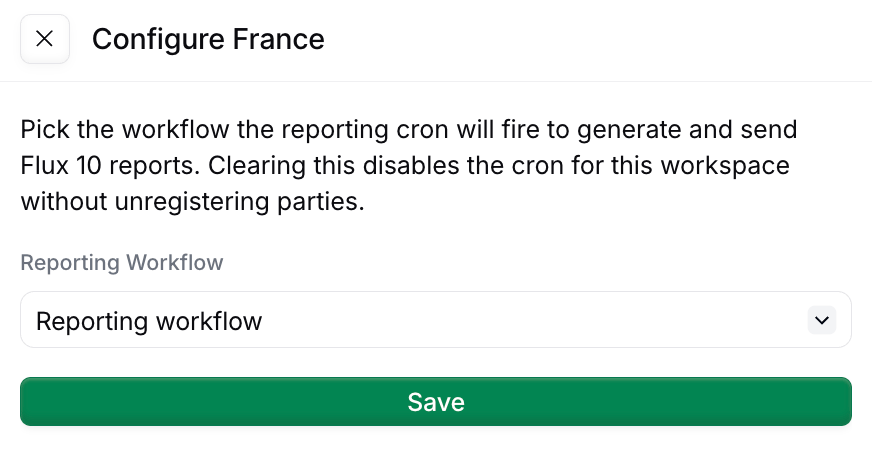 You can also trigger this workflow manually against any registered party — useful for testing, or to bring a party up to date after onboarding.
## Disabling reporting
When a party should no longer be reported on, run the disable workflow. The party remains on file for audit purposes, but no new records are accepted and no new reports are generated. Previously filed reports are unaffected.
### How it works
Marks the silo entry as "Processing".
Disables reporting for the party.
Marks the silo entry as "Void".
Disables e-reporting for a registered party.
Copy and paste into a new [Empty Party workflow](https://console.invopop.com/redirect/workflows/new?template=empty-party).
```json Reporting disable supplier workflow theme={"system"}
{
"name": "Reporting disable supplier",
"description": "Disable e-reporting for a French supplier",
"schema": "org/party",
"steps": [
{
"id": "07c5d2a0-bdda-4586-81fc-8085edb39f38",
"name": "Set state",
"provider": "silo.state",
"summary": "Set state to `processing`{.state .processing}",
"config": {
"state": "processing"
}
},
{
"id": "c91ae086-f830-425b-b67c-72af00efc22c",
"name": "Disable party for reporting",
"provider": "gov-fr.reporting.disable"
},
{
"id": "fbefc8f6-22b6-4e3b-9d39-1acedb5e8468",
"name": "Set state",
"provider": "silo.state",
"summary": "Set state to `void`{.state .void}",
"config": {
"state": "void"
}
}
],
"rescue": [
{
"id": "cbe8ffa2-0c77-4b24-8430-78ccd4532901",
"name": "Set state",
"provider": "silo.state",
"summary": "Set state to `error`{.state .error}",
"config": {
"state": "error"
}
}
]
}
```
To change a party's VAT regime, disable first and re-register with the new `vat-regime` argument.
## Reading what's filed
Four read endpoints expose submission status and the raw report XML, all scoped to the party's silo entry id:
GET `/v1/reports/:silo_entry_id`
You can also trigger this workflow manually against any registered party — useful for testing, or to bring a party up to date after onboarding.
## Disabling reporting
When a party should no longer be reported on, run the disable workflow. The party remains on file for audit purposes, but no new records are accepted and no new reports are generated. Previously filed reports are unaffected.
### How it works
Marks the silo entry as "Processing".
Disables reporting for the party.
Marks the silo entry as "Void".
Disables e-reporting for a registered party.
Copy and paste into a new [Empty Party workflow](https://console.invopop.com/redirect/workflows/new?template=empty-party).
```json Reporting disable supplier workflow theme={"system"}
{
"name": "Reporting disable supplier",
"description": "Disable e-reporting for a French supplier",
"schema": "org/party",
"steps": [
{
"id": "07c5d2a0-bdda-4586-81fc-8085edb39f38",
"name": "Set state",
"provider": "silo.state",
"summary": "Set state to `processing`{.state .processing}",
"config": {
"state": "processing"
}
},
{
"id": "c91ae086-f830-425b-b67c-72af00efc22c",
"name": "Disable party for reporting",
"provider": "gov-fr.reporting.disable"
},
{
"id": "fbefc8f6-22b6-4e3b-9d39-1acedb5e8468",
"name": "Set state",
"provider": "silo.state",
"summary": "Set state to `void`{.state .void}",
"config": {
"state": "void"
}
}
],
"rescue": [
{
"id": "cbe8ffa2-0c77-4b24-8430-78ccd4532901",
"name": "Set state",
"provider": "silo.state",
"summary": "Set state to `error`{.state .error}",
"config": {
"state": "error"
}
}
]
}
```
To change a party's VAT regime, disable first and re-register with the new `vat-regime` argument.
## Reading what's filed
Four read endpoints expose submission status and the raw report XML, all scoped to the party's silo entry id:
GET `/v1/reports/:silo_entry_id`
Summary per kind (current window, next deadline, last filed report)
GET `/v1/reports/:silo_entry_id/periods`
Paginated history of filed periods (filter with `?kind=tx` or `?kind=py`)
GET `/v1/reports/:silo_entry_id/periods/:period_id`
A single period's metadata
GET `/v1/reports/:silo_entry_id/periods/:period_id/xml`
The raw report XML sent to the PPF
## FAQ
For TVA, file via DGFiP's portal — Invopop does not generate CA3 yet. For e-reporting (Flow 10): submit via your Plateforme Agréée — Invopop's e-reporting workflow batches transactions per period and submits to the PPF.
TVA: DGFiP's EDI-TVA XML schema. E-reporting Flow 10: a structured JSON/XML payload defined by the PPF specification (currently in beta). Invopop emits Flow 10 via the upcoming `fr-ctc-flow10-v1` GOBL addon.
Flow 10 e-reporting: 3× per month (every 10 days) for B2C and cross-border transactions. Lifecycle status (CDAR): per event, near real-time. Specific deadlines depend on the supplier's tax filing cadence (monthly/quarterly).
Flow 10 uses a JSON envelope wrapping aggregated transaction data, defined in the PPF technical specification. Lifecycle CDAR payloads are XML messages exchanged over Peppol with structured status codes.
More available in our [France FAQ](/faq/france) section
***
| | |
| ---------- | ------------------------------------------------------------------------------------------------------------------------------------------------------------------------------------------------------------------------------------------------------------------------------------------------------------------------------------------------------------------------------------- |
| Compliance | [Invoicing compliance in France](/compliance/france)
[Compliance timeline](/timelines/france) |
| Apps | [France](/apps/france)
[Peppol](/apps/peppol)
[ChorusPro France](/apps/choruspro-france) |
| Guides | [ChorusPro Guide](/guides/fr-chorus-pro)
[PA Guide](/guides/fr-pa) — [Registration](/guides/fr-pa-registration) · [Invoicing](/guides/fr-pa-invoicing) · [Status](/guides/fr-pa-status) · [Reporting](/guides/fr-pa-reporting) |
| FAQ | [France FAQ](/faq/france) |
| GOBL | [France Tax Regime](https://docs.gobl.org/regimes/fr)
[Chorus Pro Addon](https://docs.gobl.org/addons/fr-choruspro-v1)
[French Factur-X Addon](https://docs.gobl.org/addons/fr-facturx-v1) |
| GitHub | [gobl.xinvoice](https://github.com/invopop/gobl.xinvoice) |