> ## Documentation Index
> Fetch the complete documentation index at: https://docs.invopop.com/llms.txt
> Use this file to discover all available pages before exploring further.
# GOBL Builder Guide
> An interactive, low code tool for building GOBL documents.
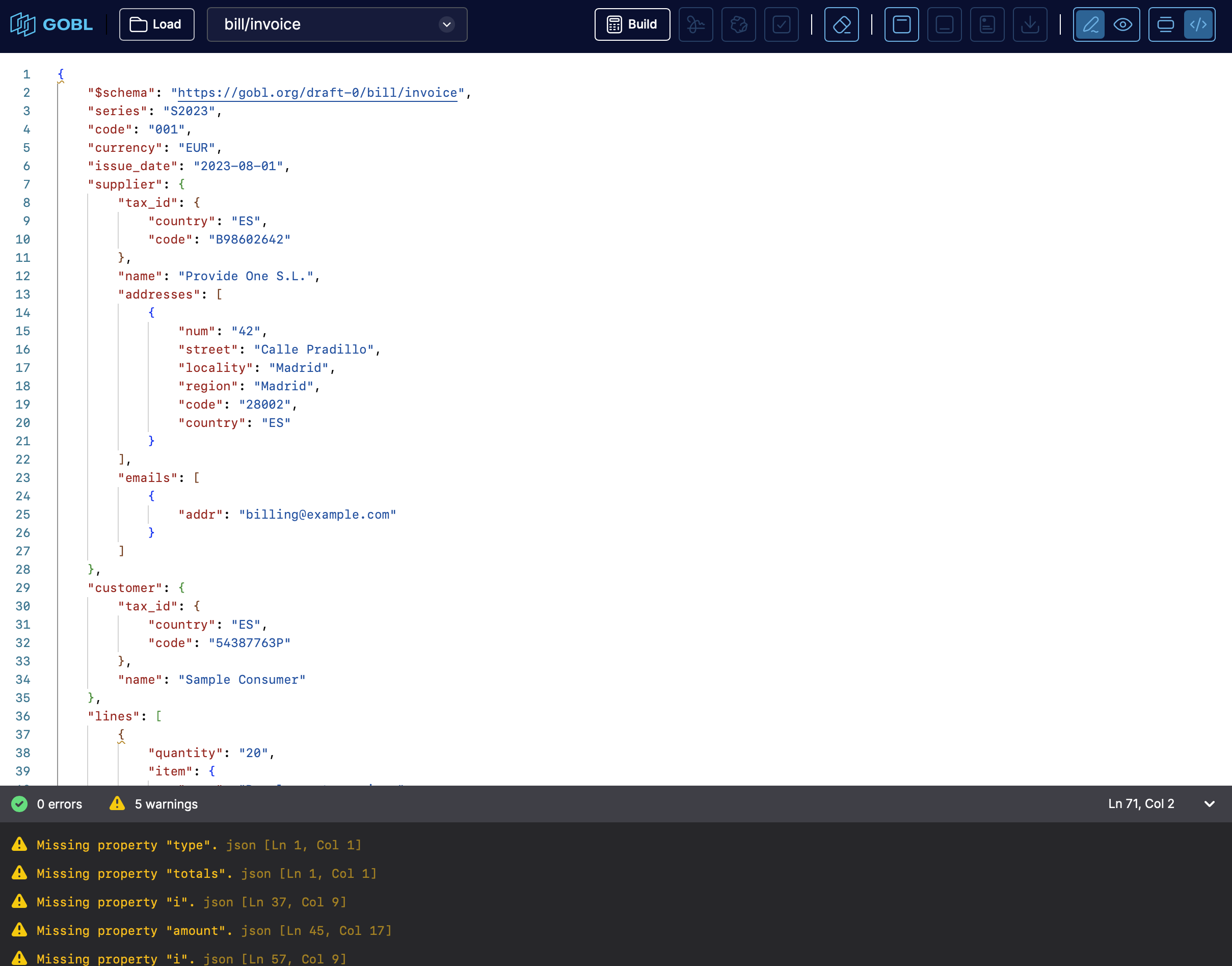 GOBL Builder is a browser-based, interactive editor that lets you create, edit, validate and build documents compliant with [GOBL](/guides/gobl) — a JSON-Schema-based standard for business documents ([invoices](/console/doc-types), messages, etc.).
Whereas the standard [GOBL](/guides/gobl) toolset is a Go library (or CLI) meant for developers, GOBL Builder brings similar functionality into the browser through the hosted GOBL API. This lets you work hands-on with [GOBL](/guides/gobl) documents directly, without installing anything.
## Interface
The key components of the interface are:
* **Menu bar / toolbar** — top-level controls (e.g. open, save, choose schema, maybe settings).
* **Code editor pane** — where you write or paste your document (in JSON or YAML) following a [GOBL](/guides/gobl) schema.
* **Bottom drawer / panel for feedback** — area where validation results, warnings, or errors appear after running build/validate; this helps you detect issues immediately.
* **Schema selector / configuration input** — ability to choose the kind of [GOBL](/guides/gobl) document you are building ([invoice](/console/doc-types), message, etc.), by pointing to a JSON-Schema URL, so that the tool knows how to interpret and validate your data.
Validation and computations — such as tax calculations, rounding, and totals — are performed by the hosted GOBL API, so results match exactly what the standard [GOBL](/guides/gobl) library or CLI would produce. You need an internet connection to build, validate, or correct documents.
## What you can do with the builder
Using GOBL Builder on [build.gobl.org](https://build.gobl.org), you can:
* **Create [GOBL](/guides/gobl) documents from scratch** — define your business document ([invoice](/console/doc-types), message, etc.) in JSON or YAML following the appropriate schema.
* **Validate and build documents** — the editor checks structure, data types and required fields; it performs calculations (e.g. taxes, totals) and generates complete JSON output conforming to [GOBL's](/guides/gobl) envelope-and-document structure.
* **Get immediate feedback on errors or warnings** — bottom panel shows problems so you can correct them before exporting.
* **Export or copy the resulting document** — once valid, you can take the generated JSON (a full [GOBL](/guides/gobl) envelope) and use it in your codebase or tooling.
* **Experiment with different schemas easily** — switch between [document types](/console/doc-types) by changing the schema URL; handy for exploring what's possible without setting up a dev environment.
Because it uses the same underlying logic as the [GOBL](/guides/gobl) library (called through the hosted GOBL API), the documents you build in the browser are equivalent in structure and validity to those you'd build via the standard CLI or library.
## Step by step guide
Open [build.gobl.org](https://build.gobl.org) in your browser.
Load an existing document through the **Load** button, or paste an existing document in the code editor pane selecting the appropriate schema from the dropdown.
If you pasted a document, make sure to select the `$schema` field (e.g. `"https://gobl.org/draft-0/bill/invoice"` or similar) so the builder knows what kind of document you intend.
Trigger the build/validate action by clicking the calculator icon button.
Review bottom-panel for errors or warnings. If there are any, correct them in the editor.
Once validation passes, you get a full [GOBL](/guides/gobl) envelope + document JSON, with all computed fields (sums, tax calculations, metadata, etc.).
Copy/export the JSON to use in your application, or for further processing (signing, converting to other formats, etc.).
Sign the document by clicking on the **Sign** button, then click on the **Preview** button to see the PDF preview.
## When GOBL Builder Is Especially Useful
* For **rapid prototyping** — quickly draft a document to test how [GOBL](/guides/gobl) handles taxes, rounding, fields, without writing code.
* For **learning / exploring** [GOBL](/guides/gobl) — experimenting with different schemas to see how [GOBL](/guides/gobl) structures different [document types](/console/doc-types).
* For **proof-of-concepts or demos** — creating valid [GOBL](/guides/gobl) documents without needing to set up a Go environment or external tooling.
* For **validating data inputs** — pre-validating JSON/YAML before integrating into a backend or database, ensuring compliance with [GOBL](/guides/gobl) schema.
## What GOBL Builder *Does Not* Provide (or What to Expect)
* It's not a full invoicing app — GOBL Builder helps you build the structured document, but does not provide UI for things like customer management, templates, PDF rendering, persistence, or user workflows.
* It doesn't replace a complete backend — for production you'd still integrate with [GOBL](/guides/gobl) library or CLI to sign, store, convert, or deliver documents.
* It expects familiarity with JSON or YAML and with [GOBL](/guides/gobl) schema types — it's a low-code tool, but not a "no-code" drag & drop generator.
Ask and answer questions about GOBL Builder →
GOBL Builder is a browser-based, interactive editor that lets you create, edit, validate and build documents compliant with [GOBL](/guides/gobl) — a JSON-Schema-based standard for business documents ([invoices](/console/doc-types), messages, etc.).
Whereas the standard [GOBL](/guides/gobl) toolset is a Go library (or CLI) meant for developers, GOBL Builder brings similar functionality into the browser through the hosted GOBL API. This lets you work hands-on with [GOBL](/guides/gobl) documents directly, without installing anything.
## Interface
The key components of the interface are:
* **Menu bar / toolbar** — top-level controls (e.g. open, save, choose schema, maybe settings).
* **Code editor pane** — where you write or paste your document (in JSON or YAML) following a [GOBL](/guides/gobl) schema.
* **Bottom drawer / panel for feedback** — area where validation results, warnings, or errors appear after running build/validate; this helps you detect issues immediately.
* **Schema selector / configuration input** — ability to choose the kind of [GOBL](/guides/gobl) document you are building ([invoice](/console/doc-types), message, etc.), by pointing to a JSON-Schema URL, so that the tool knows how to interpret and validate your data.
Validation and computations — such as tax calculations, rounding, and totals — are performed by the hosted GOBL API, so results match exactly what the standard [GOBL](/guides/gobl) library or CLI would produce. You need an internet connection to build, validate, or correct documents.
## What you can do with the builder
Using GOBL Builder on [build.gobl.org](https://build.gobl.org), you can:
* **Create [GOBL](/guides/gobl) documents from scratch** — define your business document ([invoice](/console/doc-types), message, etc.) in JSON or YAML following the appropriate schema.
* **Validate and build documents** — the editor checks structure, data types and required fields; it performs calculations (e.g. taxes, totals) and generates complete JSON output conforming to [GOBL's](/guides/gobl) envelope-and-document structure.
* **Get immediate feedback on errors or warnings** — bottom panel shows problems so you can correct them before exporting.
* **Export or copy the resulting document** — once valid, you can take the generated JSON (a full [GOBL](/guides/gobl) envelope) and use it in your codebase or tooling.
* **Experiment with different schemas easily** — switch between [document types](/console/doc-types) by changing the schema URL; handy for exploring what's possible without setting up a dev environment.
Because it uses the same underlying logic as the [GOBL](/guides/gobl) library (called through the hosted GOBL API), the documents you build in the browser are equivalent in structure and validity to those you'd build via the standard CLI or library.
## Step by step guide
Open [build.gobl.org](https://build.gobl.org) in your browser.
Load an existing document through the **Load** button, or paste an existing document in the code editor pane selecting the appropriate schema from the dropdown.
If you pasted a document, make sure to select the `$schema` field (e.g. `"https://gobl.org/draft-0/bill/invoice"` or similar) so the builder knows what kind of document you intend.
Trigger the build/validate action by clicking the calculator icon button.
Review bottom-panel for errors or warnings. If there are any, correct them in the editor.
Once validation passes, you get a full [GOBL](/guides/gobl) envelope + document JSON, with all computed fields (sums, tax calculations, metadata, etc.).
Copy/export the JSON to use in your application, or for further processing (signing, converting to other formats, etc.).
Sign the document by clicking on the **Sign** button, then click on the **Preview** button to see the PDF preview.
## When GOBL Builder Is Especially Useful
* For **rapid prototyping** — quickly draft a document to test how [GOBL](/guides/gobl) handles taxes, rounding, fields, without writing code.
* For **learning / exploring** [GOBL](/guides/gobl) — experimenting with different schemas to see how [GOBL](/guides/gobl) structures different [document types](/console/doc-types).
* For **proof-of-concepts or demos** — creating valid [GOBL](/guides/gobl) documents without needing to set up a Go environment or external tooling.
* For **validating data inputs** — pre-validating JSON/YAML before integrating into a backend or database, ensuring compliance with [GOBL](/guides/gobl) schema.
## What GOBL Builder *Does Not* Provide (or What to Expect)
* It's not a full invoicing app — GOBL Builder helps you build the structured document, but does not provide UI for things like customer management, templates, PDF rendering, persistence, or user workflows.
* It doesn't replace a complete backend — for production you'd still integrate with [GOBL](/guides/gobl) library or CLI to sign, store, convert, or deliver documents.
* It expects familiarity with JSON or YAML and with [GOBL](/guides/gobl) schema types — it's a low-code tool, but not a "no-code" drag & drop generator.
Ask and answer questions about GOBL Builder →