> ## Documentation Index
> Fetch the complete documentation index at: https://docs.invopop.com/llms.txt
> Use this file to discover all available pages before exploring further.
# CFDI issuing invoices guide
> Issue CFDI documents in Mexico using the SAT Mexico app.
## Introduction
The CFDI (*Comprobante Fiscal Digital por Internet*) is the standardized electronic invoicing format in Mexico, managed by the country's tax authority, the SAT (*Servicio de Administración Tributaria*). This system ensures that all fiscal documents are digitally generated, validated, and reported to SAT in compliance with national tax laws.
In this guide you'll learn how to register a supplier and issue invoices in their name using the [SAT Mexico app](/apps/sat-mexico). For importing received invoices, see the companion guide: [Mexico: Receiving invoices](/guides/mx-sat-receiving).
## Prerequisites
To issue invoices in Mexico via the SAT, you will need:
* **Supplier Information**:
* Name
* Taxpayer ID (RFC - *Registro Federal de Contribuyentes*)
* Address
* Fiscal regime code (as defined by SAT)
* **Customer Information** (same as supplier, plus):
* CFDI use code (*Código de uso CFDI*)
* **Line items**:
* Quantity, unit price, and applicable tax rates
* SAT product/service code (*Clave Producto-Servicio*)
* **Additional requirements**
* Selected invoice series
* Place of issue code (*Lugar de expedición*)
* **Two certificates** required by the SAT:
1. **e.firma (FIEL)**: Confirms your identity before SAT. Required to obtain the CSD below and to authorize the PAC to issue on your behalf as explained in step 3 of the [Register a Supplier](#register-a-supplier) section below.
2. **CSD (Certificado de Sello Digital)**: Required to sign electronic invoices and prove they were issued by you.
| - | Sandbox | Live |
| ------------ | --------------------------------------------------------------- | ------------------------------------- |
| **Supplier** | Test CSDs pre-registered; can use test RFC or register your own | Real RFC and CSD certificate required |
## Setup
Configure your Invopop workspace for CFDI invoicing by following these steps in the [Invopop Console](https://console.invopop.com):
These instructions apply to both the sandbox and live environments, with a few exceptions related to supplier data and registration details when real information is not available.
This workflow marks Suppliers as `Registered`. You will select this workflow in the SAT (Mexico) app configuration later.
Copy and paste into a new [Empty Party workflow](https://console.invopop.com/redirect/workflows/new?template=empty-party) code view.
```json Example SAT supplier post-registration workflow theme={"system"}
{
"name": "SAT supplier post-registration",
"description": "Mark a SAT supplier as registered",
"schema": "org/party",
"steps": [
{
"id": "7e8d8070-3870-11ef-af29-4533d56cea03",
"name": "Set state",
"config": {
"state": "registered"
},
"summary": "Set state to `registered`{.state .registered}",
"provider": "silo.state"
}
],
"rescue": []
}
```
Before starting, review the [workflows guide](/guides/features/workflows) to understand the general setup process.
In [Console](https://console.invopop.com), create a new workflow and choose [Empty Party workflow](https://console.invopop.com/redirect/workflows/new?template=empty-party) as the base. Then name the workflow with a descriptive label such as "SAT Post-registration flow".
This workflow is composed by a single step:
1. **Set state** - To `Registered`.
Though you can customize it to suit your needs (adding a webhook, or an email notification after a supplier has been registered.)
Issues a registration request for a supplier to complete in order to issue invoices through SAT.
Copy and paste into a new [Empty Party workflow](https://console.invopop.com/redirect/workflows/new?template=empty-party) code view.
```json Example SAT register supplier workflow theme={"system"}
{
"name": "SAT register supplier",
"description": "Register a supplier with SAT",
"schema": "org/party",
"steps": [
{
"id": "1a9bcde0-a816-11ef-87b2-fd751e6d3b88",
"name": "Sign envelope",
"provider": "silo.close"
},
{
"id": "2061c540-a816-11ef-87b2-fd751e6d3b88",
"name": "Register supplier with SAT",
"provider": "sat-mx.register"
},
{
"id": "6f9282a0-3870-11ef-af29-4533d56cea03",
"name": "Set state",
"config": {
"state": "processing"
},
"summary": "Set state to `processing`{.state .processing}",
"provider": "silo.state"
}
],
"rescue": [
{
"id": "9a7b3d50-1358-11ef-af96-a18cfb3774fa",
"name": "Set state",
"config": {
"state": "error"
},
"provider": "silo.state",
"summary": "Set state to `error`{.state .error}"
}
]
}
```
Before starting, review the [workflows guide](/guides/features/workflows) to understand the general setup process.
In [Console](https://console.invopop.com), create a new workflow and choose [Empty Party workflow](https://console.invopop.com/redirect/workflows/new?template=empty-party) as the base. Then name the workflow with a descriptive label such as "SAT Register Supplier".
The new workflow will need to perform these steps:
* **Sign envelope**
* **Register supplier with SAT**
* **Set state** - with configuration set to `Processing`.
Add any additional steps you may need, and save the new workflow.
In the left sidebar, under the **Configuration** section, click **Apps**. This will display all available apps.
Search for SAT Mexico and click **Connect**. The app will move to the "Enabled Apps" section.
Next, click **Configure**. This will open a dialog on the right with two fields:
* **Environment**: Sandbox / Live
* **Post-registration workflow**: SAT supplier post-registration
Issue a CFDI invoice through SAT.
Copy and paste into a new [Empty Invoice workflow](https://console.invopop.com/redirect/workflows/new?template=empty-invoice) code view.
```json Example SAT issue invoice workflow theme={"system"}
{
"name": "SAT issue invoice",
"description": "Issue an invoice through SAT and generate PDF",
"schema": "bill/invoice",
"steps": [
{
"id": "3cbf8d50-a819-11ef-87b2-fd751e6d3b88",
"name": "Add sequential code",
"provider": "sequence.enumerate",
"summary": "Dynamic · SAT · 000001",
"config": {
"padding": 6,
"start": 1
}
},
{
"id": "fc75e4f0-8721-11ef-a962-73e3f2037a52",
"name": "Sign envelope",
"provider": "silo.close"
},
{
"id": "1f60a0b0-ea9f-11ee-8846-3d414f6173e4",
"name": "Send invoice to SAT",
"config": {
"generate_pdf": false,
"prepaid": false
},
"provider": "sat-mx"
},
{
"id": "7a645420-1358-11ef-af96-a18cfb3774fa",
"name": "Generate PDF",
"provider": "pdf",
"summary": "English · Letter",
"config": {
"layout": "Letter",
"logo_height": 40,
"locale": "en",
"date_format": "%Y-%m-%d"
}
},
{
"id": "85bf20c0-1358-11ef-af96-a18cfb3774fa",
"name": "Set state",
"config": {
"state": "sent"
},
"provider": "silo.state",
"summary": "Set state to `sent`{.state .sent}"
}
],
"rescue": [
{
"id": "9a7b3d50-1358-11ef-af96-a18cfb3774fa",
"name": "Set state",
"config": {
"state": "error"
},
"provider": "silo.state",
"summary": "Set state to `error`{.state .error}"
}
]
}
```
Before starting, review the [workflows guide](/guides/features/workflows) to understand the general setup process.
In [Console](https://console.invopop.com), create a new workflow and choose [Empty Invoice workflow](https://console.invopop.com/redirect/workflows/new?template=empty-invoice) as the base. Then name the workflow with a descriptive label such as "Issue SAT Invoices".
The new workflow will need to perform these steps:
* **Add sequential code:** with dynamic sequences, and name like "SAT Invoices".
* **Sign envelope:** - no configuration needed
* **Send invoice to SAT:** no configuration needed.
* **Generate PDF** - Set according to your needs. Layout "Letter" and locale "es - Spanish" are recommended.
* **Set state** - to "sent".
Finally, in the Error Handling area, add the **Set state** action and select `Error`.
Add any additional steps you may need, and save the new workflow.
## Running
Learn how to register a business entity (supplier) and issue CFDI invoices:
You can complete this process through the Invopop Console or the API. We'll walk through it using the Console, but don't worry, the steps are nearly identical for the API. We'll add notes along the way to clarify any differences.
### Register a supplier
Registering a business entity requires uploading the CSD to our local provider, SW Sapiens, via a form (see Step 2: Complete Supplier Registration). This upload goes to either the sandbox or live environment, depending on your SAT Mexico App configuration.
Each CSD is tied to an RFC. When you submit an e-invoice, including the supplier's RFC, SW Sapiens checks for a valid CSD linked to it, as SAT requires a valid certificate to issue invoices.
To speed things up, we've pre-registered all the test CSDs listed on the [SW Sapien test page](https://developers.sw.com.mx/knowledge-base/donde-encuentro-csd-de-pruebas-vigentes/) in the sandbox.
If you're working in **sandbox**, you can either:
* Skip this section and go straight to [Send an Invoice](#send-an-invoice) using a test RFC, or
* Register your own certificate by following the steps below.
In the left sidebar, go to the **Parties** section and click **Suppliers**.
Then click **+New Supplier** and enter the supplier's data manually using the console, or switch to developer mode (`` icon) to paste the data directly.
Here is an example supplier for reference:
```json SAT Mexico party example theme={"system"}
{
"$schema": "https://gobl.org/draft-0/org/party",
"uuid": "018fbeda-bc61-7000-b66d-398ce3e21c43",
"name": "ESCUELA KEMPER URGATE",
"tax_id": {
"country": "MX",
"code": "EKU9003173C9"
},
"ext": {
"mx-cfdi-fiscal-regime": "601"
}
}
```
Click **Build**, make sure there are no errors, then click **Save**.
Next, click **Select Workflow** and execute the **Supplier Registration Workflow**.
After it completes, open the **Details** window and click on **Meta**. You should see a section called **Registration Link** with a URL:
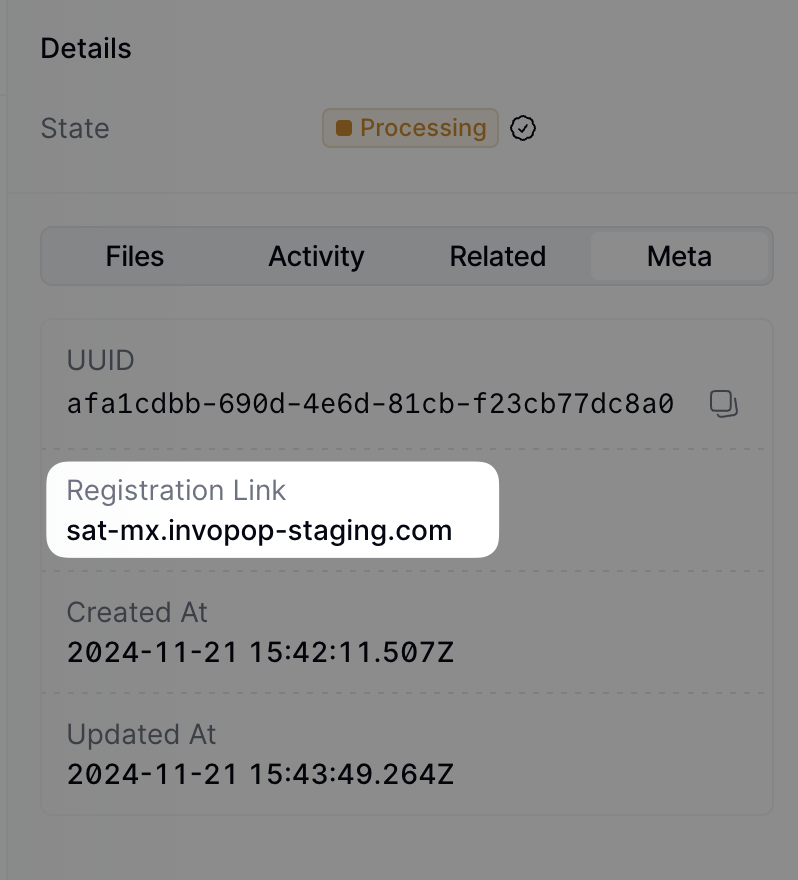 You can access the registration link via the API by [fetching the silo entry](/api-ref/silo/entries/fetch-an-entry) and locating the meta entry where the key is`registration-link`.
Visit that URL to access the form for registering the supplier.
Note that this form can be shared directly with the supplier if required.
You can access the registration link via the API by [fetching the silo entry](/api-ref/silo/entries/fetch-an-entry) and locating the meta entry where the key is`registration-link`.
Visit that URL to access the form for registering the supplier.
Note that this form can be shared directly with the supplier if required.
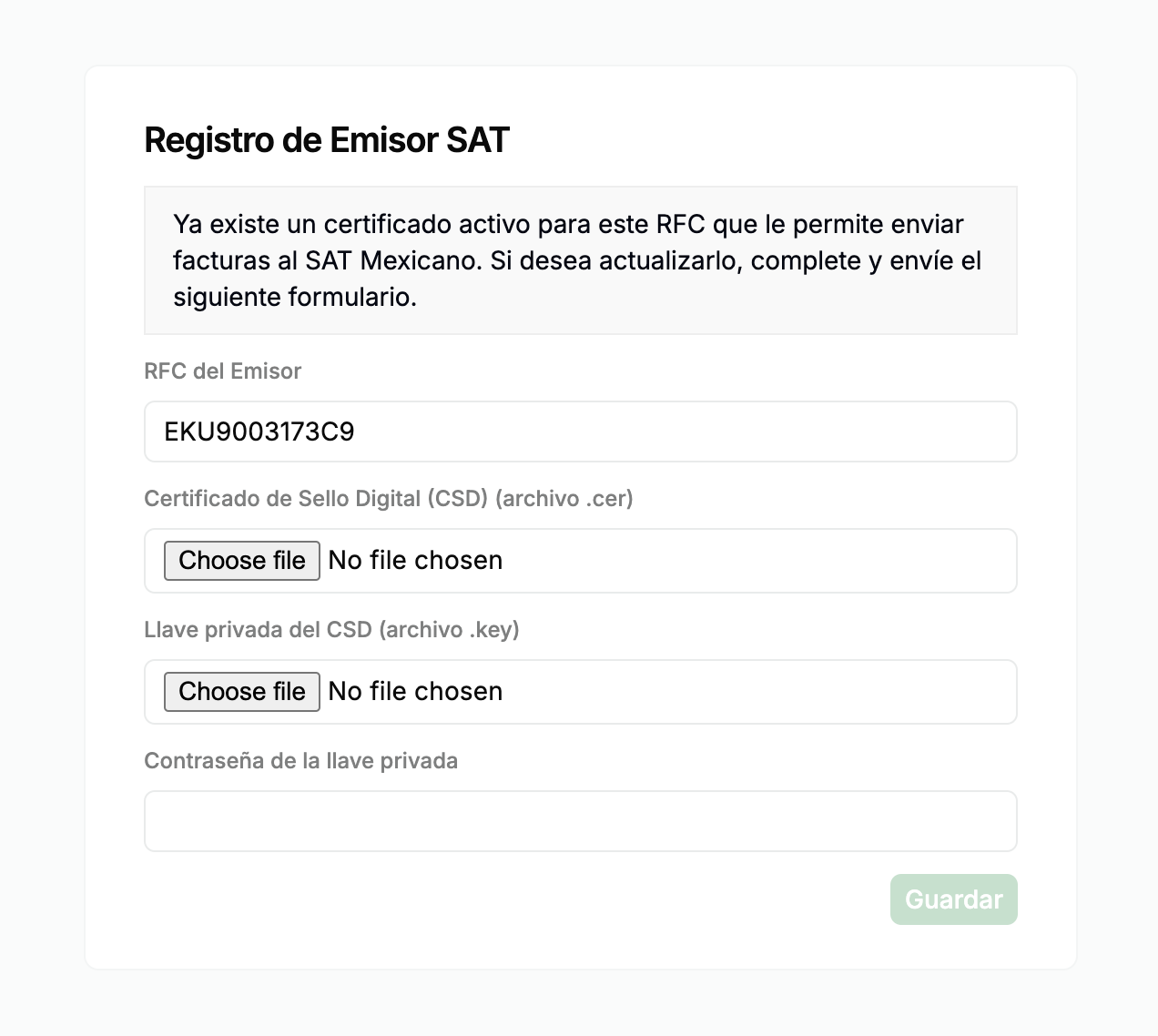 Fill out the form with the following information: Issuer RFC, CSD certificate file (`.crt`), private key (`.key`), and the private key password.
Follow this [guide](https://sw.com.mx/blog/administracion-fiscal/sellos-digitales-que-son-y-como-funcionan) to generate the CSD certificate and key.
When you click **Save**, the form details are securely sent to the PAC (*Proveedor Autorizado de Certificación*), who will handle invoice signing and submission to the SAT.
You can fill the form via API by sending a PUT request to the registration link. The payload should be a JSON object with the following fields:
* `csd_file` (string): The CSD certificate file (`.crt`).
* `key_file` (string): The private key (`.key`).
* `password` (string): The private key password.
The response will be a JSON object with the following fields:
* `rfc` (string): The RFC of the supplier.
* `active_cert` (boolean): Whether the certificate is active.
Since we are using a local PAC, you must authorize the PAC to sign, stamp, and send CFDIs to the SAT on your behalf.
To do this, visit the following [page](https://firmamanifiesto.lunasoft.net/) and **sign the manifesto using your e.firma (FIEL)**.
At this point, you're ready to start sending invoices on behalf of the supplier.
### Send an invoice
The following examples are of partial [GOBL](https://docs.gobl.org) documents you can copy and paste directly into the [Invopop Console](https://console.invopop.com) or store via the API as silo entries.
[GOBL Invoices](https://docs.gobl.org/draft-0/bill/invoice) sent to the SAT require the following properties in order to perform the correct normalization and validation steps. Invopop will try to assign these automatically, but we recommend defining them explicitly before upload:
* `$regime` to be set to [`MX`](https://docs.gobl.org/regimes/mx)
* `$addons` to include [`mx-cfdi-v4`](https://docs.gobl.org/addons/mx-cfdi-v4)
This main type of invoice is a standard B2B invoice from a Mexican supplier to another Mexican customer.
Notice:
* we've added the [`mx-cfdi-v4`](https://docs.gobl.org/addons/mx-cfdi-v4) addon, this ensures the document will be validated using the CFDI v4 rules built into the [GOBL](https://docs.gobl.org) library,
* extensions (`ext`) fields have been used in multiple locations for fields whose values cannot be determined any other way,
* VAT will be applied at the standard rate, the percentage will be set automatically, and,
* there are no totals nor calculations, all of these will be made automatically when uploading.
```json SAT B2B Invoice theme={"system"}
{
"$schema": "https://gobl.org/draft-0/bill/invoice",
"$regime": "MX",
"$addons": [
"mx-cfdi-v4"
],
"series": "XXMX",
"tax": {
"ext": {
"mx-cfdi-issue-place": "44100"
}
},
"supplier": {
"uuid": "018fbeda-bc61-7000-b66d-398ce3e21c43",
"name": "ESCUELA KEMPER URGATE",
"tax_id": {
"country": "MX",
"code": "EKU9003173C9"
},
"addresses": [
{
"street": "Julia Navarrete No. 1430",
"locality": "Guadalajara",
"region": "Jalisco",
"code": "44100",
"country": "MX"
}
],
"emails": [
{
"addr": "esckemperugarte@example.com"
}
],
"ext": {
"mx-cfdi-fiscal-regime": "601"
}
},
"customer": {
"name": "UNIVERSIDAD ROBOTICA ESPAÑOLA",
"tax_id": {
"country": "MX",
"code": "URE180429TM6"
},
"addresses": [
{
"locality": "Ciudad de Mexico",
"region": "Ciudad de Mexico",
"code": "86991",
"country": "MX"
}
],
"ext": {
"mx-cfdi-fiscal-regime": "601",
"mx-cfdi-post-code": "86991",
"mx-cfdi-use": "G01"
}
},
"lines": [
{
"quantity": "1",
"item": {
"name": "Standard Plan",
"price": "1000.00",
"ext": {
"mx-cfdi-prod-serv": "81112002"
}
},
"taxes": [
{
"cat": "VAT",
"rate": "standard"
}
]
}
]
}
```
```json Built version theme={"system"}
{
"$schema": "https://gobl.org/draft-0/bill/invoice",
"$regime": "MX",
"$addons": [
"mx-cfdi-v4"
],
"type": "standard",
"series": "XXMX",
"issue_date": "2026-04-20",
"issue_time": "04:23:50",
"currency": "MXN",
"tax": {
"ext": {
"mx-cfdi-doc-type": "I",
"mx-cfdi-issue-place": "44100",
"mx-cfdi-payment-method": "PPD"
}
},
"supplier": {
"uuid": "018fbeda-bc61-7000-b66d-398ce3e21c43",
"name": "ESCUELA KEMPER URGATE",
"tax_id": {
"country": "MX",
"code": "EKU9003173C9"
},
"addresses": [
{
"street": "Julia Navarrete No. 1430",
"locality": "Guadalajara",
"region": "Jalisco",
"code": "44100",
"country": "MX"
}
],
"emails": [
{
"addr": "esckemperugarte@example.com"
}
],
"ext": {
"mx-cfdi-fiscal-regime": "601"
}
},
"customer": {
"name": "UNIVERSIDAD ROBOTICA ESPAÑOLA",
"tax_id": {
"country": "MX",
"code": "URE180429TM6"
},
"addresses": [
{
"locality": "Ciudad de Mexico",
"region": "Ciudad de Mexico",
"code": "86991",
"country": "MX"
}
],
"ext": {
"mx-cfdi-fiscal-regime": "601",
"mx-cfdi-use": "G01"
}
},
"lines": [
{
"i": 1,
"quantity": "1",
"item": {
"name": "Standard Plan",
"price": "1000.00",
"ext": {
"mx-cfdi-prod-serv": "81112002"
}
},
"sum": "1000.00",
"taxes": [
{
"cat": "VAT",
"key": "standard",
"rate": "general",
"percent": "16.0%"
}
],
"total": "1000.00"
}
],
"totals": {
"sum": "1000.00",
"total": "1000.00",
"taxes": {
"categories": [
{
"code": "VAT",
"rates": [
{
"key": "standard",
"base": "1000.00",
"percent": "16.0%",
"amount": "160.00"
}
],
"amount": "160.00"
}
],
"sum": "160.00"
},
"tax": "160.00",
"total_with_tax": "1160.00",
"payable": "1160.00"
}
}
```
This invoice is used when the **issuer (supplier)** bills the customer **on behalf of another taxpayer** who is the real seller — for example **consignment** sales. The **third party** is identified on each line in the `seller` object (RFC, fiscal regime, address), while `supplier` remains the party issuing the CFDI.
Notice:
* the line `seller` carries the third party’s tax identity and regime so SAT can relate the CFDI to **cuenta de terceros** rules,
* the [`mx-cfdi-v4`](https://docs.gobl.org/addons/mx-cfdi-v4) addon validates extensions on supplier, customer, and line seller,
* the minimal `tax.ext` only needs the place of issue; `gobl build` adds document type and payment method (`PPD` in the built example) like other B2B invoices,
* there are no totals in the minimal version; upload or `gobl build` will compute IVA and totals, and,
* the built example shows a consignment-style line (`Venta en consignación`) with full tax breakdown.
```json SAT third-party invoice theme={"system"}
{
"$schema": "https://gobl.org/draft-0/bill/invoice",
"$regime": "MX",
"$addons": [
"mx-cfdi-v4"
],
"series": "LMC",
"code": "002",
"issue_time": "01:42:18",
"tax": {
"ext": {
"mx-cfdi-issue-place": "26015"
}
},
"supplier": {
"name": "ESCUELA KEMPER URGATE",
"tax_id": {
"country": "MX",
"code": "EKU9003173C9"
},
"ext": {
"mx-cfdi-fiscal-regime": "601"
}
},
"customer": {
"name": "UNIVERSIDAD ROBOTICA ESPAÑOLA",
"tax_id": {
"country": "MX",
"code": "URE180429TM6"
},
"addresses": [
{
"code": "86991"
}
],
"ext": {
"mx-cfdi-fiscal-regime": "601",
"mx-cfdi-use": "G01"
}
},
"lines": [
{
"quantity": "2",
"item": {
"name": "Venta en consignación",
"price": "100.00",
"ext": {
"mx-cfdi-prod-serv": "50211502"
}
},
"taxes": [
{
"cat": "VAT",
"percent": "16.0%"
}
],
"seller": {
"name": "XENON INDUSTRIAL ARTICLES",
"tax_id": {
"country": "MX",
"code": "XIA190128J61"
},
"addresses": [
{
"code": "76343"
}
],
"ext": {
"mx-cfdi-fiscal-regime": "601"
}
}
}
]
}
```
```json Built version theme={"system"}
{
"$schema": "https://gobl.org/draft-0/bill/invoice",
"$regime": "MX",
"$addons": [
"mx-cfdi-v4"
],
"type": "standard",
"series": "LMC",
"code": "002",
"issue_date": "2026-04-20",
"issue_time": "01:42:18",
"currency": "MXN",
"tax": {
"ext": {
"mx-cfdi-doc-type": "I",
"mx-cfdi-issue-place": "26015",
"mx-cfdi-payment-method": "PPD"
}
},
"supplier": {
"name": "ESCUELA KEMPER URGATE",
"tax_id": {
"country": "MX",
"code": "EKU9003173C9"
},
"ext": {
"mx-cfdi-fiscal-regime": "601"
}
},
"customer": {
"name": "UNIVERSIDAD ROBOTICA ESPAÑOLA",
"tax_id": {
"country": "MX",
"code": "URE180429TM6"
},
"addresses": [
{
"code": "86991"
}
],
"ext": {
"mx-cfdi-fiscal-regime": "601",
"mx-cfdi-use": "G01"
}
},
"lines": [
{
"i": 1,
"quantity": "2",
"item": {
"name": "Venta en consignación",
"price": "100.00",
"ext": {
"mx-cfdi-prod-serv": "50211502"
}
},
"sum": "200.00",
"taxes": [
{
"cat": "VAT",
"key": "standard",
"percent": "16.0%"
}
],
"total": "200.00",
"seller": {
"name": "XENON INDUSTRIAL ARTICLES",
"tax_id": {
"country": "MX",
"code": "XIA190128J61"
},
"addresses": [
{
"code": "76343"
}
],
"ext": {
"mx-cfdi-fiscal-regime": "601"
}
}
}
],
"totals": {
"sum": "200.00",
"total": "200.00",
"taxes": {
"categories": [
{
"code": "VAT",
"rates": [
{
"key": "standard",
"base": "200.00",
"percent": "16.0%",
"amount": "32.00"
}
],
"amount": "32.00"
}
],
"sum": "32.00"
},
"tax": "32.00",
"total_with_tax": "232.00",
"payable": "232.00"
}
}
```
This is a standard B2C invoice from a Mexican supplier to a Mexican physical person with tax details, but no specific tax declaration requirements. This would be for a larger sale when the "Simplified" and "Global Invoice" do not apply.
In addition to the observations for regular B2B invoices, note in the customer:
* the presence of an RFC in the same format as for companies, and,
* the [`mx-cfdi-fiscal-regime`](https://docs.gobl.org/addons/mx-cfdi-v4#fiscal-regime-code) and [`mx-cfdi-use`](https://docs.gobl.org/addons/mx-cfdi-v4#cfdi-use-code) extensions have been set to `616` and `S01` respectively reflecting that the customer is not subject to tax.
It is important in Mexico to ensure the correct Fiscal Regime and CFDI Use codes are set correctly as the SAT will check these details and reject documents with unexpected combinations.
```json SAT B2C Invoice theme={"system"}
{
"$schema": "https://gobl.org/draft-0/bill/invoice",
"$regime": "MX",
"$addons": [
"mx-cfdi-v4"
],
"series": "XXMX",
"tax": {
"ext": {
"mx-cfdi-issue-place": "44100"
}
},
"supplier": {
"uuid": "018fbeda-bc61-7000-b66d-398ce3e21c43",
"name": "ESCUELA KEMPER URGATE",
"tax_id": {
"country": "MX",
"code": "EKU9003173C9"
},
"addresses": [
{
"street": "Julia Navarrete No. 1430",
"locality": "Guadalajara",
"region": "Jalisco",
"code": "44100",
"country": "MX"
}
],
"emails": [
{
"addr": "esckemperugarte@example.com"
}
],
"ext": {
"mx-cfdi-fiscal-regime": "601"
}
},
"customer": {
"name": "LUIS IAN ÑUZCO",
"tax_id": {
"country": "MX",
"code": "IAÑL750210963"
},
"addresses": [
{
"locality": "Ciudad de Mexico",
"region": "Ciudad de Mexico",
"code": "85256",
"country": "MX"
}
],
"ext": {
"mx-cfdi-fiscal-regime": "616",
"mx-cfdi-use": "S01"
}
},
"lines": [
{
"quantity": "1",
"item": {
"name": "Standard Plan",
"price": "500.00",
"ext": {
"mx-cfdi-prod-serv": "81112002"
}
},
"taxes": [
{
"cat": "VAT",
"rate": "standard"
}
]
}
]
}
```
```json Built version theme={"system"}
{
"$schema": "https://gobl.org/draft-0/bill/invoice",
"$regime": "MX",
"$addons": [
"mx-cfdi-v4"
],
"type": "standard",
"series": "XXMX",
"issue_date": "2026-04-20",
"issue_time": "04:23:50",
"currency": "MXN",
"tax": {
"ext": {
"mx-cfdi-doc-type": "I",
"mx-cfdi-issue-place": "44100",
"mx-cfdi-payment-method": "PPD"
}
},
"supplier": {
"uuid": "018fbeda-bc61-7000-b66d-398ce3e21c43",
"name": "ESCUELA KEMPER URGATE",
"tax_id": {
"country": "MX",
"code": "EKU9003173C9"
},
"addresses": [
{
"street": "Julia Navarrete No. 1430",
"locality": "Guadalajara",
"region": "Jalisco",
"code": "44100",
"country": "MX"
}
],
"emails": [
{
"addr": "esckemperugarte@example.com"
}
],
"ext": {
"mx-cfdi-fiscal-regime": "601"
}
},
"customer": {
"name": "LUIS IAN ÑUZCO",
"tax_id": {
"country": "MX",
"code": "IAÑL750210963"
},
"addresses": [
{
"locality": "Ciudad de Mexico",
"region": "Ciudad de Mexico",
"code": "85256",
"country": "MX"
}
],
"ext": {
"mx-cfdi-fiscal-regime": "616",
"mx-cfdi-use": "S01"
}
},
"lines": [
{
"i": 1,
"quantity": "1",
"item": {
"name": "Standard Plan",
"price": "500.00",
"ext": {
"mx-cfdi-prod-serv": "81112002"
}
},
"sum": "500.00",
"taxes": [
{
"cat": "VAT",
"key": "standard",
"rate": "general",
"percent": "16.0%"
}
],
"total": "500.00"
}
],
"totals": {
"sum": "500.00",
"total": "500.00",
"taxes": {
"categories": [
{
"code": "VAT",
"rates": [
{
"key": "standard",
"base": "500.00",
"percent": "16.0%",
"amount": "80.00"
}
],
"amount": "80.00"
}
],
"sum": "80.00"
},
"tax": "80.00",
"total_with_tax": "580.00",
"payable": "580.00"
}
}
```
In Mexico, a General Public Invoice (Factura al Público en General) is a type of tax document issued to record sales made to customers who do not request an invoice with a specific Federal Taxpayer Registry (RFC) number. Instead, a generic RFC is used to identify the recipient:
* XAXX010101000 for domestic transactions
* XEXX010101000 for foreign transactions
This type of invoice is mandatory for businesses that sell to the general public and do not issue individual invoices for each transaction.
To create this type of invoice in Invopop:
* the `customer` field is not required
* the `$tags` field is used to identify this as a simplified invoice.
```json SAT Mexico simplified invoice theme={"system"}
{
"$schema": "https://gobl.org/draft-0/bill/invoice",
"$regime": "MX",
"$addons": [
"mx-cfdi-v4"
],
"$tags": [
"simplified"
],
"series": "TEST",
"code": "00001",
"tax": {
"ext": {
"mx-cfdi-issue-place": "44100"
}
},
"supplier": {
"name": "ESCUELA KEMPER URGATE",
"tax_id": {
"country": "MX",
"code": "EKU9003173C9"
},
"ext": {
"mx-cfdi-fiscal-regime": "601"
}
},
"lines": [
{
"quantity": "1",
"item": {
"name": "Cobro por tarjetas",
"price": "10.00",
"ext": {
"mx-cfdi-prod-serv": "84141602"
}
},
"discounts": [
{
"percent": "10.0%",
"amount": "1.00"
}
],
"taxes": [
{
"cat": "VAT",
"rate": "standard"
}
]
},
{
"quantity": "1",
"item": {
"name": "Porcentaje sobre GMV",
"price": "10.00",
"unit": "service",
"ext": {
"mx-cfdi-prod-serv": "80141628"
}
},
"taxes": [
{
"cat": "VAT",
"rate": "standard"
}
]
}
],
"payment": {
"terms": {
"notes": "Condiciones de pago"
}
}
}
```
```json Built version theme={"system"}
{
"$schema": "https://gobl.org/draft-0/bill/invoice",
"$regime": "MX",
"$addons": [
"mx-cfdi-v4"
],
"$tags": [
"simplified"
],
"type": "standard",
"series": "TEST",
"code": "00001",
"issue_date": "2026-04-20",
"issue_time": "04:23:50",
"currency": "MXN",
"tax": {
"ext": {
"mx-cfdi-doc-type": "I",
"mx-cfdi-issue-place": "44100",
"mx-cfdi-payment-method": "PPD"
}
},
"supplier": {
"name": "ESCUELA KEMPER URGATE",
"tax_id": {
"country": "MX",
"code": "EKU9003173C9"
},
"ext": {
"mx-cfdi-fiscal-regime": "601"
}
},
"lines": [
{
"i": 1,
"quantity": "1",
"item": {
"name": "Cobro por tarjetas",
"price": "10.00",
"ext": {
"mx-cfdi-prod-serv": "84141602"
}
},
"sum": "10.00",
"discounts": [
{
"percent": "10.0%",
"amount": "1.00"
}
],
"taxes": [
{
"cat": "VAT",
"key": "standard",
"rate": "general",
"percent": "16.0%"
}
],
"total": "9.00"
},
{
"i": 2,
"quantity": "1",
"item": {
"name": "Porcentaje sobre GMV",
"price": "10.00",
"unit": "service",
"ext": {
"mx-cfdi-prod-serv": "80141628"
}
},
"sum": "10.00",
"taxes": [
{
"cat": "VAT",
"key": "standard",
"rate": "general",
"percent": "16.0%"
}
],
"total": "10.00"
}
],
"payment": {
"terms": {
"notes": "Condiciones de pago"
}
},
"totals": {
"sum": "19.00",
"total": "19.00",
"taxes": {
"categories": [
{
"code": "VAT",
"rates": [
{
"key": "standard",
"base": "19.00",
"percent": "16.0%",
"amount": "3.04"
}
],
"amount": "3.04"
}
],
"sum": "3.04"
},
"tax": "3.04",
"total_with_tax": "22.04",
"payable": "22.04"
}
}
```
The Global Invoice is used to group a set of invoices into a single CFDI document.
Notice:
* the `$tags` field has been used to identify this as a global invoice,
* each `line` has a `ref` which is used to identify the invoice that it belongs to,
* the [`tax.ext.mx-cfdi-global-month`](https://docs.gobl.org/addons/mx-cfdi-v4#cfdi-global-month), [`mx-cfdi-global-period`](https://docs.gobl.org/addons/mx-cfdi-v4#cfdi-global-period), and [`mx-cfdi-global-year`](https://docs.gobl.org/addons/mx-cfdi-v4#cfdi-global-year) fields have been used to identify the global invoice period.
```json SAT Mexico global invoice theme={"system"}
{
"$schema": "https://gobl.org/draft-0/bill/invoice",
"$addons": [
"mx-cfdi-v4"
],
"$tags": [
"global"
],
"series": "GLOBAL",
"code": "0001",
"tax": {
"ext": {
"mx-cfdi-global-month": "03",
"mx-cfdi-global-period": "04",
"mx-cfdi-global-year": "2025",
"mx-cfdi-issue-place": "44100"
}
},
"supplier": {
"name": "ESCUELA KEMPER URGATE",
"tax_id": {
"country": "MX",
"code": "EKU9003173C9"
},
"ext": {
"mx-cfdi-fiscal-regime": "601"
}
},
"lines": [
{
"quantity": "1",
"item": {
"ref": "SALE1",
"name": "Sale 1",
"price": "10.00"
},
"discounts": [
{
"percent": "10.0%"
}
],
"taxes": [
{
"cat": "VAT",
"rate": "standard"
}
]
},
{
"quantity": "1",
"item": {
"ref": "SALE2",
"name": "Sale 2",
"price": "20.00"
},
"taxes": [
{
"cat": "VAT",
"rate": "standard"
}
]
}
],
"payment": {
"advances": [
{
"key": "cash",
"description": "Prepaid",
"percent": "100%"
}
]
}
}
```
```json Built version theme={"system"}
{
"$schema": "https://gobl.org/draft-0/bill/invoice",
"$regime": "MX",
"$addons": [
"mx-cfdi-v4"
],
"$tags": [
"global"
],
"type": "standard",
"series": "GLOBAL",
"code": "0001",
"issue_date": "2026-04-20",
"issue_time": "04:23:50",
"currency": "MXN",
"tax": {
"ext": {
"mx-cfdi-doc-type": "I",
"mx-cfdi-global-month": "03",
"mx-cfdi-global-period": "04",
"mx-cfdi-global-year": "2025",
"mx-cfdi-issue-place": "44100",
"mx-cfdi-payment-method": "PUE"
}
},
"supplier": {
"name": "ESCUELA KEMPER URGATE",
"tax_id": {
"country": "MX",
"code": "EKU9003173C9"
},
"ext": {
"mx-cfdi-fiscal-regime": "601"
}
},
"lines": [
{
"i": 1,
"quantity": "1",
"item": {
"ref": "SALE1",
"name": "Sale 1",
"price": "10.00"
},
"sum": "10.00",
"discounts": [
{
"percent": "10.0%",
"amount": "1.00"
}
],
"taxes": [
{
"cat": "VAT",
"key": "standard",
"rate": "general",
"percent": "16.0%"
}
],
"total": "9.00"
},
{
"i": 2,
"quantity": "1",
"item": {
"ref": "SALE2",
"name": "Sale 2",
"price": "20.00"
},
"sum": "20.00",
"taxes": [
{
"cat": "VAT",
"key": "standard",
"rate": "general",
"percent": "16.0%"
}
],
"total": "20.00"
}
],
"payment": {
"advances": [
{
"key": "cash",
"description": "Prepaid",
"percent": "100%",
"amount": "33.64",
"ext": {
"mx-cfdi-payment-means": "01"
}
}
]
},
"totals": {
"sum": "29.00",
"total": "29.00",
"taxes": {
"categories": [
{
"code": "VAT",
"rates": [
{
"key": "standard",
"base": "29.00",
"percent": "16.0%",
"amount": "4.64"
}
],
"amount": "4.64"
}
],
"sum": "4.64"
},
"tax": "4.64",
"total_with_tax": "33.64",
"payable": "33.64",
"advance": "33.64",
"due": "0.00"
}
}
```
The Credit Note is used to cancel an invoice.
Notice:
* the `$type` field has been set to `credit-note`,
* the `preceding` field has been used to identify the invoice that is being cancelled.
```json SAT Mexico credit note theme={"system"}
{
"$schema": "https://gobl.org/draft-0/bill/invoice",
"$addons": [
"mx-cfdi-v4"
],
"type": "credit-note",
"series": "CN",
"code": "0003",
"preceding": [
{
"series": "TEST",
"code": "0001",
"issue_date": "2023-07-10",
"issue_time": "12:00:00",
"stamps": [
{
"prv": "sat-uuid",
"val": "1fac4464-1111-0000-1111-cd37179db12e"
}
]
}
],
"supplier": {
"name": "ESCUELA KEMPER URGATE",
"tax_id": {
"country": "MX",
"code": "EKU9003173C9"
},
"addresses": [
{
"street": "Julia Navarrete No. 1430",
"locality": "Guadalajara",
"region": "Jalisco",
"code": "44100",
"country": "MX"
}
],
"ext": {
"mx-cfdi-fiscal-regime": "615"
}
},
"customer": {
"name": "UNIVERSIDAD ROBOTICA ESPAÑOLA",
"tax_id": {
"country": "MX",
"code": "URE180429TM6"
},
"addresses": [
{
"locality": "Ciudad de Mexico",
"region": "Ciudad de Mexico",
"code": "86991",
"country": "MX"
}
],
"ext": {
"mx-cfdi-fiscal-regime": "624",
"mx-cfdi-use": "G01"
}
},
"lines": [
{
"quantity": "2",
"item": {
"name": "Cigarros",
"ext": {
"mx-cfdi-prod-serv": "50211502"
},
"price": "100.1010",
"unit": "piece"
},
"taxes": [
{
"cat": "VAT",
"rate": "standard"
}
]
}
],
"payment": {
"terms": {
"notes": "Pago a 30 días."
}
}
}
```
```json Built version theme={"system"}
{
"$schema": "https://gobl.org/draft-0/bill/invoice",
"$regime": "MX",
"$addons": [
"mx-cfdi-v4"
],
"type": "credit-note",
"series": "CN",
"code": "0003",
"issue_date": "2026-04-20",
"issue_time": "04:23:50",
"currency": "MXN",
"preceding": [
{
"issue_date": "2023-07-10",
"series": "TEST",
"code": "0001",
"stamps": [
{
"prv": "sat-uuid",
"val": "1fac4464-1111-0000-1111-cd37179db12e"
}
]
}
],
"tax": {
"ext": {
"mx-cfdi-doc-type": "E",
"mx-cfdi-issue-place": "44100",
"mx-cfdi-payment-method": "PPD",
"mx-cfdi-rel-type": "01"
}
},
"supplier": {
"name": "ESCUELA KEMPER URGATE",
"tax_id": {
"country": "MX",
"code": "EKU9003173C9"
},
"addresses": [
{
"street": "Julia Navarrete No. 1430",
"locality": "Guadalajara",
"region": "Jalisco",
"code": "44100",
"country": "MX"
}
],
"ext": {
"mx-cfdi-fiscal-regime": "615"
}
},
"customer": {
"name": "UNIVERSIDAD ROBOTICA ESPAÑOLA",
"tax_id": {
"country": "MX",
"code": "URE180429TM6"
},
"addresses": [
{
"locality": "Ciudad de Mexico",
"region": "Ciudad de Mexico",
"code": "86991",
"country": "MX"
}
],
"ext": {
"mx-cfdi-fiscal-regime": "624",
"mx-cfdi-use": "G01"
}
},
"lines": [
{
"i": 1,
"quantity": "2",
"item": {
"name": "Cigarros",
"price": "100.1010",
"unit": "piece",
"ext": {
"mx-cfdi-prod-serv": "50211502"
}
},
"sum": "200.2020",
"taxes": [
{
"cat": "VAT",
"key": "standard",
"rate": "general",
"percent": "16.0%"
}
],
"total": "200.2020"
}
],
"payment": {
"terms": {
"notes": "Pago a 30 días."
}
},
"totals": {
"sum": "200.20",
"total": "200.20",
"taxes": {
"categories": [
{
"code": "VAT",
"rates": [
{
"key": "standard",
"base": "200.20",
"percent": "16.0%",
"amount": "32.03"
}
],
"amount": "32.03"
}
],
"sum": "32.03"
},
"tax": "32.03",
"total_with_tax": "232.23",
"payable": "232.23"
}
}
```
## FAQ
Purchases under \$100 mxn don't need to be issued, but they need to be registered in the global CFDI. Often issuing all invoices will simplify your operation.
Yes. We must obtain a the supplier's CSD (digtial seal) and credentials to issue invoices in that company's name. We are especially powerful and simple for this. Read more in our [white label use case](/guides/white-label).
Yes. The `mx-cfdi-v4` addon supports both PUE and PPD on the original invoice. What is **not** automated is the issuance of the subsequent payment receipts (REPs / Pago / complemento de pago) that must be emitted as payments are collected. If your operation regularly issues PPD invoices, you will need a separate mechanism for the REP lifecycle.
Yes, if the original was issued as PUE and payment is not received by the last day of the issuance month, rule 2.7.1.32 RMF requires cancelling the original and re-issuing as PPD with `FormaPago = 99`, then issuing REPs as payments come in. This is calendar-driven, not payment-event-driven, and it surprises most non-Mexican implementations. The conservative approach is to issue PPD whenever there is any uncertainty about same-month payment.
REPs must be issued by the fifth calendar day of the month following payment receipt (rule 2.7.1.35 RMF). Missing the deadline does not invalidate the underlying invoice, but it prevents the customer from deducting the expense in the correct period and exposes the issuer to fines. This is a recurring source of friction and the reason customers will sometimes refuse to accept cancellations from a supplier with poor REP discipline.
Install the SAT Mexico app (uses SW Sapien as PAC) plus the SW Sapien app for credentials. Onboard each issuing supplier with their CSD certificate and `mx-cfdi-issue-place`. Run invoices through the Issue CFDI workflow.
The library that transforms GOBL into CFDI documents is publicly available as an open-source project and can be found at [github.com/invopop/gobl.cfdi](https://github.com/invopop/gobl.cfdi).
For further details on how GOBL prepares data for conversion, see the [Mexico Tax Regime](https://github.com/invopop/gobl/blob/main/regimes/mx/README.md).
The most common cause is a mismatch between the receiver's postal code in the CFDI and the postal code SAT has on file for that RFC. Resolution: ask the customer for their CIF (Constancia de Situación Fiscal) and use the postal code printed there, exactly. Secondary causes:
* The postal code is real but not yet in `c_CodigoPostal`. Use the closest catalog code from the place of issuance.
* The receiver is `XAXX010101000` or `XEXX010101000` and `DomicilioFiscalReceptor` differs from `LugarExpedicion`. They must be equal for generic RFCs.
* The branch issuing the document is configured with the matriz's postal code instead of its own.
In Mexico, a reduced VAT rate of 8% applies to transactions in border zones (northern and southern border regions). To successfully issue invoices with this rate, **both** of the following conditions must be met:
1. The supplier's RFC must be enabled by the SAT to invoice with the reduced rate in border zones.
2. Both the `mx-cfdi-issue-place` field and the customer's postal code (when included) must correspond to border zones.
If either condition is not met, the SAT will reject the invoice with an error.
CFDI40999 is a generic "unclassified error" returned by the SAT when no other, more specific error code applies. This error can have multiple causes.
A common scenario is invoicing in border zones with the reduced 8% VAT rate. If you receive this error in that context, verify:
1. **RFC registration**: The supplier's RFC must be registered in the taxpayers registry for the appropriate border region tax incentive. Without this registration, the SAT will reject all invoices with the reduced rate. See [SAT's registration requirements and procedures](https://www.sat.gob.mx/minisitio/EstimulosFiscalesFronteraNorteSur/) for more information.
2. **Issue place postal code**: The [`mx-cfdi-issue-place`](https://docs.gobl.org/addons/mx-cfdi-v4#place-of-issue) field must contain a postal code from a municipality within a border zone.
3. **Tax rate**: Ensure you're applying the correct percentage (typically 8%) for the border zone.
If the error persists after verifying these points, or you're getting this error for other reasons, please reach out to our support team.
The UsoCFDI must be allowed for the receiver's `RegimenFiscal`. The catalog defines the valid combinations; not every code works for every régimen. For example, D01–D10 (personal deductions) are only valid for individuals, never for legal entities. RESICO contributors (régimen 626) have a restricted set. When in doubt, default to `S01` (Sin efectos fiscales) — it is always valid but produces a non-deductible invoice for the receiver. Always ask the customer which UsoCFDI they need before issuing.
By default, Invopop uses Mexico City's time zone (UTC-6) when automatically setting the [`issue_date`](https://docs.gobl.org/draft-0/bill/invoice#issue-date) and [`issue_time`](https://docs.gobl.org/draft-0/bill/invoice#issue-time) fields. However, the SAT validates these fields based on the time zone of the postal code specified in [`mx-cfdi-issue-place`](https://docs.gobl.org/addons/mx-cfdi-v4#place-of-issue).
If the issuing location is in a different time zone, the SAT may reject the invoice with an error indicating the timestamp is in the future, as it only allows up to 5 minutes ahead of the local time.
To avoid this, explicitly set `issue_date` and `issue_time` in your GOBL invoice using the local time zone of the issuing location when operating outside Mexico City's time zone.
For non-MXN invoices, `TipoCambio` must be present and use the FIX rate published by Banxico in the DOF the day prior to the operation (Article 20 CFF, Article 56 Ley Aduanera). Common errors:
* Using the day-of rate instead of the prior day's.
* Quoting the inverse (USD per MXN instead of MXN per USD).
* Setting `TipoCambio` on an MXN invoice (it must be 1 or absent).
* Rounding inconsistently between line totals and document totals — Anexo 20 has specific rounding rules.
See the [Mexico tax regime in GOBL](https://docs.gobl.org/regimes/mx) for tax categories, RFC structure, and CFDI extensions. The [`mx-cfdi-v4`](https://docs.gobl.org/addons/mx-cfdi-v4) addon documents required fields including UsoCFDI, RegimenFiscal, and place-of-issue.
More available in our [Mexico FAQ](/faq/mexico) section
***
| | |
| ---------- | ----------------------------------------------------------------------------------------------------------------------------------------------------------------------------------------------------------------------------------------------------------------------------------------------- |
| Compliance | [Invoicing compliance in Mexico](/compliance/mexico)
Fill out the form with the following information: Issuer RFC, CSD certificate file (`.crt`), private key (`.key`), and the private key password.
Follow this [guide](https://sw.com.mx/blog/administracion-fiscal/sellos-digitales-que-son-y-como-funcionan) to generate the CSD certificate and key.
When you click **Save**, the form details are securely sent to the PAC (*Proveedor Autorizado de Certificación*), who will handle invoice signing and submission to the SAT.
You can fill the form via API by sending a PUT request to the registration link. The payload should be a JSON object with the following fields:
* `csd_file` (string): The CSD certificate file (`.crt`).
* `key_file` (string): The private key (`.key`).
* `password` (string): The private key password.
The response will be a JSON object with the following fields:
* `rfc` (string): The RFC of the supplier.
* `active_cert` (boolean): Whether the certificate is active.
Since we are using a local PAC, you must authorize the PAC to sign, stamp, and send CFDIs to the SAT on your behalf.
To do this, visit the following [page](https://firmamanifiesto.lunasoft.net/) and **sign the manifesto using your e.firma (FIEL)**.
At this point, you're ready to start sending invoices on behalf of the supplier.
### Send an invoice
The following examples are of partial [GOBL](https://docs.gobl.org) documents you can copy and paste directly into the [Invopop Console](https://console.invopop.com) or store via the API as silo entries.
[GOBL Invoices](https://docs.gobl.org/draft-0/bill/invoice) sent to the SAT require the following properties in order to perform the correct normalization and validation steps. Invopop will try to assign these automatically, but we recommend defining them explicitly before upload:
* `$regime` to be set to [`MX`](https://docs.gobl.org/regimes/mx)
* `$addons` to include [`mx-cfdi-v4`](https://docs.gobl.org/addons/mx-cfdi-v4)
This main type of invoice is a standard B2B invoice from a Mexican supplier to another Mexican customer.
Notice:
* we've added the [`mx-cfdi-v4`](https://docs.gobl.org/addons/mx-cfdi-v4) addon, this ensures the document will be validated using the CFDI v4 rules built into the [GOBL](https://docs.gobl.org) library,
* extensions (`ext`) fields have been used in multiple locations for fields whose values cannot be determined any other way,
* VAT will be applied at the standard rate, the percentage will be set automatically, and,
* there are no totals nor calculations, all of these will be made automatically when uploading.
```json SAT B2B Invoice theme={"system"}
{
"$schema": "https://gobl.org/draft-0/bill/invoice",
"$regime": "MX",
"$addons": [
"mx-cfdi-v4"
],
"series": "XXMX",
"tax": {
"ext": {
"mx-cfdi-issue-place": "44100"
}
},
"supplier": {
"uuid": "018fbeda-bc61-7000-b66d-398ce3e21c43",
"name": "ESCUELA KEMPER URGATE",
"tax_id": {
"country": "MX",
"code": "EKU9003173C9"
},
"addresses": [
{
"street": "Julia Navarrete No. 1430",
"locality": "Guadalajara",
"region": "Jalisco",
"code": "44100",
"country": "MX"
}
],
"emails": [
{
"addr": "esckemperugarte@example.com"
}
],
"ext": {
"mx-cfdi-fiscal-regime": "601"
}
},
"customer": {
"name": "UNIVERSIDAD ROBOTICA ESPAÑOLA",
"tax_id": {
"country": "MX",
"code": "URE180429TM6"
},
"addresses": [
{
"locality": "Ciudad de Mexico",
"region": "Ciudad de Mexico",
"code": "86991",
"country": "MX"
}
],
"ext": {
"mx-cfdi-fiscal-regime": "601",
"mx-cfdi-post-code": "86991",
"mx-cfdi-use": "G01"
}
},
"lines": [
{
"quantity": "1",
"item": {
"name": "Standard Plan",
"price": "1000.00",
"ext": {
"mx-cfdi-prod-serv": "81112002"
}
},
"taxes": [
{
"cat": "VAT",
"rate": "standard"
}
]
}
]
}
```
```json Built version theme={"system"}
{
"$schema": "https://gobl.org/draft-0/bill/invoice",
"$regime": "MX",
"$addons": [
"mx-cfdi-v4"
],
"type": "standard",
"series": "XXMX",
"issue_date": "2026-04-20",
"issue_time": "04:23:50",
"currency": "MXN",
"tax": {
"ext": {
"mx-cfdi-doc-type": "I",
"mx-cfdi-issue-place": "44100",
"mx-cfdi-payment-method": "PPD"
}
},
"supplier": {
"uuid": "018fbeda-bc61-7000-b66d-398ce3e21c43",
"name": "ESCUELA KEMPER URGATE",
"tax_id": {
"country": "MX",
"code": "EKU9003173C9"
},
"addresses": [
{
"street": "Julia Navarrete No. 1430",
"locality": "Guadalajara",
"region": "Jalisco",
"code": "44100",
"country": "MX"
}
],
"emails": [
{
"addr": "esckemperugarte@example.com"
}
],
"ext": {
"mx-cfdi-fiscal-regime": "601"
}
},
"customer": {
"name": "UNIVERSIDAD ROBOTICA ESPAÑOLA",
"tax_id": {
"country": "MX",
"code": "URE180429TM6"
},
"addresses": [
{
"locality": "Ciudad de Mexico",
"region": "Ciudad de Mexico",
"code": "86991",
"country": "MX"
}
],
"ext": {
"mx-cfdi-fiscal-regime": "601",
"mx-cfdi-use": "G01"
}
},
"lines": [
{
"i": 1,
"quantity": "1",
"item": {
"name": "Standard Plan",
"price": "1000.00",
"ext": {
"mx-cfdi-prod-serv": "81112002"
}
},
"sum": "1000.00",
"taxes": [
{
"cat": "VAT",
"key": "standard",
"rate": "general",
"percent": "16.0%"
}
],
"total": "1000.00"
}
],
"totals": {
"sum": "1000.00",
"total": "1000.00",
"taxes": {
"categories": [
{
"code": "VAT",
"rates": [
{
"key": "standard",
"base": "1000.00",
"percent": "16.0%",
"amount": "160.00"
}
],
"amount": "160.00"
}
],
"sum": "160.00"
},
"tax": "160.00",
"total_with_tax": "1160.00",
"payable": "1160.00"
}
}
```
This invoice is used when the **issuer (supplier)** bills the customer **on behalf of another taxpayer** who is the real seller — for example **consignment** sales. The **third party** is identified on each line in the `seller` object (RFC, fiscal regime, address), while `supplier` remains the party issuing the CFDI.
Notice:
* the line `seller` carries the third party’s tax identity and regime so SAT can relate the CFDI to **cuenta de terceros** rules,
* the [`mx-cfdi-v4`](https://docs.gobl.org/addons/mx-cfdi-v4) addon validates extensions on supplier, customer, and line seller,
* the minimal `tax.ext` only needs the place of issue; `gobl build` adds document type and payment method (`PPD` in the built example) like other B2B invoices,
* there are no totals in the minimal version; upload or `gobl build` will compute IVA and totals, and,
* the built example shows a consignment-style line (`Venta en consignación`) with full tax breakdown.
```json SAT third-party invoice theme={"system"}
{
"$schema": "https://gobl.org/draft-0/bill/invoice",
"$regime": "MX",
"$addons": [
"mx-cfdi-v4"
],
"series": "LMC",
"code": "002",
"issue_time": "01:42:18",
"tax": {
"ext": {
"mx-cfdi-issue-place": "26015"
}
},
"supplier": {
"name": "ESCUELA KEMPER URGATE",
"tax_id": {
"country": "MX",
"code": "EKU9003173C9"
},
"ext": {
"mx-cfdi-fiscal-regime": "601"
}
},
"customer": {
"name": "UNIVERSIDAD ROBOTICA ESPAÑOLA",
"tax_id": {
"country": "MX",
"code": "URE180429TM6"
},
"addresses": [
{
"code": "86991"
}
],
"ext": {
"mx-cfdi-fiscal-regime": "601",
"mx-cfdi-use": "G01"
}
},
"lines": [
{
"quantity": "2",
"item": {
"name": "Venta en consignación",
"price": "100.00",
"ext": {
"mx-cfdi-prod-serv": "50211502"
}
},
"taxes": [
{
"cat": "VAT",
"percent": "16.0%"
}
],
"seller": {
"name": "XENON INDUSTRIAL ARTICLES",
"tax_id": {
"country": "MX",
"code": "XIA190128J61"
},
"addresses": [
{
"code": "76343"
}
],
"ext": {
"mx-cfdi-fiscal-regime": "601"
}
}
}
]
}
```
```json Built version theme={"system"}
{
"$schema": "https://gobl.org/draft-0/bill/invoice",
"$regime": "MX",
"$addons": [
"mx-cfdi-v4"
],
"type": "standard",
"series": "LMC",
"code": "002",
"issue_date": "2026-04-20",
"issue_time": "01:42:18",
"currency": "MXN",
"tax": {
"ext": {
"mx-cfdi-doc-type": "I",
"mx-cfdi-issue-place": "26015",
"mx-cfdi-payment-method": "PPD"
}
},
"supplier": {
"name": "ESCUELA KEMPER URGATE",
"tax_id": {
"country": "MX",
"code": "EKU9003173C9"
},
"ext": {
"mx-cfdi-fiscal-regime": "601"
}
},
"customer": {
"name": "UNIVERSIDAD ROBOTICA ESPAÑOLA",
"tax_id": {
"country": "MX",
"code": "URE180429TM6"
},
"addresses": [
{
"code": "86991"
}
],
"ext": {
"mx-cfdi-fiscal-regime": "601",
"mx-cfdi-use": "G01"
}
},
"lines": [
{
"i": 1,
"quantity": "2",
"item": {
"name": "Venta en consignación",
"price": "100.00",
"ext": {
"mx-cfdi-prod-serv": "50211502"
}
},
"sum": "200.00",
"taxes": [
{
"cat": "VAT",
"key": "standard",
"percent": "16.0%"
}
],
"total": "200.00",
"seller": {
"name": "XENON INDUSTRIAL ARTICLES",
"tax_id": {
"country": "MX",
"code": "XIA190128J61"
},
"addresses": [
{
"code": "76343"
}
],
"ext": {
"mx-cfdi-fiscal-regime": "601"
}
}
}
],
"totals": {
"sum": "200.00",
"total": "200.00",
"taxes": {
"categories": [
{
"code": "VAT",
"rates": [
{
"key": "standard",
"base": "200.00",
"percent": "16.0%",
"amount": "32.00"
}
],
"amount": "32.00"
}
],
"sum": "32.00"
},
"tax": "32.00",
"total_with_tax": "232.00",
"payable": "232.00"
}
}
```
This is a standard B2C invoice from a Mexican supplier to a Mexican physical person with tax details, but no specific tax declaration requirements. This would be for a larger sale when the "Simplified" and "Global Invoice" do not apply.
In addition to the observations for regular B2B invoices, note in the customer:
* the presence of an RFC in the same format as for companies, and,
* the [`mx-cfdi-fiscal-regime`](https://docs.gobl.org/addons/mx-cfdi-v4#fiscal-regime-code) and [`mx-cfdi-use`](https://docs.gobl.org/addons/mx-cfdi-v4#cfdi-use-code) extensions have been set to `616` and `S01` respectively reflecting that the customer is not subject to tax.
It is important in Mexico to ensure the correct Fiscal Regime and CFDI Use codes are set correctly as the SAT will check these details and reject documents with unexpected combinations.
```json SAT B2C Invoice theme={"system"}
{
"$schema": "https://gobl.org/draft-0/bill/invoice",
"$regime": "MX",
"$addons": [
"mx-cfdi-v4"
],
"series": "XXMX",
"tax": {
"ext": {
"mx-cfdi-issue-place": "44100"
}
},
"supplier": {
"uuid": "018fbeda-bc61-7000-b66d-398ce3e21c43",
"name": "ESCUELA KEMPER URGATE",
"tax_id": {
"country": "MX",
"code": "EKU9003173C9"
},
"addresses": [
{
"street": "Julia Navarrete No. 1430",
"locality": "Guadalajara",
"region": "Jalisco",
"code": "44100",
"country": "MX"
}
],
"emails": [
{
"addr": "esckemperugarte@example.com"
}
],
"ext": {
"mx-cfdi-fiscal-regime": "601"
}
},
"customer": {
"name": "LUIS IAN ÑUZCO",
"tax_id": {
"country": "MX",
"code": "IAÑL750210963"
},
"addresses": [
{
"locality": "Ciudad de Mexico",
"region": "Ciudad de Mexico",
"code": "85256",
"country": "MX"
}
],
"ext": {
"mx-cfdi-fiscal-regime": "616",
"mx-cfdi-use": "S01"
}
},
"lines": [
{
"quantity": "1",
"item": {
"name": "Standard Plan",
"price": "500.00",
"ext": {
"mx-cfdi-prod-serv": "81112002"
}
},
"taxes": [
{
"cat": "VAT",
"rate": "standard"
}
]
}
]
}
```
```json Built version theme={"system"}
{
"$schema": "https://gobl.org/draft-0/bill/invoice",
"$regime": "MX",
"$addons": [
"mx-cfdi-v4"
],
"type": "standard",
"series": "XXMX",
"issue_date": "2026-04-20",
"issue_time": "04:23:50",
"currency": "MXN",
"tax": {
"ext": {
"mx-cfdi-doc-type": "I",
"mx-cfdi-issue-place": "44100",
"mx-cfdi-payment-method": "PPD"
}
},
"supplier": {
"uuid": "018fbeda-bc61-7000-b66d-398ce3e21c43",
"name": "ESCUELA KEMPER URGATE",
"tax_id": {
"country": "MX",
"code": "EKU9003173C9"
},
"addresses": [
{
"street": "Julia Navarrete No. 1430",
"locality": "Guadalajara",
"region": "Jalisco",
"code": "44100",
"country": "MX"
}
],
"emails": [
{
"addr": "esckemperugarte@example.com"
}
],
"ext": {
"mx-cfdi-fiscal-regime": "601"
}
},
"customer": {
"name": "LUIS IAN ÑUZCO",
"tax_id": {
"country": "MX",
"code": "IAÑL750210963"
},
"addresses": [
{
"locality": "Ciudad de Mexico",
"region": "Ciudad de Mexico",
"code": "85256",
"country": "MX"
}
],
"ext": {
"mx-cfdi-fiscal-regime": "616",
"mx-cfdi-use": "S01"
}
},
"lines": [
{
"i": 1,
"quantity": "1",
"item": {
"name": "Standard Plan",
"price": "500.00",
"ext": {
"mx-cfdi-prod-serv": "81112002"
}
},
"sum": "500.00",
"taxes": [
{
"cat": "VAT",
"key": "standard",
"rate": "general",
"percent": "16.0%"
}
],
"total": "500.00"
}
],
"totals": {
"sum": "500.00",
"total": "500.00",
"taxes": {
"categories": [
{
"code": "VAT",
"rates": [
{
"key": "standard",
"base": "500.00",
"percent": "16.0%",
"amount": "80.00"
}
],
"amount": "80.00"
}
],
"sum": "80.00"
},
"tax": "80.00",
"total_with_tax": "580.00",
"payable": "580.00"
}
}
```
In Mexico, a General Public Invoice (Factura al Público en General) is a type of tax document issued to record sales made to customers who do not request an invoice with a specific Federal Taxpayer Registry (RFC) number. Instead, a generic RFC is used to identify the recipient:
* XAXX010101000 for domestic transactions
* XEXX010101000 for foreign transactions
This type of invoice is mandatory for businesses that sell to the general public and do not issue individual invoices for each transaction.
To create this type of invoice in Invopop:
* the `customer` field is not required
* the `$tags` field is used to identify this as a simplified invoice.
```json SAT Mexico simplified invoice theme={"system"}
{
"$schema": "https://gobl.org/draft-0/bill/invoice",
"$regime": "MX",
"$addons": [
"mx-cfdi-v4"
],
"$tags": [
"simplified"
],
"series": "TEST",
"code": "00001",
"tax": {
"ext": {
"mx-cfdi-issue-place": "44100"
}
},
"supplier": {
"name": "ESCUELA KEMPER URGATE",
"tax_id": {
"country": "MX",
"code": "EKU9003173C9"
},
"ext": {
"mx-cfdi-fiscal-regime": "601"
}
},
"lines": [
{
"quantity": "1",
"item": {
"name": "Cobro por tarjetas",
"price": "10.00",
"ext": {
"mx-cfdi-prod-serv": "84141602"
}
},
"discounts": [
{
"percent": "10.0%",
"amount": "1.00"
}
],
"taxes": [
{
"cat": "VAT",
"rate": "standard"
}
]
},
{
"quantity": "1",
"item": {
"name": "Porcentaje sobre GMV",
"price": "10.00",
"unit": "service",
"ext": {
"mx-cfdi-prod-serv": "80141628"
}
},
"taxes": [
{
"cat": "VAT",
"rate": "standard"
}
]
}
],
"payment": {
"terms": {
"notes": "Condiciones de pago"
}
}
}
```
```json Built version theme={"system"}
{
"$schema": "https://gobl.org/draft-0/bill/invoice",
"$regime": "MX",
"$addons": [
"mx-cfdi-v4"
],
"$tags": [
"simplified"
],
"type": "standard",
"series": "TEST",
"code": "00001",
"issue_date": "2026-04-20",
"issue_time": "04:23:50",
"currency": "MXN",
"tax": {
"ext": {
"mx-cfdi-doc-type": "I",
"mx-cfdi-issue-place": "44100",
"mx-cfdi-payment-method": "PPD"
}
},
"supplier": {
"name": "ESCUELA KEMPER URGATE",
"tax_id": {
"country": "MX",
"code": "EKU9003173C9"
},
"ext": {
"mx-cfdi-fiscal-regime": "601"
}
},
"lines": [
{
"i": 1,
"quantity": "1",
"item": {
"name": "Cobro por tarjetas",
"price": "10.00",
"ext": {
"mx-cfdi-prod-serv": "84141602"
}
},
"sum": "10.00",
"discounts": [
{
"percent": "10.0%",
"amount": "1.00"
}
],
"taxes": [
{
"cat": "VAT",
"key": "standard",
"rate": "general",
"percent": "16.0%"
}
],
"total": "9.00"
},
{
"i": 2,
"quantity": "1",
"item": {
"name": "Porcentaje sobre GMV",
"price": "10.00",
"unit": "service",
"ext": {
"mx-cfdi-prod-serv": "80141628"
}
},
"sum": "10.00",
"taxes": [
{
"cat": "VAT",
"key": "standard",
"rate": "general",
"percent": "16.0%"
}
],
"total": "10.00"
}
],
"payment": {
"terms": {
"notes": "Condiciones de pago"
}
},
"totals": {
"sum": "19.00",
"total": "19.00",
"taxes": {
"categories": [
{
"code": "VAT",
"rates": [
{
"key": "standard",
"base": "19.00",
"percent": "16.0%",
"amount": "3.04"
}
],
"amount": "3.04"
}
],
"sum": "3.04"
},
"tax": "3.04",
"total_with_tax": "22.04",
"payable": "22.04"
}
}
```
The Global Invoice is used to group a set of invoices into a single CFDI document.
Notice:
* the `$tags` field has been used to identify this as a global invoice,
* each `line` has a `ref` which is used to identify the invoice that it belongs to,
* the [`tax.ext.mx-cfdi-global-month`](https://docs.gobl.org/addons/mx-cfdi-v4#cfdi-global-month), [`mx-cfdi-global-period`](https://docs.gobl.org/addons/mx-cfdi-v4#cfdi-global-period), and [`mx-cfdi-global-year`](https://docs.gobl.org/addons/mx-cfdi-v4#cfdi-global-year) fields have been used to identify the global invoice period.
```json SAT Mexico global invoice theme={"system"}
{
"$schema": "https://gobl.org/draft-0/bill/invoice",
"$addons": [
"mx-cfdi-v4"
],
"$tags": [
"global"
],
"series": "GLOBAL",
"code": "0001",
"tax": {
"ext": {
"mx-cfdi-global-month": "03",
"mx-cfdi-global-period": "04",
"mx-cfdi-global-year": "2025",
"mx-cfdi-issue-place": "44100"
}
},
"supplier": {
"name": "ESCUELA KEMPER URGATE",
"tax_id": {
"country": "MX",
"code": "EKU9003173C9"
},
"ext": {
"mx-cfdi-fiscal-regime": "601"
}
},
"lines": [
{
"quantity": "1",
"item": {
"ref": "SALE1",
"name": "Sale 1",
"price": "10.00"
},
"discounts": [
{
"percent": "10.0%"
}
],
"taxes": [
{
"cat": "VAT",
"rate": "standard"
}
]
},
{
"quantity": "1",
"item": {
"ref": "SALE2",
"name": "Sale 2",
"price": "20.00"
},
"taxes": [
{
"cat": "VAT",
"rate": "standard"
}
]
}
],
"payment": {
"advances": [
{
"key": "cash",
"description": "Prepaid",
"percent": "100%"
}
]
}
}
```
```json Built version theme={"system"}
{
"$schema": "https://gobl.org/draft-0/bill/invoice",
"$regime": "MX",
"$addons": [
"mx-cfdi-v4"
],
"$tags": [
"global"
],
"type": "standard",
"series": "GLOBAL",
"code": "0001",
"issue_date": "2026-04-20",
"issue_time": "04:23:50",
"currency": "MXN",
"tax": {
"ext": {
"mx-cfdi-doc-type": "I",
"mx-cfdi-global-month": "03",
"mx-cfdi-global-period": "04",
"mx-cfdi-global-year": "2025",
"mx-cfdi-issue-place": "44100",
"mx-cfdi-payment-method": "PUE"
}
},
"supplier": {
"name": "ESCUELA KEMPER URGATE",
"tax_id": {
"country": "MX",
"code": "EKU9003173C9"
},
"ext": {
"mx-cfdi-fiscal-regime": "601"
}
},
"lines": [
{
"i": 1,
"quantity": "1",
"item": {
"ref": "SALE1",
"name": "Sale 1",
"price": "10.00"
},
"sum": "10.00",
"discounts": [
{
"percent": "10.0%",
"amount": "1.00"
}
],
"taxes": [
{
"cat": "VAT",
"key": "standard",
"rate": "general",
"percent": "16.0%"
}
],
"total": "9.00"
},
{
"i": 2,
"quantity": "1",
"item": {
"ref": "SALE2",
"name": "Sale 2",
"price": "20.00"
},
"sum": "20.00",
"taxes": [
{
"cat": "VAT",
"key": "standard",
"rate": "general",
"percent": "16.0%"
}
],
"total": "20.00"
}
],
"payment": {
"advances": [
{
"key": "cash",
"description": "Prepaid",
"percent": "100%",
"amount": "33.64",
"ext": {
"mx-cfdi-payment-means": "01"
}
}
]
},
"totals": {
"sum": "29.00",
"total": "29.00",
"taxes": {
"categories": [
{
"code": "VAT",
"rates": [
{
"key": "standard",
"base": "29.00",
"percent": "16.0%",
"amount": "4.64"
}
],
"amount": "4.64"
}
],
"sum": "4.64"
},
"tax": "4.64",
"total_with_tax": "33.64",
"payable": "33.64",
"advance": "33.64",
"due": "0.00"
}
}
```
The Credit Note is used to cancel an invoice.
Notice:
* the `$type` field has been set to `credit-note`,
* the `preceding` field has been used to identify the invoice that is being cancelled.
```json SAT Mexico credit note theme={"system"}
{
"$schema": "https://gobl.org/draft-0/bill/invoice",
"$addons": [
"mx-cfdi-v4"
],
"type": "credit-note",
"series": "CN",
"code": "0003",
"preceding": [
{
"series": "TEST",
"code": "0001",
"issue_date": "2023-07-10",
"issue_time": "12:00:00",
"stamps": [
{
"prv": "sat-uuid",
"val": "1fac4464-1111-0000-1111-cd37179db12e"
}
]
}
],
"supplier": {
"name": "ESCUELA KEMPER URGATE",
"tax_id": {
"country": "MX",
"code": "EKU9003173C9"
},
"addresses": [
{
"street": "Julia Navarrete No. 1430",
"locality": "Guadalajara",
"region": "Jalisco",
"code": "44100",
"country": "MX"
}
],
"ext": {
"mx-cfdi-fiscal-regime": "615"
}
},
"customer": {
"name": "UNIVERSIDAD ROBOTICA ESPAÑOLA",
"tax_id": {
"country": "MX",
"code": "URE180429TM6"
},
"addresses": [
{
"locality": "Ciudad de Mexico",
"region": "Ciudad de Mexico",
"code": "86991",
"country": "MX"
}
],
"ext": {
"mx-cfdi-fiscal-regime": "624",
"mx-cfdi-use": "G01"
}
},
"lines": [
{
"quantity": "2",
"item": {
"name": "Cigarros",
"ext": {
"mx-cfdi-prod-serv": "50211502"
},
"price": "100.1010",
"unit": "piece"
},
"taxes": [
{
"cat": "VAT",
"rate": "standard"
}
]
}
],
"payment": {
"terms": {
"notes": "Pago a 30 días."
}
}
}
```
```json Built version theme={"system"}
{
"$schema": "https://gobl.org/draft-0/bill/invoice",
"$regime": "MX",
"$addons": [
"mx-cfdi-v4"
],
"type": "credit-note",
"series": "CN",
"code": "0003",
"issue_date": "2026-04-20",
"issue_time": "04:23:50",
"currency": "MXN",
"preceding": [
{
"issue_date": "2023-07-10",
"series": "TEST",
"code": "0001",
"stamps": [
{
"prv": "sat-uuid",
"val": "1fac4464-1111-0000-1111-cd37179db12e"
}
]
}
],
"tax": {
"ext": {
"mx-cfdi-doc-type": "E",
"mx-cfdi-issue-place": "44100",
"mx-cfdi-payment-method": "PPD",
"mx-cfdi-rel-type": "01"
}
},
"supplier": {
"name": "ESCUELA KEMPER URGATE",
"tax_id": {
"country": "MX",
"code": "EKU9003173C9"
},
"addresses": [
{
"street": "Julia Navarrete No. 1430",
"locality": "Guadalajara",
"region": "Jalisco",
"code": "44100",
"country": "MX"
}
],
"ext": {
"mx-cfdi-fiscal-regime": "615"
}
},
"customer": {
"name": "UNIVERSIDAD ROBOTICA ESPAÑOLA",
"tax_id": {
"country": "MX",
"code": "URE180429TM6"
},
"addresses": [
{
"locality": "Ciudad de Mexico",
"region": "Ciudad de Mexico",
"code": "86991",
"country": "MX"
}
],
"ext": {
"mx-cfdi-fiscal-regime": "624",
"mx-cfdi-use": "G01"
}
},
"lines": [
{
"i": 1,
"quantity": "2",
"item": {
"name": "Cigarros",
"price": "100.1010",
"unit": "piece",
"ext": {
"mx-cfdi-prod-serv": "50211502"
}
},
"sum": "200.2020",
"taxes": [
{
"cat": "VAT",
"key": "standard",
"rate": "general",
"percent": "16.0%"
}
],
"total": "200.2020"
}
],
"payment": {
"terms": {
"notes": "Pago a 30 días."
}
},
"totals": {
"sum": "200.20",
"total": "200.20",
"taxes": {
"categories": [
{
"code": "VAT",
"rates": [
{
"key": "standard",
"base": "200.20",
"percent": "16.0%",
"amount": "32.03"
}
],
"amount": "32.03"
}
],
"sum": "32.03"
},
"tax": "32.03",
"total_with_tax": "232.23",
"payable": "232.23"
}
}
```
## FAQ
Purchases under \$100 mxn don't need to be issued, but they need to be registered in the global CFDI. Often issuing all invoices will simplify your operation.
Yes. We must obtain a the supplier's CSD (digtial seal) and credentials to issue invoices in that company's name. We are especially powerful and simple for this. Read more in our [white label use case](/guides/white-label).
Yes. The `mx-cfdi-v4` addon supports both PUE and PPD on the original invoice. What is **not** automated is the issuance of the subsequent payment receipts (REPs / Pago / complemento de pago) that must be emitted as payments are collected. If your operation regularly issues PPD invoices, you will need a separate mechanism for the REP lifecycle.
Yes, if the original was issued as PUE and payment is not received by the last day of the issuance month, rule 2.7.1.32 RMF requires cancelling the original and re-issuing as PPD with `FormaPago = 99`, then issuing REPs as payments come in. This is calendar-driven, not payment-event-driven, and it surprises most non-Mexican implementations. The conservative approach is to issue PPD whenever there is any uncertainty about same-month payment.
REPs must be issued by the fifth calendar day of the month following payment receipt (rule 2.7.1.35 RMF). Missing the deadline does not invalidate the underlying invoice, but it prevents the customer from deducting the expense in the correct period and exposes the issuer to fines. This is a recurring source of friction and the reason customers will sometimes refuse to accept cancellations from a supplier with poor REP discipline.
Install the SAT Mexico app (uses SW Sapien as PAC) plus the SW Sapien app for credentials. Onboard each issuing supplier with their CSD certificate and `mx-cfdi-issue-place`. Run invoices through the Issue CFDI workflow.
The library that transforms GOBL into CFDI documents is publicly available as an open-source project and can be found at [github.com/invopop/gobl.cfdi](https://github.com/invopop/gobl.cfdi).
For further details on how GOBL prepares data for conversion, see the [Mexico Tax Regime](https://github.com/invopop/gobl/blob/main/regimes/mx/README.md).
The most common cause is a mismatch between the receiver's postal code in the CFDI and the postal code SAT has on file for that RFC. Resolution: ask the customer for their CIF (Constancia de Situación Fiscal) and use the postal code printed there, exactly. Secondary causes:
* The postal code is real but not yet in `c_CodigoPostal`. Use the closest catalog code from the place of issuance.
* The receiver is `XAXX010101000` or `XEXX010101000` and `DomicilioFiscalReceptor` differs from `LugarExpedicion`. They must be equal for generic RFCs.
* The branch issuing the document is configured with the matriz's postal code instead of its own.
In Mexico, a reduced VAT rate of 8% applies to transactions in border zones (northern and southern border regions). To successfully issue invoices with this rate, **both** of the following conditions must be met:
1. The supplier's RFC must be enabled by the SAT to invoice with the reduced rate in border zones.
2. Both the `mx-cfdi-issue-place` field and the customer's postal code (when included) must correspond to border zones.
If either condition is not met, the SAT will reject the invoice with an error.
CFDI40999 is a generic "unclassified error" returned by the SAT when no other, more specific error code applies. This error can have multiple causes.
A common scenario is invoicing in border zones with the reduced 8% VAT rate. If you receive this error in that context, verify:
1. **RFC registration**: The supplier's RFC must be registered in the taxpayers registry for the appropriate border region tax incentive. Without this registration, the SAT will reject all invoices with the reduced rate. See [SAT's registration requirements and procedures](https://www.sat.gob.mx/minisitio/EstimulosFiscalesFronteraNorteSur/) for more information.
2. **Issue place postal code**: The [`mx-cfdi-issue-place`](https://docs.gobl.org/addons/mx-cfdi-v4#place-of-issue) field must contain a postal code from a municipality within a border zone.
3. **Tax rate**: Ensure you're applying the correct percentage (typically 8%) for the border zone.
If the error persists after verifying these points, or you're getting this error for other reasons, please reach out to our support team.
The UsoCFDI must be allowed for the receiver's `RegimenFiscal`. The catalog defines the valid combinations; not every code works for every régimen. For example, D01–D10 (personal deductions) are only valid for individuals, never for legal entities. RESICO contributors (régimen 626) have a restricted set. When in doubt, default to `S01` (Sin efectos fiscales) — it is always valid but produces a non-deductible invoice for the receiver. Always ask the customer which UsoCFDI they need before issuing.
By default, Invopop uses Mexico City's time zone (UTC-6) when automatically setting the [`issue_date`](https://docs.gobl.org/draft-0/bill/invoice#issue-date) and [`issue_time`](https://docs.gobl.org/draft-0/bill/invoice#issue-time) fields. However, the SAT validates these fields based on the time zone of the postal code specified in [`mx-cfdi-issue-place`](https://docs.gobl.org/addons/mx-cfdi-v4#place-of-issue).
If the issuing location is in a different time zone, the SAT may reject the invoice with an error indicating the timestamp is in the future, as it only allows up to 5 minutes ahead of the local time.
To avoid this, explicitly set `issue_date` and `issue_time` in your GOBL invoice using the local time zone of the issuing location when operating outside Mexico City's time zone.
For non-MXN invoices, `TipoCambio` must be present and use the FIX rate published by Banxico in the DOF the day prior to the operation (Article 20 CFF, Article 56 Ley Aduanera). Common errors:
* Using the day-of rate instead of the prior day's.
* Quoting the inverse (USD per MXN instead of MXN per USD).
* Setting `TipoCambio` on an MXN invoice (it must be 1 or absent).
* Rounding inconsistently between line totals and document totals — Anexo 20 has specific rounding rules.
See the [Mexico tax regime in GOBL](https://docs.gobl.org/regimes/mx) for tax categories, RFC structure, and CFDI extensions. The [`mx-cfdi-v4`](https://docs.gobl.org/addons/mx-cfdi-v4) addon documents required fields including UsoCFDI, RegimenFiscal, and place-of-issue.
More available in our [Mexico FAQ](/faq/mexico) section
***
| | |
| ---------- | ----------------------------------------------------------------------------------------------------------------------------------------------------------------------------------------------------------------------------------------------------------------------------------------------- |
| Compliance | [Invoicing compliance in Mexico](/compliance/mexico)
[Compliance timeline](/timelines/mexico) |
| Apps | [SAT Mexico](/apps/sat-mexico)
[SW Sapien](/apps/sw-sapien)
[Cron](/apps/cron) |
| Guides | [Issuing invoices](/guides/mx-sat-issuing)
[Receiving invoices](/guides/mx-sat-receiving) |
| FAQ | [Mexico FAQ](/faq/mexico) |
| GOBL | [Mexico Tax Regime](https://docs.gobl.org/regimes/mx)
[Mexican SAT CFDI Addon](https://docs.gobl.org/addons/mx-cfdi-v4) |
| GitHub | [gobl.cfdi](https://github.com/invopop/gobl.cfdi) |
Ask and answer questions about invoicing in Mexico →