> ## Documentation Index
> Fetch the complete documentation index at: https://docs.invopop.com/llms.txt
> Use this file to discover all available pages before exploring further.

# KSeF receiving invoices guide

> Automatically import invoices received through Poland's KSeF 2.0 system into your Invopop workspace.

export const plRegisterReceiveWorkflow = {
  "name": "KSeF register supplier (receive)",
  "description": "Register a supplier with KSeF for receiving e-invoices",
  "schema": "org/party",
  "steps": [{
    "id": "f6ca2240-fb6b-11f0-b2f4-37a8eb8f9eb9",
    "name": "Set state",
    "provider": "silo.state",
    "summary": "Set state to `processing`{.state .processing}",
    "config": {
      "state": "processing"
    }
  }, {
    "id": "f7315970-fb74-11f0-8137-27e02839a7ca",
    "name": "Register supplier with KSeF",
    "provider": "gov-pl.register"
  }, {
    "id": "3166cb10-fdba-11f0-a562-870ebfef62f3",
    "name": "Wait for KSeF certificate upload",
    "provider": "gov-pl.wait.upload"
  }, {
    "id": "a1b2c3d0-fb75-11f0-b567-89abcdef0123",
    "name": "Subscribe to periodic execution",
    "provider": "cron.subscribe",
    "summary": "Periodic KSeF sync"
  }, {
    "id": "f0b45d30-fb6b-11f0-b2f4-37a8eb8f9eb9",
    "name": "Set state",
    "provider": "silo.state",
    "summary": "Set state to `registered`{.state .registered}",
    "config": {
      "state": "registered"
    }
  }],
  "rescue": [{
    "id": "ebf99440-fb6b-11f0-b2f4-37a8eb8f9eb9",
    "name": "Set state",
    "provider": "silo.state",
    "summary": "Set state to `error`{.state .error}",
    "config": {
      "state": "error"
    }
  }]
};

export const plSyncWorkflow = {
  "name": "KSeF sync received invoices",
  "description": "Sync received invoices from KSeF and dispatch import jobs",
  "schema": "org/party",
  "steps": [{
    "id": "5bddfd40-0220-11f1-bd80-c7df39ccdf0b",
    "name": "Sync received invoices from KSeF",
    "provider": "gov-pl.sync"
  }],
  "rescue": []
};

export const plImportWorkflow = {
  "name": "KSeF import invoice",
  "description": "Import an invoice received through KSeF",
  "schema": "bill/invoice",
  "steps": [{
    "id": "ba8faad0-01d7-11f1-8b4e-fdb288ce1d84",
    "name": "Import invoice from KSeF",
    "provider": "gov-pl.import"
  }, {
    "id": "5efe18e0-01e7-11f1-8a2b-3f4babb9af4d",
    "name": "Set folder",
    "provider": "silo.folder",
    "summary": "Set folder to `Invoices · Expenses`{.font-medium}",
    "config": {
      "folder": "expenses"
    }
  }, {
    "id": "653ff700-01e7-11f1-8a2b-3f4babb9af4d",
    "name": "Set state",
    "provider": "silo.state",
    "summary": "Set state to `registered`{.state .registered}",
    "config": {
      "state": "registered"
    }
  }],
  "rescue": [{
    "id": "7d993da0-0275-11f1-94f6-05637523f70d",
    "name": "Set state",
    "provider": "silo.state",
    "summary": "Set state to `error`{.state .error}",
    "config": {
      "state": "error"
    }
  }]
};

export const WorkflowDiagram = ({workflow}) => {
  const stateColors = {
    processing: "yellow",
    sent: "blue",
    received: "blue",
    registered: "green",
    completed: "green",
    error: "red"
  };
  const StateChip = ({state, label}) => <Badge size="sm" color={stateColors[state] || "gray"} icon="square-small" iconType="solid">
      {label.charAt(0).toUpperCase() + label.slice(1)}
    </Badge>;
  const providerIcons = {
    "silo.state": "https://silo.invopop.com/images/status.svg",
    "silo.close": "https://silo.invopop.com/images/check-badge.svg",
    "silo.if": "https://assets.invopop.com/apps/silo/if.svg",
    "silo.folder": "https://silo.invopop.com/images/folder.svg",
    "silo.modify": "https://silo.invopop.com/images/modify.svg",
    "silo.correct": "https://silo.invopop.com/images/replace.svg",
    "silo.sleep": "https://assets.invopop.com/icons/sleep.svg",
    silo: "https://assets.invopop.com/apps/silo/icon.svg",
    "sequence.enumerate": "https://sequence.invopop.com/images/enumerate.svg",
    "transform.job.create": "https://transform.invopop.com/images/jobs.svg",
    webhook: "https://webhook.invopop.com/icon.svg",
    lookup: "https://lookup.invopop.com/icon.png",
    dropbox: "https://dropbox.invopop.com/icon.png",
    pdf: "https://pdf.invopop.com/file-pdf.svg",
    peppol: "https://assets.invopop.com/apps/peppol/icon.svg",
    ubl: "https://assets.invopop.com/apps/ubl/logo.svg",
    cii: "https://assets.invopop.com/apps/cii/logo.svg",
    "gov-dk": "https://assets.invopop.com/flags/dk.svg",
    "gov-fi": "https://assets.invopop.com/flags/fi.svg",
    "gov-fr": "https://assets.invopop.com/flags/fr.svg",
    "chorus-pro": "https://assets.invopop.com/apps/chroruspro/icon.svg",
    "gov-es": "https://assets.invopop.com/apps/gov-es/icon.svg",
    "gov-es.sii": "https://assets.invopop.com/apps/sii/icon.svg",
    "gov-es.ticketbai": "https://assets.invopop.com/apps/ticketbai/icon.svg",
    "gov-es.facturae": "https://assets.invopop.com/apps/facturae/icon.svg",
    verifactu: "https://assets.invopop.com/apps/verifactu/icon.svg",
    "gov-pl": "https://assets.invopop.com/apps/ksef/icon.svg",
    "gov-sa": "https://assets.invopop.com/apps/zatca/icon.svg",
    "gov-ar": "https://assets.invopop.com/apps/arca/icon.svg",
    "at-pt": "https://assets.invopop.com/apps/at-pt/icon.svg",
    "sat-mx": "https://assets.invopop.com/apps/sat-mexico/icon.svg",
    "sw-sapien": "https://assets.invopop.com/apps/sw-sapien/icon.svg",
    "sdi-it": "https://assets.invopop.com/apps/sdi-italy/icon.svg",
    "ticket-it": "https://assets.invopop.com/apps/agenzia-entrate/icon.svg",
    "nfe-br": "https://assets.invopop.com/apps/notas-fiscais-eletronicas-brazil/icon.svg",
    chargebee: "https://assets.invopop.com/apps/chargebee/icon.svg",
    stripe: "https://assets.invopop.com/apps/stripe/icon.svg",
    email: "https://assets.invopop.com/apps/email/icon.svg",
    cron: "https://assets.invopop.com/apps/cron/icon.svg",
    ilyda: "https://assets.invopop.com/apps/ilyda/icon.svg",
    invoicexpress: "https://assets.invopop.com/apps/invoicexpress/icon.svg",
    plemsi: "https://assets.invopop.com/flags/co.svg"
  };
  const iconFor = provider => {
    const parts = (provider || "").split(".");
    for (let i = parts.length; i > 0; i--) {
      const url = providerIcons[parts.slice(0, i).join(".")];
      if (url) return url;
    }
    return null;
  };
  const StepIcon = ({provider}) => {
    const url = iconFor(provider);
    return <span title={provider} className="flex h-7 w-7 shrink-0 items-center justify-center rounded-md border border-gray-950/10 bg-white dark:border-white/10 dark:bg-white/5">
        {url ? <img src={url} alt="" className="h-4 w-4" /> : null}
      </span>;
  };
  const renderSummary = summary => {
    const nodes = [];
    const re = /`([^`]+)`(\{[^}]*\})?/g;
    let last = 0;
    let m;
    let k = 0;
    while ((m = re.exec(summary)) !== null) {
      if (m.index > last) nodes.push(summary.slice(last, m.index));
      const attrs = m[2] || "";
      if (attrs.indexOf(".state") >= 0) {
        const state = (attrs.match(/\.state\s+\.([\w-]+)/) || [])[1] || m[1];
        nodes.push(<StateChip key={k++} state={state} label={m[1]} />);
      } else if (attrs) {
        nodes.push(<span key={k++} className="text-sm font-medium text-gray-700 dark:text-gray-300">
            {m[1]}
          </span>);
      } else {
        nodes.push(<code key={k++} className="text-sm rounded bg-gray-100 px-1 font-mono text-sm dark:bg-white/10">
            {m[1]}
          </code>);
      }
      last = m.index + m[0].length;
    }
    if (last < summary.length) nodes.push(summary.slice(last));
    return nodes;
  };
  const NoteRow = ({text}) => <div className="mt-4 mb-1 font-mono text-sm leading-5 text-gray-400 dark:text-gray-500">{"// " + text}</div>;
  const renderSteps = (steps, counter) => (steps || []).map(step => {
    counter.n += 1;
    const n = counter.n;
    const branches = (step.next || []).filter(b => b.steps && b.steps.length > 0);
    return <div key={step.id || "step-" + n}>
          {step.notes ? <NoteRow text={step.notes} /> : null}
          <div className="mt-2.5 flex items-center">
            <span className="absolute left-0 w-10 text-center font-mono text-sm text-gray-400 select-none dark:text-gray-500">
              {n}
            </span>
            <div className="flex min-w-0 flex-1 items-center gap-2 rounded-xl border border-gray-950/5 bg-white px-2 py-2 dark:border-white/10 dark:bg-gray-900">
              <StepIcon provider={step.provider} />
              <span className="text-sm shrink-0 font-medium text-gray-900 dark:text-gray-100">{step.name}</span>
              {step.summary ? <span className="text-sm min-w-0 truncate text-gray-500 dark:text-gray-400">{renderSummary(step.summary)}</span> : null}
            </div>
          </div>
          {branches.length > 0 ? <div className="ml-5 border-l border-gray-200 -my-1 py-1 pl-6 dark:border-white/10">
              {branches.map((branch, bi) => <div key={branch.code || branch.status || bi}>
                  <div className="mt-4">
                    <span className="rounded-md bg-gray-200/70 px-2 py-1 font-mono text-sm text-gray-600 dark:bg-white/10 dark:text-gray-300">
                      {branch.code || branch.status}
                    </span>
                  </div>
                  {renderSteps(branch.steps, counter)}
                </div>)}
            </div> : null}
        </div>;
  });
  const counter = {
    n: 0
  };
  const wf = workflow || ({});
  return <div className="not-prose relative my-5 rounded-2xl border border-gray-950/5 bg-gray-50 py-3 pr-4 pb-5 pl-12 dark:border-white/10 dark:bg-white/[0.03]">
      {renderSteps(wf.steps, counter)}
      {wf.rescue && wf.rescue.length > 0 ? <div className="mt-6 border-t border-dashed border-gray-300 dark:border-white/10">
          <NoteRow text="If any step fails" />
          {renderSteps(wf.rescue, counter)}
        </div> : null}
    </div>;
};

## Introduction

KSeF (Krajowy System e-Faktur) 2.0 is Poland's mandatory national e-invoicing system operated by the [Ministry of Finance](https://www.gov.pl/web/finanse). Because all B2B invoices are cleared through KSeF, the invoices your suppliers *receive* are also available in the system — and Invopop can import them into your workspace automatically.

This guide walks you through configuring your workspace to periodically import received invoices from KSeF, and how to trigger imports manually when needed. Two companion guides cover the rest of the family: [Poland: Supplier registration](/guides/pl-ksef-supplier) and [Poland: Issuing invoices](/guides/pl-ksef).

The import process uses two apps working together:

* **[Poland](/apps/poland):** Queries KSeF for received invoices and converts the FA(3) XML to [GOBL](https://docs.gobl.org) format.
* **[Cron](/apps/cron):** Schedules the sync workflow to run automatically at a regular interval (e.g., hourly or daily).

## Prerequisites

To receive invoices from KSeF, you will need:

* **The Poland app connected and a registration workflow in place**: covered in the [KSeF supplier registration guide](/guides/pl-ksef-supplier). Parties must be registered with the **send & receive** variant of the registration workflow described below.
* **The Cron app**, connected as part of the setup in this guide.

## How it works

Once everything is configured, imports run automatically:

1. **Cron scheduling**: The [Cron app](/apps/cron) creates a job for the sync workflow at each configured interval, passing the time window (`from` and `upto`) to process
2. **Sync workflow**: The sync workflow queries KSeF for all invoices received within the time window
3. **Import jobs**: For each invoice found, a job is created using your import workflow
4. **Import workflow**: Each job downloads the FA(3) XML from KSeF, converts it to GOBL format, and stores it in your Invopop silo
5. **Organization**: Imported invoices are automatically placed in the configured folder (typically "Invoices · Expenses") with a `Registered` state

## Setup

All of the following steps must be carried out from the [Invopop Console](https://console.invopop.com).

<Info>
  The Poland app must already be connected — this is covered in the [supplier registration guide](/guides/pl-ksef-supplier).
</Info>

<Steps>
  <Step title="Connect the Cron app">
    1. Navigate to **Configuration** → **Apps**
    2. Find **Cron** in the app discovery list
    3. Click **Connect** to activate

    No additional configuration is needed. The [Cron app](/apps/cron) handles scheduling periodic workflow execution for importing received invoices.
  </Step>

  <Step title="Configure the invoice import workflow">
    This workflow imports an individual invoice from KSeF when it is received. It is automatically triggered by the sync workflow (configured in the next step) for each invoice found.

    <Card iconType="duotone" title="KSeF import invoice workflow" icon="code-branch" href="https://console.invopop.com/redirect/workflows/new?template=pl-import" horizontal>
      Add to my workspace →
    </Card>

    <Tabs>
      <Tab title="Workflow">
        <WorkflowDiagram workflow={plImportWorkflow} />
      </Tab>

      <Tab title="Code">
        Copy and paste into a new [Empty Invoice workflow](https://console.invopop.com/redirect/workflows/new?template=empty-invoice) code view.

        <Note>
          This workflow receives KSeF number and NIP as input arguments, not a silo entry. It's designed to be triggered automatically by the sync workflow.
        </Note>

        ```json Example KSeF import invoice workflow theme={"system"}
        {
            "name": "KSeF import invoice",
            "description": "Import an invoice received through KSeF",
            "schema": "bill/invoice",
            "steps": [
                {
                    "id": "ba8faad0-01d7-11f1-8b4e-fdb288ce1d84",
                    "name": "Import invoice from KSeF",
                    "provider": "gov-pl.import"
                },
                {
                    "id": "5efe18e0-01e7-11f1-8a2b-3f4babb9af4d",
                    "name": "Set folder",
                    "provider": "silo.folder",
                    "summary": "Set folder to `Invoices · Expenses`{.font-medium}",
                    "config": {
                        "folder": "expenses"
                    }
                },
                {
                    "id": "653ff700-01e7-11f1-8a2b-3f4babb9af4d",
                    "name": "Set state",
                    "provider": "silo.state",
                    "summary": "Set state to `registered`{.state .registered}",
                    "config": {
                        "state": "registered"
                    }
                }
            ],
            "rescue": [
                {
                    "id": "7d993da0-0275-11f1-94f6-05637523f70d",
                    "name": "Set state",
                    "provider": "silo.state",
                    "summary": "Set state to `error`{.state .error}",
                    "config": {
                        "state": "error"
                    }
                }
            ]
        }
        ```
      </Tab>
    </Tabs>
  </Step>

  <Step title="Configure the invoice sync workflow">
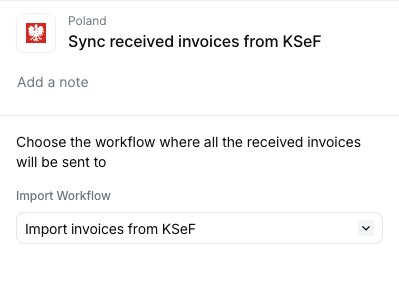
    This workflow syncs all received invoices for a party within a specific time range. It creates an import job for each invoice found, using the import workflow you configured in the previous step.

    Configure the **Sync received invoices from KSeF** step to reference the import workflow created in the previous step.

    <Frame>
      <img width="400" src="https://mintcdn.com/invopop/5xG_wGkekID7jeG3/assets/guides/pl-sync-config.png?fit=max&auto=format&n=5xG_wGkekID7jeG3&q=85&s=38b67787692f717d95bc4a5ad3be8164" alt="Configure the workflow that all invoices will be sent to" data-path="assets/guides/pl-sync-config.png" />
    </Frame>

    <Card iconType="duotone" title="KSeF sync received invoices workflow" icon="code-branch" href="https://console.invopop.com/redirect/workflows/new?template=pl-sync" horizontal>
      Add to my workspace →
    </Card>

    <Tabs>
      <Tab title="Workflow">
        <WorkflowDiagram workflow={plSyncWorkflow} />
      </Tab>

      <Tab title="Code">
        Copy and paste into a new [Empty Party workflow](https://console.invopop.com/redirect/workflows/new?template=empty-party) code view.

        ```json Example KSeF sync received invoices workflow theme={"system"}
        {
            "name": "KSeF sync received invoices",
            "description": "Sync received invoices from KSeF and dispatch import jobs",
            "schema": "org/party",
            "steps": [
                {
                    "id": "5bddfd40-0220-11f1-bd80-c7df39ccdf0b",
                    "name": "Sync received invoices from KSeF",
                    "provider": "gov-pl.sync"
                }
            ],
            "rescue": []
        }
        ```
      </Tab>
    </Tabs>
  </Step>

  <Step title="Configure the send & receive registration workflow">
    To receive invoices for a party, the party must be registered with the **send & receive** variant of the registration workflow. In addition to registering the party with KSeF, this variant subscribes the party to periodic invoice imports via the [Cron app](/apps/cron).

    <Card iconType="duotone" title="KSeF party registration workflow (receive)" icon="code-branch" href="https://console.invopop.com/redirect/workflows/new?template=pl-register-receive" horizontal>
      Add to my workspace →
    </Card>

    <Tabs>
      <Tab title="Workflow">
        <WorkflowDiagram workflow={plRegisterReceiveWorkflow} />
      </Tab>

      <Tab title="Code">
        Copy and paste into a new [Empty Party workflow](https://console.invopop.com/redirect/workflows/new?template=empty-party) code view.

        <Note>
          The template uses test mode by default (for sandbox). To use demo mode in sandbox, add `"config": {"environment": "demo"}` to the **Register supplier with KSeF** step. In Invopop production, the workflow automatically targets the KSeF production environment.
        </Note>

        ```json Example KSeF register supplier (receive) workflow theme={"system"}
        {
            "name": "KSeF register supplier (receive)",
            "description": "Register a supplier with KSeF for receiving e-invoices",
            "schema": "org/party",
            "steps": [
                {
                    "id": "f6ca2240-fb6b-11f0-b2f4-37a8eb8f9eb9",
                    "name": "Set state",
                    "provider": "silo.state",
                    "summary": "Set state to `processing`{.state .processing}",
                    "config": {
                        "state": "processing"
                    }
                },
                {
                    "id": "f7315970-fb74-11f0-8137-27e02839a7ca",
                    "name": "Register supplier with KSeF",
                    "provider": "gov-pl.register"
                },
                {
                    "id": "3166cb10-fdba-11f0-a562-870ebfef62f3",
                    "name": "Wait for KSeF certificate upload",
                    "provider": "gov-pl.wait.upload"
                },
                {
                    "id": "a1b2c3d0-fb75-11f0-b567-89abcdef0123",
                    "name": "Subscribe to periodic execution",
                    "provider": "cron.subscribe",
                    "summary": "Periodic KSeF sync"
                },
                {
                    "id": "f0b45d30-fb6b-11f0-b2f4-37a8eb8f9eb9",
                    "name": "Set state",
                    "provider": "silo.state",
                    "summary": "Set state to `registered`{.state .registered}",
                    "config": {
                        "state": "registered"
                    }
                }
            ],
            "rescue": [
                {
                    "id": "ebf99440-fb6b-11f0-b2f4-37a8eb8f9eb9",
                    "name": "Set state",
                    "provider": "silo.state",
                    "summary": "Set state to `error`{.state .error}",
                    "config": {
                        "state": "error"
                    }
                }
            ]
        }
        ```
      </Tab>
    </Tabs>
  </Step>

  <Step title="Configure the cron step to start syncing invoices to Invopop">
    After adding the send & receive workflow (regardless of how you created it), open the **Subscribe to periodic KSeF sync** step and configure the two fields below. This is what tells the [Cron app](/apps/cron) which workflow to run and how often.

    1. **Workflow** — select the **KSeF Sync Received Invoices** workflow you created earlier in this setup. The Cron app will trigger this workflow on each tick.
    2. **Interval** — choose how often KSeF should be checked for new invoices (for example, every hour or every day). Pick a frequency that matches how quickly you need received invoices to appear in Invopop.

    Once configured, the step should look like this:

    <Frame>
      <img width="500" src="https://mintcdn.com/invopop/pOmQD8W3zKXkCwsD/assets/guides/pl-config-cron.png?fit=max&auto=format&n=pOmQD8W3zKXkCwsD&q=85&s=a7522555034af5f2ef884625c7a092b3" alt="Configured Subscribe to periodic KSeF sync step showing the selected sync workflow and interval" data-path="assets/guides/pl-config-cron.png" />
    </Frame>
  </Step>
</Steps>

## Running

### Register a party for receiving

Register each party whose received invoices you want to import by running the **send & receive** registration workflow on their party entry. The registration steps — creating the party, running the workflow, and completing the certificate upload in demo or production — are identical to the ones described in the [supplier registration guide](/guides/pl-ksef-supplier#running); simply select the send & receive workflow instead of the send-only one.

<Info>
  Each party is subscribed to periodic imports during registration. To use a different interval for a specific party, adjust the **Subscribe to periodic KSeF sync** step settings in the registration workflow before running it.
</Info>

<Note>
  If a party was already registered with the send-only workflow, run the send & receive workflow on the same party entry to subscribe it to periodic imports.
</Note>

### Automatic import

Once parties are registered with the send & receive workflow, the [Cron app](/apps/cron) automatically triggers the sync workflow at the interval configured in the registration workflow's **Subscribe to periodic KSeF sync** step, following the process described in [How it works](#how-it-works). Imported invoices appear in the configured folder (typically "Invoices · Expenses") with a `Registered` state.

### Manual import

If you need to import invoices outside of the automatic cron schedule, you can manually trigger imports from the [Console](/guides/workflows#running-from-the-console) or via the API.

**Import a single invoice**

To import a specific invoice from KSeF, you need:

* **KSeF Number**: The unique invoice identifier (e.g., `1234567890-20260120-ABCD1234-EF`)
* **Supplier NIP**: The Polish Tax ID of the invoice issuer

<Tabs>
  <Tab title="Console">
    1. Navigate to **Workflows** and find your **KSeF Import Invoice** workflow
    2. Click **Run** from the workflow editor or the `...` menu in the workflow list (see [Running from the Console](/guides/workflows#running-from-the-console))
    3. Leave the document field empty — the import workflow will create a new silo entry automatically
    4. Fill in the **Arguments**:

    | Key           | Value                             |
    | ------------- | --------------------------------- |
    | `ksef-number` | `1234567890-20260120-ABCD1234-EF` |
    | `nip`         | `1234567890`                      |

    5. Click <kbd>Run workflow</kbd>
  </Tab>

  <Tab title="API">
    Use the [Create a Job endpoint](/api-ref/transform/jobs/create-a-job-post):

    ```bash theme={"system"}
    curl -X POST https://api.invopop.com/transform/v1/jobs \
      -H "Authorization: Bearer YOUR_API_TOKEN" \
      -H "Content-Type: application/json" \
      -d '{
        "workflow_id": "YOUR_IMPORT_WORKFLOW_ID",
        "args": {
          "ksef-number": "1234567890-20260120-ABCD1234-EF",
          "nip": "1234567890"
        }
      }'
    ```
  </Tab>
</Tabs>

The invoice will be downloaded from KSeF, converted to GOBL, and stored in your silo.

**Import multiple invoices by date range**

To import all invoices received within a specific time period, you need:

* The **party silo entry** for the supplier whose invoices you want to sync
* The **date range** (`from` and `upto`) to process

<Tabs>
  <Tab title="Console">
    1. Navigate to **Workflows** and find your **KSeF Sync Received Invoices** workflow
    2. Click **Run** from the workflow editor or the `...` menu in the workflow list
    3. In the **Select a document** field, search for and select the party (supplier) entry
    4. Fill in the **Arguments**:

    | Key    | Value                  |
    | ------ | ---------------------- |
    | `from` | `2026-01-01T00:00:00Z` |
    | `upto` | `2026-01-31T23:59:59Z` |

    5. Click <kbd>Run workflow</kbd>
  </Tab>

  <Tab title="API">
    Use the [Create a Job endpoint](/api-ref/transform/jobs/create-a-job-post) with your sync workflow:

    ```bash theme={"system"}
    curl -X POST https://api.invopop.com/transform/v1/jobs \
      -H "Authorization: Bearer YOUR_API_TOKEN" \
      -H "Content-Type: application/json" \
      -d '{
        "workflow_id": "YOUR_SYNC_WORKFLOW_ID",
        "silo_entry_id": "YOUR_PARTY_ENTRY_ID",
        "args": {
          "from": "2026-01-01T00:00:00Z",
          "upto": "2026-01-31T23:59:59Z"
        }
      }'
    ```
  </Tab>
</Tabs>

The sync workflow will query KSeF for all invoices received in that date range and create individual import jobs for each invoice found.

<Tip>
  Use single invoice import to bring in a specific invoice immediately after receiving notification from a supplier. Use date range sync to backfill invoices or to import historical invoices from before the cron subscription was active.
</Tip>

### Error handling and notifications

We strongly recommend adding notification steps to your workflows to alert you of import failures:

* **In the import workflow**: Add email or Slack notifications to the error handling section
* **In the sync workflow**: Add notifications for when the sync process encounters issues

This ensures you're immediately aware if invoices fail to import, allowing you to take corrective action.

<Tip>
  Common import issues include certificate expired or invalid, KSeF API temporarily unavailable, invoice format not supported by GOBL conversion, and network connectivity issues. Check your workflow error logs in the Console for detailed error messages.
</Tip>

## FAQ

<AccordionGroup>
  <Accordion title="How do I import received invoices from suppliers?">
    Invopop automatically imports received invoices through a polling service:

    1. **Configure polling interval** during party registration (hourly, daily, weekly, or monthly)
    2. **Set up the sync workflow** to query KSeF for new invoices
    3. **Configure the import workflow** to convert FA(3) XML to GOBL format
    4. **Link the workflows** in the Poland app configuration

    The system automatically checks KSeF at your chosen interval and imports any new invoices to your configured folder.

    **For manual import**, use the API to trigger import jobs with specific KSeF numbers or date ranges. See the [Manual import](/guides/pl-ksef-receiving#manual-import) section in the receiving invoices guide.
  </Accordion>

  <Accordion title="Can I import historical invoices or backfill missed invoices?">
    Yes. You can manually trigger a sync workflow to import invoices from a specific date range using the [Create a Job endpoint](/api-ref/transform/jobs/create-a-job-post).

    Pass the `from` and `upto` date parameters to sync all invoices received within that period:

    ```json theme={"system"}
    {
      "workflow_id": "YOUR_SYNC_WORKFLOW_ID",
      "entry_id": "YOUR_PARTY_ENTRY_ID",
      "args": {
        "from": "2026-01-01T00:00:00Z",
        "upto": "2026-01-31T23:59:59Z"
      }
    }
    ```

    This is useful for backfilling invoices after a polling outage or importing historical data before enabling automatic polling.
  </Accordion>

  <Accordion title="How do I know if my automatic invoice import is working?">
    Check these indicators:

    1. **Polling configuration**: Verify the polling interval is set in your party registration workflow configuration
    2. **App configuration**: Confirm the Poland app has your sync workflow configured
    3. **Recent imports**: Check the "Invoices · Expenses" folder for newly imported invoices
    4. **Job logs**: Review job logs in the Console for sync and import workflow executions
    5. **Error notifications**: Set up email or Slack notifications in your workflow error handling to alert you of failures

    <Tip>
      Test the import by manually triggering the sync workflow with a date range that includes known received invoices.
    </Tip>
  </Accordion>

  <Accordion title="What format do received KSeF invoices arrive in?">
    FA(3) XML conforming to the Ministry of Finance schema. Each invoice carries a unique KSeF reference (numer KSeF) plus the issuer's signature and a QR code linking to the public verification page.
  </Accordion>

  <Accordion title="How does Invopop convert received Polish invoices into GOBL?">
    Inbound FA(3) XMLs are parsed via [`gobl.ksef`](https://github.com/invopop/gobl.ksef). Tax rates, line items, and parties map onto GOBL fields; the original signed XML is preserved as a silo entry attachment.
  </Accordion>
</AccordionGroup>

More available in our [Poland FAQ](/faq/poland) section

***

<AccordionGroup>
  <Accordion title="🇵🇱 Invopop resources for Poland">
    |            |                                                                                                                                                                                                                                                      |
    | ---------- | ---------------------------------------------------------------------------------------------------------------------------------------------------------------------------------------------------------------------------------------------------- |
    | Compliance | <Icon icon="https://assets.invopop.com/flags/pl.svg" /> [Invoicing compliance in Poland](/compliance/poland)<br /> <Icon icon="timeline" /> [Compliance timeline](/timelines/poland)                                                                 |
    | Apps       | <Icon icon="https://assets.invopop.com/flags/pl.svg" /> [Poland](/apps/poland)                                                                                                                                                                       |
    | Guides     | <Icon icon="book" /> [Supplier registration](/guides/pl-ksef-supplier)<br /> <Icon icon="book" /> [Issuing invoices](/guides/pl-ksef)<br /> <Icon icon="book" /> [Receiving invoices](/guides/pl-ksef-receiving)                                     |
    | FAQ        | <Icon icon="square-question" /> [Poland FAQ](/faq/poland)                                                                                                                                                                                            |
    | GOBL       | <Icon icon="https://assets.invopop.com/icons/gobl.svg" />  [Poland Tax Regime](https://docs.gobl.org/regimes/pl)<br /> <Icon icon="https://assets.invopop.com/icons/gobl.svg" /> [Polish KSeF FA(3) Addon](https://docs.gobl.org/addons/pl-favat-v3) |
  </Accordion>
</AccordionGroup>

<Card title="Participate in our community" icon="forumbee" href="https://community.invopop.com" arrow="true" horizontal>
  Ask and answer questions about invoicing in Poland →
</Card>