> ## Documentation Index
> Fetch the complete documentation index at: https://docs.invopop.com/llms.txt
> Use this file to discover all available pages before exploring further.
# Related Documents Guide
> Configure linked documents using UUIDs.
## Introduction
In the Invopop Console, each document features a `Related` tab. When configured correctly, this tab shows other documents linked to the current one, such as all invoices associated with a supplier or the invoice referenced by a credit note.
The key to linking documents reliably is the UUID field. This optional field is generated by Invopop if left blank, but you can use your own internal identifiers if preferred.
## Use Case
This guide will follow the example of linking a supplier to its invoices.
Upload a supplier to Invopop. You can either use your own UUID or leave it blank and Invopop will generate it.
The supplier must be signed for the linked invoice to appear. Send the supplier to a "contacts" workflow with the `Sign envelope` step. For further information on workflows check the [docs](/guides/features/workflows).
When creating an invoice you want to link to a supplier, add the contact's UUID field to the invoice, just like you would with `name` or `address`. The invoice will then be linked to the supplier, and all invoices with that supplier will appear on its `Related` tab.
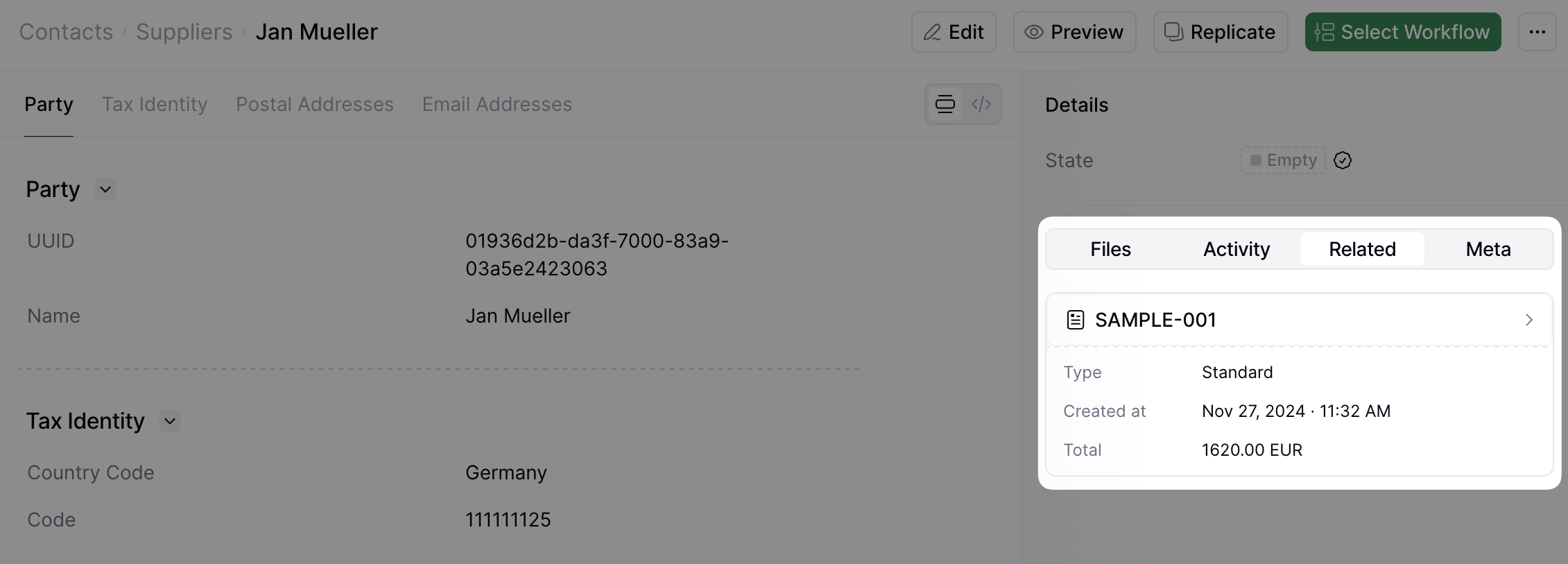 The related document search works in one direction. You will be able to see all invoices linked to a supplier in its `Related` tab, but not the supplier's link in an invoice.
## FAQ
Please contact the [Invopop support team](email:support@invopop.com) if you have any questions that are not listed here.
A UUID (Universally Unique Identifier) is a 128-bit identifier unique across space and time. In Invopop, UUIDs link documents reliably, ensuring each document has a unique reference.
No. If you don't provide a UUID, Invopop will generate one for you. You can use your own internal identifiers if preferred.
No. Once a document is created and signed with a UUID, that identifier becomes permanent and cannot be modified.
Since the UUID is optional, providing an invalid format or referencing a non-existent document will result in no link being created.
Ask and answer questions about related documents →
The related document search works in one direction. You will be able to see all invoices linked to a supplier in its `Related` tab, but not the supplier's link in an invoice.
## FAQ
Please contact the [Invopop support team](email:support@invopop.com) if you have any questions that are not listed here.
A UUID (Universally Unique Identifier) is a 128-bit identifier unique across space and time. In Invopop, UUIDs link documents reliably, ensuring each document has a unique reference.
No. If you don't provide a UUID, Invopop will generate one for you. You can use your own internal identifiers if preferred.
No. Once a document is created and signed with a UUID, that identifier becomes permanent and cannot be modified.
Since the UUID is optional, providing an invalid format or referencing a non-existent document will result in no link being created.
Ask and answer questions about related documents →