An application to send emails from your workflows, with or without attachments.
Introduction
This guide will show you how to set up the Email app and its associated workflow actions for emailing invoices or sending notifications.
Prerequisites
You can send emails from Company name <email@invopop.com> by simply connecting the Email app.If you wish to send emails from your own domain such as Company Name <name@yourdomain.com>, you will need one of the following:
An SMTP server which is authorized to send emails from your domain (Gmail, iCloud, Amazon SES)
In the case of SMTP delivery we strongly recommend using an app password or token if your service provider allows it. This is the best security practice because it allows you to revoke authorization at any time, even if you lose access to Invopop.
Setup
1
Connect the Email app.
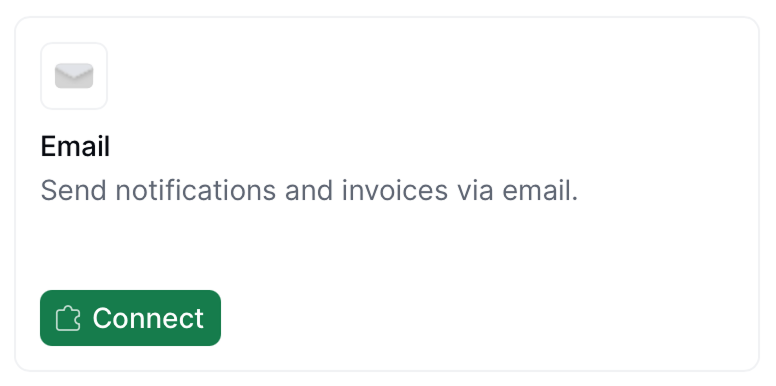
Head over to Configuration → Apps, and find Email from the list of apps to discover. Tap the Connect button to enable.
2
Add Senders
After connecting the Email app, click on Configure. You will find a pre-defined email address Invopop Email <email@invopop.com>. Editing this email address will allow you to customize the Sender name, allowing you to send emails with your company name Company Name <email@invopop.com>.You can add as many senders as you need by tapping on the Add button. Email providers other than Invopop will allow you to use your own domain name (after it’s configured with the email provider).
3
Set up your workflow
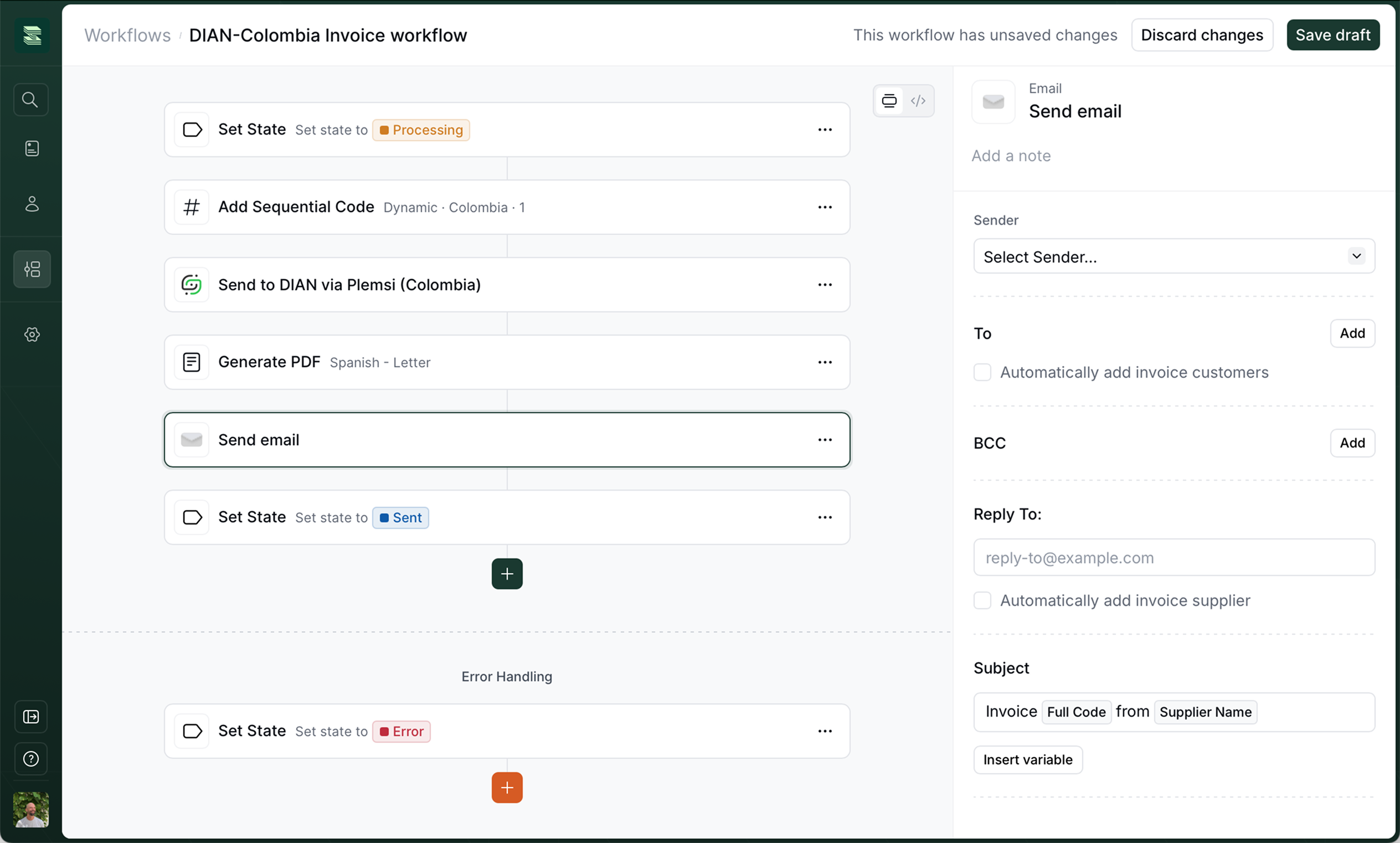
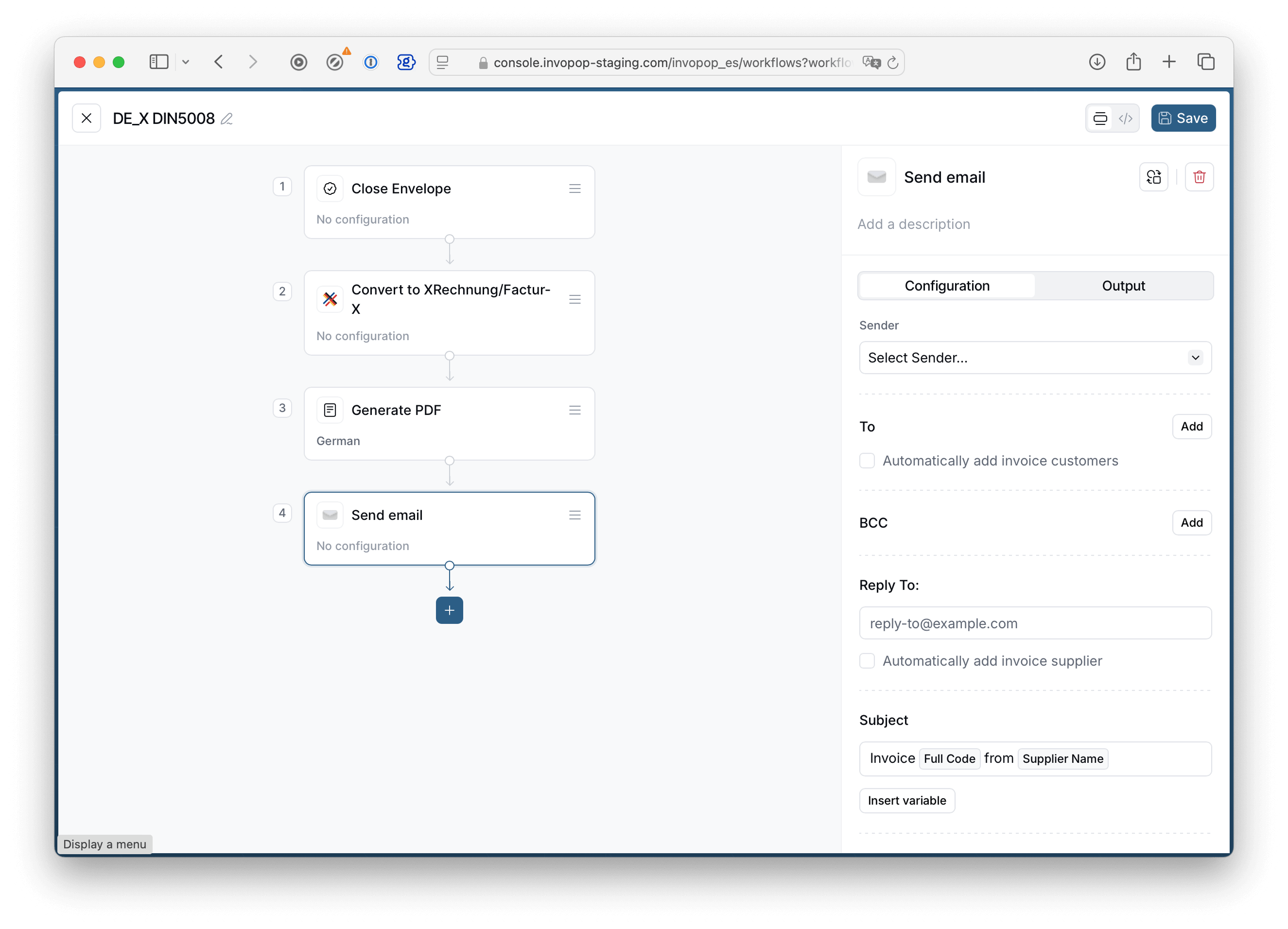
Whether you start from an existing or new workflow, make sure that you add the Send email step after you have issued an invoice via the corresponding tax authority and generated a PDF (if required). This will ensure the necessary files are attached, and that the invoice complies with local regulatory requirements.If you simply want to send a Notification via Email, this suggestion does not apply, as no files are attached.
Workflow actions
The Email app adds two items to your workflow action list:
Send email: this action will attach the files associated with a silo entry, and is mainly used for sending invoices to customers or other recipients.
Notify via Email: this action will not attach files, and is meant for sending messages such as notifications or failures.
Workflow step configuration
Sender
Here you will find Senders which were added in the Email app configuration. A sender can be thought of as a person or company name and email address.To
Check Automatically add invoice customers if you wish to send the invoice as an attachment to the customer. This is usually the case for B2C workflows. If you wish to send the email with attachments to a specific address, tap on the Add button and write an address in the email field.You can combine both options: any addresses you add manually are merged with the automatically detected customer or party emails, so all recipients receive the message.BCC
BCC stands for Blind Carbon Copy, and is used when you do not want the recipients in this field to appear in the message header. Other recipients won’t know that a copy was sent to these addresses. This is useful to send a copy of the invoice to yourself, for example.Reply To
The “Reply To” field requires a valid email address where recipients’ responses will be directed. This field determines where replies go, regardless of the sending address.Subject
The email subject field is a brief heading that summarizes your message’s purpose. This field allows you to use template variables in order to customize the subject for the recipient.
For maximum effectiveness, keep it clear and specific (e.g., “Invoice #12345 from Acme Inc.”). Many email clients display only the first 60-70 characters of a subject, so prioritize key information at the beginning.
Body
The email body textarea is where you compose your message’s main content. This field allows template variables and will preserve whitespace.Combine attachments into a single zip file
It’s possible that your workflow generates several files per invoice (sometimes an XML and a PDF file are required by legislation). This option allows you to combine and compress all files into a single .zip file.
Custom template variables with job args
In addition to the predefined variables available in the Insert variable menu, you can inject custom variables into your email templates using job args. This is particularly useful for dynamic content like payment links, conditional text, and other external data.
How it works
When using the API to run a workflow you pass an args data object with custom variables you want to inject into your email. You will then introduce the variable into the email’s subject or body with the following syntax: {{args.variable_name}}. If you need to provide a fallback in case the variable is not present, we recommend using the following syntax: {{ or args.value "Default value" }}.
Example: adding a payment link
Let’s say you want to send an email with a custom payment link. Here’s how to set it up:
1
Configure your email template
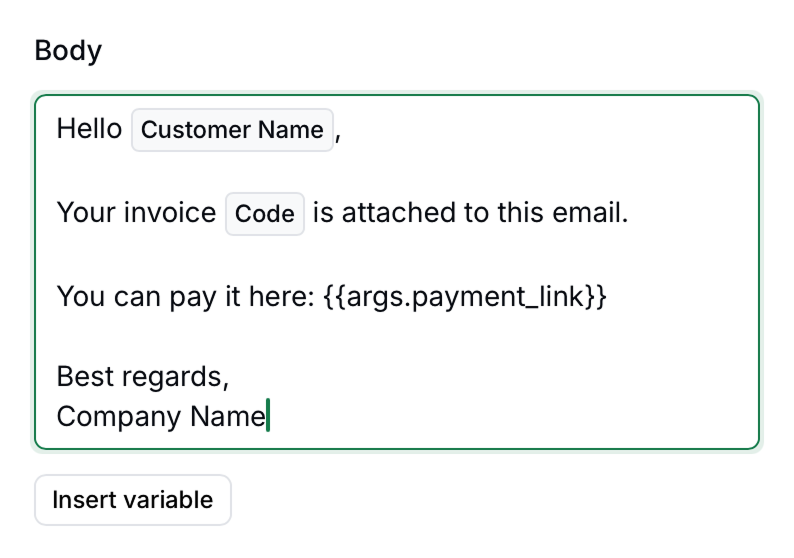
In the email body field you can use both UI variables (in this case Customer Name and Full Code) and custom variables {{args.payment_link}}.
Body field example with custom arguments
2
Execute the job with custom args
Arguments (args) are key-value pairs tailored to specific applications, in this case we are creating a payment_link which will be available to the Email App. Create the job via API with the proper payload:
The email recipient should receive an email with the following content:
Hello John Doe,Your invoice INV-2025-001 is attached to this email.You can pay it here: https://your-payment-link.comBest regards,Invopop
Key points
Use {{args.variable_name}} syntax in email templates for custom variables
Include the same variable names in the args object when executing the job via API
Custom variables work in both email body and subject fields
Variable names must match exactly between template and API payload
FAQ
How do I get errors emailed to me when a workflow fails?
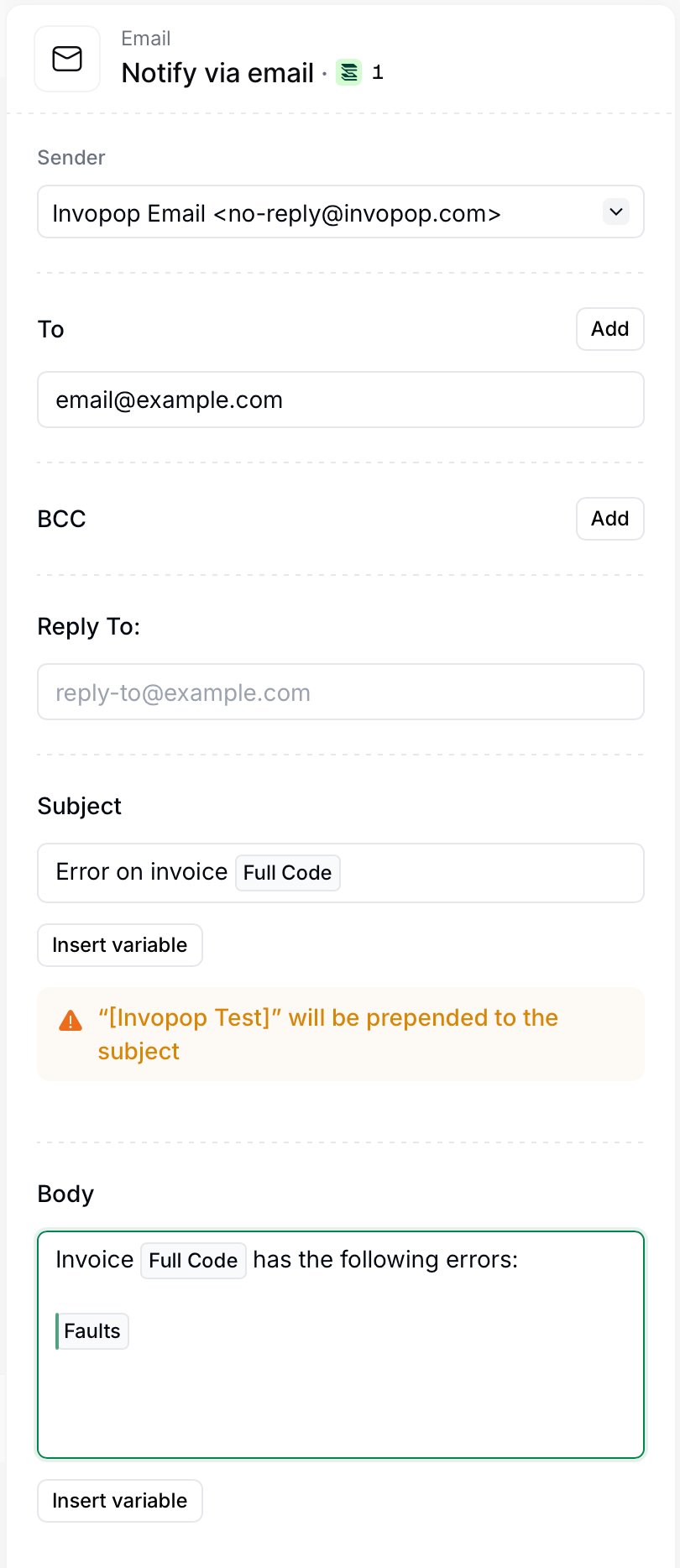
Notify via email configuration
Add a Notify via email step to the error handling area at the end of your workflow. The error handler only runs when something upstream fails, so the email is sent just for failed jobs. Alternatively, if you handle the exception, add it in the exception handling area nested in the step.Configure the step like this:
To — your own address (or a shared inbox / distribution list).
Subject — write a short label such as Error on invoice. You can use the Insert variable button to append the Full Code so you can identify which document failed.
Body — describe the problem, then use Insert variable to add the Full Code and the Faults variable. Faults expands into the list of errors that caused the job to fail, so you get the full reason without opening the console.
For example, a body of Invoice [Full Code] has the following errors: [Faults] produces a message naming the document and listing every error.Once saved, any job that fails will trigger this step and send you the error details automatically.
Is email in sandbox limited in any way?
We strive to make our sandbox workspaces as similar to our live workspaces as possible. However, in order to prevent abuse and email mistakes, the following differences should be observed in Sandbox:
Emailing customers is disabled in sandbox workspaces.
Emailing suppliers is disabled in sandbox workspaces.
Invoice PDFs will have a “Sample” watermark.
[Invopop Test] will be prepended to the subject.
How do I set up Gmail as my SMTP server
Follow the instructions in this support guide. Setting up an SMTP relay allows you more fine-grained control over your email needs and has the largest quota (up to 10,000 recipients per day); but can only be set up by an account administrator.Gmail’s SMTP server allows up to 2,000 emails per day. It can be set up by an end-user by creating an app password and using the set-up configuration listed in the Google support guide.
{"docsConfig":{"theme":"mint","$schema":"https://mintlify.com/docs.json","name":"Invopop","colors":{"primary":"#169958","light":"#169958","dark":"#103830"},"logo":{"light":"https://mintcdn.com/invopop/tvrHhZ01dWh1WgVy/assets/logos/light.svg?fit=max\u0026auto=format\u0026n=tvrHhZ01dWh1WgVy\u0026q=85\u0026s=acee80bf7ace42a69f7bc31d48bac07d","dark":"https://mintcdn.com/invopop/tvrHhZ01dWh1WgVy/assets/logos/dark.svg?fit=max\u0026auto=format\u0026n=tvrHhZ01dWh1WgVy\u0026q=85\u0026s=8682d855b2ae592f840a2e75835dd6a4"},"favicon":"https://mintcdn.com/invopop/RHaqrZ8_qKav21l4/favicon.png?fit=max\u0026auto=format\u0026n=RHaqrZ8_qKav21l4\u0026q=85\u0026s=40f5b8d569abe96aa51c7d89f608f971","api":{"mdx":{"auth":{"method":"bearer"},"server":"https://api.invopop.com"}},"navbar":{"links":[{"href":"https://www.invopop.com/contact","label":"Contact us"},{"href":"https://community.invopop.com","label":"Community"}]},"footer":{"socials":{"x":"https://x.com/goInvopop","linkedin":"https://www.linkedin.com/company/invopop","github":"https://github.com/invopop"}},"fonts":{"family":"Inter"},"styling":{"codeblocks":"system","latex":true},"integrations":{"plausible":{"domain":"docs.invopop.com"}},"contextual":{"options":["copy","chatgpt","claude","perplexity","mcp","cursor","vscode"],"display":"header"},"navigation":{"pages":[]}},"deployment":{"deploymentMetadataValue":{"subdomain":"invopop","hasAudioNarration":false,"actualSubdomain":"invopop","customDomains":["docs.invopop.com"],"gitSource":{"type":"github","owner":"invopop","repo":"docs.invopop.com","deployBranch":"main","contentDirectory":"","mountPath":"","label":""},"feedback":{"thumbs":true,"edits":true,"issues":false},"entitlements":{"AI_CHAT":{"status":"ENABLED"},"WEB_MCP":{"status":"ENABLED"},"NARRATION":{"status":"ENABLED"}},"buildId":"6af6dc84d091d1e549765cb3","clientVersion":"0.0.4143","searchFilterCounts":[{"language":"default","tag":"API Reference","count":93},{"language":"default","tag":"Apps","count":93},{"language":"default","tag":"Get Started","count":91},{"language":"default","tag":"Country compliance","count":86},{"language":"default","tag":"Guides","count":86},{"language":"default","tag":"Countries","count":60},{"language":"default","tag":"Europe","count":46},{"language":"default","tag":"Platform","count":39},{"language":"default","tag":"France","count":28},{"language":"default","tag":"Console","count":25}]},"assistantConfig":{},"basePath":"","hasChatPermissions":true,"hasWebMcpPermissions":true,"toggles":[{"name":"kill-isr","enabled":true,"variant":{"name":"disabled","enabled":false,"feature_enabled":true},"impressionData":false},{"name":"custom-rbac-roles","enabled":true,"variant":{"name":"disabled","enabled":false,"feature_enabled":true},"impressionData":false},{"name":"agent-mintlify-slack","enabled":true,"variant":{"name":"disabled","enabled":false,"feature_enabled":true},"impressionData":false},{"name":"agent-integrations-settings","enabled":true,"variant":{"name":"disabled","enabled":false,"feature_enabled":true},"impressionData":false},{"name":"rbac-expansion","enabled":true,"variant":{"name":"disabled","enabled":false,"feature_enabled":true},"impressionData":false},{"name":"automations-pr-grouping","enabled":true,"variant":{"name":"disabled","enabled":false,"feature_enabled":true},"impressionData":false},{"name":"custom-prefix","enabled":true,"variant":{"name":"disabled","enabled":false,"feature_enabled":true},"impressionData":false},{"name":"analytics-v7","enabled":true,"variant":{"name":"disabled","enabled":false,"feature_enabled":true},"impressionData":false},{"name":"user-flows-analytics","enabled":true,"variant":{"name":"disabled","enabled":false,"feature_enabled":true},"impressionData":false},{"name":"no-publish-flow","enabled":true,"variant":{"name":"disabled","enabled":false,"feature_enabled":true},"impressionData":false},{"name":"workos-onboarding","enabled":true,"variant":{"name":"disabled","enabled":false,"feature_enabled":true},"impressionData":false},{"name":"snapshot-serving-live","enabled":true,"variant":{"name":"disabled","enabled":false,"feature_enabled":true},"impressionData":false},{"name":"stripTemperatureMiddleware","enabled":true,"variant":{"name":"disabled","enabled":false,"feature_enabled":true},"impressionData":false},{"name":"support-platform-pylon-zendesk","enabled":true,"variant":{"name":"disabled","enabled":false,"feature_enabled":true},"impressionData":false},{"name":"snapshot-serving","enabled":true,"variant":{"name":"disabled","enabled":false,"feature_enabled":true},"impressionData":false},{"name":"instant-rollback","enabled":true,"variant":{"name":"disabled","enabled":false,"feature_enabled":true},"impressionData":false},{"name":"granular-notifications-server","enabled":true,"variant":{"name":"disabled","enabled":false,"feature_enabled":true},"impressionData":false},{"name":"granular-notifications","enabled":true,"variant":{"name":"disabled","enabled":false,"feature_enabled":true},"impressionData":false},{"name":"automations-fable","enabled":true,"variant":{"name":"disabled","enabled":false,"feature_enabled":true},"impressionData":false},{"name":"fixed-ai-action-pricing","enabled":true,"variant":{"name":"disabled","enabled":false,"feature_enabled":true},"impressionData":false},{"name":"automation-resolve-merge-conflict","enabled":true,"variant":{"name":"disabled","enabled":false,"feature_enabled":true},"impressionData":false},{"name":"scoped-publishing","enabled":true,"variant":{"name":"disabled","enabled":false,"feature_enabled":true},"impressionData":false},{"name":"mintql","enabled":true,"variant":{"name":"disabled","enabled":false,"feature_enabled":true},"impressionData":false},{"name":"page-level-analytics","enabled":true,"variant":{"name":"disabled","enabled":false,"feature_enabled":true},"impressionData":false},{"name":"editor-version-history-v2","enabled":true,"variant":{"name":"disabled","enabled":false,"feature_enabled":true},"impressionData":false},{"name":"billing-page-v2","enabled":true,"variant":{"name":"disabled","enabled":false,"feature_enabled":true},"impressionData":false},{"name":"full-page-search","enabled":true,"variant":{"name":"disabled","enabled":false,"feature_enabled":true},"impressionData":false},{"name":"workspace-projects","enabled":true,"variant":{"name":"disabled","enabled":false,"feature_enabled":true},"impressionData":false},{"name":"assistant-v5","enabled":true,"variant":{"name":"disabled","enabled":false,"feature_enabled":true},"impressionData":false},{"name":"fork-pr-previews","enabled":true,"variant":{"name":"disabled","enabled":false,"feature_enabled":true},"impressionData":false},{"name":"revalidation-jwt","enabled":true,"variant":{"name":"disabled","enabled":false,"feature_enabled":true},"impressionData":false},{"name":"workos-sso-scim","enabled":true,"variant":{"name":"disabled","enabled":false,"feature_enabled":true},"impressionData":false},{"name":"hobby-abuse-scan","enabled":true,"variant":{"name":"disabled","enabled":false,"feature_enabled":true},"impressionData":false},{"name":"dashboard-inbox","enabled":true,"variant":{"name":"disabled","enabled":false,"feature_enabled":true},"impressionData":false},{"name":"workos-signup","enabled":true,"variant":{"name":"disabled","enabled":false,"feature_enabled":true},"impressionData":false},{"name":"turbopuffer-dual-write","enabled":true,"variant":{"name":"disabled","enabled":false,"feature_enabled":true},"impressionData":false},{"name":"workos-enabled","enabled":true,"variant":{"name":"disabled","enabled":false,"feature_enabled":true},"impressionData":false},{"name":"approve-review-flow","enabled":true,"variant":{"name":"disabled","enabled":false,"feature_enabled":true},"impressionData":false},{"name":"editor-metadata","enabled":true,"variant":{"name":"disabled","enabled":false,"feature_enabled":true},"impressionData":false},{"name":"sso-setup-deadline-banner","enabled":true,"variant":{"name":"disabled","enabled":false,"feature_enabled":true},"impressionData":false},{"name":"turbopuffer-serve","enabled":true,"variant":{"name":"disabled","enabled":false,"feature_enabled":true},"impressionData":false},{"name":"live-agents","enabled":true,"variant":{"name":"disabled","enabled":false,"feature_enabled":true},"impressionData":false},{"name":"llms-txt-v2","enabled":true,"variant":{"name":"disabled","enabled":false,"feature_enabled":true},"impressionData":false}],"googleFontsInlined":false},"customCss":[{"filePath":"styles.css","content":"[data-component-part=card-icon]{min-width:24px}.card .icon{margin:0;position:relative;top:-1px;width:20px!important;height:20px!important}.pop-count{position:absolute;top:16px;right:16px;font-size:12px;font-weight:bold}.pop-count .icon{margin-right:3px}table tr:has(th:empty){display:none}.update table td,.tab-container table td{min-width:auto}.tab-container table td{white-space:nowrap}.dark\\:bg-primary-light:is(.dark *){background:transparent}h4 .icon,h4 .icon+a{opacity:0.7;font-size:14px;border-bottom:none}h4 .icon{margin-left:1em}h4 .icon+a:hover{opacity:1}h4+div>.table td{min-width:auto}button:has(svg[style*=\"transporter-empty\"]),a:has(svg[style*=\"transporter-empty\"]){opacity:0.4}button:has(img[src*=\"coming-soon\"]),a:has(img[src*=\"coming-soon\"]){opacity:0.4}div:has(>svg[style*=\"transporter-empty\"]),svg[style*=\"transporter-empty\"]{position:absolute;display:none}td .icon{margin-top:12px!important;margin-bottom:12px!important;margin-right:8px!important}.country{margin:-2em 0;background:#f6f6f6;padding:4px}h2:has(+.country){margin-bottom:2em}div[data-component-part=\"accordion-content\"]{overflow-x:hidden!important}.grow+[data-table-wrapper=true]{padding:0}.grow+[data-table-wrapper=true]>div.table{margin:0 0 0 1rem}a[href=\"https://www.mintlify.com?utm_campaign=poweredBy\u0026utm_medium=referral\u0026utm_source=undefined\"]{display:none}img[src*=\"apps/tables/icon.svg\"]:is(.dark *){content:url(\"https://assets.invopop.com/apps/tables/icon-white.svg\")}"}],"page":{"pagePath":"guides/email","slug":"/guides/email","pageMetadata":{"title":"Email guide","sidebarTitle":"Email","icon":"https://assets.invopop.com/apps/email/icon.svg","description":"An application to send emails from your workflows, with or without attachments.","href":"/guides/email"},"description":{"compiledSource":"\"use strict\";\nconst {jsx: _jsx} = arguments[0];\nconst {useMDXComponents: _provideComponents} = arguments[0];\nfunction _createMdxContent(props) {\n const _components = {\n p: \"p\",\n ..._provideComponents(),\n ...props.components\n };\n return _jsx(_components.p, {\n children: \"An application to send emails from your workflows, with or without attachments.\"\n });\n}\nfunction MDXContent(props = {}) {\n const {wrapper: MDXLayout} = {\n ..._provideComponents(),\n ...props.components\n };\n return MDXLayout ? _jsx(MDXLayout, {\n ...props,\n children: _jsx(_createMdxContent, {\n ...props\n })\n }) : _createMdxContent(props);\n}\nreturn {\n default: MDXContent\n};\n","frontmatter":{},"scope":{}},"pageType":"default","mdx":{"mdxSource":{"compiledSource":"\"use strict\";const{Fragment:_Fragment,jsx:_jsx,jsxs:_jsxs}=arguments[0];const{useMDXComponents:_provideComponents}=arguments[0];function _createMdxContent(props){const _components={a:`a`,code:`code`,em:`em`,hr:`hr`,li:`li`,ol:`ol`,p:`p`,pre:`pre`,span:`span`,strong:`strong`,ul:`ul`,..._provideComponents(),...props.components},{Accordion,AccordionGroup,Card,CodeBlock,Frame,Heading,Info,OptimizedImage,Step,Steps,Tip,Warning}=_components;if(!Accordion)_missingMdxReference(`Accordion`,true);if(!AccordionGroup)_missingMdxReference(`AccordionGroup`,true);if(!Card)_missingMdxReference(`Card`,true);if(!CodeBlock)_missingMdxReference(`CodeBlock`,true);if(!Frame)_missingMdxReference(`Frame`,true);if(!Heading)_missingMdxReference(`Heading`,true);if(!Info)_missingMdxReference(`Info`,true);if(!OptimizedImage)_missingMdxReference(`OptimizedImage`,true);if(!Step)_missingMdxReference(`Step`,true);if(!Steps)_missingMdxReference(`Steps`,true);if(!Tip)_missingMdxReference(`Tip`,true);if(!Warning)_missingMdxReference(`Warning`,true);return _jsxs(_Fragment,{children:[_jsx(Heading,{level:`2`,id:`introduction`,children:`Introduction`}),`\n`,_jsx(_components.p,{children:`This guide will show you how to set up the Email app and its associated workflow actions for emailing invoices or sending notifications.`}),`\n`,_jsx(Heading,{level:`2`,id:`prerequisites`,children:`Prerequisites`}),`\n`,_jsxs(_components.p,{children:[`You can send emails from `,_jsx(_components.code,{children:`Company name \u003cemail@invopop.com>`}),` by simply connecting the Email app.`]}),`\n`,_jsxs(_components.p,{children:[`If you wish to send emails from your own domain such as `,_jsx(_components.code,{children:`Company Name \u003cname@yourdomain.com>`}),`, you will need one of the following:`]}),`\n`,_jsxs(_components.ul,{children:[`\n`,_jsxs(_components.li,{children:[`A `,_jsx(_components.a,{href:`https://resend.com`,children:`Resend`}),` account with a `,_jsx(_components.a,{href:`https://resend.com/docs/dashboard/domains/introduction#verifying-a-domain`,children:`verified domain`})]}),`\n`,_jsxs(_components.li,{children:[`A `,_jsx(_components.a,{href:`https://sendgrid.com`,children:`SendGrid`}),` account with an `,_jsx(_components.a,{href:`https://www.twilio.com/docs/sendgrid/ui/account-and-settings/how-to-set-up-domain-authentication`,children:`authenticated domain`})]}),`\n`,_jsxs(_components.li,{children:[`An SMTP server which is authorized to send emails from your domain (`,_jsx(_components.a,{href:`https://support.google.com/a/answer/176600?hl=en`,children:`Gmail`}),`, `,_jsx(_components.a,{href:`https://support.apple.com/en-us/102525`,children:`iCloud`}),`, `,_jsx(_components.a,{href:`https://docs.aws.amazon.com/ses/latest/dg/send-email-smtp.html`,children:`Amazon SES`}),`)`]}),`\n`]}),`\n`,_jsxs(Warning,{children:[`In the case of SMTP delivery we strongly recommend using an `,_jsx(_components.em,{children:`app password`}),` or `,_jsx(_components.em,{children:`token`}),` if your service provider allows it. This is the best security practice because it allows you to revoke authorization at any time, even if you lose access to Invopop.`]}),`\n`,_jsx(Heading,{level:`2`,id:`setup`,children:`Setup`}),`\n`,_jsxs(Steps,{children:[_jsxs(Step,{title:`Connect the Email app.`,children:[_jsxs(_components.p,{children:[`Head over to `,_jsx(_components.code,{children:`Configuration → Apps`}),`, and find `,_jsx(_components.code,{children:`Email`}),` from the list of apps to discover. Tap the `,_jsx(_components.strong,{children:`Connect`}),` button to enable.`]}),_jsx(Frame,{children:_jsx(OptimizedImage,{width:`388`,src:`https://mintcdn.com/invopop/fWniCD0icTwRKXxR/assets/guides/email-connect.png?fit=max\u0026auto=format\u0026n=fWniCD0icTwRKXxR\u0026q=85\u0026s=50729c9e9bb83051aa9f6caef755e41c`,alt:`Email app connected`,\"data-og-width\":`776`,\"data-og-height\":`386`,\"data-path\":`assets/guides/email-connect.png`,\"data-optimize\":`true`,\"data-opv\":`3`,srcset:`https://mintcdn.com/invopop/fWniCD0icTwRKXxR/assets/guides/email-connect.png?w=280\u0026fit=max\u0026auto=format\u0026n=fWniCD0icTwRKXxR\u0026q=85\u0026s=df5d0a4391667249677971fe6584c957 280w, https://mintcdn.com/invopop/fWniCD0icTwRKXxR/assets/guides/email-connect.png?w=560\u0026fit=max\u0026auto=format\u0026n=fWniCD0icTwRKXxR\u0026q=85\u0026s=b9085f7e010487778a0baa6e1557a56e 560w, https://mintcdn.com/invopop/fWniCD0icTwRKXxR/assets/guides/email-connect.png?w=840\u0026fit=max\u0026auto=format\u0026n=fWniCD0icTwRKXxR\u0026q=85\u0026s=8f79fe872b02d1c0ee812a9ec3947542 840w, https://mintcdn.com/invopop/fWniCD0icTwRKXxR/assets/guides/email-connect.png?w=1100\u0026fit=max\u0026auto=format\u0026n=fWniCD0icTwRKXxR\u0026q=85\u0026s=30f2f25704f67ec5d91dda2b668010a8 1100w, https://mintcdn.com/invopop/fWniCD0icTwRKXxR/assets/guides/email-connect.png?w=1650\u0026fit=max\u0026auto=format\u0026n=fWniCD0icTwRKXxR\u0026q=85\u0026s=d2b8274493ba489b930439e0c958ca77 1650w, https://mintcdn.com/invopop/fWniCD0icTwRKXxR/assets/guides/email-connect.png?w=2500\u0026fit=max\u0026auto=format\u0026n=fWniCD0icTwRKXxR\u0026q=85\u0026s=4f355ac48562a1d24122054ccc18dfa7 2500w`})})]}),_jsxs(Step,{title:`Add Senders`,children:[_jsxs(_components.p,{children:[`After connecting the Email app, click on `,_jsx(_components.code,{children:`Configure`}),`. You will find a pre-defined email address `,_jsx(_components.code,{children:`Invopop Email \u003cemail@invopop.com>`}),`. Editing this email address will allow you to customize the Sender name, allowing you to send emails with your company name `,_jsx(_components.code,{children:`Company Name \u003cemail@invopop.com>`}),`.`]}),_jsxs(_components.p,{children:[`You can add as many senders as you need by tapping on the `,_jsx(_components.code,{children:`Add`}),` button. Email providers other than Invopop will allow you to use your own domain name (after it’s configured with the email provider).`]})]}),_jsxs(Step,{title:`Set up your workflow`,children:[_jsxs(_components.p,{children:[`Whether you start from an existing or new workflow, make sure that you add the `,_jsx(_components.code,{children:`Send email`}),` step after you have issued an invoice via the corresponding tax authority and generated a PDF (if required). This will ensure the necessary files are attached, and that the invoice complies with local regulatory requirements.`]}),_jsx(OptimizedImage,{src:`https://assets.invopop.com/docs/email/email-screen2.png`,width:`100%`,alt:`Workflow with email actions`}),_jsxs(_components.p,{children:[`If you simply want to send a `,_jsx(_components.code,{children:`Notification via Email`}),`, this suggestion does not apply, as no files are attached.`]})]})]}),`\n`,_jsx(Heading,{level:`2`,id:`workflow-actions`,children:`Workflow actions`}),`\n`,_jsx(_components.p,{children:`The Email app adds two items to your workflow action list:`}),`\n`,_jsxs(_components.ol,{children:[`\n`,_jsxs(_components.li,{children:[_jsx(_components.strong,{children:`Send email`}),`: this action will attach the files associated with a silo entry, and is mainly used for sending invoices to customers or other recipients.`]}),`\n`,_jsxs(_components.li,{children:[_jsx(_components.strong,{children:`Notify via Email`}),`: this action will `,_jsx(_components.em,{children:`not`}),` attach files, and is meant for sending messages such as notifications or failures.`]}),`\n`]}),`\n`,_jsx(Heading,{level:`2`,id:`workflow-step-configuration`,children:`Workflow step configuration`}),`\n`,_jsx(Frame,{children:_jsx(OptimizedImage,{width:`100%`,src:`https://mintcdn.com/invopop/fWniCD0icTwRKXxR/assets/guides/email-configuration.png?fit=max\u0026auto=format\u0026n=fWniCD0icTwRKXxR\u0026q=85\u0026s=f965dd2d9f369838f87d9092c9557be8`,alt:`Email step configuration`,\"data-og-width\":`2528`,\"data-og-height\":`1522`,\"data-path\":`assets/guides/email-configuration.png`,\"data-optimize\":`true`,\"data-opv\":`3`,srcset:`https://mintcdn.com/invopop/fWniCD0icTwRKXxR/assets/guides/email-configuration.png?w=280\u0026fit=max\u0026auto=format\u0026n=fWniCD0icTwRKXxR\u0026q=85\u0026s=473c3a466e5789fa3340cddb498e317d 280w, https://mintcdn.com/invopop/fWniCD0icTwRKXxR/assets/guides/email-configuration.png?w=560\u0026fit=max\u0026auto=format\u0026n=fWniCD0icTwRKXxR\u0026q=85\u0026s=597e0635e7ef8283ebcbae4a01ccac27 560w, https://mintcdn.com/invopop/fWniCD0icTwRKXxR/assets/guides/email-configuration.png?w=840\u0026fit=max\u0026auto=format\u0026n=fWniCD0icTwRKXxR\u0026q=85\u0026s=78d29260919eab36dee5aaa43b35e06d 840w, https://mintcdn.com/invopop/fWniCD0icTwRKXxR/assets/guides/email-configuration.png?w=1100\u0026fit=max\u0026auto=format\u0026n=fWniCD0icTwRKXxR\u0026q=85\u0026s=d9279dc777da2eff166e4324b6128ba2 1100w, https://mintcdn.com/invopop/fWniCD0icTwRKXxR/assets/guides/email-configuration.png?w=1650\u0026fit=max\u0026auto=format\u0026n=fWniCD0icTwRKXxR\u0026q=85\u0026s=22b90fc73161eaf1a5289ff9dc4b993f 1650w, https://mintcdn.com/invopop/fWniCD0icTwRKXxR/assets/guides/email-configuration.png?w=2500\u0026fit=max\u0026auto=format\u0026n=fWniCD0icTwRKXxR\u0026q=85\u0026s=32b6e9e4c3e239707fa475070826a3f3 2500w`})}),`\n`,_jsxs(_components.p,{children:[_jsx(_components.strong,{children:`Sender`}),_jsx(`br`,{}),`\nHere you will find Senders which were added in the Email app configuration. A sender can be thought of as a person or company name and email address.`]}),`\n`,_jsxs(_components.p,{children:[_jsx(_components.strong,{children:`To`}),_jsx(`br`,{}),`\nCheck `,_jsx(_components.code,{children:`Automatically add invoice customers`}),` if you wish to send the invoice as an attachment to the customer. This is usually the case for B2C workflows. If you wish to send the email with attachments to a specific address, tap on the `,_jsx(_components.code,{children:`Add`}),` button and write an address in the email field.`]}),`\n`,_jsx(_components.p,{children:`You can combine both options: any addresses you add manually are merged with the automatically detected customer or party emails, so all recipients receive the message.`}),`\n`,_jsxs(_components.p,{children:[_jsx(_components.strong,{children:`BCC`}),_jsx(`br`,{}),`\nBCC stands for `,_jsx(_components.em,{children:`Blind Carbon Copy`}),`, and is used when you do not want the recipients in this field to appear in the message header. Other recipients won’t know that a copy was sent to these addresses. This is useful to send a copy of the invoice to yourself, for example.`]}),`\n`,_jsxs(_components.p,{children:[_jsx(_components.strong,{children:`Reply To`}),_jsx(`br`,{}),`\nThe “Reply To” field requires a valid email address where recipients’ responses will be directed. This field determines where replies go, regardless of the sending address.`]}),`\n`,_jsxs(_components.p,{children:[_jsx(_components.strong,{children:`Subject`}),_jsx(`br`,{}),`\nThe email subject field is a brief heading that summarizes your message’s purpose. This field allows you to use template variables in order to customize the subject for the recipient.`]}),`\n`,_jsx(Tip,{children:_jsx(_components.p,{children:`For maximum effectiveness, keep it clear and specific (e.g., “Invoice #12345 from Acme Inc.”). Many email clients display only the first 60-70 characters of a subject, so prioritize key information at the beginning.`})}),`\n`,_jsxs(_components.p,{children:[_jsx(_components.strong,{children:`Body`}),_jsx(`br`,{}),`\nThe email body textarea is where you compose your message’s main content. This field allows template variables and will preserve whitespace.`]}),`\n`,_jsxs(_components.p,{children:[_jsx(_components.strong,{children:`Combine attachments into a single zip file`}),_jsx(`br`,{}),`\nIt’s possible that your workflow generates several files per invoice (sometimes an XML and a PDF file are required by legislation). This option allows you to combine and compress all files into a single `,_jsx(_components.code,{children:`.zip`}),` file.`]}),`\n`,_jsx(_components.hr,{}),`\n`,_jsx(Heading,{level:`2`,id:`custom-template-variables-with-job-args`,children:`Custom template variables with job args`}),`\n`,_jsxs(_components.p,{children:[`In addition to the predefined variables available in the `,_jsx(_components.strong,{children:`Insert variable`}),` menu, you can inject custom variables into your email templates using job args. This is particularly useful for dynamic content like payment links, conditional text, and other external data.`]}),`\n`,_jsx(Heading,{level:`3`,id:`how-it-works`,children:`How it works`}),`\n`,_jsxs(_components.p,{children:[`When `,_jsx(_components.a,{href:`/api-ref/transform/jobs/create-a-job-put`,children:`using the API to run a workflow`}),` you pass an `,_jsx(_components.code,{children:`args`}),` data object with custom variables you want to inject into your email. You will then introduce the variable into the email’s subject or body with the following syntax: `,_jsx(_components.code,{children:`{{args.variable_name}}`}),`. If you need to provide a fallback in case the variable is not present, we recommend using the following syntax: `,_jsx(_components.code,{children:`{{ or args.value \"Default value\" }}`}),`.`]}),`\n`,_jsx(Heading,{level:`3`,id:`example-adding-a-payment-link`,children:`Example: adding a payment link`}),`\n`,_jsx(_components.p,{children:`Let’s say you want to send an email with a custom payment link. Here’s how to set it up:`}),`\n`,_jsxs(Steps,{children:[_jsxs(Step,{title:`Configure your email template`,children:[_jsxs(_components.p,{children:[`In the email body field you can use both UI variables (in this case `,_jsx(_components.code,{children:`Customer Name`}),` and `,_jsx(_components.code,{children:`Full Code`}),`) and custom variables `,_jsx(_components.code,{children:`{{args.payment_link}}`}),`.`]}),_jsx(Frame,{caption:`Body field example with custom arguments`,children:_jsx(OptimizedImage,{width:`395`,src:`https://mintcdn.com/invopop/fWniCD0icTwRKXxR/assets/guides/email-body.png?fit=max\u0026auto=format\u0026n=fWniCD0icTwRKXxR\u0026q=85\u0026s=5e4b3af234b1b7f0c9c2f70b593645be`,alt:`Email step configuration`,\"data-og-width\":`794`,\"data-og-height\":`558`,\"data-path\":`assets/guides/email-body.png`,\"data-optimize\":`true`,\"data-opv\":`3`,srcset:`https://mintcdn.com/invopop/fWniCD0icTwRKXxR/assets/guides/email-body.png?w=280\u0026fit=max\u0026auto=format\u0026n=fWniCD0icTwRKXxR\u0026q=85\u0026s=0473bd74efd8be54c44f0d0e332f3262 280w, https://mintcdn.com/invopop/fWniCD0icTwRKXxR/assets/guides/email-body.png?w=560\u0026fit=max\u0026auto=format\u0026n=fWniCD0icTwRKXxR\u0026q=85\u0026s=dfbcb1c4f846713759b1d1d6f9b60562 560w, https://mintcdn.com/invopop/fWniCD0icTwRKXxR/assets/guides/email-body.png?w=840\u0026fit=max\u0026auto=format\u0026n=fWniCD0icTwRKXxR\u0026q=85\u0026s=d63ceea70ddccd45f2ff36d85724898c 840w, https://mintcdn.com/invopop/fWniCD0icTwRKXxR/assets/guides/email-body.png?w=1100\u0026fit=max\u0026auto=format\u0026n=fWniCD0icTwRKXxR\u0026q=85\u0026s=5991810148b8276e10f3d595fec3840f 1100w, https://mintcdn.com/invopop/fWniCD0icTwRKXxR/assets/guides/email-body.png?w=1650\u0026fit=max\u0026auto=format\u0026n=fWniCD0icTwRKXxR\u0026q=85\u0026s=c019213a42b5fd3f4f9f82a3d4528915 1650w, https://mintcdn.com/invopop/fWniCD0icTwRKXxR/assets/guides/email-body.png?w=2500\u0026fit=max\u0026auto=format\u0026n=fWniCD0icTwRKXxR\u0026q=85\u0026s=902b1b1f272a891a6a1478f34a476f1a 2500w`})})]}),_jsxs(Step,{title:`Execute the job with custom args`,children:[_jsxs(_components.p,{children:[`Arguments (`,_jsx(_components.code,{children:`args`}),`) are key-value pairs tailored to specific applications, in this case we are creating a `,_jsx(_components.code,{children:`payment_link`}),` which will be available to the Email App. `,_jsx(_components.a,{href:`/api-ref/transform/jobs/create-a-job-put`,children:`Create the job via API`}),` with the proper payload:`]}),_jsx(CodeBlock,{filename:``,numberOfLines:`8`,language:`json`,children:_jsx(_components.pre,{className:`shiki shiki-themes github-light-default dark-plus`,style:{backgroundColor:`#ffffff`,\"--shiki-dark-bg\":`#0B0C0E`,color:`#1f2328`,\"--shiki-dark\":`#D4D4D4`},language:`json`,children:_jsxs(_components.code,{language:`json`,numberOfLines:`8`,children:[_jsx(_components.span,{className:`line`,children:_jsx(_components.span,{style:{color:`#1F2328`,\"--shiki-dark\":`#D4D4D4`},children:` {`})}),`\n`,_jsxs(_components.span,{className:`line`,children:[_jsx(_components.span,{style:{color:`#116329`,\"--shiki-dark\":`#9CDCFE`},children:` \"content_type\"`}),_jsx(_components.span,{style:{color:`#1F2328`,\"--shiki-dark\":`#D4D4D4`},children:`: `}),_jsx(_components.span,{style:{color:`#0A3069`,\"--shiki-dark\":`#CE9178`},children:`\"application/json\"`}),_jsx(_components.span,{style:{color:`#1F2328`,\"--shiki-dark\":`#D4D4D4`},children:`,`})]}),`\n`,_jsxs(_components.span,{className:`line`,children:[_jsx(_components.span,{style:{color:`#116329`,\"--shiki-dark\":`#9CDCFE`},children:` \"silo_entry_id\"`}),_jsx(_components.span,{style:{color:`#1F2328`,\"--shiki-dark\":`#D4D4D4`},children:`: `}),_jsx(_components.span,{style:{color:`#0A3069`,\"--shiki-dark\":`#CE9178`},children:`\"...\"`}),_jsx(_components.span,{style:{color:`#1F2328`,\"--shiki-dark\":`#D4D4D4`},children:`,`})]}),`\n`,_jsxs(_components.span,{className:`line`,children:[_jsx(_components.span,{style:{color:`#116329`,\"--shiki-dark\":`#9CDCFE`},children:` \"workflow_id\"`}),_jsx(_components.span,{style:{color:`#1F2328`,\"--shiki-dark\":`#D4D4D4`},children:`: `}),_jsx(_components.span,{style:{color:`#0A3069`,\"--shiki-dark\":`#CE9178`},children:`\"...\"`}),_jsx(_components.span,{style:{color:`#1F2328`,\"--shiki-dark\":`#D4D4D4`},children:`,`})]}),`\n`,_jsxs(_components.span,{className:`line`,children:[_jsx(_components.span,{style:{color:`#116329`,\"--shiki-dark\":`#9CDCFE`},children:` \"args\"`}),_jsx(_components.span,{style:{color:`#1F2328`,\"--shiki-dark\":`#D4D4D4`},children:`: {`})]}),`\n`,_jsxs(_components.span,{className:`line`,children:[_jsx(_components.span,{style:{color:`#116329`,\"--shiki-dark\":`#9CDCFE`},children:` \"payment_link\"`}),_jsx(_components.span,{style:{color:`#1F2328`,\"--shiki-dark\":`#D4D4D4`},children:`: `}),_jsx(_components.span,{style:{color:`#0A3069`,\"--shiki-dark\":`#CE9178`},children:`\"https://your-payment-link.com\"`})]}),`\n`,_jsx(_components.span,{className:`line`,children:_jsx(_components.span,{style:{color:`#1F2328`,\"--shiki-dark\":`#D4D4D4`},children:` }`})}),`\n`,_jsx(_components.span,{className:`line`,children:_jsx(_components.span,{style:{color:`#1F2328`,\"--shiki-dark\":`#D4D4D4`},children:` }`})}),`\n`]})})})]}),_jsxs(Step,{title:`Verify result`,children:[_jsx(_components.p,{children:`The email recipient should receive an email with the following content:`}),_jsx(CodeBlock,{numberOfLines:`9`,language:`text`,children:_jsx(_components.pre,{className:`shiki shiki-themes github-light-default dark-plus`,style:{backgroundColor:`#ffffff`,\"--shiki-dark-bg\":`#0B0C0E`,color:`#1f2328`,\"--shiki-dark\":`#D4D4D4`},language:`text`,children:_jsxs(_components.code,{language:`text`,numberOfLines:`9`,children:[_jsx(_components.span,{className:`line`,children:_jsx(_components.span,{children:`Hello John Doe,`})}),`\n`,_jsx(_components.span,{className:`line`,children:_jsx(_components.span,{})}),`\n`,_jsx(_components.span,{className:`line`,children:_jsx(_components.span,{children:`Your invoice INV-2025-001 is attached to this email.`})}),`\n`,_jsx(_components.span,{className:`line`,children:_jsx(_components.span,{})}),`\n`,_jsx(_components.span,{className:`line`,children:_jsx(_components.span,{children:`You can pay it here: https://your-payment-link.com`})}),`\n`,_jsx(_components.span,{className:`line`,children:_jsx(_components.span,{})}),`\n`,_jsx(_components.span,{className:`line`,children:_jsx(_components.span,{children:`Best regards,`})}),`\n`,_jsx(_components.span,{className:`line`,children:_jsx(_components.span,{children:`Invopop`})}),`\n`,_jsx(_components.span,{className:`line`,children:_jsx(_components.span,{})})]})})})]})]}),`\n`,_jsxs(Info,{children:[_jsx(_components.p,{children:_jsx(_components.strong,{children:`Key points`})}),_jsxs(_components.ul,{children:[`\n`,_jsxs(_components.li,{children:[`Use `,_jsx(_components.code,{children:`{{args.variable_name}}`}),` syntax in email templates for custom variables`]}),`\n`,_jsxs(_components.li,{children:[`Include the same variable names in the `,_jsx(_components.code,{children:`args`}),` object when executing the job via API`]}),`\n`,_jsx(_components.li,{children:`Custom variables work in both email body and subject fields`}),`\n`,_jsx(_components.li,{children:`Variable names must match exactly between template and API payload`}),`\n`]})]}),`\n`,_jsx(_components.p,{children:_jsx(_components.strong,{children:`FAQ`})}),`\n`,_jsxs(AccordionGroup,{children:[_jsxs(Accordion,{title:`How do I get errors emailed to me when a workflow fails?`,id:`how-do-i-get-errors-emailed-to-me-when-a-workflow-fails`,children:[_jsx(Frame,{caption:`Notify via email configuration`,children:_jsx(OptimizedImage,{width:`395`,src:`https://mintcdn.com/invopop/32KaFA1_vOohhMdV/assets/guides/email-faults.png?fit=max\u0026auto=format\u0026n=32KaFA1_vOohhMdV\u0026q=85\u0026s=b3b632ffae89917921f28c1641befaaa`,alt:`Email faults`,\"data-og-width\":`810`,\"data-og-height\":`1868`,\"data-path\":`assets/guides/email-faults.png`,\"data-optimize\":`true`,\"data-opv\":`3`,srcset:`https://mintcdn.com/invopop/32KaFA1_vOohhMdV/assets/guides/email-faults.png?w=280\u0026fit=max\u0026auto=format\u0026n=32KaFA1_vOohhMdV\u0026q=85\u0026s=4843ead39cf61b7b81db64cdfeef9d99 280w, https://mintcdn.com/invopop/32KaFA1_vOohhMdV/assets/guides/email-faults.png?w=560\u0026fit=max\u0026auto=format\u0026n=32KaFA1_vOohhMdV\u0026q=85\u0026s=2c84d02abd67623ee6bfd47507f1d17d 560w, https://mintcdn.com/invopop/32KaFA1_vOohhMdV/assets/guides/email-faults.png?w=840\u0026fit=max\u0026auto=format\u0026n=32KaFA1_vOohhMdV\u0026q=85\u0026s=fa88df83cc78d8cb8c137aa1dd43fb48 840w, https://mintcdn.com/invopop/32KaFA1_vOohhMdV/assets/guides/email-faults.png?w=1100\u0026fit=max\u0026auto=format\u0026n=32KaFA1_vOohhMdV\u0026q=85\u0026s=0067548281b073b1c24e06608c1c8089 1100w, https://mintcdn.com/invopop/32KaFA1_vOohhMdV/assets/guides/email-faults.png?w=1650\u0026fit=max\u0026auto=format\u0026n=32KaFA1_vOohhMdV\u0026q=85\u0026s=c5876ae1360f83bc4e95896caf230630 1650w, https://mintcdn.com/invopop/32KaFA1_vOohhMdV/assets/guides/email-faults.png?w=2500\u0026fit=max\u0026auto=format\u0026n=32KaFA1_vOohhMdV\u0026q=85\u0026s=b29bf2b7b85f4c541fc1948243245387 2500w`})}),_jsxs(_components.p,{children:[`Add a `,_jsx(_components.strong,{children:`Notify via email`}),` step to the error handling area at the end of your workflow. The error handler only runs when something upstream fails, so the email is sent just for failed jobs. Alternatively, if you handle the exception, add it in the exception handling area nested in the step.`]}),_jsx(_components.p,{children:`Configure the step like this:`}),_jsxs(_components.ul,{children:[`\n`,_jsxs(_components.li,{children:[_jsx(_components.strong,{children:`To`}),` — your own address (or a shared inbox / distribution list).`]}),`\n`,_jsxs(_components.li,{children:[_jsx(_components.strong,{children:`Subject`}),` — write a short label such as `,_jsx(_components.code,{children:`Error on invoice`}),`. You can use the `,_jsx(`kbd`,{children:`Insert variable`}),` button to append the `,_jsx(_components.strong,{children:`Full Code`}),` so you can identify which document failed.`]}),`\n`,_jsxs(_components.li,{children:[_jsx(_components.strong,{children:`Body`}),` — describe the problem, then use `,_jsx(`kbd`,{children:`Insert variable`}),` to add the `,_jsx(_components.strong,{children:`Full Code`}),` and the `,_jsx(_components.strong,{children:`Faults`}),` variable. `,_jsx(_components.code,{children:`Faults`}),` expands into the list of errors that caused the job to fail, so you get the full reason without opening the console.`]}),`\n`]}),_jsxs(_components.p,{children:[`For example, a body of `,_jsx(_components.code,{children:`Invoice [Full Code] has the following errors: [Faults]`}),` produces a message naming the document and listing every error.`]}),_jsx(_components.p,{children:`Once saved, any job that fails will trigger this step and send you the error details automatically.`})]}),_jsxs(Accordion,{title:`Is email in sandbox limited in any way?`,id:`is-email-in-sandbox-limited-in-any-way`,children:[_jsx(_components.p,{children:`We strive to make our sandbox workspaces as similar to our live workspaces as possible. However, in order to prevent abuse and email mistakes, the following differences should be observed in Sandbox:`}),_jsxs(_components.ul,{children:[`\n`,_jsx(_components.li,{children:`Emailing customers is disabled in sandbox workspaces.`}),`\n`,_jsx(_components.li,{children:`Emailing suppliers is disabled in sandbox workspaces.`}),`\n`,_jsx(_components.li,{children:`Invoice PDFs will have a “Sample” watermark.`}),`\n`,_jsxs(_components.li,{children:[_jsx(_components.code,{children:`[Invopop Test]`}),` will be prepended to the subject.`]}),`\n`]})]}),_jsxs(Accordion,{title:`How do I set up Gmail as my SMTP server`,id:`how-do-i-set-up-gmail-as-my-smtp-server`,children:[_jsxs(_components.p,{children:[`Follow `,_jsx(_components.a,{href:`https://support.google.com/a/answer/176600?hl=en`,children:`the instructions in this support guide`}),`. Setting up an SMTP relay allows you more fine-grained control over your email needs and has the largest quota (up to 10,000 recipients per day); but can only be set up by an account administrator.`]}),_jsxs(_components.p,{children:[`Gmail’s SMTP server allows up to 2,000 emails per day. It can be set up by an end-user by creating an `,_jsx(_components.a,{href:`https://support.google.com/mail/answer/185833`,children:`app password`}),` and using the set-up configuration listed in the Google support guide.`]})]}),_jsx(Accordion,{title:`How do I set up iCloud Mail`,id:`how-do-i-set-up-icloud-mail`,children:_jsxs(_components.p,{children:[`Follow the instructions found in `,_jsx(_components.a,{href:`https://support.apple.com/en-us/102525`,children:`iCloud Mail server settings for other email client apps`}),`.`]})}),_jsx(Accordion,{title:`How do I set up Microsoft 365`,id:`how-do-i-set-up-microsoft-365`,children:_jsxs(_components.p,{children:[`Follow the instructions found in `,_jsx(_components.a,{href:`https://learn.microsoft.com/en-us/exchange/mail-flow-best-practices/how-to-set-up-a-multifunction-device-or-application-to-send-email-using-microsoft-365-or-office-365`,children:`How to set up a multifunction device or application to send emails using Microsoft 365 or Office 365`})]})}),_jsx(Accordion,{title:`How do I set up Amazon SES`,id:`how-do-i-set-up-amazon-ses`,children:_jsxs(_components.p,{children:[`Follow the instructions found in `,_jsx(_components.a,{href:`https://docs.aws.amazon.com/ses/latest/dg/send-email-smtp.html`,children:`Using the Amazon SES SMTP interface to send email`})]})}),_jsxs(Accordion,{title:`My custom variable displays as \u003cno value>`,id:`my-custom-variable-displays-as-no-value`,children:[_jsxs(_components.p,{children:[`This means the job’s `,_jsx(_components.code,{children:`args`}),` key/value pair was not set. Ensure that you pass a value, even if it’s empty:`]}),_jsx(CodeBlock,{filename:``,numberOfLines:`8`,language:`json`,children:_jsx(_components.pre,{className:`shiki shiki-themes github-light-default dark-plus`,style:{backgroundColor:`#ffffff`,\"--shiki-dark-bg\":`#0B0C0E`,color:`#1f2328`,\"--shiki-dark\":`#D4D4D4`},language:`json`,children:_jsxs(_components.code,{language:`json`,numberOfLines:`8`,children:[_jsx(_components.span,{className:`line`,children:_jsx(_components.span,{style:{color:`#1F2328`,\"--shiki-dark\":`#D4D4D4`},children:` {`})}),`\n`,_jsxs(_components.span,{className:`line`,children:[_jsx(_components.span,{style:{color:`#116329`,\"--shiki-dark\":`#9CDCFE`},children:` \"content_type\"`}),_jsx(_components.span,{style:{color:`#1F2328`,\"--shiki-dark\":`#D4D4D4`},children:`: `}),_jsx(_components.span,{style:{color:`#0A3069`,\"--shiki-dark\":`#CE9178`},children:`\"application/json\"`}),_jsx(_components.span,{style:{color:`#1F2328`,\"--shiki-dark\":`#D4D4D4`},children:`,`})]}),`\n`,_jsxs(_components.span,{className:`line`,children:[_jsx(_components.span,{style:{color:`#116329`,\"--shiki-dark\":`#9CDCFE`},children:` \"silo_entry_id\"`}),_jsx(_components.span,{style:{color:`#1F2328`,\"--shiki-dark\":`#D4D4D4`},children:`: `}),_jsx(_components.span,{style:{color:`#0A3069`,\"--shiki-dark\":`#CE9178`},children:`\"...\"`}),_jsx(_components.span,{style:{color:`#1F2328`,\"--shiki-dark\":`#D4D4D4`},children:`,`})]}),`\n`,_jsxs(_components.span,{className:`line`,children:[_jsx(_components.span,{style:{color:`#116329`,\"--shiki-dark\":`#9CDCFE`},children:` \"workflow_id\"`}),_jsx(_components.span,{style:{color:`#1F2328`,\"--shiki-dark\":`#D4D4D4`},children:`: `}),_jsx(_components.span,{style:{color:`#0A3069`,\"--shiki-dark\":`#CE9178`},children:`\"...\"`}),_jsx(_components.span,{style:{color:`#1F2328`,\"--shiki-dark\":`#D4D4D4`},children:`,`})]}),`\n`,_jsxs(_components.span,{className:`line`,children:[_jsx(_components.span,{style:{color:`#116329`,\"--shiki-dark\":`#9CDCFE`},children:` \"args\"`}),_jsx(_components.span,{style:{color:`#1F2328`,\"--shiki-dark\":`#D4D4D4`},children:`: {`})]}),`\n`,_jsxs(_components.span,{className:`line`,children:[_jsx(_components.span,{style:{color:`#116329`,\"--shiki-dark\":`#9CDCFE`},children:` \"payment_link\"`}),_jsx(_components.span,{style:{color:`#1F2328`,\"--shiki-dark\":`#D4D4D4`},children:`: `}),_jsx(_components.span,{style:{color:`#0A3069`,\"--shiki-dark\":`#CE9178`},children:`\"\"`})]}),`\n`,_jsx(_components.span,{className:`line`,children:_jsx(_components.span,{style:{color:`#1F2328`,\"--shiki-dark\":`#D4D4D4`},children:` }`})}),`\n`,_jsx(_components.span,{className:`line`,children:_jsx(_components.span,{style:{color:`#1F2328`,\"--shiki-dark\":`#D4D4D4`},children:` }`})}),`\n`]})})}),_jsxs(_components.p,{children:[`Alternatively, you can handle undefined `,_jsx(_components.code,{children:`args`}),` by using a fallback:`]}),_jsx(CodeBlock,{numberOfLines:`2`,language:`text`,children:_jsx(_components.pre,{className:`shiki shiki-themes github-light-default dark-plus`,style:{backgroundColor:`#ffffff`,\"--shiki-dark-bg\":`#0B0C0E`,color:`#1f2328`,\"--shiki-dark\":`#D4D4D4`},language:`text`,children:_jsxs(_components.code,{language:`text`,numberOfLines:`2`,children:[_jsx(_components.span,{className:`line`,children:_jsx(_components.span,{children:`{{or args.variable_name \"Default value\"}}`})}),`\n`,_jsx(_components.span,{className:`line`,children:_jsx(_components.span,{})})]})})})]})]}),`\n`,_jsx(Card,{title:`Participate in our community`,icon:`forumbee`,href:`https://community.invopop.com`,arrow:`true`,horizontal:true,children:_jsx(_components.p,{children:`Ask and answer questions about email integration →`})})]})}function MDXContent(props={}){const{wrapper:MDXLayout}={..._provideComponents(),...props.components};return MDXLayout?_jsx(MDXLayout,{...props,children:_jsx(_createMdxContent,{...props})}):_createMdxContent(props)}return{default:MDXContent};function _missingMdxReference(id,component){throw new Error(`Expected `+(component?`component`:`object`)+\" `\"+id+\"` to be defined: you likely forgot to import, pass, or provide it.\")}","frontmatter":{},"scope":{"codeStyling":"system","config":{},"pageMetadata":{"title":"Email guide","sidebarTitle":"Email","icon":"https://assets.invopop.com/apps/email/icon.svg","description":"An application to send emails from your workflows, with or without attachments.","href":"/guides/email"}}},"mdxSourceWithNoJs":null},"mdxExtracts":{"tableOfContents":[{"title":"Introduction","slug":"introduction","depth":2,"children":[]},{"title":"Prerequisites","slug":"prerequisites","depth":2,"children":[]},{"title":"Setup","slug":"setup","depth":2,"children":[]},{"title":"Workflow actions","slug":"workflow-actions","depth":2,"children":[]},{"title":"Workflow step configuration","slug":"workflow-step-configuration","depth":2,"children":[]},{"title":"Custom template variables with job args","slug":"custom-template-variables-with-job-args","depth":2,"children":[{"title":"How it works","slug":"how-it-works","depth":3,"children":[]},{"title":"Example: adding a payment link","slug":"example-adding-a-payment-link","depth":3,"children":[]}]}],"codeExamples":{}},"jsLinks":[],"subdomain":"invopop","siteName":"Invopop","title":"Email guide - Invopop","navMaps":{"firstHrefInVersion":{},"firstHrefInLanguage":{}},"lastModified":"2026-07-22T09:11:57.148Z","originalFileLocation":"guides/email.mdx"},"headHtml":"\u003cscript data-mint-head>(function(){var d=document.documentElement,p=null;if(!p){try{p=localStorage.getItem(\"isDarkMode\")}catch(e){}if(p==='true')p='dark';else if(p==='false')p='light';if(p!=='light'\u0026\u0026p!=='dark'\u0026\u0026p!=='system')p=\"system\"}var r=p==='system'?(matchMedia(\"(prefers-color-scheme: dark)\").matches?'dark':'light'):p;d.classList.remove(r==='dark'?'light':'dark');d.classList.add(r);d.setAttribute(\"data-theme-preference\",p)})();\u003c/script>\u003cmeta data-mint-head name=\"description\" content=\"An application to send emails from your workflows, with or without attachments.\">\u003cmeta data-mint-head name=\"application-name\" content=\"Invopop\">\u003cmeta data-mint-head name=\"generator\" content=\"Mintlify\">\u003clink data-mint-head rel=\"icon\" type=\"image/png\" sizes=\"192x192\" href=\"/mintlify-assets/_mintlify/favicons/invopop/HVc7roIt8SKteIfU/_generated/favicon/android-chrome-192x192.png\" media=\"(prefers-color-scheme: light)\">\u003clink data-mint-head rel=\"apple-touch-icon\" type=\"image/png\" sizes=\"180x180\" href=\"/mintlify-assets/_mintlify/favicons/invopop/HVc7roIt8SKteIfU/_generated/favicon/apple-touch-icon.png\">\u003clink data-mint-head rel=\"icon\" type=\"image/png\" sizes=\"16x16\" href=\"/mintlify-assets/_mintlify/favicons/invopop/HVc7roIt8SKteIfU/_generated/favicon/favicon-16x16.png\" media=\"(prefers-color-scheme: light)\">\u003clink data-mint-head rel=\"icon\" type=\"image/png\" sizes=\"32x32\" href=\"/mintlify-assets/_mintlify/favicons/invopop/HVc7roIt8SKteIfU/_generated/favicon/favicon-32x32.png\" media=\"(prefers-color-scheme: light)\">\u003clink data-mint-head rel=\"shortcut icon\" type=\"image/x-icon\" href=\"/mintlify-assets/_mintlify/favicons/invopop/HVc7roIt8SKteIfU/_generated/favicon/favicon.ico\" media=\"(prefers-color-scheme: light)\">\u003clink data-mint-head rel=\"icon\" type=\"image/png\" sizes=\"192x192\" href=\"/mintlify-assets/_mintlify/favicons/invopop/HVc7roIt8SKteIfU/_generated/favicon-dark/android-chrome-192x192.png\" media=\"(prefers-color-scheme: dark)\">\u003clink data-mint-head rel=\"icon\" type=\"image/png\" sizes=\"16x16\" href=\"/mintlify-assets/_mintlify/favicons/invopop/HVc7roIt8SKteIfU/_generated/favicon-dark/favicon-16x16.png\" media=\"(prefers-color-scheme: dark)\">\u003clink data-mint-head rel=\"icon\" type=\"image/png\" sizes=\"32x32\" href=\"/mintlify-assets/_mintlify/favicons/invopop/HVc7roIt8SKteIfU/_generated/favicon-dark/favicon-32x32.png\" media=\"(prefers-color-scheme: dark)\">\u003clink data-mint-head rel=\"shortcut icon\" type=\"image/x-icon\" href=\"/mintlify-assets/_mintlify/favicons/invopop/HVc7roIt8SKteIfU/_generated/favicon-dark/favicon.ico\" media=\"(prefers-color-scheme: dark)\">\u003cmeta data-mint-head property=\"og:title\" content=\"Email guide - Invopop\">\u003cmeta data-mint-head property=\"og:description\" content=\"An application to send emails from your workflows, with or without attachments.\">\u003cmeta data-mint-head property=\"og:site_name\" content=\"Invopop\">\u003cmeta data-mint-head property=\"og:url\" content=\"https://docs.invopop.com/guides/email\">\u003cmeta data-mint-head property=\"og:type\" content=\"website\">\u003cmeta data-mint-head property=\"og:image\" content=\"https://invopop.mintlify.site/_mintlify/api/og/v2?division=Apps\u0026amp;title=Email+guide\u0026amp;description=An+application+to+send+emails+from+your+workflows%2C+with+or+without+attachments.\u0026amp;theme=dac54da033d40b1e92880c2c\u0026amp;signature=bf3142babdbae649d3311fdfca3e0cc686995aa36cfde4036623673fa2c49060\">\u003cmeta data-mint-head property=\"og:image:width\" content=\"1200\">\u003cmeta data-mint-head property=\"og:image:height\" content=\"630\">\u003cmeta data-mint-head name=\"twitter:card\" content=\"summary_large_image\">\u003cmeta data-mint-head name=\"twitter:title\" content=\"Email guide - Invopop\">\u003cmeta data-mint-head name=\"twitter:description\" content=\"An application to send emails from your workflows, with or without attachments.\">\u003cmeta data-mint-head name=\"twitter:image\" content=\"https://invopop.mintlify.site/_mintlify/api/og/v2?division=Apps\u0026amp;title=Email+guide\u0026amp;description=An+application+to+send+emails+from+your+workflows%2C+with+or+without+attachments.\u0026amp;theme=dac54da033d40b1e92880c2c\u0026amp;signature=bf3142babdbae649d3311fdfca3e0cc686995aa36cfde4036623673fa2c49060\">\u003cmeta data-mint-head name=\"twitter:image:width\" content=\"1200\">\u003cmeta data-mint-head name=\"twitter:image:height\" content=\"630\">\u003cmeta data-mint-head name=\"msapplication-config\" content=\"/mintlify-assets/_mintlify/favicons/invopop/HVc7roIt8SKteIfU/_generated/favicon/browserconfig.xml\">\u003cmeta data-mint-head name=\"apple-mobile-web-app-title\" content=\"Invopop\">\u003cmeta data-mint-head name=\"msapplication-TileColor\" content=\"#169958\">\u003clink data-mint-head rel=\"canonical\" href=\"https://docs.invopop.com/guides/email\">\u003clink data-mint-head rel=\"alternate\" type=\"application/xml\" href=\"/sitemap.xml\">\u003clink data-mint-head rel=\"alternate\" type=\"text/markdown\" href=\"/guides/email.md\">\u003cscript data-mint-head type=\"application/ld+json\">{\"@context\":\"https://schema.org\",\"@graph\":[{\"@type\":\"Organization\",\"@id\":\"https://docs.invopop.com/#organization\",\"name\":\"Invopop\",\"url\":\"https://docs.invopop.com\",\"logo\":{\"@type\":\"ImageObject\",\"url\":\"https://mintcdn.com/invopop/tvrHhZ01dWh1WgVy/assets/logos/light.svg?fit=max\u0026auto=format\u0026n=tvrHhZ01dWh1WgVy\u0026q=85\u0026s=acee80bf7ace42a69f7bc31d48bac07d\"}},{\"@type\":\"WebSite\",\"@id\":\"https://docs.invopop.com#website\",\"name\":\"Invopop\",\"url\":\"https://docs.invopop.com\",\"publisher\":{\"@id\":\"https://docs.invopop.com/#organization\"}},{\"@type\":\"WebPage\",\"@id\":\"https://docs.invopop.com/guides/email#webpage\",\"url\":\"https://docs.invopop.com/guides/email\",\"name\":\"Email guide\",\"description\":\"An application to send emails from your workflows, with or without attachments.\",\"dateModified\":\"2026-07-22T09:11:57.148Z\",\"isPartOf\":{\"@id\":\"https://docs.invopop.com#website\"},\"breadcrumb\":{\"@id\":\"https://docs.invopop.com/guides/email#breadcrumb\"}},{\"@type\":\"BreadcrumbList\",\"@id\":\"https://docs.invopop.com/guides/email#breadcrumb\",\"itemListElement\":[{\"@type\":\"ListItem\",\"position\":1,\"name\":\"Apps\",\"item\":\"https://docs.invopop.com/guides/connect\"},{\"@type\":\"ListItem\",\"position\":2,\"name\":\"Email guide\",\"item\":\"https://docs.invopop.com/guides/email\"}]},{\"@type\":[\"Article\",\"TechArticle\"],\"@id\":\"https://docs.invopop.com/guides/email#article\",\"headline\":\"Email guide\",\"name\":\"Email guide\",\"description\":\"An application to send emails from your workflows, with or without attachments.\",\"url\":\"https://docs.invopop.com/guides/email\",\"mainEntityOfPage\":{\"@id\":\"https://docs.invopop.com/guides/email#webpage\"},\"dateModified\":\"2026-07-22T09:11:57.148Z\",\"publisher\":{\"@id\":\"https://docs.invopop.com/#organization\"},\"isPartOf\":{\"@id\":\"https://docs.invopop.com#website\"}}]}\u003c/script>\u003cscript data-mint-head type=\"application/ld+json\">{\"@context\":\"https://schema.org\",\"@type\":\"WebSite\",\"name\":\"Invopop\",\"publisher\":{\"@type\":\"Organization\",\"name\":\"Invopop\"},\"provider\":{\"@type\":\"Organization\",\"name\":\"Mintlify\",\"url\":\"https://mintlify.com\"}}\u003c/script>","agentPointerHref":"/guides/email.md","siteName":"Invopop","nav":{"global":null,"tabs":[{"tab":"Get Started","icon":"compass","pages":[{"title":"Get Started","href":""}]},{"tab":"Platform","icon":"sidebar","pages":[{"title":"Platform","href":"/console"}]},{"tab":"Guides","icon":"map","pages":[{"title":"Guides","sidebarTitle":"Overview","href":"/guides"},{"group":"Networks","pages":[{"title":"Peppol guide","sidebarTitle":"Peppol","icon":"https://assets.invopop.com/apps/peppol/icon.svg","href":"/guides/peppol"}]},{"group":"Countries","pages":[{"group":"Argentina","icon":"https://assets.invopop.com/flags/ar.svg","pages":[{"title":"ARCA supplier onboarding","sidebarTitle":"Supplier registration","href":"/guides/ar-arca-suppliers"},{"title":"ARCA invoices","sidebarTitle":"Issuing invoices","href":"/guides/ar-arca-invoices"}]},{"title":"Belgium Peppol guide","sidebarTitle":"Belgium","icon":"https://assets.invopop.com/flags/be.svg","href":"/guides/be-peppol"},{"group":"Brazil","icon":"https://assets.invopop.com/flags/br.svg","pages":[{"title":"DF-e supplier registration guide","sidebarTitle":"Supplier registration","href":"/guides/br-dfe-supplier"},{"title":"DF-e issuing invoices guide","sidebarTitle":"Issuing invoices","href":"/guides/br-dfe"}]},{"group":"Colombia","icon":"https://assets.invopop.com/flags/co.svg","pages":[{"title":"Supplier registration in Colombia","sidebarTitle":"Supplier registration","href":"/guides/co-dian-registration"},{"title":"Invoicing in Colombia","sidebarTitle":"Issuing invoices","href":"/guides/co-dian-invoicing"}]},{"group":"Denmark","icon":"https://assets.invopop.com/flags/dk.svg","pages":[{"title":"NemHandel supplier registration guide","sidebarTitle":"Supplier registration","href":"/guides/dk-nemhandel-supplier"},{"title":"NemHandel issuing invoices guide","sidebarTitle":"Issuing invoices","href":"/guides/dk-nemhandel"},{"title":"NemHandel receiving invoices guide","sidebarTitle":"Receiving invoices","href":"/guides/dk-nemhandel-receiving"}]},{"group":"Finland","icon":"https://assets.invopop.com/flags/fi.svg","pages":[{"title":"Finvoice supplier registration guide","sidebarTitle":"Supplier registration","href":"/guides/fi-finvoice-supplier"},{"title":"Finvoice issuing invoices guide","sidebarTitle":"Issuing invoices","href":"/guides/fi-finvoice"},{"title":"Finvoice receiving invoices guide","sidebarTitle":"Receiving invoices","href":"/guides/fi-finvoice-receiving"}]},{"group":"Germany","icon":"https://assets.invopop.com/flags/de.svg","pages":[{"title":"XRechnung \u0026 ZUGFeRD guide","sidebarTitle":"XRechnung \u0026 ZUGFeRD","href":"/guides/de-ubl"}]},{"group":"France","icon":"https://assets.invopop.com/flags/fr.svg","pages":[{"group":"Plateforme Agréée (PA)","pages":[{"title":"Plateforme Agréée (PA) guide","sidebarTitle":"Overview","href":"/guides/fr-pa"},{"title":"SIREN registration in France","sidebarTitle":"Registration","href":"/guides/fr-pa-registration"},{"title":"Moving parties between Plateformes Agréées","sidebarTitle":"Migrations","href":"/guides/fr-pa-migrations"},{"title":"Invoicing in France","sidebarTitle":"Invoicing","href":"/guides/fr-pa-invoicing"},{"title":"Invoice lifecycle status in France","sidebarTitle":"Status","href":"/guides/fr-pa-status"},{"title":"Reporting on France PA","sidebarTitle":"Reporting","href":"/guides/fr-pa-reporting"},{"title":"Public sector invoicing in France","sidebarTitle":"Public sector","href":"/guides/fr-pa-b2g"},{"title":"Lookup in the French directory","sidebarTitle":"Directory lookup","href":"/guides/fr-lookup"}]},{"group":"Chorus Pro","pages":[{"title":"Chorus Pro supplier registration guide","sidebarTitle":"Supplier registration","href":"/guides/fr-chorus-pro-supplier"},{"title":"Chorus Pro issuing invoices guide","sidebarTitle":"Issuing invoices","href":"/guides/fr-chorus-pro"}]}]},{"group":"Greece","icon":"https://assets.invopop.com/flags/gr.svg","pages":[{"title":"myDATA supplier registration guide","sidebarTitle":"Supplier registration","href":"/guides/gr-iapr-supplier"},{"title":"myDATA issuing invoices guide","sidebarTitle":"Issuing invoices","href":"/guides/gr-iapr"}]},{"group":"Italy","icon":"https://assets.invopop.com/flags/it.svg","pages":[{"group":"SDI","pages":[{"title":"Italy issuing invoices guide","sidebarTitle":"Issuing invoices","href":"/guides/it-sdi-invoicing"},{"title":"Invoice lifecycle status in Italy","sidebarTitle":"Status","href":"/guides/it-sdi-status"},{"title":"Italy receiving invoices guide","sidebarTitle":"Receiving invoices","href":"/guides/it-sdi-reception"},{"title":"Italy archiving guide","sidebarTitle":"Archiving","href":"/guides/it-sdi-archiving"}]},{"group":"SDI Italy (legacy)","pages":[{"title":"SDI sending invoices guide","sidebarTitle":"Issuing invoices","href":"/guides/it-sdi-sending"},{"title":"SDI receiving invoices guide","sidebarTitle":"Receiving invoices","href":"/guides/it-sdi-receiving"}]},{"group":"Smart Receipts","pages":[{"title":"Smart Receipts supplier registration guide","sidebarTitle":"Supplier registration","href":"/guides/it-ticket-supplier"},{"title":"Smart Receipts issuing guide","sidebarTitle":"Issuing receipts","href":"/guides/it-ticket"}]}]},{"group":"Mexico","icon":"https://assets.invopop.com/flags/mx.svg","pages":[{"title":"CFDI supplier registration guide","sidebarTitle":"Supplier registration","href":"/guides/mx-sat-supplier"},{"title":"CFDI issuing guide","sidebarTitle":"Issuing documents","href":"/guides/mx-sat-issuing"},{"title":"CFDI cancellation guide","sidebarTitle":"Cancelling documents","href":"/guides/mx-sat-cancelling"},{"title":"CFDI receiving invoices guide","sidebarTitle":"Receiving invoices","href":"/guides/mx-sat-receiving"},{"title":"Digital platform reporting for Mexico","sidebarTitle":"Platform reporting","href":"/guides/mx-sat-platform-reporting"}]},{"title":"Norway Peppol guide","sidebarTitle":"Norway","icon":"https://assets.invopop.com/flags/no.svg","href":"/guides/no-peppol"},{"group":"Poland","icon":"https://assets.invopop.com/flags/pl.svg","pages":[{"title":"KSeF supplier registration guide","sidebarTitle":"Supplier registration","href":"/guides/pl-ksef-supplier"},{"title":"KSeF issuing invoices guide","sidebarTitle":"Issuing invoices","href":"/guides/pl-ksef"},{"title":"KSeF receiving invoices guide","sidebarTitle":"Receiving invoices","href":"/guides/pl-ksef-receiving"}]},{"group":"Portugal","icon":"https://assets.invopop.com/flags/pt.svg","pages":[{"title":"AT supplier registration guide","sidebarTitle":"Supplier registration","href":"/guides/pt-at-supplier"},{"title":"AT issuing invoices guide","sidebarTitle":"Issuing invoices","href":"/guides/pt-at"}]},{"group":"Romania","icon":"https://assets.invopop.com/flags/ro.svg","pages":[{"title":"RO e-Factura supplier registration guide","sidebarTitle":"Supplier registration","href":"/guides/ro-efactura-supplier"},{"title":"RO e-Factura issuing invoices guide","sidebarTitle":"Issuing invoices","href":"/guides/ro-efactura"},{"title":"RO e-Factura receiving invoices guide","sidebarTitle":"Receiving invoices","href":"/guides/ro-efactura-receiving"}]},{"group":"Spain","icon":"https://assets.invopop.com/flags/es.svg","pages":[{"group":"VERI*FACTU","pages":[{"title":"VERI*FACTU onboarding guide","sidebarTitle":"Supplier registration","href":"/guides/es-verifactu-supplier"},{"title":"VERI*FACTU invoicing guide","sidebarTitle":"Invoicing","href":"/guides/es-verifactu"},{"group":"NO VERI*FACTU","pages":[{"title":"NO VERI*FACTU onboarding guide","sidebarTitle":"Supplier registration","href":"/guides/es-noverifactu-supplier"},{"title":"NO VERI*FACTU invoicing guide","sidebarTitle":"Invoicing","href":"/guides/es-noverifactu"}]}]},{"group":"TicketBAI","pages":[{"title":"TicketBAI onboarding guide","sidebarTitle":"Supplier registration","href":"/guides/es-ticketbai-supplier"},{"title":"TicketBAI invoicing guide","sidebarTitle":"Invoicing","href":"/guides/es-ticketbai"}]},{"group":"SII","pages":[{"title":"SII onboarding guide","sidebarTitle":"Supplier registration","href":"/guides/es-sii-supplier"},{"title":"SII Invoicing guide","sidebarTitle":"Invoicing","href":"/guides/es-sii"}]},{"title":"Facturae guide","sidebarTitle":"Facturae","href":"/guides/es-facturae"},{"title":"AEAT tax ID lookup guide","sidebarTitle":"AEAT Lookup","href":"/guides/es-lookup"}]},{"group":"Saudi Arabia","icon":"https://assets.invopop.com/flags/sa.svg","pages":[{"title":"ZATCA clearance \u0026 reporting in Saudi Arabia","sidebarTitle":"Clearance \u0026 reporting","href":"/guides/sa-zatca-clearance-reporting"},{"title":"ZATCA supplier registration in Saudi Arabia","sidebarTitle":"Registration","href":"/guides/sa-zatca-registration"}]}]},{"group":"Set-up","pages":[{"title":"How to go live","icon":"circle-bolt","href":"/guides/how-to-go-live"}]},{"group":"GOBL","pages":[{"title":"What is GOBL?","sidebarTitle":"Overview","href":"/guides/gobl"},{"title":"GOBL Builder guide","sidebarTitle":"Builder","href":"/guides/gobl-builder"}]},{"group":"Apps","pages":[{"title":"Connect guide","sidebarTitle":"Connect","icon":"https://assets.invopop.com/apps/connect/icon.svg","href":"/guides/connect"},{"title":"PDF Generator guide","sidebarTitle":"PDF Generator","icon":"https://assets.invopop.com/apps/pdf/logo.svg","href":"/guides/pdf-invoice"},{"title":"Slack guide","sidebarTitle":"Slack","description":"Simple connection to Slack for sending messages.","icon":"https://assets.invopop.com/apps/slack/icon.svg","href":"/guides/slack"},{"title":"Email guide","sidebarTitle":"Email","icon":"https://assets.invopop.com/apps/email/icon.svg","href":"/guides/email"},{"title":"Stripe guide","sidebarTitle":"Stripe","icon":"https://assets.invopop.com/apps/stripe/icon.svg","description":"Import and process invoices and credit notes from Stripe","href":"/guides/stripe"},{"group":"Chargebee","icon":"https://assets.invopop.com/apps/chargebee/icon.svg","pages":[{"title":"Chargebee guide","sidebarTitle":"Overview","href":"/guides/chargebee"},{"title":"Chargebee in Belgium","sidebarTitle":"Belgium","icon":"https://assets.invopop.com/flags/be.svg","href":"/guides/cb-belgium"},{"title":"Chargebee in Denmark","sidebarTitle":"Denmark","icon":"https://assets.invopop.com/flags/dk.svg","href":"/guides/cb-denmark"},{"title":"Chargebee in France","sidebarTitle":"France","icon":"https://assets.invopop.com/flags/fr.svg","href":"/guides/cb-france"},{"title":"Chargebee in Germany","sidebarTitle":"Germany","icon":"https://assets.invopop.com/flags/de.svg","href":"/guides/cb-germany"},{"title":"Chargebee in Romania","sidebarTitle":"Romania","icon":"https://assets.invopop.com/flags/ro.svg","href":"/guides/cb-romania"}]},{"title":"Tables guide","sidebarTitle":"Tables","icon":"https://assets.invopop.com/apps/tables/icon.svg","href":"/guides/tables"},{"title":"Lookup guide","sidebarTitle":"Lookup","icon":"magnifying-glass","iconType":"solid","href":"/guides/lookup"}]},{"group":"API","pages":[{"title":"Authentication guide","sidebarTitle":"Authentication","icon":"key","href":"/guides/authentication"},{"title":"Upload files to silo entries","sidebarTitle":"Upload files","icon":"file-upload","href":"/guides/file-uploads"}]},{"group":"Features","pages":[{"title":"Series guide","sidebarTitle":"Series","icon":"arrow-down-wide-short","href":"/guides/series"},{"title":"Workflows guide","sidebarTitle":"Workflows","icon":"timeline","href":"/guides/workflows"},{"title":"Webhooks guide","sidebarTitle":"Webhooks","icon":"webhook","href":"/guides/webhooks"},{"title":"Update exchange rates guide","sidebarTitle":"Update exchange rates","icon":"circle-euro","href":"/guides/update-exchange-rates"},{"title":"Related documents guide","sidebarTitle":"Related documents","icon":"arrows-split-up-and-left","href":"/guides/related-docs"},{"title":"Correct invoices guide","sidebarTitle":"Correct Invoices","icon":"eraser","href":"/guides/correct-invoice"}]}]},{"tab":"Apps","icon":"app-store","pages":[{"title":"Apps","href":"/apps"}]},{"tab":"API Reference","icon":"code","pages":[{"title":"API Reference","href":"/api-ref/introduction"}]}]},"basePath":"","title":"Email guide - Invopop","buildId":"dpl_Fyv1NbzwP68g2bEH2Roy98uY1zmE","deploymentId":"dpl_Fyv1NbzwP68g2bEH2Roy98uY1zmE","dynamics":["07c022d89b","a74be98ba7"],"chunks":["Frame-D2acuaLg.js","DynamicMarkdown-Co5nikxh.js","zoom-image-lightbox-BbK2OBGL.js","lightbox-handle-r17bVUz3.js"]}


 If you simply want to send a