

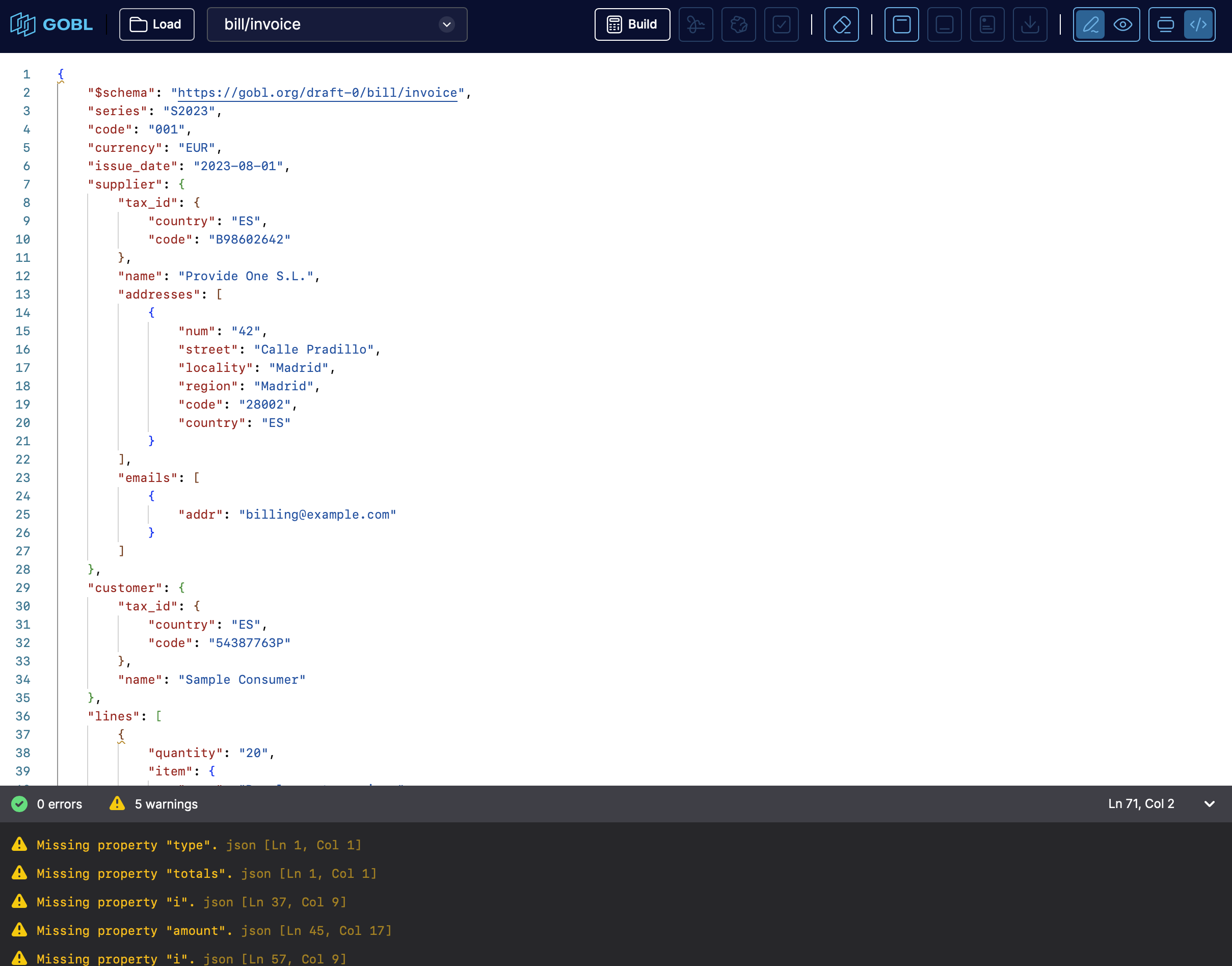
Interface
The key components of the interface are:- Menu bar / toolbar — top-level controls (open, save, choose schema).
- Code editor pane — where you write or paste your document (in JSON or YAML) following a GOBL schema.
- Bottom drawer / panel for feedback — area where validation results, warnings, or errors appear after running build/validate; this helps you detect issues immediately.
- Schema selector / configuration input — ability to choose the kind of GOBL document you are building (invoice, message, etc.), by pointing to a JSON-Schema URL, so that the tool knows how to interpret and validate your data.
What you can do with the builder
Using GOBL Builder on build.gobl.org, you can:- Create GOBL documents from scratch — define your business document (invoice, message, etc.) in JSON or YAML following the appropriate schema.
- Validate and build documents — the editor checks structure, data types and required fields; it performs calculations (e.g. taxes, totals) and generates complete JSON output conforming to GOBL’s envelope-and-document structure.
- Get immediate feedback on errors or warnings — bottom panel shows problems so you can correct them before exporting.
- Export or copy the resulting document — once valid, you can take the generated JSON (a full GOBL envelope) and use it in your codebase or tooling.
- Experiment with different schemas easily — switch between document types by changing the schema URL; handy for exploring what’s possible without setting up a dev environment.
Step by step guide
1
Open GOBL Builder
Open build.gobl.org in your browser.
2
Create your document
Load an existing document through the Load button, or paste an existing document in the code editor pane selecting the appropriate schema from the dropdown.
3
Set the schema
If you pasted a document, make sure to select the
$schema field (e.g. "https://gobl.org/draft-0/bill/invoice" or similar) so the builder knows what kind of document you intend.4
Build and validate
Trigger the build/validate action by clicking the calculator icon button.
5
Review feedback
Review bottom-panel for errors or warnings. If there are any, correct them in the editor.
6
Get the complete document
Once validation passes, you get a full GOBL envelope + document JSON, with all computed fields (sums, tax calculations, metadata, etc.).
7
Export your document
Copy/export the JSON to use in your application, or for further processing (signing, converting to other formats, etc.).
8
Preview the PDF
Sign the document by clicking on the Sign button, then click on the Preview button to see the PDF preview.
When GOBL Builder is especially useful
- For rapid prototyping — quickly draft a document to test how GOBL handles taxes, rounding, fields, without writing code.
- For learning / exploring GOBL — experimenting with different schemas to see how GOBL structures different document types.
- For proof-of-concepts or demos — creating valid GOBL documents without needing to set up a Go environment or external tooling.
- For validating data inputs — pre-validating JSON/YAML before integrating into a backend or database, ensuring compliance with GOBL schema.
What GOBL Builder does not provide (or what to expect)
- It’s not a full invoicing app — GOBL Builder helps you build the structured document, but does not provide UI for things like customer management, templates, PDF rendering, persistence, or user workflows.
- It doesn’t replace a complete backend — for production you’d still integrate with GOBL library or CLI to sign, store, convert, or deliver documents.
- It expects familiarity with JSON or YAML and with GOBL schema types — it’s a low-code tool, but not a “no-code” drag & drop generator.
Participate in our community
Ask and answer questions about GOBL Builder →