

Introduction
The DIAN is the Colombian government agency responsible for managing and overseeing tax collection, customs operations, and facilitating international trade. Before issuing electronic invoices, a business must be registered with the DIAN with an active RUT (Registro Único Tributario), pass the DIAN enablement (habilitación) with its chosen technology provider, and hold an authorized numbering range for its invoices. Invopop has partnered with Alegra, a DIAN-authorized technology provider, to onboard suppliers and issue documents on their behalf. Registering a supplier involves three steps:- Invopop: a workflow creates the supplier’s Alegra account and publishes a portal link.
- DIAN: the supplier selects Alegra as their technology provider and submits the enablement test set through that portal.
- Numbering (live only): the supplier links their authorized numbering range to Alegra in the DIAN portal.
Prerequisites
To register a supplier in Colombia, you will need:- Supplier details to build the GOBL party: legal name, NIT with the verification digit, and email. The address and the
co-dian-municipalityextension are optional here but required on the supplier’s invoices (see When is the municipality code required?). - The supplier’s legal representative, with access to the email on their own RUT (the DIAN’s Habilitación portal sends its login links there) and, for numbering, a MUISCA account with a DIAN electronic signature.
- For live issuing, a numbering range authorization (resolución de numeración) from the DIAN for each invoice series. See Numbering resolutions.
Colombia supplier
Colombia supplier
co-dian-municipality extension identifying where the supplier is registered, and uses Alegra’s sandbox NIT so it can be registered in the sandbox.co-dian-fiscal-responsibility extension: O-13 Gran contribuyente, O-15 Autorretenedor, O-23 Agente de retención IVA, or O-47 Régimen simple de tributación. It defaults to R-99-PN when none apply.Setup
All of the following steps must be carried out from the Invopop Console.Connect the Colombia app
- Navigate to Configuration → Apps
- Find Colombia in the app discovery list
- Click Connect to activate
Create the registration workflow
Colombia register supplier workflow
- Workflow
- Code
How it works
Set state → Processing
Register supplier
registration-link key in the entry’s meta section.Wait for DIAN enablement
Set state → Registered
Register a supplier
Each supplier NIT can be registered once per workspace and environment. For each supplier:Run the registration workflow
Share the portal link
link_url of the meta row with the key registration-link:Register as electronic invoicer at the DIAN
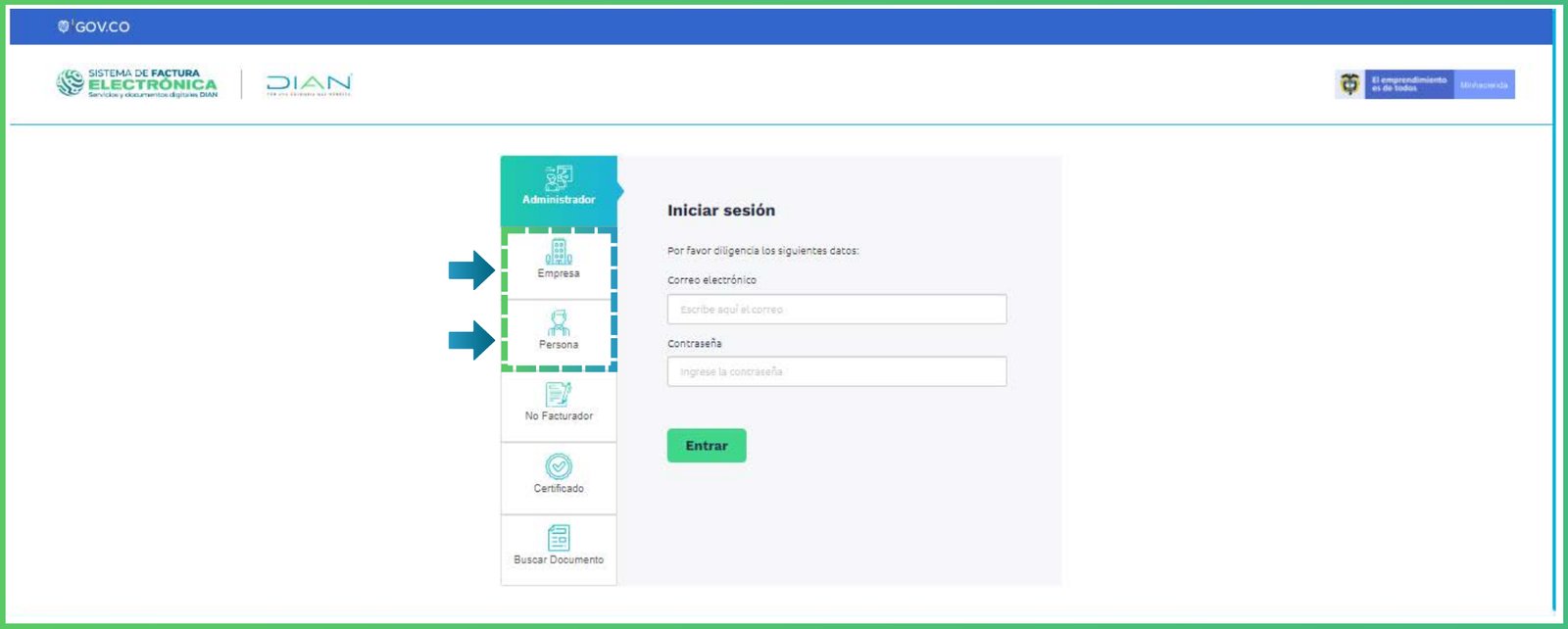
Habilitación login (DIAN)
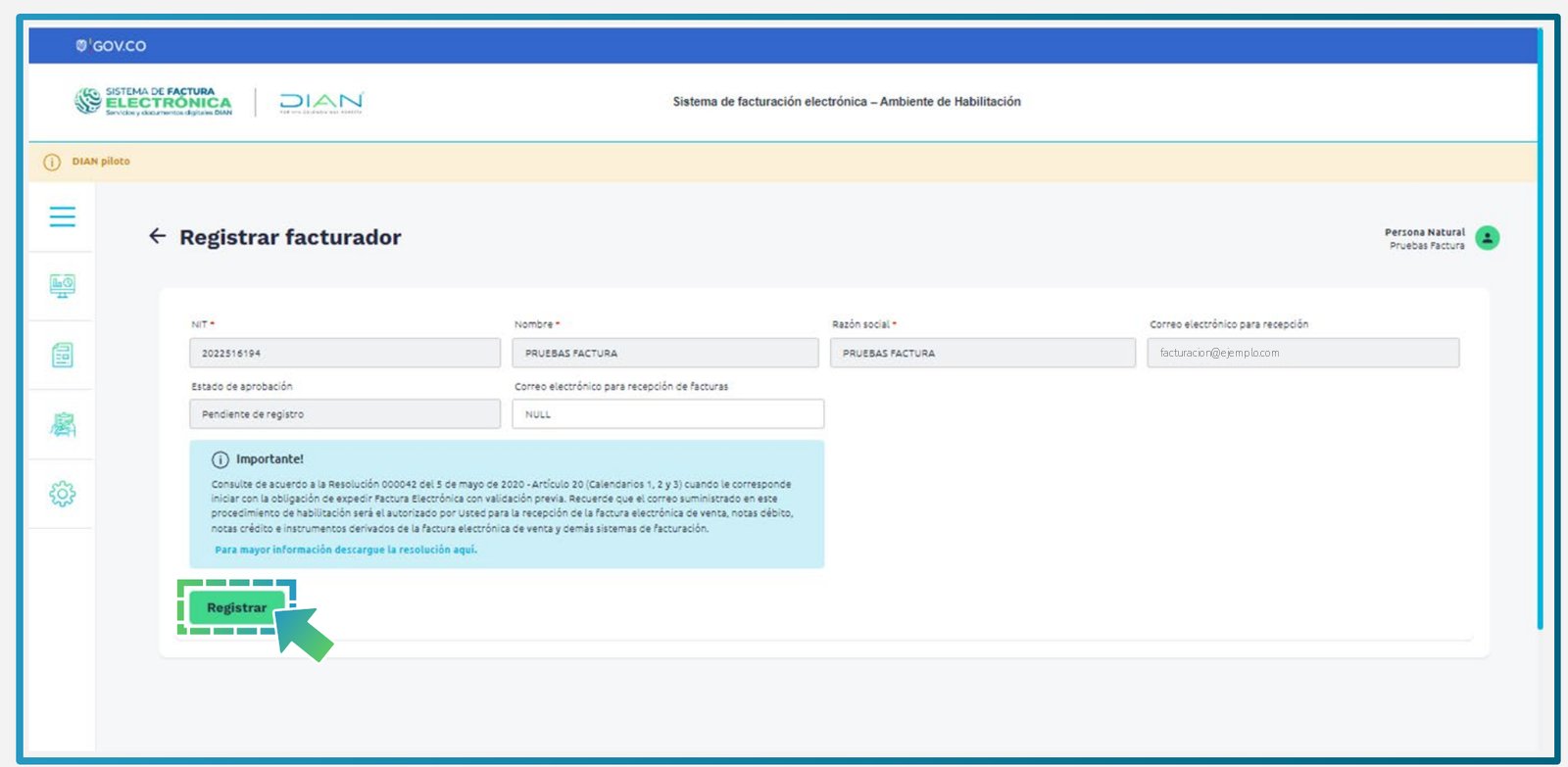
Registrar facturador (DIAN)
Select Alegra as technology provider at the DIAN
- Goes to Registro y habilitación → Documentos electrónicos → Factura electrónica and clicks Configurar modos de operación.
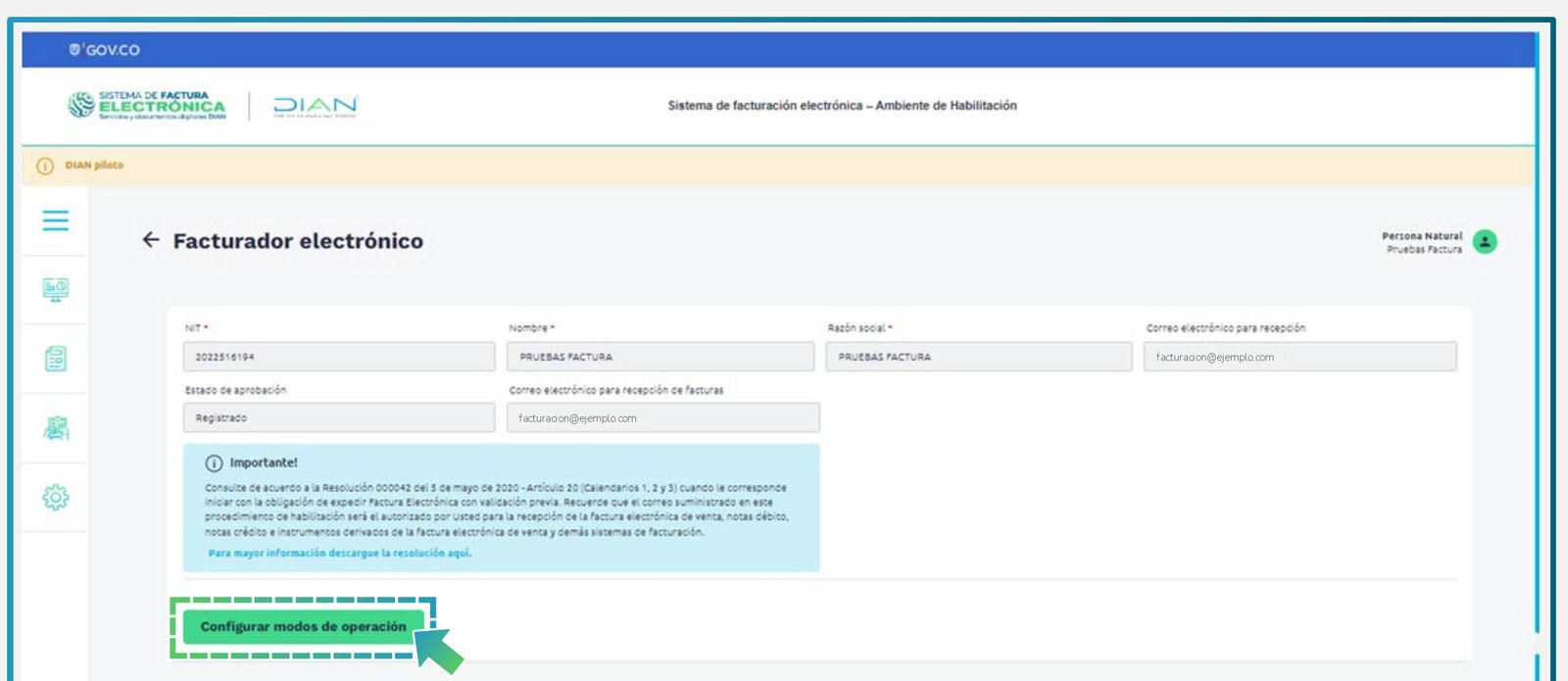
Facturador electrónico (DIAN)
- Under Seleccione el modo de operación, picks Software de un proveedor tecnológico.
- Under Datos de empresa y software, sets Nombre empresa proveedora to Soluciones Alegra S.A.S and Nombre del software to Alegra’s software from the list, then clicks Asociar.
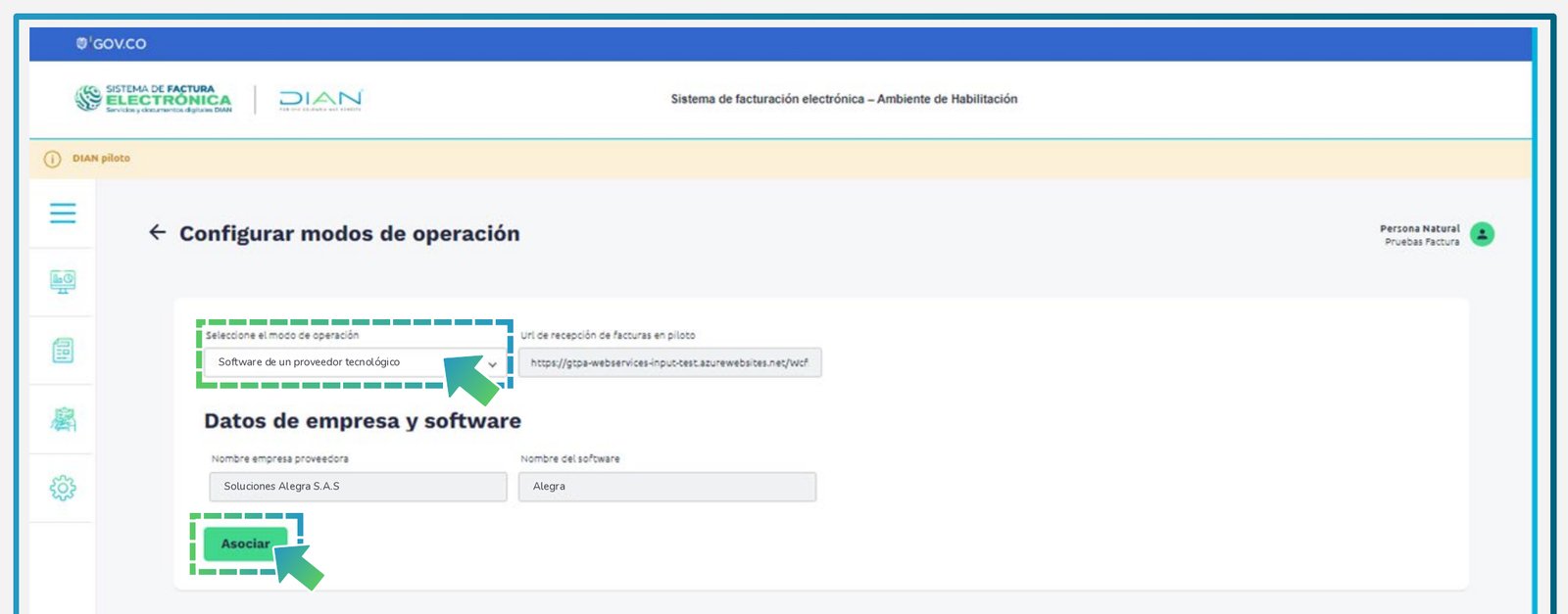
Configurar modos de operación, filled in for Alegra (DIAN)
- Under Listado de modos de operación asociados, clicks the eye icon in Acciones. If asked for a Tipo de documento, they choose Factura electrónica and click Set de pruebas. They copy the TestSetId shown in the ¡Importante! banner.

Listado de modos de operación asociados, with Alegra (DIAN)
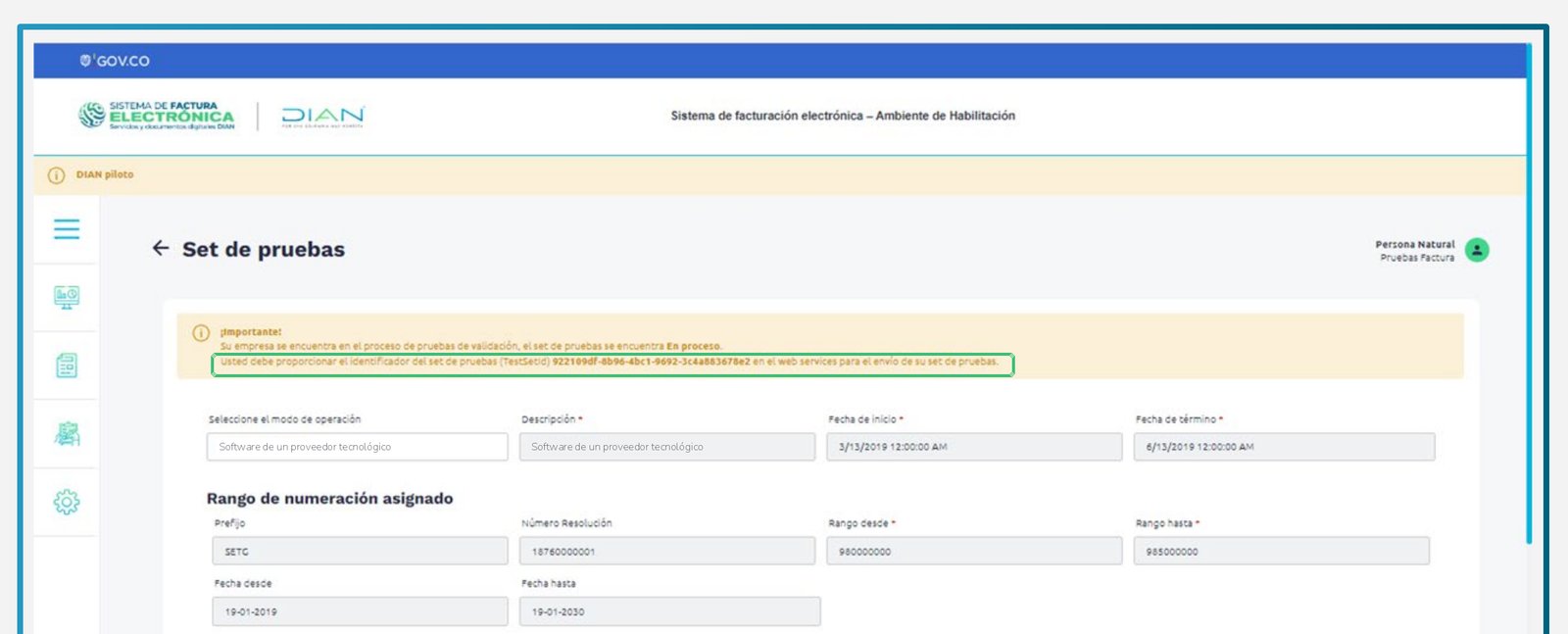
Set de pruebas with the TestSetId, for Alegra (DIAN)
Submit the test set
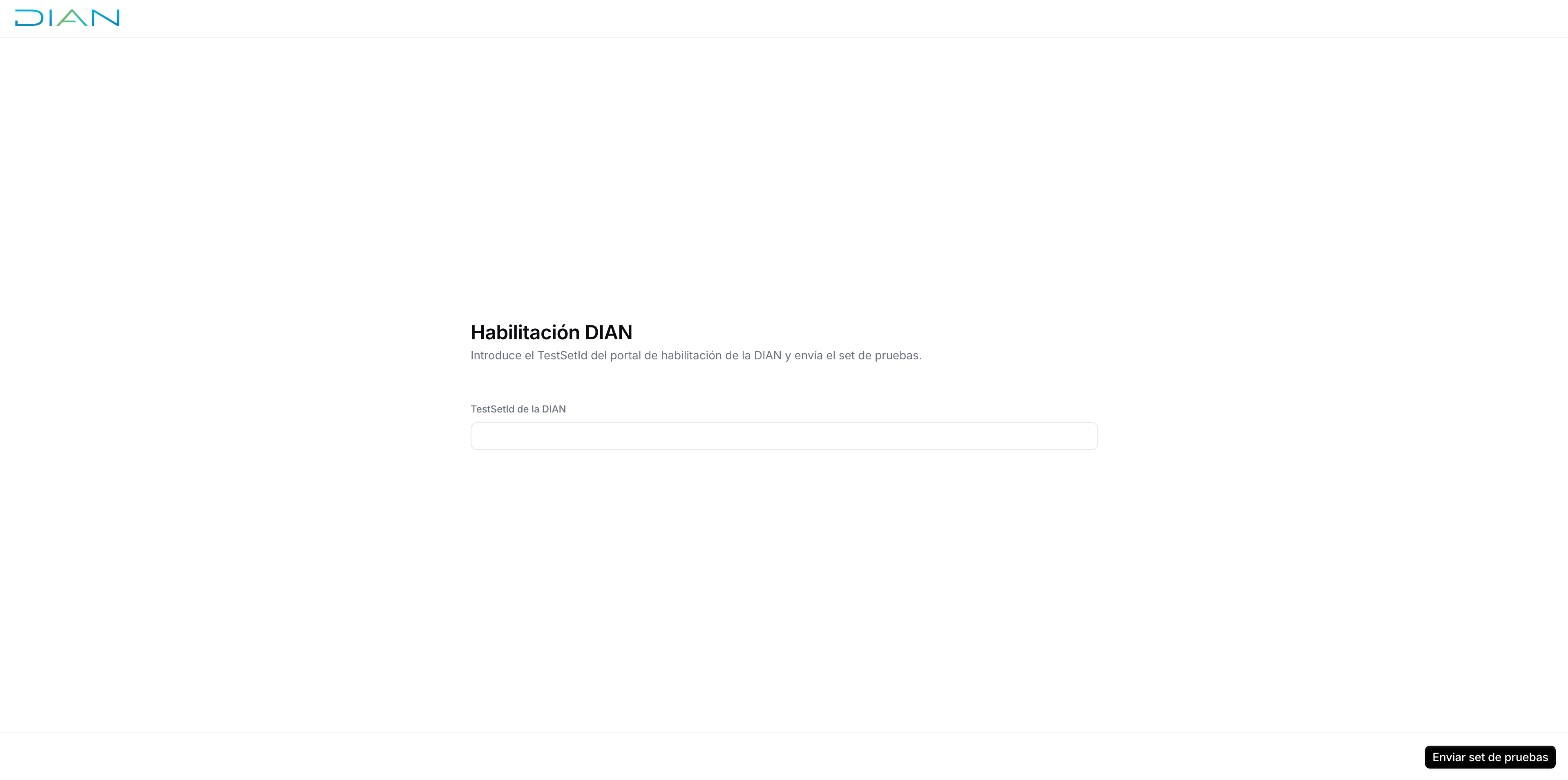
Enablement portal
Wait for the DIAN response
Numbering resolutions
In live, every invoice series needs a DIAN numbering range authorization linked to Alegra. This isn’t needed in the sandbox, which uses the fixedSETP test resolution. Each authorization is valid for 2 years.
Request the numbering range
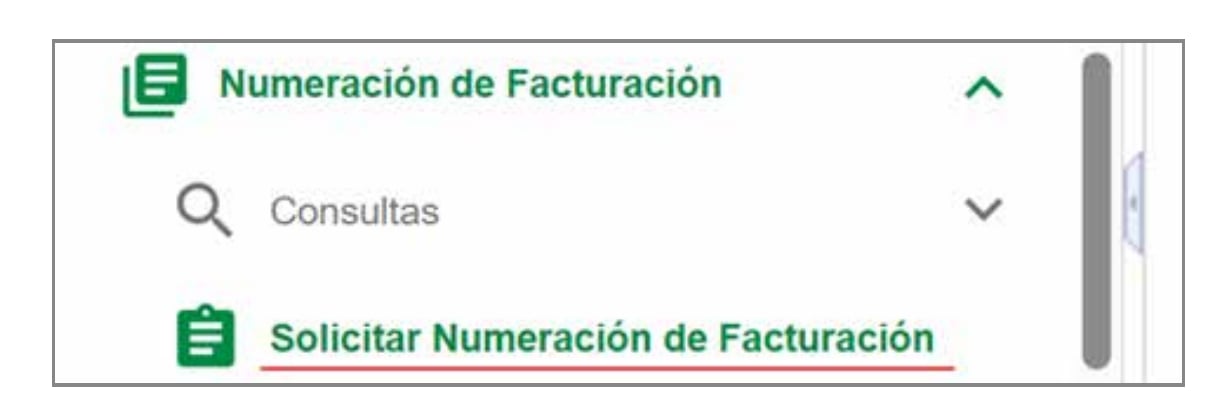
MUISCA menu (DIAN)
- Checks that the RUT is up to date (name, address, invoicing responsibility, and establishments).
- Clicks Autorizar Rangos and fills in Prefijo (up to four letters or digits, which becomes the invoice
series), Tipo Facturación set to FACTURA ELECTRÓNICA DE VENTA, and Rango Desde / Rango Hasta, then clicks Agregar. - Signs the request with their DIAN electronic signature (firma electrónica), first as form 1302 and then as form 1876, which the DIAN issues with the authorized ranges and validity.
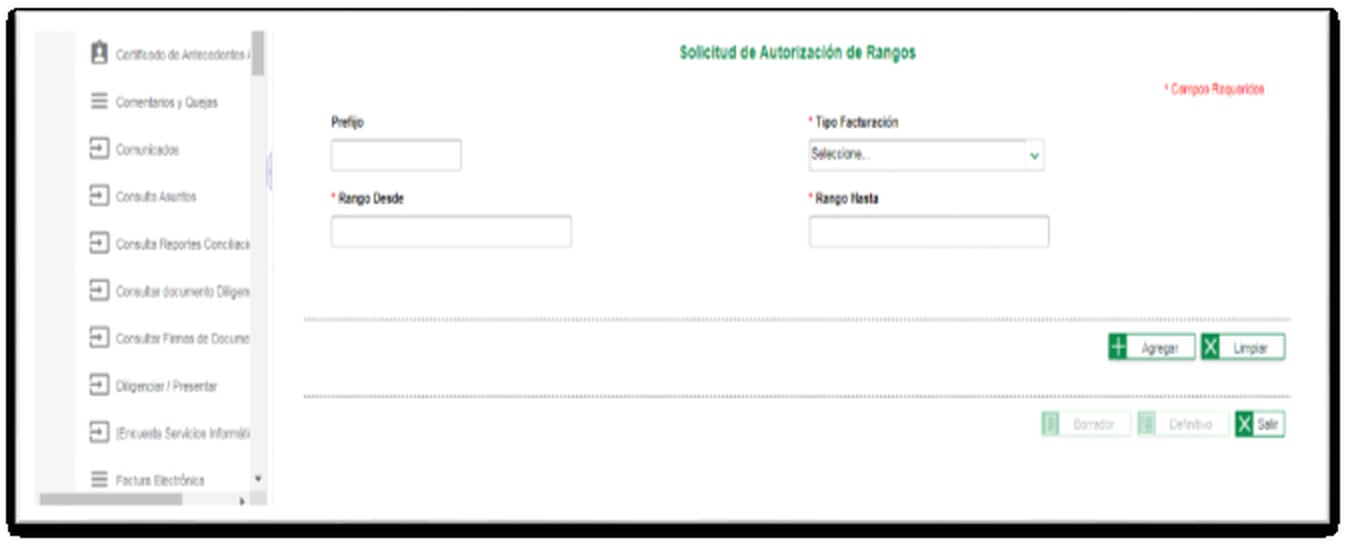
Solicitud de autorización de rangos (DIAN)
Link the range to Alegra
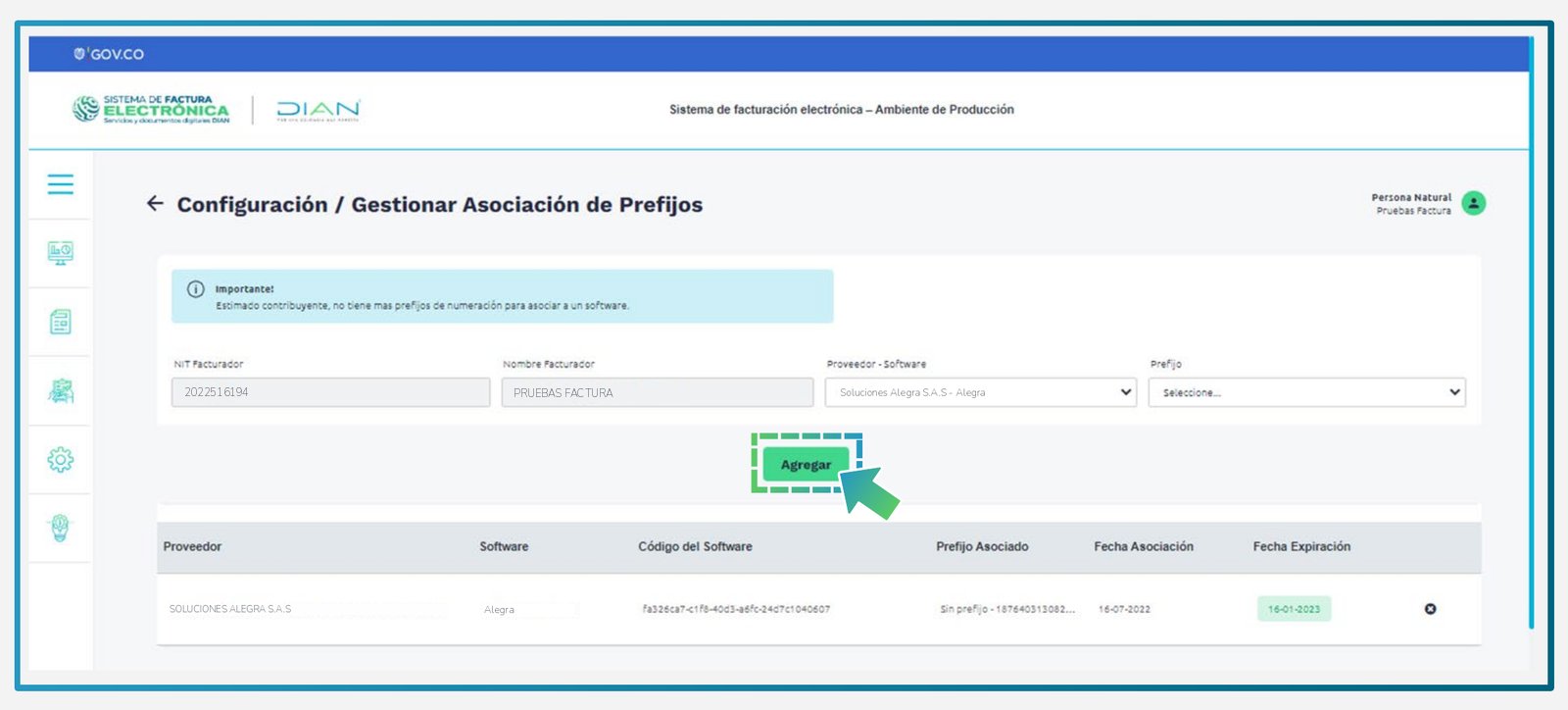
Gestionar asociación de prefijos, with Alegra selected (DIAN)
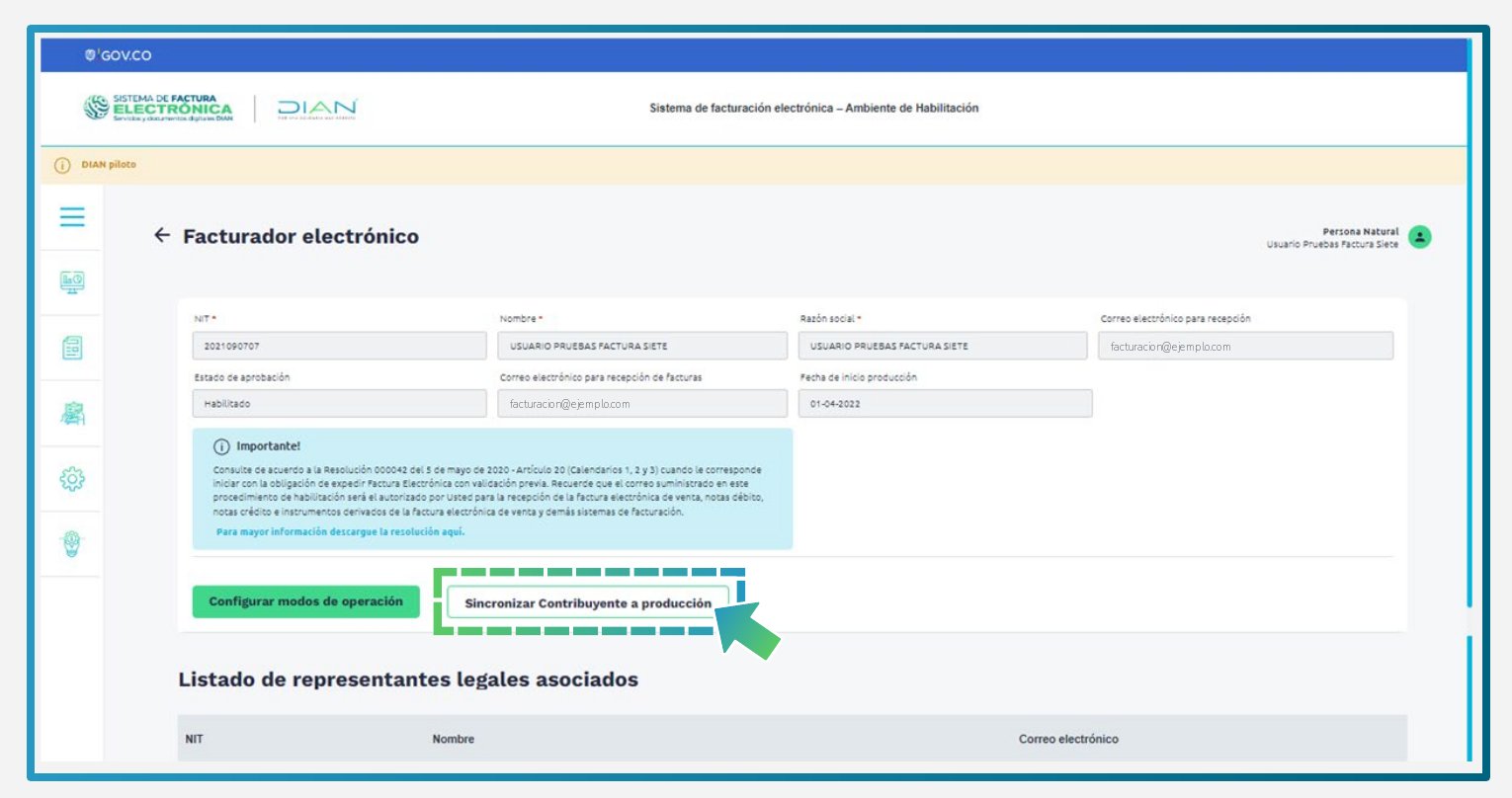
Sincronizar contribuyente a producción (DIAN)
Renew a range
A range with numbers left can be extended once it’s within 15 business days of its expiry date; the new validity is set by the DIAN on the resulting form 1876. Once a range is used up or expired, request a new one as described above instead.Open the range
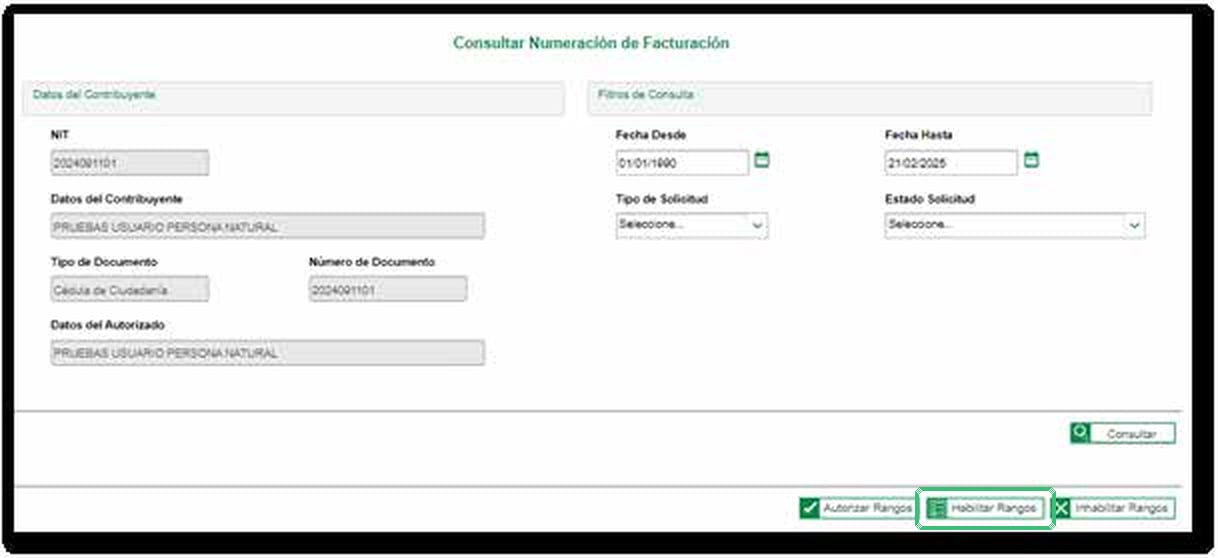
Consultar numeración de facturación (DIAN)
Request the extension
Sign it
Contingency range
To keep invoicing on paper when electronic invoicing isn’t possible (see Transmitting invoices issued during a contingency), the supplier needs a separate range for paper invoices. Request it ahead of time following the same steps as above, with Tipo Facturación set to the paper invoice option (factura de talonario o de papel), then link it the same way. The DIAN doesn’t assign a technical key to these ranges. See the DIAN’s contingency numbering and transcription guide.Complete the enablement via the API
For platforms that want to drive the enablement programmatically instead of sharing the hosted portal, use the enablement API (both endpoints under/apps/gov-co/v1/entries/{silo_entry_id}/enablement). The entry must belong to the authenticated workspace and have been registered first.
Submit the test set
400 when a test set is already awaiting the DIAN outcome, the supplier is already enabled, or a previous enablement failed. Run the registration workflow again to restart a failed enablement.Track the outcome
status moves from pending to accepted or failed once the DIAN responds. The workflow’s Wait for DIAN enablement step picks up the outcome exactly as it does for portal submissions.The endpoint returns the status only. When it’s failed, read the reason in the registration job’s faults, as described in Failed enablement.Failed enablement
When the DIAN rejects the test set, or the submission fails, the Wait for DIAN enablement step fails, the enablement status becomesfailed, and the registration job continues in the workflow’s error handling flow. The DIAN’s reason isn’t returned by the enablement endpoint; it’s recorded in the faults of the registration job, under the gov-co.wait.enablement provider. Read it from any of:
- The Console: open the supplier entry and check its job history.
- The API: fetch the job and read its
faultsarray. Prefer the job’s faults over thefaultsfield on the silo entry. - A webhook: with a Send Webhook step in the error handling flow, the payload includes the same
faults.
Regla: FAJ40) are explained in section 8 of the DIAN’s technical annex, and section 7.12 lists the test set status codes.
To start again:
- Fix the cause, for example by correcting the supplier details in the entry or getting a new TestSetId from the DIAN portal.
- Re-run the registration workflow on the same entry. Until you do, Submit test set responds
400. - Submit the test set again, from the portal or via the API.
Sandbox
The same registration flow runs in sandbox workspaces against the DIAN test environment, with a few differences:- Only Alegra’s own NIT (
9005590882) can be registered, since the DIAN test registry accepts documents from that emitter alone. A NIT can be registered once per workspace, so each workspace has a single sandbox supplier. - The fixed DIAN test resolution (series
SETP, codes990000000–995000000) is seeded automatically on registration. The range is shared with other users testing in the sandbox, so pick codes unlikely to collide. - The enablement is simulated: instead of a real DIAN TestSetId, enter one of the following values in the portal to choose the outcome.
Migrate from Plemsi
Moving a supplier from the old Plemsi integration takes the same steps as a new registration. At the DIAN, the supplier simply adds Alegra as another technology provider.Set up the Colombia app
Register the supplier
Set up the numbering ranges
- Move the existing range: unlink it from Plemsi (the ✕ icon next to it in the list) and link it to Alegra. The series stays the same, and new invoices must continue after the last number issued through Plemsi.
- Add a new range: request a new range with a new prefix and link it to Alegra. Invoices sent through Alegra start a fresh series, while the old range stays with Plemsi until it’s no longer needed.
Switch to the new send workflow
FAQ
What does a supplier need before issuing invoices in Colombia?
What does a supplier need before issuing invoices in Colombia?
How do I register a supplier in Colombia?
How do I register a supplier in Colombia?
registration-link in the entry’s meta; the supplier’s legal representative completes the DIAN enablement there, and the workflow finishes once the DIAN accepts it. See the supplier registration guide.What is the DIAN habilitación?
What is the DIAN habilitación?
The enablement failed: how do I know why?
The enablement failed: how do I know why?
failed. The DIAN’s reason is in the faults of the registration job: check the entry’s job history in the Console, fetch the job via the API, or receive it in a Send Webhook step in the workflow’s error handling flow. Fix the cause and re-run the registration workflow to start again. See Failed enablement.Do I need to register suppliers in the sandbox?
Do I need to register suppliers in the sandbox?
9005590882) can be registered. The enablement is simulated: enter the TestSetId a70562e0-631e-4ceb-aa65-36887b57dc17 for an instant acceptance. Other outcomes are in the sandbox section of the guide.🇨🇴 Invopop resources for Colombia
🇨🇴 Invopop resources for Colombia

