

Introduction
RO e-Factura is Romania’s mandatory national e-invoicing system, run by the Ministry of Finance and ANAF. Every B2B invoice in scope must be uploaded within 5 working days of issue, and B2C invoices are reported the same way. The platform validates each invoice and seals it with the Ministry of Finance signature: the sealed XML is the legal invoice. Invoices are encoded in UBL 2.1 following CIUS-RO, the Romanian profile of EN 16931. Invopop builds the XML from your GOBL invoice, checks it against the official ANAF schematron, uploads it and waits for ANAF’s decision. This guide covers three key processes:- Invoice issuance: Creating and sending CIUS-RO invoices through RO e-Factura
- Corrections: Credit notes and corrective invoices for accepted invoices
- Special cases: B2C, self-billed and accounting invoices
- Send only: You issue invoices through RO e-Factura on behalf of your suppliers. This is the simplest setup and does not require the Cron app or the sync and import workflows.
- Send & receive: In addition to sending, you also want to automatically import invoices received by your suppliers. This requires the Cron app to periodically check for new invoices.
Prerequisites
To issue invoices through RO e-Factura, you will need:- A registered party (supplier): follow the RO e-Factura supplier registration guide to connect the Romania app and register the party with ANAF before issuing.
- Customer details, including their Romanian CIF for domestic B2B invoices, and their address with county.
- Line items with quantities, prices, and applicable VAT rates.
Setup
All of the following steps must be carried out from the Invopop Console.Configure the invoice sending workflow
- Set state to Processing.
- Add sequential code gives the invoice its number.
- Generate e-Factura XML converts the GOBL invoice to CIUS-RO, checks it against the ANAF schematron and attaches it as
efactura.xml. - Sign envelope seals the GOBL document so it can no longer change.
- Send e-Factura XML to ANAF uploads the XML and waits until ANAF accepts or rejects it. On acceptance, the official XML returned by ANAF is attached as
anaf-efactura.xmland the invoice is stamped with the ANAF upload ID and response date. - Generate PDF renders a PDF of the invoice in Romanian to hand to your customer.
- Set state to Sent.
- Workflow
- Code
Have your agent issue an RO e-Factura invoice in your sandbox.
Running
In this section, we’ll provide details on how to issue invoices on behalf of a registered party.Send an invoice
Once a party is registered, you can issue invoices on their behalf.Upload an invoice
$addons: includero-efactura-v1supplier: use the details of the party you’ve registered beforecustomer: the Romanian CIF for domestic B2B invoices, and the address with its county instate
B2B standard invoice
B2B standard invoice
- the minimal version in the first tab contains only the essential fields required to create the invoice,
- the
ro-efactura-v1addon ensures the document is validated using the national CIUS-RO rules (BR-RO) on top of EN 16931, - addresses in Romania carry the county as
state(ISO 3166-2:RO code,Bfor Bucharest), and Bucharest addresses use the sector aslocality, - payment terms are required whenever an amount is due,
- the built version in the second tab shows the calculated totals and the
untdid-document-typeextension set to380, and, - make sure to process it with the “RO generate & send” workflow created during setup.
B2C standard invoice
B2C standard invoice
- the customer has no
tax_id, so Invopop uploads the invoice to ANAF’s B2C endpoint, - the built version adds the thirteen zeros CNP (
0000000000000) that Romanian law requires for a consumer without an identifier, and, - if the consumer gives you their CNP, add it as a
CNPidentity on the customer instead.
B2B credit note
B2B credit note
381) to refund part of a previous invoice.Notice:- the
typefield is set tocredit-note, - the
precedingfield references the original invoice byseries,codeandissue_date, - quantities and amounts are expressed as positive values, as in every GOBL credit note, and,
- the built version shows the
untdid-document-typeextension set to381.
B2B corrective invoice
B2B corrective invoice
384) that replaces a previous invoice.Notice:- the
typefield is set tocorrective, - the
precedingfield references the original invoice byseries,codeandissue_date, and, - the built version shows the
untdid-document-typeextension set to384.
Self-billed invoice
Self-billed invoice
389).Notice:- the
$tagsfield includesself-billed, - the registered party issuing the invoice is the customer, so the customer’s CIF is the one used to upload it to ANAF,
- the built version adds the mandatory
Autofacturănote and sets theuntdid-document-typeextension to389, and, - Invopop flags the upload as self-billed (
autofactura=DA) automatically.
Empty.Send the invoice to the RO generate & send workflow
workflow_id: use the Workflow ID of the RO generate & send workflow we created during setupsilo_entry_id: use the Silo Entry ID of the invoice you’ve just uploaded.
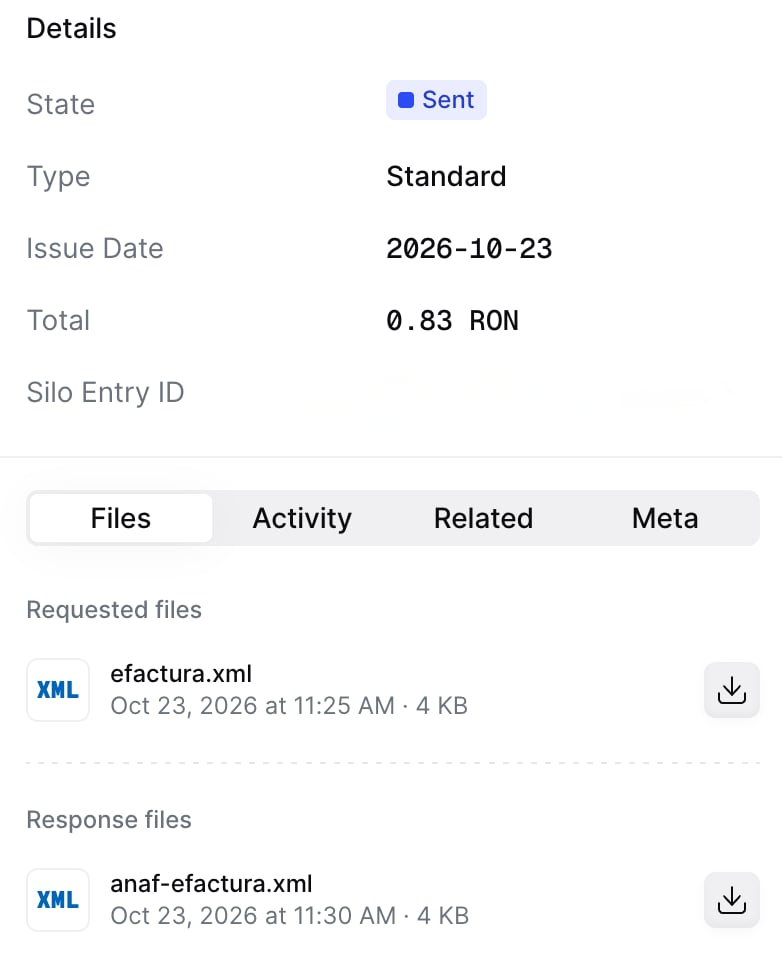
- ✓ Accepted (
ok): the invoice moves to Sent and carries the official XML returned by ANAF, next to the generated XML and the PDF. The invoice is stamped with the ANAF upload ID (ro-anaf-upload-index) and the date ANAF returned (ro-anaf-upload-date), shown in the Headers section of the invoice in the Console. - × Rejected (
nok): the job fails with the errors ANAF returned. Correct the invoice and run the workflow again.
Issue a credit note
An invoice accepted by RO e-Factura cannot be cancelled. To correct it, issue a new document that references it. In Romania you can either:- Issue a credit note (type code
381), which adjusts the value of the original invoice, or - Issue a corrective invoice (type code
384), which replaces the original invoice entirely.
Upload a credit note
credit-note. The process is very similar to uploading an invoice, use the Create an entry endpoint to upload a credit note. Include an invoice object in the data field, with these required fields:$addons: includero-efactura-v1supplier: use the same supplier details as in the original invoicetype:credit-notepreceding: references the original invoice, within it, you must include:uuid: the UUID of the original invoice (optional but recommended)issue_date: the date of the original invoiceseries: the series of the original invoicecode: the code of the original invoice
Empty. If you’ve included the uuid of the invoice in preceding, you’ll see a link to the credit note in the Related tab of the original invoice.Send the credit note to the RO generate & send workflow
workflow_id: use the Workflow ID of the RO generate & send workflow we created during setupsilo_entry_id: use the Silo Entry ID of the credit note you’ve just uploaded.
Issue a corrective invoice
Upload a corrective invoice
corrective. The process is very similar to uploading an invoice, use the Create an entry endpoint to upload a corrective invoice. Include an invoice object in the data field, with these required fields:$addons: includero-efactura-v1supplier: use the same supplier details as in the original invoicetype:correctivepreceding: references the original invoice, within it, you must include:uuid: the UUID of the original invoice (optional but recommended)issue_date: the date of the original invoiceseries: the series of the original invoicecode: the code of the original invoice
Empty. If you’ve included the uuid of the invoice in preceding, you’ll see a link to the corrective invoice in the Related tab of the original invoice.Send the corrective invoice to the RO generate & send workflow
workflow_id: use the Workflow ID of the RO generate & send workflow we created during setupsilo_entry_id: use the Silo Entry ID of the corrective invoice you’ve just uploaded.
Special cases
Invopop picks the right ANAF upload options from the invoice itself, so the same workflow handles every case:- B2C invoices: when the customer has no tax ID, the invoice is uploaded to ANAF’s B2C endpoint. The
ro-efactura-v1addon adds the thirteen zeros CNP that Romanian law requires for consumers without an identifier. - Self-billed invoices (autofactură, type code
389): add theself-billedtag. The customer issues the invoice in the supplier’s name, so the customer must be the registered party. The addon adds theAutofacturănote, and the upload is flagged as self-billed. - Invoices for accounting purposes (type code
751): add theaccountingtag. - Enforcement procedures: add the
enforcementtag and name the enforcement body as payee. The upload is made with the payee’s CIF and flagged as enforcement.
GOBL addon reference
Detailed information about the CIUS-RO rules, scenarios and tags can be found in thero-efactura-v1 addon documentation.
FAQ
What format does a Romanian e-invoice use?
What format does a Romanian e-invoice use?
Is a PDF invoice still valid?
Is a PDF invoice still valid?
How do I correct an invoice after RO e-Factura accepts it?
How do I correct an invoice after RO e-Factura accepts it?
Can the buyer reject an invoice in RO e-Factura?
Can the buyer reject an invoice in RO e-Factura?
Which VAT rates apply in Romania?
Which VAT rates apply in Romania?
How long can I download invoices from RO e-Factura?
How long can I download invoices from RO e-Factura?
Is self-billing allowed?
Is self-billing allowed?
Which GOBL documents can I send to RO e-Factura?
Which GOBL documents can I send to RO e-Factura?
ro-efactura-v1 addon: standard invoices (380), invoices for accounting purposes (751, with the accounting tag), self-billed invoices (389, with the self-billed tag), credit notes (381) and corrective invoices (384).How long does ANAF take to accept an invoice?
How long does ANAF take to accept an invoice?
ok or nok. The job finishes when ANAF has decided.Where do I find the official invoice?
Where do I find the official invoice?
anaf-efactura.xml, next to the generated efactura.xml. The archive is also kept in Invopop’s database.What happens when ANAF rejects an invoice?
What happens when ANAF rejects an invoice?
Can I send the same invoice twice?
Can I send the same invoice twice?
How are B2C and self-billed invoices handled?
How are B2C and self-billed invoices handled?
autofactura. No workflow configuration is needed.🇷🇴 Invopop resources for Romania
🇷🇴 Invopop resources for Romania

