

Make sure you have completed the registration guide before clearing or reporting invoices.
| Flow | Invoices |
|---|---|
| Clearance | Standard tax invoices (B2B, B2G) |
| Reporting | Simplified tax invoices (B2C) |
Sending
The send workflow claims the next ICV, builds and hashes the UBL document, signs it and generates the QR (for simplified invoices), submits to ZATCA and then stores the final XML and QR back on the silo entry.How it works
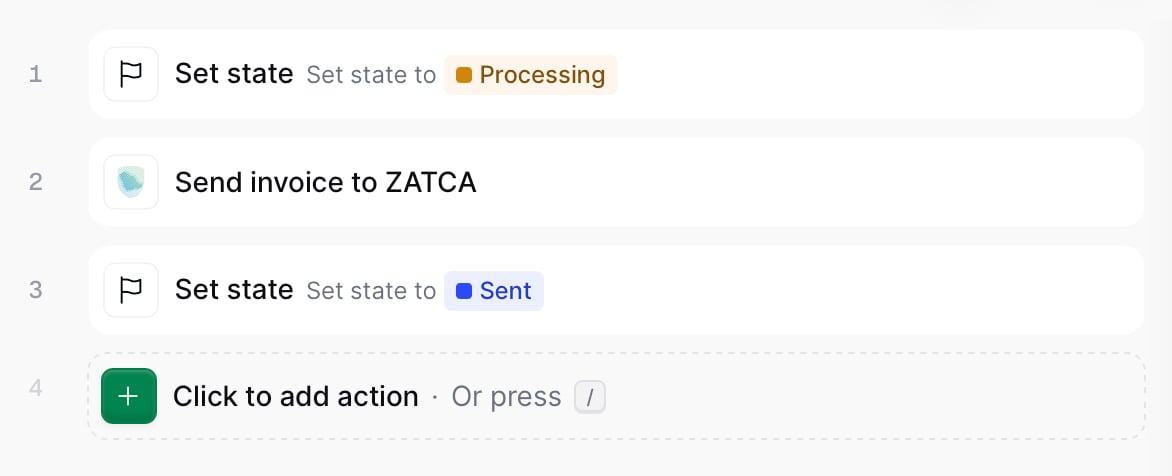
ZATCA send invoice workflow
1
Set State → Processing
Sets the state of the silo entry as “Processing”.
2
Send invoice to ZATCA
Converts the GOBL invoice to UBL 2.1, adds the ICV and PIH chain values, hashes the document, and submits it to the clearance or reporting flows.
3
Set state → Sent
Marks the silo entry as “Sent”
Saudi Arabia send invoice workflow
Add to my workspace →
- Workflow
- Code
Copy and paste into a new Empty Invoice workflow.
ZATCA send invoice workflow
{
    "name": "ZATCA send invoice",
    "description": "Clears standard invoices and reports simplified invoices to ZATCA",
    "schema": "bill/invoice",
    "steps": [
        {
            "id": "cf001030-6fce-11f1-b09d-79f60b032746",
            "name": "Set state",
            "provider": "silo.state",
            "summary": "Set state to `processing`{.state .processing}",
            "config": {
                "state": "processing"
            }
        },
        {
            "id": "4d45d610-b821-11f1-a782-f773a0732f50",
            "name": "Sign Envelope",
            "provider": "silo.close"
        },
        {
            "id": "d0badf90-6fce-11f1-b09d-79f60b032746",
            "name": "Send invoice to ZATCA",
            "provider": "gov-sa.invoice.send"
        },
        {
            "id": "d5f9cca0-6fce-11f1-b09d-79f60b032746",
            "name": "Set state",
            "provider": "silo.state",
            "summary": "Set state to `sent`{.state .sent}",
            "config": {
                "state": "sent"
            }
        }
    ],
    "rescue": [
        {
            "id": "d9c3a5e0-6fce-11f1-b09d-79f60b032746",
            "name": "Set state",
            "provider": "silo.state",
            "summary": "Set state to `error`{.state .error}",
            "config": {
                "state": "error"
            }
        }
    ]
}
An invoice that is already signed is skipped as “already sent”.
Credit and debit notes
Issued invoices can’t be cancelled or edited once cleared or reported. Corrections are made with credit notes (reduction) or debit notes (increase) that reference the original invoice. A note flows through the same clearance or reporting model as the document it corrects, using the same send workflow.Reading the chain
The ZATCA invoices dashboard lists every invoice the workspace has sent to ZATCA, newest first, so you can follow the cleared and reported chain at a glance. Each row surfaces the chain values ZATCA mandates: Supplier Tax Code, Identity Code, Identity Scheme, Invoice Counter, Silo Entry, the document Hash (each invoice’s hash seeds the next invoice’s PIH, linking the documents into a tamper-evident chain), the Invoice ID, Previous Invoice ID and Created at timestamp. In sandbox, an extra Environment column follows the silo entry, separating Simulation from Developer invoices.Rows with an empty Silo Entry are the compliance sample invoices Invopop submits during registration to obtain the Production CSID. They advance the chain but do not have a silo entry.
The Supplier Tax Code in each row is a quick filter: selecting it opens the registrations tab filtered to the party that owns the chain. The Name column on that tab filters back the other way, to the party’s invoices.
Example invoices
Every example pairs the minimal hand-authored GOBL input with the built version produced bygobl build. All carry the sa-zatca-v1 add-on. Standard invoices are cleared; simplified invoices are reported.
Standard tax invoices (clearance)
Standard invoice (B2B)
Standard invoice (B2B)
A standard tax invoice between two VAT-registered parties, billed at the 15% standard rate. This is the baseline document cleared with ZATCA before it is shared with the buyer.
{
	"$schema": "https://gobl.org/draft-0/bill/invoice",
	"$addons": [
		"sa-zatca-v1"
	],
	"uuid": "3aea7b56-59d8-4beb-90bd-f8f280d852a0",
	"issue_date": "2022-02-01",
	"issue_time": "12:00:00",
	"code": "SAMPLE-001",
	"type": "standard",
	"regime": "SA",
	"supplier": {
		"tax_id": {
			"country": "SA",
			"code": "312345678912343"
		},
		"name": "Acme Corp Saudi",
		"identities": [
			{
				"type": "CRN",
				"code": "1234567890"
			}
		],
		"addresses": [
			{
				"street": "King Fahd Road",
				"street_extra": "Al Olaya",
				"num": "1234",
				"locality": "Riyadh",
				"region": "Riyadh",
				"code": "12345",
				"country": "SA"
			}
		]
	},
	"customer": {
		"identities": [
			{
				"type": "TIN",
				"code": "123456789012345"
			}
		],
		"name": "Sample Consumer LLC",
		"addresses": [
			{
				"street": "Olaya Street",
				"street_extra": "Al Malaz",
				"num": "5678",
				"locality": "Riyadh",
				"region": "Riyadh",
				"code": "54321",
				"country": "SA"
			}
		]
	},
	"delivery": {
		"date": "2022-02-01",
		"period": {
			"start": "2022-02-01",
			"end": "2022-02-28"
		}
	},
	"payment": {
		"instructions": {
			"key": "credit-transfer"
		},
		"terms": {
			"notes": "Payment due within 30 days"
		}
	},
	"lines": [
		{
			"quantity": 20,
			"item": {
				"name": "Development services",
				"price": "90.00",
				"unit": "h"
			},
			"taxes": [
				{
					"cat": "VAT",
					"rate": "standard"
				}
			]
		}
	]
}
{
	"$schema": "https://gobl.org/draft-0/bill/invoice",
	"$regime": "SA",
	"$addons": [
		"eu-en16931-v2017",
		"sa-zatca-v1"
	],
	"uuid": "3aea7b56-59d8-4beb-90bd-f8f280d852a0",
	"type": "standard",
	"code": "SAMPLE-001",
	"issue_date": "2022-02-01",
	"issue_time": "12:00:00",
	"currency": "SAR",
	"tax": {
		"rounding": "currency",
		"ext": {
			"sa-zatca-invoice-type": "0100000",
			"untdid-document-type": "388"
		}
	},
	"supplier": {
		"name": "Acme Corp Saudi",
		"tax_id": {
			"country": "SA",
			"code": "312345678912343"
		},
		"identities": [
			{
				"type": "CRN",
				"code": "1234567890"
			}
		],
		"addresses": [
			{
				"num": "1234",
				"street": "King Fahd Road",
				"street_extra": "Al Olaya",
				"locality": "Riyadh",
				"region": "Riyadh",
				"code": "12345",
				"country": "SA"
			}
		]
	},
	"customer": {
		"name": "Sample Consumer LLC",
		"identities": [
			{
				"type": "TIN",
				"code": "123456789012345"
			}
		],
		"addresses": [
			{
				"num": "5678",
				"street": "Olaya Street",
				"street_extra": "Al Malaz",
				"locality": "Riyadh",
				"region": "Riyadh",
				"code": "54321",
				"country": "SA"
			}
		]
	},
	"lines": [
		{
			"i": 1,
			"quantity": "20",
			"item": {
				"name": "Development services",
				"price": "90.00",
				"unit": "h"
			},
			"sum": "1800.00",
			"taxes": [
				{
					"cat": "VAT",
					"key": "standard",
					"rate": "general",
					"percent": "15.0%",
					"ext": {
						"untdid-tax-category": "S"
					}
				}
			],
			"total": "1800.00"
		}
	],
	"payment": {
		"terms": {
			"notes": "Payment due within 30 days"
		},
		"instructions": {
			"key": "credit-transfer",
			"ext": {
				"untdid-payment-means": "30"
			}
		}
	},
	"delivery": {
		"date": "2022-02-01",
		"period": {
			"start": "2022-02-01",
			"end": "2022-02-28"
		}
	},
	"totals": {
		"sum": "1800.00",
		"total": "1800.00",
		"taxes": {
			"categories": [
				{
					"code": "VAT",
					"rates": [
						{
							"key": "standard",
							"ext": {
								"untdid-tax-category": "S"
							},
							"base": "1800.00",
							"percent": "15.0%",
							"amount": "270.00"
						}
					],
					"amount": "270.00"
				}
			],
			"sum": "270.00"
		},
		"tax": "270.00",
		"total_with_tax": "2070.00",
		"payable": "2070.00"
	}
}
Standard credit note
Standard credit note
A credit note that reduces a previously cleared standard invoice. The
preceding block links it to the original document.{
"$schema": "https://gobl.org/draft-0/bill/invoice",
"$addons": [
"sa-zatca-v1"
],
"uuid": "a1b2c3d4-1111-4aaa-bbbb-000000000001",
"type": "credit-note",
"issue_date": "2022-03-01",
"issue_time": "10:00:00",
"series": "CN",
"code": "CN-001",
"regime": "SA",
"preceding": [
{
"series": "",
"code": "SAMPLE-001",
"issue_date": "2022-02-01",
"reason": "Return of development services"
}
],
"supplier": {
"tax_id": {
"country": "SA",
"code": "312345678912343"
},
"name": "Acme Corp Saudi",
"identities": [
{
"type": "CRN",
"code": "1234567890"
}
],
"addresses": [
{
"street": "King Fahd Road",
"street_extra": "Al Olaya",
"num": "1234",
"locality": "Riyadh",
"region": "Riyadh",
"code": "12345",
"country": "SA"
}
]
},
"customer": {
"identities": [
{
"type": "TIN",
"code": "123456789012345"
}
],
"name": "Sample Consumer LLC",
"addresses": [
{
"street": "Olaya Street",
"street_extra": "Al Malaz",
"num": "5678",
"locality": "Riyadh",
"region": "Riyadh",
"code": "54321",
"country": "SA"
}
]
},
"delivery": {
"date": "2022-03-01",
"period": {
"start": "2022-02-01",
"end": "2022-02-28"
}
},
"payment": {
"instructions": {
"key": "credit-transfer"
},
"terms": {
"notes": "Refund within 14 days"
}
},
"lines": [
{
"quantity": 5,
"item": {
"name": "Development services",
"price": "90.00",
"unit": "h"
},
"taxes": [
{
"cat": "VAT",
"rate": "standard"
}
]
}
]
}
{
	"$schema": "https://gobl.org/draft-0/bill/invoice",
	"$regime": "SA",
	"$addons": [
		"eu-en16931-v2017",
		"sa-zatca-v1"
	],
	"uuid": "a1b2c3d4-1111-4aaa-bbbb-000000000001",
	"type": "credit-note",
	"series": "CN",
	"code": "CN-001",
	"issue_date": "2022-03-01",
	"issue_time": "10:00:00",
	"currency": "SAR",
	"preceding": [
		{
			"issue_date": "2022-02-01",
			"code": "SAMPLE-001",
			"reason": "Return of development services"
		}
	],
	"tax": {
		"rounding": "currency",
		"ext": {
			"sa-zatca-invoice-type": "0100000",
			"untdid-document-type": "381"
		}
	},
	"supplier": {
		"name": "Acme Corp Saudi",
		"tax_id": {
			"country": "SA",
			"code": "312345678912343"
		},
		"identities": [
			{
				"type": "CRN",
				"code": "1234567890"
			}
		],
		"addresses": [
			{
				"num": "1234",
				"street": "King Fahd Road",
				"street_extra": "Al Olaya",
				"locality": "Riyadh",
				"region": "Riyadh",
				"code": "12345",
				"country": "SA"
			}
		]
	},
	"customer": {
		"name": "Sample Consumer LLC",
		"identities": [
			{
				"type": "TIN",
				"code": "123456789012345"
			}
		],
		"addresses": [
			{
				"num": "5678",
				"street": "Olaya Street",
				"street_extra": "Al Malaz",
				"locality": "Riyadh",
				"region": "Riyadh",
				"code": "54321",
				"country": "SA"
			}
		]
	},
	"lines": [
		{
			"i": 1,
			"quantity": "5",
			"item": {
				"name": "Development services",
				"price": "90.00",
				"unit": "h"
			},
			"sum": "450.00",
			"taxes": [
				{
					"cat": "VAT",
					"key": "standard",
					"rate": "general",
					"percent": "15.0%",
					"ext": {
						"untdid-tax-category": "S"
					}
				}
			],
			"total": "450.00"
		}
	],
	"payment": {
		"terms": {
			"notes": "Refund within 14 days"
		},
		"instructions": {
			"key": "credit-transfer",
			"ext": {
				"untdid-payment-means": "30"
			}
		}
	},
	"delivery": {
		"date": "2022-03-01",
		"period": {
			"start": "2022-02-01",
			"end": "2022-02-28"
		}
	},
	"totals": {
		"sum": "450.00",
		"total": "450.00",
		"taxes": {
			"categories": [
				{
					"code": "VAT",
					"rates": [
						{
							"key": "standard",
							"ext": {
								"untdid-tax-category": "S"
							},
							"base": "450.00",
							"percent": "15.0%",
							"amount": "67.50"
						}
					],
					"amount": "67.50"
				}
			],
			"sum": "67.50"
		},
		"tax": "67.50",
		"total_with_tax": "517.50",
		"payable": "517.50"
	}
}
Standard debit note
Standard debit note
A debit note that increases the value of a previously cleared standard invoice, referencing the original in
preceding.{
"$schema": "https://gobl.org/draft-0/bill/invoice",
"$addons": [
"sa-zatca-v1"
],
"uuid": "a1b2c3d4-2222-4aaa-bbbb-000000000002",
"type": "debit-note",
"issue_date": "2022-03-01",
"issue_time": "10:00:00",
"series": "DN",
"code": "DN-001",
"regime": "SA",
"preceding": [
{
"series": "",
"code": "SAMPLE-001",
"issue_date": "2022-02-01",
"reason": "Price adjustment for development services"
}
],
"supplier": {
"tax_id": {
"country": "SA",
"code": "312345678912343"
},
"name": "Acme Corp Saudi",
"identities": [
{
"type": "CRN",
"code": "1234567890"
}
],
"addresses": [
{
"street": "King Fahd Road",
"street_extra": "Al Olaya",
"num": "1234",
"locality": "Riyadh",
"region": "Riyadh",
"code": "12345",
"country": "SA"
}
]
},
"customer": {
"identities": [
{
"type": "TIN",
"code": "123456789012345"
}
],
"name": "Sample Consumer LLC",
"addresses": [
{
"street": "Olaya Street",
"street_extra": "Al Malaz",
"num": "5678",
"locality": "Riyadh",
"region": "Riyadh",
"code": "54321",
"country": "SA"
}
]
},
"delivery": {
"date": "2022-03-01",
"period": {
"start": "2022-02-01",
"end": "2022-02-28"
}
},
"payment": {
"instructions": {
"key": "credit-transfer"
},
"terms": {
"notes": "Payment due within 30 days"
}
},
"lines": [
{
"quantity": 5,
"item": {
"name": "Development services",
"price": "90.00",
"unit": "h"
},
"taxes": [
{
"cat": "VAT",
"rate": "standard"
}
]
}
]
}
{
	"$schema": "https://gobl.org/draft-0/bill/invoice",
	"$regime": "SA",
	"$addons": [
		"eu-en16931-v2017",
		"sa-zatca-v1"
	],
	"uuid": "a1b2c3d4-2222-4aaa-bbbb-000000000002",
	"type": "debit-note",
	"series": "DN",
	"code": "DN-001",
	"issue_date": "2022-03-01",
	"issue_time": "10:00:00",
	"currency": "SAR",
	"preceding": [
		{
			"issue_date": "2022-02-01",
			"code": "SAMPLE-001",
			"reason": "Price adjustment for development services"
		}
	],
	"tax": {
		"rounding": "currency",
		"ext": {
			"sa-zatca-invoice-type": "0100000",
			"untdid-document-type": "383"
		}
	},
	"supplier": {
		"name": "Acme Corp Saudi",
		"tax_id": {
			"country": "SA",
			"code": "312345678912343"
		},
		"identities": [
			{
				"type": "CRN",
				"code": "1234567890"
			}
		],
		"addresses": [
			{
				"num": "1234",
				"street": "King Fahd Road",
				"street_extra": "Al Olaya",
				"locality": "Riyadh",
				"region": "Riyadh",
				"code": "12345",
				"country": "SA"
			}
		]
	},
	"customer": {
		"name": "Sample Consumer LLC",
		"identities": [
			{
				"type": "TIN",
				"code": "123456789012345"
			}
		],
		"addresses": [
			{
				"num": "5678",
				"street": "Olaya Street",
				"street_extra": "Al Malaz",
				"locality": "Riyadh",
				"region": "Riyadh",
				"code": "54321",
				"country": "SA"
			}
		]
	},
	"lines": [
		{
			"i": 1,
			"quantity": "5",
			"item": {
				"name": "Development services",
				"price": "90.00",
				"unit": "h"
			},
			"sum": "450.00",
			"taxes": [
				{
					"cat": "VAT",
					"key": "standard",
					"rate": "general",
					"percent": "15.0%",
					"ext": {
						"untdid-tax-category": "S"
					}
				}
			],
			"total": "450.00"
		}
	],
	"payment": {
		"terms": {
			"notes": "Payment due within 30 days"
		},
		"instructions": {
			"key": "credit-transfer",
			"ext": {
				"untdid-payment-means": "30"
			}
		}
	},
	"delivery": {
		"date": "2022-03-01",
		"period": {
			"start": "2022-02-01",
			"end": "2022-02-28"
		}
	},
	"totals": {
		"sum": "450.00",
		"total": "450.00",
		"taxes": {
			"categories": [
				{
					"code": "VAT",
					"rates": [
						{
							"key": "standard",
							"ext": {
								"untdid-tax-category": "S"
							},
							"base": "450.00",
							"percent": "15.0%",
							"amount": "67.50"
						}
					],
					"amount": "67.50"
				}
			],
			"sum": "67.50"
		},
		"tax": "67.50",
		"total_with_tax": "517.50",
		"payable": "517.50"
	}
}
Standard export invoice
Standard export invoice
An export to a customer outside the GCC, taxed at the zero rate. Exports carry an exemption reason and are reported with the export tag.
{
	"$schema": "https://gobl.org/draft-0/bill/invoice",
	"$addons": [
		"sa-zatca-v1"
	],
	"uuid": "3aea7b56-59d8-4beb-90bd-f8f280d852d0",
	"issue_date": "2022-02-01",
	"issue_time": "12:00:00",
	"code": "SAMPLE-EX-001",
	"type": "standard",
	"regime": "SA",
	"$tags": [
		"export"
	],
	"supplier": {
		"tax_id": {
			"country": "SA",
			"code": "312345678912343"
		},
		"name": "Acme Corp Saudi",
		"identities": [
			{
				"type": "CRN",
				"code": "1234567890"
			}
		],
		"addresses": [
			{
				"street": "King Fahd Road",
				"street_extra": "Al Olaya",
				"num": "1234",
				"locality": "Riyadh",
				"region": "Riyadh",
				"code": "12345",
				"country": "SA"
			}
		]
	},
	"customer": {
		"name": "Global Importers Ltd",
		"identities": [
			{
				"type": "PAS",
				"code": "X1234567"
			}
		],
		"addresses": [
			{
				"street": "Sheikh Zayed Road",
				"num": "100",
				"locality": "Dubai",
				"code": "00000",
				"country": "AE"
			}
		]
	},
	"delivery": {
		"date": "2022-02-01",
		"period": {
			"start": "2022-02-01",
			"end": "2022-02-28"
		}
	},
	"payment": {
		"instructions": {
			"key": "credit-transfer"
		},
		"terms": {
			"notes": "Payment due within 30 days"
		}
	},
	"lines": [
		{
			"quantity": 20,
			"item": {
				"name": "Development services",
				"price": "90.00",
				"unit": "h"
			},
			"taxes": [
				{
					"cat": "VAT",
					"rate": "zero",
					"ext": {
						"untdid-tax-category": "Z",
						"cef-vatex": "VATEX-SA-32"
					}
				}
			]
		}
	]
}
{
	"$schema": "https://gobl.org/draft-0/bill/invoice",
	"$regime": "SA",
	"$addons": [
		"eu-en16931-v2017",
		"sa-zatca-v1"
	],
	"$tags": [
		"export"
	],
	"uuid": "3aea7b56-59d8-4beb-90bd-f8f280d852d0",
	"type": "standard",
	"code": "SAMPLE-EX-001",
	"issue_date": "2022-02-01",
	"issue_time": "12:00:00",
	"currency": "SAR",
	"tax": {
		"rounding": "currency",
		"ext": {
			"sa-zatca-invoice-type": "0100100",
			"untdid-document-type": "388"
		},
		"notes": [
			{
				"cat": "VAT",
				"key": "zero",
				"text": "Export of goods",
				"ext": {
					"untdid-tax-category": "Z"
				}
			}
		]
	},
	"supplier": {
		"name": "Acme Corp Saudi",
		"tax_id": {
			"country": "SA",
			"code": "312345678912343"
		},
		"identities": [
			{
				"type": "CRN",
				"code": "1234567890"
			}
		],
		"addresses": [
			{
				"num": "1234",
				"street": "King Fahd Road",
				"street_extra": "Al Olaya",
				"locality": "Riyadh",
				"region": "Riyadh",
				"code": "12345",
				"country": "SA"
			}
		]
	},
	"customer": {
		"name": "Global Importers Ltd",
		"identities": [
			{
				"type": "PAS",
				"code": "X1234567"
			}
		],
		"addresses": [
			{
				"num": "100",
				"street": "Sheikh Zayed Road",
				"locality": "Dubai",
				"code": "00000",
				"country": "AE"
			}
		]
	},
	"lines": [
		{
			"i": 1,
			"quantity": "20",
			"item": {
				"name": "Development services",
				"price": "90.00",
				"unit": "h"
			},
			"sum": "1800.00",
			"taxes": [
				{
					"cat": "VAT",
					"key": "zero",
					"percent": "0%",
					"ext": {
						"cef-vatex": "VATEX-SA-32",
						"untdid-tax-category": "Z"
					}
				}
			],
			"total": "1800.00"
		}
	],
	"payment": {
		"terms": {
			"notes": "Payment due within 30 days"
		},
		"instructions": {
			"key": "credit-transfer",
			"ext": {
				"untdid-payment-means": "30"
			}
		}
	},
	"delivery": {
		"date": "2022-02-01",
		"period": {
			"start": "2022-02-01",
			"end": "2022-02-28"
		}
	},
	"totals": {
		"sum": "1800.00",
		"total": "1800.00",
		"taxes": {
			"categories": [
				{
					"code": "VAT",
					"rates": [
						{
							"key": "zero",
							"ext": {
								"cef-vatex": "VATEX-SA-32",
								"untdid-tax-category": "Z"
							},
							"base": "1800.00",
							"percent": "0%",
							"amount": "0.00"
						}
					],
					"amount": "0.00"
				}
			],
			"sum": "0.00"
		},
		"tax": "0.00",
		"total_with_tax": "1800.00",
		"payable": "1800.00"
	}
}
Standard nominal invoice
Standard nominal invoice
A nominal (deemed) supply — goods or services provided without a monetary charge but still subject to VAT.
{
	"$schema": "https://gobl.org/draft-0/bill/invoice",
	"$addons": [
		"sa-zatca-v1"
	],
	"uuid": "3aea7b56-59d8-4beb-90bd-f8f280d852c0",
	"issue_date": "2022-02-01",
	"issue_time": "12:00:00",
	"code": "SAMPLE-NM-001",
	"type": "standard",
	"regime": "SA",
	"$tags": [
		"nominal"
	],
	"supplier": {
		"tax_id": {
			"country": "SA",
			"code": "312345678912343"
		},
		"name": "Acme Corp Saudi",
		"identities": [
			{
				"type": "CRN",
				"code": "1234567890"
			}
		],
		"addresses": [
			{
				"street": "King Fahd Road",
				"street_extra": "Al Olaya",
				"num": "1234",
				"locality": "Riyadh",
				"region": "Riyadh",
				"code": "12345",
				"country": "SA"
			}
		]
	},
	"customer": {
		"identities": [
			{
				"type": "TIN",
				"code": "123456789012345"
			}
		],
		"name": "Sample Consumer LLC",
		"addresses": [
			{
				"street": "Olaya Street",
				"street_extra": "Al Malaz",
				"num": "5678",
				"locality": "Riyadh",
				"region": "Riyadh",
				"code": "54321",
				"country": "SA"
			}
		]
	},
	"delivery": {
		"date": "2022-02-01",
		"period": {
			"start": "2022-02-01",
			"end": "2022-02-28"
		}
	},
	"payment": {
		"instructions": {
			"key": "credit-transfer"
		},
		"terms": {
			"notes": "Payment due within 30 days"
		}
	},
	"lines": [
		{
			"quantity": 20,
			"item": {
				"name": "Development services",
				"price": "90.00",
				"unit": "h"
			},
			"taxes": [
				{
					"cat": "VAT",
					"rate": "standard"
				}
			]
		}
	]
}
{
	"$schema": "https://gobl.org/draft-0/bill/invoice",
	"$regime": "SA",
	"$addons": [
		"eu-en16931-v2017",
		"sa-zatca-v1"
	],
	"$tags": [
		"nominal"
	],
	"uuid": "3aea7b56-59d8-4beb-90bd-f8f280d852c0",
	"type": "standard",
	"code": "SAMPLE-NM-001",
	"issue_date": "2022-02-01",
	"issue_time": "12:00:00",
	"currency": "SAR",
	"tax": {
		"rounding": "currency",
		"ext": {
			"sa-zatca-invoice-type": "0101000",
			"untdid-document-type": "388"
		}
	},
	"supplier": {
		"name": "Acme Corp Saudi",
		"tax_id": {
			"country": "SA",
			"code": "312345678912343"
		},
		"identities": [
			{
				"type": "CRN",
				"code": "1234567890"
			}
		],
		"addresses": [
			{
				"num": "1234",
				"street": "King Fahd Road",
				"street_extra": "Al Olaya",
				"locality": "Riyadh",
				"region": "Riyadh",
				"code": "12345",
				"country": "SA"
			}
		]
	},
	"customer": {
		"name": "Sample Consumer LLC",
		"identities": [
			{
				"type": "TIN",
				"code": "123456789012345"
			}
		],
		"addresses": [
			{
				"num": "5678",
				"street": "Olaya Street",
				"street_extra": "Al Malaz",
				"locality": "Riyadh",
				"region": "Riyadh",
				"code": "54321",
				"country": "SA"
			}
		]
	},
	"lines": [
		{
			"i": 1,
			"quantity": "20",
			"item": {
				"name": "Development services",
				"price": "90.00",
				"unit": "h"
			},
			"sum": "1800.00",
			"taxes": [
				{
					"cat": "VAT",
					"key": "standard",
					"rate": "general",
					"percent": "15.0%",
					"ext": {
						"untdid-tax-category": "S"
					}
				}
			],
			"total": "1800.00"
		}
	],
	"payment": {
		"terms": {
			"notes": "Payment due within 30 days"
		},
		"instructions": {
			"key": "credit-transfer",
			"ext": {
				"untdid-payment-means": "30"
			}
		}
	},
	"delivery": {
		"date": "2022-02-01",
		"period": {
			"start": "2022-02-01",
			"end": "2022-02-28"
		}
	},
	"totals": {
		"sum": "1800.00",
		"total": "1800.00",
		"taxes": {
			"categories": [
				{
					"code": "VAT",
					"rates": [
						{
							"key": "standard",
							"ext": {
								"untdid-tax-category": "S"
							},
							"base": "1800.00",
							"percent": "15.0%",
							"amount": "270.00"
						}
					],
					"amount": "270.00"
				}
			],
			"sum": "270.00"
		},
		"tax": "270.00",
		"total_with_tax": "2070.00",
		"payable": "2070.00"
	}
}
Standard self-billed invoice
Standard self-billed invoice
A self-billed invoice, where the customer issues the document on the supplier’s behalf under a self-billing agreement.
{
	"$schema": "https://gobl.org/draft-0/bill/invoice",
	"$addons": [
		"sa-zatca-v1"
	],
	"uuid": "3aea7b56-59d8-4beb-90bd-f8f280d853a1",
	"issue_date": "2024-06-15",
	"issue_time": "12:00:00",
	"code": "SAMPLE-SB-001",
	"type": "standard",
	"regime": "SA",
	"$tags": [
		"self-billed"
	],
	"supplier": {
		"tax_id": {
			"country": "SA",
			"code": "312345678912343"
		},
		"name": "Acme Corp Saudi",
		"identities": [
			{
				"type": "CRN",
				"code": "1234567890"
			}
		],
		"addresses": [
			{
				"street": "King Fahd Road",
				"street_extra": "Al Olaya",
				"num": "1234",
				"locality": "Riyadh",
				"region": "Riyadh",
				"code": "12345",
				"country": "SA"
			}
		]
	},
	"customer": {
		"tax_id": {
			"country": "SA",
			"code": "399999999900003"
		},
		"identities": [
			{
				"type": "CRN",
				"code": "123456789012345"
			}
		],
		"name": "Sample Consumer LLC",
		"addresses": [
			{
				"street": "Olaya Street",
				"street_extra": "Al Malaz",
				"num": "5678",
				"locality": "Riyadh",
				"region": "Riyadh",
				"code": "54321",
				"country": "SA"
			}
		]
	},
	"delivery": {
		"date": "2024-06-15",
		"period": {
			"start": "2024-06-01",
			"end": "2024-06-30"
		}
	},
	"payment": {
		"instructions": {
			"key": "credit-transfer"
		},
		"terms": {
			"notes": "Payment due within 30 days"
		}
	},
	"lines": [
		{
			"quantity": 20,
			"item": {
				"name": "Development services",
				"price": "90.00",
				"unit": "h"
			},
			"taxes": [
				{
					"cat": "VAT",
					"rate": "standard"
				}
			]
		}
	]
}
{
	"$schema": "https://gobl.org/draft-0/bill/invoice",
	"$regime": "SA",
	"$addons": [
		"eu-en16931-v2017",
		"sa-zatca-v1"
	],
	"$tags": [
		"self-billed"
	],
	"uuid": "3aea7b56-59d8-4beb-90bd-f8f280d853a1",
	"type": "standard",
	"code": "SAMPLE-SB-001",
	"issue_date": "2024-06-15",
	"issue_time": "12:00:00",
	"currency": "SAR",
	"tax": {
		"rounding": "currency",
		"ext": {
			"sa-zatca-invoice-type": "0100001",
			"untdid-document-type": "388"
		}
	},
	"supplier": {
		"name": "Acme Corp Saudi",
		"tax_id": {
			"country": "SA",
			"code": "312345678912343"
		},
		"identities": [
			{
				"type": "CRN",
				"code": "1234567890"
			}
		],
		"addresses": [
			{
				"num": "1234",
				"street": "King Fahd Road",
				"street_extra": "Al Olaya",
				"locality": "Riyadh",
				"region": "Riyadh",
				"code": "12345",
				"country": "SA"
			}
		]
	},
	"customer": {
		"name": "Sample Consumer LLC",
		"tax_id": {
			"country": "SA",
			"code": "399999999900003"
		},
		"identities": [
			{
				"type": "CRN",
				"code": "123456789012345"
			}
		],
		"addresses": [
			{
				"num": "5678",
				"street": "Olaya Street",
				"street_extra": "Al Malaz",
				"locality": "Riyadh",
				"region": "Riyadh",
				"code": "54321",
				"country": "SA"
			}
		]
	},
	"lines": [
		{
			"i": 1,
			"quantity": "20",
			"item": {
				"name": "Development services",
				"price": "90.00",
				"unit": "h"
			},
			"sum": "1800.00",
			"taxes": [
				{
					"cat": "VAT",
					"key": "standard",
					"rate": "general",
					"percent": "15.0%",
					"ext": {
						"untdid-tax-category": "S"
					}
				}
			],
			"total": "1800.00"
		}
	],
	"payment": {
		"terms": {
			"notes": "Payment due within 30 days"
		},
		"instructions": {
			"key": "credit-transfer",
			"ext": {
				"untdid-payment-means": "30"
			}
		}
	},
	"delivery": {
		"date": "2024-06-15",
		"period": {
			"start": "2024-06-01",
			"end": "2024-06-30"
		}
	},
	"totals": {
		"sum": "1800.00",
		"total": "1800.00",
		"taxes": {
			"categories": [
				{
					"code": "VAT",
					"rates": [
						{
							"key": "standard",
							"ext": {
								"untdid-tax-category": "S"
							},
							"base": "1800.00",
							"percent": "15.0%",
							"amount": "270.00"
						}
					],
					"amount": "270.00"
				}
			],
			"sum": "270.00"
		},
		"tax": "270.00",
		"total_with_tax": "2070.00",
		"payable": "2070.00"
	}
}
Standard third-party invoice
Standard third-party invoice
An invoice issued by an authorised third party on behalf of the supplier.
{
	"$schema": "https://gobl.org/draft-0/bill/invoice",
	"$addons": [
		"sa-zatca-v1"
	],
	"uuid": "3aea7b56-59d8-4beb-90bd-f8f280d852b0",
	"issue_date": "2022-02-01",
	"issue_time": "12:00:00",
	"code": "SAMPLE-TP-001",
	"type": "standard",
	"regime": "SA",
	"$tags": [
		"third-party"
	],
	"supplier": {
		"tax_id": {
			"country": "SA",
			"code": "312345678912343"
		},
		"name": "Acme Corp Saudi",
		"identities": [
			{
				"type": "CRN",
				"code": "1234567890"
			}
		],
		"addresses": [
			{
				"street": "King Fahd Road",
				"street_extra": "Al Olaya",
				"num": "1234",
				"locality": "Riyadh",
				"region": "Riyadh",
				"code": "12345",
				"country": "SA"
			}
		]
	},
	"customer": {
		"identities": [
			{
				"type": "TIN",
				"code": "123456789012345"
			}
		],
		"name": "Sample Consumer LLC",
		"addresses": [
			{
				"street": "Olaya Street",
				"street_extra": "Al Malaz",
				"num": "5678",
				"locality": "Riyadh",
				"region": "Riyadh",
				"code": "54321",
				"country": "SA"
			}
		]
	},
	"delivery": {
		"date": "2022-02-01",
		"period": {
			"start": "2022-02-01",
			"end": "2022-02-28"
		}
	},
	"payment": {
		"instructions": {
			"key": "credit-transfer"
		},
		"terms": {
			"notes": "Payment due within 30 days"
		}
	},
	"lines": [
		{
			"quantity": 20,
			"item": {
				"name": "Development services",
				"price": "90.00",
				"unit": "h"
			},
			"taxes": [
				{
					"cat": "VAT",
					"rate": "standard"
				}
			]
		}
	]
}
{
	"$schema": "https://gobl.org/draft-0/bill/invoice",
	"$regime": "SA",
	"$addons": [
		"eu-en16931-v2017",
		"sa-zatca-v1"
	],
	"$tags": [
		"third-party"
	],
	"uuid": "3aea7b56-59d8-4beb-90bd-f8f280d852b0",
	"type": "standard",
	"code": "SAMPLE-TP-001",
	"issue_date": "2022-02-01",
	"issue_time": "12:00:00",
	"currency": "SAR",
	"tax": {
		"rounding": "currency",
		"ext": {
			"sa-zatca-invoice-type": "0110000",
			"untdid-document-type": "388"
		}
	},
	"supplier": {
		"name": "Acme Corp Saudi",
		"tax_id": {
			"country": "SA",
			"code": "312345678912343"
		},
		"identities": [
			{
				"type": "CRN",
				"code": "1234567890"
			}
		],
		"addresses": [
			{
				"num": "1234",
				"street": "King Fahd Road",
				"street_extra": "Al Olaya",
				"locality": "Riyadh",
				"region": "Riyadh",
				"code": "12345",
				"country": "SA"
			}
		]
	},
	"customer": {
		"name": "Sample Consumer LLC",
		"identities": [
			{
				"type": "TIN",
				"code": "123456789012345"
			}
		],
		"addresses": [
			{
				"num": "5678",
				"street": "Olaya Street",
				"street_extra": "Al Malaz",
				"locality": "Riyadh",
				"region": "Riyadh",
				"code": "54321",
				"country": "SA"
			}
		]
	},
	"lines": [
		{
			"i": 1,
			"quantity": "20",
			"item": {
				"name": "Development services",
				"price": "90.00",
				"unit": "h"
			},
			"sum": "1800.00",
			"taxes": [
				{
					"cat": "VAT",
					"key": "standard",
					"rate": "general",
					"percent": "15.0%",
					"ext": {
						"untdid-tax-category": "S"
					}
				}
			],
			"total": "1800.00"
		}
	],
	"payment": {
		"terms": {
			"notes": "Payment due within 30 days"
		},
		"instructions": {
			"key": "credit-transfer",
			"ext": {
				"untdid-payment-means": "30"
			}
		}
	},
	"delivery": {
		"date": "2022-02-01",
		"period": {
			"start": "2022-02-01",
			"end": "2022-02-28"
		}
	},
	"totals": {
		"sum": "1800.00",
		"total": "1800.00",
		"taxes": {
			"categories": [
				{
					"code": "VAT",
					"rates": [
						{
							"key": "standard",
							"ext": {
								"untdid-tax-category": "S"
							},
							"base": "1800.00",
							"percent": "15.0%",
							"amount": "270.00"
						}
					],
					"amount": "270.00"
				}
			],
			"sum": "270.00"
		},
		"tax": "270.00",
		"total_with_tax": "2070.00",
		"payable": "2070.00"
	}
}
Standard invoice in foreign currency (USD)
Standard invoice in foreign currency (USD)
An invoice issued in USD. The VAT amount must also be expressed in SAR, converted at the SAMA rate on the supply date.
{
	"$schema": "https://gobl.org/draft-0/bill/invoice",
	"$addons": [
		"sa-zatca-v1"
	],
	"uuid": "3aea7b56-59d8-4beb-90bd-f8f280d852a0",
	"currency": "USD",
	"issue_date": "2022-02-01",
	"issue_time": "12:00:00",
	"code": "SAMPLE-001",
	"regime": "SA",
	"exchange_rates": [
		{
			"from": "USD",
			"to": "SAR",
			"amount": 3.75
		}
	],
	"supplier": {
		"tax_id": {
			"country": "SA",
			"code": "312345678912343"
		},
		"name": "Acme Corp Saudi",
		"identities": [
			{
				"type": "CRN",
				"code": "1234567890"
			}
		],
		"addresses": [
			{
				"street": "King Fahd Road",
				"street_extra": "Al Olaya",
				"num": "1234",
				"locality": "Riyadh",
				"region": "Riyadh",
				"code": "12345",
				"country": "SA"
			}
		]
	},
	"customer": {
		"identities": [
			{
				"type": "TIN",
				"code": "123456789012345"
			}
		],
		"name": "Sample Consumer LLC",
		"addresses": [
			{
				"street": "Olaya Street",
				"street_extra": "Al Malaz",
				"num": "5678",
				"locality": "Riyadh",
				"region": "Riyadh",
				"code": "54321",
				"country": "SA"
			}
		]
	},
	"delivery": {
		"date": "2022-02-01",
		"period": {
			"start": "2022-02-01",
			"end": "2022-02-28"
		}
	},
	"payment": {
		"instructions": {
			"key": "credit-transfer"
		},
		"terms": {
			"notes": "Payment due within 30 days"
		}
	},
	"lines": [
		{
			"quantity": 20,
			"item": {
				"name": "Development services",
				"price": "90.00",
				"unit": "h"
			},
			"taxes": [
				{
					"cat": "VAT",
					"rate": "standard"
				}
			]
		}
	]
}
{
	"$schema": "https://gobl.org/draft-0/bill/invoice",
	"$regime": "SA",
	"$addons": [
		"eu-en16931-v2017",
		"sa-zatca-v1"
	],
	"uuid": "3aea7b56-59d8-4beb-90bd-f8f280d852a0",
	"type": "standard",
	"code": "SAMPLE-001",
	"issue_date": "2022-02-01",
	"issue_time": "12:00:00",
	"currency": "USD",
	"exchange_rates": [
		{
			"from": "USD",
			"to": "SAR",
			"amount": "3.75"
		}
	],
	"tax": {
		"rounding": "currency",
		"ext": {
			"sa-zatca-invoice-type": "0100000",
			"untdid-document-type": "388"
		}
	},
	"supplier": {
		"name": "Acme Corp Saudi",
		"tax_id": {
			"country": "SA",
			"code": "312345678912343"
		},
		"identities": [
			{
				"type": "CRN",
				"code": "1234567890"
			}
		],
		"addresses": [
			{
				"num": "1234",
				"street": "King Fahd Road",
				"street_extra": "Al Olaya",
				"locality": "Riyadh",
				"region": "Riyadh",
				"code": "12345",
				"country": "SA"
			}
		]
	},
	"customer": {
		"name": "Sample Consumer LLC",
		"identities": [
			{
				"type": "TIN",
				"code": "123456789012345"
			}
		],
		"addresses": [
			{
				"num": "5678",
				"street": "Olaya Street",
				"street_extra": "Al Malaz",
				"locality": "Riyadh",
				"region": "Riyadh",
				"code": "54321",
				"country": "SA"
			}
		]
	},
	"lines": [
		{
			"i": 1,
			"quantity": "20",
			"item": {
				"name": "Development services",
				"price": "90.00",
				"unit": "h"
			},
			"sum": "1800.00",
			"taxes": [
				{
					"cat": "VAT",
					"key": "standard",
					"rate": "general",
					"percent": "15.0%",
					"ext": {
						"untdid-tax-category": "S"
					}
				}
			],
			"total": "1800.00"
		}
	],
	"payment": {
		"terms": {
			"notes": "Payment due within 30 days"
		},
		"instructions": {
			"key": "credit-transfer",
			"ext": {
				"untdid-payment-means": "30"
			}
		}
	},
	"delivery": {
		"date": "2022-02-01",
		"period": {
			"start": "2022-02-01",
			"end": "2022-02-28"
		}
	},
	"totals": {
		"sum": "1800.00",
		"total": "1800.00",
		"taxes": {
			"categories": [
				{
					"code": "VAT",
					"rates": [
						{
							"key": "standard",
							"ext": {
								"untdid-tax-category": "S"
							},
							"base": "1800.00",
							"percent": "15.0%",
							"amount": "270.00"
						}
					],
					"amount": "270.00"
				}
			],
			"sum": "270.00"
		},
		"tax": "270.00",
		"total_with_tax": "2070.00",
		"payable": "2070.00"
	}
}
Summary credit note
Summary credit note
A summary credit note that corrects one or more preceding invoices in a single document, tagged
summary.{
"$schema": "https://gobl.org/draft-0/bill/invoice",
"$addons": [
"sa-zatca-v1"
],
"uuid": "8a51fd30-2a27-11ee-be56-0242ac120003",
"issue_date": "2024-02-05",
"issue_time": "09:30:00",
"series": "CN",
"code": "SAMPLE-CN-001",
"regime": "SA",
"type": "credit-note",
"$tags": [
"summary"
],
"preceding": [
{
"series": "INV",
"code": "SAMPLE-001",
"issue_date": "2024-01-31",
"reason": "Partial return of services after monthly close — discount applied per agreement BR-2024-AC-12",
"type": "standard"
}
],
"notes": [
{
"key": "general",
"text": "Monthly summary credit note covering January 2024 adjustments."
},
{
"key": "reason",
"text": "Customer returned 5 hours of consultancy and the office equipment delivered on 28 Jan."
}
],
"supplier": {
"name": "Acme Corp Saudi LLC",
"alias": "Acme SA",
"tax_id": {
"country": "SA",
"code": "312345678912343"
},
"identities": [
{
"type": "SAG",
"code": "1010101010"
}
],
"people": [
{
"name": {
"given": "Yara",
"surname": "Al-Harbi",
"prefix": "Eng."
},
"role": "Billing Manager"
}
],
"emails": [
{
"addr": "billing@acme.sa"
}
],
"telephones": [
{
"num": "+966112345678",
"label": "office"
}
],
"addresses": [
{
"street": "King Fahd Road",
"street_extra": "Al Olaya",
"num": "1234",
"locality": "Riyadh",
"region": "Riyadh",
"code": "12345",
"country": "SA"
}
]
},
"customer": {
"name": "Sample Consumer LLC",
"identities": [
{
"type": "CRN",
"code": "2020202020"
}
],
"emails": [
{
"addr": "ap@sample-consumer.sa"
}
],
"addresses": [
{
"street": "Olaya Street",
"street_extra": "Al Malaz",
"num": "5678",
"locality": "Riyadh",
"region": "Riyadh",
"code": "54321",
"country": "SA"
}
]
},
"delivery": {
"date": "2024-01-31",
"period": {
"start": "2024-01-01",
"end": "2024-01-31"
}
},
"payment": {
"instructions": {
"key": "credit-transfer",
"detail": "Refund via SEPA-equivalent local transfer",
"credit_transfer": [
{
"iban": "SA4420000001234567891234",
"bic": "RJHISARIXXX",
"name": "Sample Consumer LLC — Refund Account"
}
]
},
"terms": {
"notes": "Refund to be processed within 14 days of receipt."
}
},
"lines": [
{
"i": 1,
"quantity": 5,
"item": {
"name": "Development services",
"ref": "SVC-DEV-01",
"price": "120.00",
"unit": "h"
},
"sum": "600.00",
"discounts": [
{
"percent": "10%",
"reason": "Loyalty discount adjustment"
}
],
"taxes": [
{
"cat": "VAT",
"rate": "standard"
}
],
"total": "540.00"
},
{
"i": 2,
"quantity": 1,
"item": {
"name": "Office desk return",
"ref": "ITM-DESK-01",
"price": "850.00",
"unit": "one"
},
"sum": "850.00",
"taxes": [
{
"cat": "VAT",
"rate": "standard"
}
],
"total": "850.00"
},
{
"i": 3,
"quantity": 2,
"item": {
"name": "Domestic flights for cancelled visit",
"ref": "TRV-FLT-01",
"price": "300.00",
"unit": "one"
},
"sum": "600.00",
"taxes": [
{
"cat": "VAT",
"rate": "zero",
"ext": {
"untdid-tax-category": "Z",
"cef-vatex": "VATEX-SA-32"
}
}
],
"total": "600.00"
}
],
"charges": [
{
"reason": "Restocking and handling fee",
"amount": "50.00",
"taxes": [
{
"cat": "VAT",
"rate": "standard"
}
]
}
]
}
{
	"$schema": "https://gobl.org/draft-0/bill/invoice",
	"$regime": "SA",
	"$addons": [
		"eu-en16931-v2017",
		"sa-zatca-v1"
	],
	"$tags": [
		"summary"
	],
	"uuid": "8a51fd30-2a27-11ee-be56-0242ac120003",
	"type": "credit-note",
	"series": "CN",
	"code": "SAMPLE-CN-001",
	"issue_date": "2024-02-05",
	"issue_time": "09:30:00",
	"currency": "SAR",
	"preceding": [
		{
			"type": "standard",
			"issue_date": "2024-01-31",
			"series": "INV",
			"code": "SAMPLE-001",
			"reason": "Partial return of services after monthly close — discount applied per agreement BR-2024-AC-12"
		}
	],
	"tax": {
		"rounding": "currency",
		"ext": {
			"sa-zatca-invoice-type": "0100010",
			"untdid-document-type": "381"
		},
		"notes": [
			{
				"cat": "VAT",
				"key": "zero",
				"text": "Export of goods",
				"ext": {
					"untdid-tax-category": "Z"
				}
			}
		]
	},
	"supplier": {
		"name": "Acme Corp Saudi LLC",
		"alias": "Acme SA",
		"tax_id": {
			"country": "SA",
			"code": "312345678912343"
		},
		"identities": [
			{
				"type": "SAG",
				"code": "1010101010"
			}
		],
		"people": [
			{
				"name": {
					"prefix": "Eng.",
					"given": "Yara",
					"surname": "Al-Harbi"
				},
				"role": "Billing Manager"
			}
		],
		"addresses": [
			{
				"num": "1234",
				"street": "King Fahd Road",
				"street_extra": "Al Olaya",
				"locality": "Riyadh",
				"region": "Riyadh",
				"code": "12345",
				"country": "SA"
			}
		],
		"emails": [
			{
				"addr": "billing@acme.sa"
			}
		],
		"telephones": [
			{
				"label": "office",
				"num": "+966112345678"
			}
		]
	},
	"customer": {
		"name": "Sample Consumer LLC",
		"identities": [
			{
				"type": "CRN",
				"code": "2020202020"
			}
		],
		"addresses": [
			{
				"num": "5678",
				"street": "Olaya Street",
				"street_extra": "Al Malaz",
				"locality": "Riyadh",
				"region": "Riyadh",
				"code": "54321",
				"country": "SA"
			}
		],
		"emails": [
			{
				"addr": "ap@sample-consumer.sa"
			}
		]
	},
	"lines": [
		{
			"i": 1,
			"quantity": "5",
			"item": {
				"ref": "SVC-DEV-01",
				"name": "Development services",
				"price": "120.00",
				"unit": "h"
			},
			"sum": "600.00",
			"discounts": [
				{
					"reason": "Loyalty discount adjustment",
					"percent": "10%",
					"amount": "60.00"
				}
			],
			"taxes": [
				{
					"cat": "VAT",
					"key": "standard",
					"rate": "general",
					"percent": "15.0%",
					"ext": {
						"untdid-tax-category": "S"
					}
				}
			],
			"total": "540.00"
		},
		{
			"i": 2,
			"quantity": "1",
			"item": {
				"ref": "ITM-DESK-01",
				"name": "Office desk return",
				"price": "850.00",
				"unit": "one"
			},
			"sum": "850.00",
			"taxes": [
				{
					"cat": "VAT",
					"key": "standard",
					"rate": "general",
					"percent": "15.0%",
					"ext": {
						"untdid-tax-category": "S"
					}
				}
			],
			"total": "850.00"
		},
		{
			"i": 3,
			"quantity": "2",
			"item": {
				"ref": "TRV-FLT-01",
				"name": "Domestic flights for cancelled visit",
				"price": "300.00",
				"unit": "one"
			},
			"sum": "600.00",
			"taxes": [
				{
					"cat": "VAT",
					"key": "zero",
					"percent": "0%",
					"ext": {
						"cef-vatex": "VATEX-SA-32",
						"untdid-tax-category": "Z"
					}
				}
			],
			"total": "600.00"
		}
	],
	"charges": [
		{
			"i": 1,
			"reason": "Restocking and handling fee",
			"amount": "50.00",
			"taxes": [
				{
					"cat": "VAT",
					"key": "standard",
					"rate": "general",
					"percent": "15.0%",
					"ext": {
						"untdid-tax-category": "S"
					}
				}
			]
		}
	],
	"payment": {
		"terms": {
			"notes": "Refund to be processed within 14 days of receipt."
		},
		"instructions": {
			"key": "credit-transfer",
			"detail": "Refund via SEPA-equivalent local transfer",
			"credit_transfer": [
				{
					"iban": "SA4420000001234567891234",
					"bic": "RJHISARIXXX",
					"name": "Sample Consumer LLC — Refund Account"
				}
			],
			"ext": {
				"untdid-payment-means": "30"
			}
		}
	},
	"delivery": {
		"date": "2024-01-31",
		"period": {
			"start": "2024-01-01",
			"end": "2024-01-31"
		}
	},
	"totals": {
		"sum": "1990.00",
		"charge": "50.00",
		"total": "2040.00",
		"taxes": {
			"categories": [
				{
					"code": "VAT",
					"rates": [
						{
							"key": "standard",
							"ext": {
								"untdid-tax-category": "S"
							},
							"base": "1440.00",
							"percent": "15.0%",
							"amount": "216.00"
						},
						{
							"key": "zero",
							"ext": {
								"cef-vatex": "VATEX-SA-32",
								"untdid-tax-category": "Z"
							},
							"base": "600.00",
							"percent": "0%",
							"amount": "0.00"
						}
					],
					"amount": "216.00"
				}
			],
			"sum": "216.00"
		},
		"tax": "216.00",
		"total_with_tax": "2256.00",
		"payable": "2256.00"
	},
	"notes": [
		{
			"key": "general",
			"text": "Monthly summary credit note covering January 2024 adjustments.",
			"ext": {
				"untdid-text-subject": "AAI"
			}
		},
		{
			"key": "reason",
			"text": "Customer returned 5 hours of consultancy and the office equipment delivered on 28 Jan.",
			"ext": {
				"untdid-text-subject": "ACD"
			}
		}
	]
}
Simplified tax invoices (reporting)
Simplified invoice (B2C)
Simplified invoice (B2C)
A simplified tax invoice for a consumer sale. It is signed and stamped locally with the Production CSID, delivered immediately, and reported to ZATCA within 24 hours.
{
	"$schema": "https://gobl.org/draft-0/bill/invoice",
	"$addons": [
		"sa-zatca-v1"
	],
	"uuid": "3aea7b56-59d8-4beb-90bd-f8f280d852a0",
	"issue_date": "2022-02-01",
	"issue_time": "12:00:00",
	"code": "SAMPLE-001",
	"regime": "SA",
	"type": "standard",
	"$tags": [
		"simplified"
	],
	"supplier": {
		"tax_id": {
			"country": "SA",
			"code": "312345678912343"
		},
		"identities": [
			{
				"type": "MLS",
				"code": "1234567890"
			}
		],
		"name": "Acme Corp Saudi",
		"addresses": [
			{
				"street": "King Fahd Road",
				"street_extra": "Al Olaya",
				"num": "1234",
				"locality": "Riyadh",
				"region": "Riyadh",
				"code": "12345",
				"country": "SA"
			}
		]
	},
	"customer": {
		"name": "Sample Consumer LLC",
		"addresses": [
			{
				"street": "Olaya Street",
				"street_extra": "Al Malaz",
				"num": "5678",
				"locality": "Riyadh",
				"region": "Riyadh",
				"code": "54321",
				"country": "SA"
			}
		]
	},
	"delivery": {
		"date": "2022-02-01",
		"period": {
			"start": "2022-02-01",
			"end": "2022-02-28"
		}
	},
	"payment": {
		"instructions": {
			"key": "credit-transfer"
		},
		"terms": {
			"notes": "Payment due within 30 days"
		}
	},
	"lines": [
		{
			"quantity": 20,
			"item": {
				"name": "Development services",
				"price": "90.00",
				"unit": "h"
			},
			"taxes": [
				{
					"cat": "VAT",
					"rate": "standard"
				}
			]
		}
	]
}
{
	"$schema": "https://gobl.org/draft-0/bill/invoice",
	"$regime": "SA",
	"$addons": [
		"eu-en16931-v2017",
		"sa-zatca-v1"
	],
	"$tags": [
		"simplified"
	],
	"uuid": "3aea7b56-59d8-4beb-90bd-f8f280d852a0",
	"type": "standard",
	"code": "SAMPLE-001",
	"issue_date": "2022-02-01",
	"issue_time": "12:00:00",
	"currency": "SAR",
	"tax": {
		"rounding": "currency",
		"ext": {
			"sa-zatca-invoice-type": "0200000",
			"untdid-document-type": "388"
		}
	},
	"supplier": {
		"name": "Acme Corp Saudi",
		"tax_id": {
			"country": "SA",
			"code": "312345678912343"
		},
		"identities": [
			{
				"type": "MLS",
				"code": "1234567890"
			}
		],
		"addresses": [
			{
				"num": "1234",
				"street": "King Fahd Road",
				"street_extra": "Al Olaya",
				"locality": "Riyadh",
				"region": "Riyadh",
				"code": "12345",
				"country": "SA"
			}
		]
	},
	"customer": {
		"name": "Sample Consumer LLC",
		"addresses": [
			{
				"num": "5678",
				"street": "Olaya Street",
				"street_extra": "Al Malaz",
				"locality": "Riyadh",
				"region": "Riyadh",
				"code": "54321",
				"country": "SA"
			}
		]
	},
	"lines": [
		{
			"i": 1,
			"quantity": "20",
			"item": {
				"name": "Development services",
				"price": "90.00",
				"unit": "h"
			},
			"sum": "1800.00",
			"taxes": [
				{
					"cat": "VAT",
					"key": "standard",
					"rate": "general",
					"percent": "15.0%",
					"ext": {
						"untdid-tax-category": "S"
					}
				}
			],
			"total": "1800.00"
		}
	],
	"payment": {
		"terms": {
			"notes": "Payment due within 30 days"
		},
		"instructions": {
			"key": "credit-transfer",
			"ext": {
				"untdid-payment-means": "30"
			}
		}
	},
	"delivery": {
		"date": "2022-02-01",
		"period": {
			"start": "2022-02-01",
			"end": "2022-02-28"
		}
	},
	"totals": {
		"sum": "1800.00",
		"total": "1800.00",
		"taxes": {
			"categories": [
				{
					"code": "VAT",
					"rates": [
						{
							"key": "standard",
							"ext": {
								"untdid-tax-category": "S"
							},
							"base": "1800.00",
							"percent": "15.0%",
							"amount": "270.00"
						}
					],
					"amount": "270.00"
				}
			],
			"sum": "270.00"
		},
		"tax": "270.00",
		"total_with_tax": "2070.00",
		"payable": "2070.00"
	}
}
Simplified credit note
Simplified credit note
A credit note reducing a previously reported simplified invoice.
{
	"$schema": "https://gobl.org/draft-0/bill/invoice",
	"$addons": [
		"sa-zatca-v1"
	],
	"uuid": "a1b2c3d4-3333-4aaa-bbbb-000000000003",
	"type": "credit-note",
	"issue_date": "2022-03-01",
	"issue_time": "10:00:00",
	"series": "CN",
	"code": "CN-001",
	"regime": "SA",
	"$tags": [
		"simplified"
	],
	"preceding": [
		{
			"series": "",
			"code": "SAMPLE-001",
			"issue_date": "2022-02-01",
			"reason": "Return of development services"
		}
	],
	"supplier": {
		"tax_id": {
			"country": "SA",
			"code": "312345678912343"
		},
		"identities": [
			{
				"type": "MLS",
				"code": "1234567890"
			}
		],
		"name": "Acme Corp Saudi",
		"addresses": [
			{
				"street": "King Fahd Road",
				"street_extra": "Al Olaya",
				"num": "1234",
				"locality": "Riyadh",
				"region": "Riyadh",
				"code": "12345",
				"country": "SA"
			}
		]
	},
	"customer": {
		"name": "Sample Consumer LLC",
		"addresses": [
			{
				"street": "Olaya Street",
				"street_extra": "Al Malaz",
				"num": "5678",
				"locality": "Riyadh",
				"region": "Riyadh",
				"code": "54321",
				"country": "SA"
			}
		]
	},
	"delivery": {
		"date": "2022-03-01",
		"period": {
			"start": "2022-02-01",
			"end": "2022-02-28"
		}
	},
	"payment": {
		"instructions": {
			"key": "credit-transfer"
		},
		"terms": {
			"notes": "Refund within 14 days"
		}
	},
	"lines": [
		{
			"quantity": 5,
			"item": {
				"name": "Development services",
				"price": "90.00",
				"unit": "h"
			},
			"taxes": [
				{
					"cat": "VAT",
					"rate": "standard"
				}
			]
		}
	]
}
{
	"$schema": "https://gobl.org/draft-0/bill/invoice",
	"$regime": "SA",
	"$addons": [
		"eu-en16931-v2017",
		"sa-zatca-v1"
	],
	"$tags": [
		"simplified"
	],
	"uuid": "a1b2c3d4-3333-4aaa-bbbb-000000000003",
	"type": "credit-note",
	"series": "CN",
	"code": "CN-001",
	"issue_date": "2022-03-01",
	"issue_time": "10:00:00",
	"currency": "SAR",
	"preceding": [
		{
			"issue_date": "2022-02-01",
			"code": "SAMPLE-001",
			"reason": "Return of development services"
		}
	],
	"tax": {
		"rounding": "currency",
		"ext": {
			"sa-zatca-invoice-type": "0200000",
			"untdid-document-type": "381"
		}
	},
	"supplier": {
		"name": "Acme Corp Saudi",
		"tax_id": {
			"country": "SA",
			"code": "312345678912343"
		},
		"identities": [
			{
				"type": "MLS",
				"code": "1234567890"
			}
		],
		"addresses": [
			{
				"num": "1234",
				"street": "King Fahd Road",
				"street_extra": "Al Olaya",
				"locality": "Riyadh",
				"region": "Riyadh",
				"code": "12345",
				"country": "SA"
			}
		]
	},
	"customer": {
		"name": "Sample Consumer LLC",
		"addresses": [
			{
				"num": "5678",
				"street": "Olaya Street",
				"street_extra": "Al Malaz",
				"locality": "Riyadh",
				"region": "Riyadh",
				"code": "54321",
				"country": "SA"
			}
		]
	},
	"lines": [
		{
			"i": 1,
			"quantity": "5",
			"item": {
				"name": "Development services",
				"price": "90.00",
				"unit": "h"
			},
			"sum": "450.00",
			"taxes": [
				{
					"cat": "VAT",
					"key": "standard",
					"rate": "general",
					"percent": "15.0%",
					"ext": {
						"untdid-tax-category": "S"
					}
				}
			],
			"total": "450.00"
		}
	],
	"payment": {
		"terms": {
			"notes": "Refund within 14 days"
		},
		"instructions": {
			"key": "credit-transfer",
			"ext": {
				"untdid-payment-means": "30"
			}
		}
	},
	"delivery": {
		"date": "2022-03-01",
		"period": {
			"start": "2022-02-01",
			"end": "2022-02-28"
		}
	},
	"totals": {
		"sum": "450.00",
		"total": "450.00",
		"taxes": {
			"categories": [
				{
					"code": "VAT",
					"rates": [
						{
							"key": "standard",
							"ext": {
								"untdid-tax-category": "S"
							},
							"base": "450.00",
							"percent": "15.0%",
							"amount": "67.50"
						}
					],
					"amount": "67.50"
				}
			],
			"sum": "67.50"
		},
		"tax": "67.50",
		"total_with_tax": "517.50",
		"payable": "517.50"
	}
}
Simplified debit note
Simplified debit note
A debit note increasing the value of a previously reported simplified invoice.
{
	"$schema": "https://gobl.org/draft-0/bill/invoice",
	"$addons": [
		"sa-zatca-v1"
	],
	"uuid": "a1b2c3d4-4444-4aaa-bbbb-000000000004",
	"type": "debit-note",
	"issue_date": "2022-03-01",
	"issue_time": "10:00:00",
	"series": "DN",
	"code": "DN-001",
	"regime": "SA",
	"$tags": [
		"simplified"
	],
	"preceding": [
		{
			"series": "",
			"code": "SAMPLE-001",
			"issue_date": "2022-02-01",
			"reason": "Price adjustment for development services"
		}
	],
	"supplier": {
		"tax_id": {
			"country": "SA",
			"code": "312345678912343"
		},
		"identities": [
			{
				"type": "MLS",
				"code": "1234567890"
			}
		],
		"name": "Acme Corp Saudi",
		"addresses": [
			{
				"street": "King Fahd Road",
				"street_extra": "Al Olaya",
				"num": "1234",
				"locality": "Riyadh",
				"region": "Riyadh",
				"code": "12345",
				"country": "SA"
			}
		]
	},
	"customer": {
		"name": "Sample Consumer LLC",
		"addresses": [
			{
				"street": "Olaya Street",
				"street_extra": "Al Malaz",
				"num": "5678",
				"locality": "Riyadh",
				"region": "Riyadh",
				"code": "54321",
				"country": "SA"
			}
		]
	},
	"delivery": {
		"date": "2022-03-01",
		"period": {
			"start": "2022-02-01",
			"end": "2022-02-28"
		}
	},
	"payment": {
		"instructions": {
			"key": "credit-transfer"
		},
		"terms": {
			"notes": "Payment due within 30 days"
		}
	},
	"lines": [
		{
			"quantity": 5,
			"item": {
				"name": "Development services",
				"price": "90.00",
				"unit": "h"
			},
			"taxes": [
				{
					"cat": "VAT",
					"rate": "standard"
				}
			]
		}
	]
}
{
	"$schema": "https://gobl.org/draft-0/bill/invoice",
	"$regime": "SA",
	"$addons": [
		"eu-en16931-v2017",
		"sa-zatca-v1"
	],
	"$tags": [
		"simplified"
	],
	"uuid": "a1b2c3d4-4444-4aaa-bbbb-000000000004",
	"type": "debit-note",
	"series": "DN",
	"code": "DN-001",
	"issue_date": "2022-03-01",
	"issue_time": "10:00:00",
	"currency": "SAR",
	"preceding": [
		{
			"issue_date": "2022-02-01",
			"code": "SAMPLE-001",
			"reason": "Price adjustment for development services"
		}
	],
	"tax": {
		"rounding": "currency",
		"ext": {
			"sa-zatca-invoice-type": "0200000",
			"untdid-document-type": "383"
		}
	},
	"supplier": {
		"name": "Acme Corp Saudi",
		"tax_id": {
			"country": "SA",
			"code": "312345678912343"
		},
		"identities": [
			{
				"type": "MLS",
				"code": "1234567890"
			}
		],
		"addresses": [
			{
				"num": "1234",
				"street": "King Fahd Road",
				"street_extra": "Al Olaya",
				"locality": "Riyadh",
				"region": "Riyadh",
				"code": "12345",
				"country": "SA"
			}
		]
	},
	"customer": {
		"name": "Sample Consumer LLC",
		"addresses": [
			{
				"num": "5678",
				"street": "Olaya Street",
				"street_extra": "Al Malaz",
				"locality": "Riyadh",
				"region": "Riyadh",
				"code": "54321",
				"country": "SA"
			}
		]
	},
	"lines": [
		{
			"i": 1,
			"quantity": "5",
			"item": {
				"name": "Development services",
				"price": "90.00",
				"unit": "h"
			},
			"sum": "450.00",
			"taxes": [
				{
					"cat": "VAT",
					"key": "standard",
					"rate": "general",
					"percent": "15.0%",
					"ext": {
						"untdid-tax-category": "S"
					}
				}
			],
			"total": "450.00"
		}
	],
	"payment": {
		"terms": {
			"notes": "Payment due within 30 days"
		},
		"instructions": {
			"key": "credit-transfer",
			"ext": {
				"untdid-payment-means": "30"
			}
		}
	},
	"delivery": {
		"date": "2022-03-01",
		"period": {
			"start": "2022-02-01",
			"end": "2022-02-28"
		}
	},
	"totals": {
		"sum": "450.00",
		"total": "450.00",
		"taxes": {
			"categories": [
				{
					"code": "VAT",
					"rates": [
						{
							"key": "standard",
							"ext": {
								"untdid-tax-category": "S"
							},
							"base": "450.00",
							"percent": "15.0%",
							"amount": "67.50"
						}
					],
					"amount": "67.50"
				}
			],
			"sum": "67.50"
		},
		"tax": "67.50",
		"total_with_tax": "517.50",
		"payable": "517.50"
	}
}
Simplified zero-rated invoice
Simplified zero-rated invoice
A simplified invoice on zero-rated supplies, carrying explanatory tax notes for the applied rate.
{
	"$schema": "https://gobl.org/draft-0/bill/invoice",
	"$addons": [
		"sa-zatca-v1"
	],
	"uuid": "8d487816-70b8-4ade-a618-9d620b73814a",
	"issue_date": "2022-09-07",
	"issue_time": "12:21:28",
	"code": "123456",
	"regime": "SA",
	"type": "standard",
	"$tags": [
		"simplified"
	],
	"tax": {
		"rounding": "currency",
		"notes": [
			{
				"cat": "VAT",
				"key": "zero",
				"text": "Medicines",
				"ext": {
					"untdid-tax-category": "Z"
				}
			}
		]
	},
	"supplier": {
		"tax_id": {
			"country": "SA",
			"code": "399999999900003"
		},
		"name": "شركة توريد التكنولوجيا بأقصى سرعة المحدودة | Maximum Speed Tech Supply LTD",
		"identities": [
			{
				"type": "CRN",
				"code": "1010010000"
			}
		],
		"addresses": [
			{
				"street": "الامير سلطان | Prince Sultan",
				"street_extra": "المربع | Al-Murabba",
				"num": "2322",
				"locality": "الرياض | Riyadh",
				"code": "23333",
				"country": "SA"
			}
		]
	},
	"lines": [
		{
			"i": 1,
			"quantity": "1",
			"item": {
				"name": "Medicine | الدواء",
				"price": "50.00",
				"unit": "PCE"
			},
			"taxes": [
				{
					"cat": "VAT",
					"rate": "zero",
					"ext": {
						"cef-vatex": "VATEX-SA-35"
					}
				}
			]
		},
		{
			"i": 2,
			"quantity": "1",
			"item": {
				"name": "Shampoo | شامبو",
				"price": "21.74",
				"unit": "PCE"
			},
			"taxes": [
				{
					"cat": "VAT",
					"rate": "standard"
				}
			]
		}
	],
	"payment": {
		"instructions": {
			"key": "credit-transfer"
		},
		"terms": {
			"notes": "Payment due within 30 days"
		}
	}
}
{
	"$schema": "https://gobl.org/draft-0/bill/invoice",
	"$regime": "SA",
	"$addons": [
		"eu-en16931-v2017",
		"sa-zatca-v1"
	],
	"$tags": [
		"simplified"
	],
	"uuid": "8d487816-70b8-4ade-a618-9d620b73814a",
	"type": "standard",
	"code": "123456",
	"issue_date": "2022-09-07",
	"issue_time": "12:21:28",
	"currency": "SAR",
	"tax": {
		"rounding": "currency",
		"ext": {
			"sa-zatca-invoice-type": "0200000",
			"untdid-document-type": "388"
		},
		"notes": [
			{
				"cat": "VAT",
				"key": "zero",
				"text": "Medicines",
				"ext": {
					"untdid-tax-category": "Z"
				}
			}
		]
	},
	"supplier": {
		"name": "شركة توريد التكنولوجيا بأقصى سرعة المحدودة | Maximum Speed Tech Supply LTD",
		"tax_id": {
			"country": "SA",
			"code": "399999999900003"
		},
		"identities": [
			{
				"type": "CRN",
				"code": "1010010000"
			}
		],
		"addresses": [
			{
				"num": "2322",
				"street": "الامير سلطان | Prince Sultan",
				"street_extra": "المربع | Al-Murabba",
				"locality": "الرياض | Riyadh",
				"code": "23333",
				"country": "SA"
			}
		]
	},
	"lines": [
		{
			"i": 1,
			"quantity": "1",
			"item": {
				"name": "Medicine | الدواء",
				"price": "50.00",
				"unit": "PCE"
			},
			"sum": "50.00",
			"taxes": [
				{
					"cat": "VAT",
					"key": "zero",
					"percent": "0%",
					"ext": {
						"cef-vatex": "VATEX-SA-35",
						"untdid-tax-category": "Z"
					}
				}
			],
			"total": "50.00"
		},
		{
			"i": 2,
			"quantity": "1",
			"item": {
				"name": "Shampoo | شامبو",
				"price": "21.74",
				"unit": "PCE"
			},
			"sum": "21.74",
			"taxes": [
				{
					"cat": "VAT",
					"key": "standard",
					"rate": "general",
					"percent": "15.0%",
					"ext": {
						"untdid-tax-category": "S"
					}
				}
			],
			"total": "21.74"
		}
	],
	"payment": {
		"terms": {
			"notes": "Payment due within 30 days"
		},
		"instructions": {
			"key": "credit-transfer",
			"ext": {
				"untdid-payment-means": "30"
			}
		}
	},
	"totals": {
		"sum": "71.74",
		"total": "71.74",
		"taxes": {
			"categories": [
				{
					"code": "VAT",
					"rates": [
						{
							"key": "zero",
							"ext": {
								"cef-vatex": "VATEX-SA-35",
								"untdid-tax-category": "Z"
							},
							"base": "50.00",
							"percent": "0%",
							"amount": "0.00"
						},
						{
							"key": "standard",
							"ext": {
								"untdid-tax-category": "S"
							},
							"base": "21.74",
							"percent": "15.0%",
							"amount": "3.26"
						}
					],
					"amount": "3.26"
				}
			],
			"sum": "3.26"
		},
		"tax": "3.26",
		"total_with_tax": "75.00",
		"payable": "75.00"
	}
}
FAQ
How does Invopop decide between clearance and reporting?
How does Invopop decide between clearance and reporting?
From the GOBL invoice type. Simplified invoices (B2C) are reported to ZATCA; all standard invoices (B2B and B2G) are cleared.
When do I submit a standard invoice (clearance) to Invopop?
When do I submit a standard invoice (clearance) to Invopop?
Before you share it with the buyer. Standard invoices follow the clearance model: Invopop submits the invoice to ZATCA in real time, ZATCA validates it and applies its cryptographic stamp, and the cleared document is returned. Only that cleared version is legally valid and shareable — so the invoice must go through Invopop before you send it on to the buyer.
When do I submit a simplified invoice (reporting) to Invopop?
When do I submit a simplified invoice (reporting) to Invopop?
Within 24 hours of issuing it. Simplified invoices follow the reporting model, so you can give the invoice to the customer straight away at the point of sale — it does not need ZATCA validation first, and you can share it before it ever reaches Invopop. You then have up to 24 hours from issuance to submit it to Invopop, which forwards it to ZATCA immediately when the workflow runs.
Do I need to build the ICV/PIH chain myself?
Do I need to build the ICV/PIH chain myself?
No. Invopop calculates the Invoice Counter Value (ICV) and Previous Invoice Hash (PIH) internally on every submission. You only see them reflected in the generated invoice XML.
How is the invoice chain created?
How is the invoice chain created?
ZATCA requires every document a party issues to form a single, unbroken cryptographic chain. Invopop maintains one chain per party and environment (sandbox simulation/developer vs. production are separate sequences), so each registered CSID has its own continuous counter. Two values link it together:
- ICV starts at
1for the first document and increments by exactly1for every document that follows. - PIH of the first document is the hash of the value
0— the base case defined in ZATCA’s data dictionary. Every document after that sets its PIH to the hash of the immediately preceding document.
- Document type does not split the chain. Standard invoices, simplified invoices, credit notes, and debit notes all share one sequence.
- Rejected documents still occupy their slot. A document that ZATCA rejects keeps its ICV and hash; the next document chains off it, not off the last accepted one.
hash(invoice 2) as its PIH and ICV = 3:| Document | ICV | PIH points to | ZATCA result |
|---|---|---|---|
| Invoice 1 | 1 | hash of 0 (base case) | Accepted |
| Invoice 2 | 2 | hash(Invoice 1) | Rejected |
| Invoice 3 | 3 | hash(Invoice 2) | Accepted |
| Credit note 4 | 4 | hash(Invoice 3) | Accepted |
Where do I find the cleared invoice?
Where do I find the cleared invoice?
In the Files section of the silo entry. After a successful submission the final XML is attached as
invoice.xml — for standard invoices this is the ZATCA-cleared, stamped document. The QR code is also stamped onto the document.🇸🇦 Invopop resources for Saudi Arabia
🇸🇦 Invopop resources for Saudi Arabia
| Compliance |  Invoicing compliance in Saudi Arabia Invoicing compliance in Saudi ArabiaCompliance timeline |
| Apps | Saudi Arabia |
| Guides | Registration Clearance & reporting |
| FAQ | Saudi Arabia FAQ |
| GOBL |  Saudi Arabia Tax Regime ZATCA Addon Saudi Arabia Tax Regime ZATCA Addon |
| GitHub | gobl.sa.zatca |
Participate in our community
Ask and answer questions about invoicing in Saudi Arabia →